






I want to change the design a bit on LeptonX since the way it is setup now doesn't suit my use-case. What I am trying to do is to add a light/dark mode toggle and a logout button the footer area of the sidebar and then completely remove the toolbar. I have been able to remove the toolbar successfully, but the other tasks have proven more difficult.
- The first issue is that I don't know how to properly override _Sidebar.cshtml. This documentation (https://abp.io/docs/latest/ui-themes/lepton-x/mvc) says I can override with a file with the same name and under the same folder, but without any source code, I don't know how to do this. I feel like I need something to work off of to be able to modify it, since I don't know the logic behind it, the names of the components, etc. Worst case scenario, I could decompile the dll's to look at the source code, but I feel like that is likely not the intended workflow here.
- The second issue is that I don't know how to tie in to the appearance mode switcher. I feel like the closest I got was with this support ticket (https://abp.io/support/questions/7452/How-to-configure-LeptonX-theme-appearance-without-having-to-make-you-own-version-of-it-just-for-simple-changes), but the javascript provided was to set a default that never changes. I tried to set leptonx.globalConfig.defaultSettings.appearance but it threw an error saying it only has a getter, not a setter. I can't find any documentation on this so I need help figuring out how to tie in to this programmatically so I can create my own buttons.
9 Answer(s)
-
0
- Override
_Sidebar.cshtmland move controls to the sidebar footer
For LeptonX MVC, the sidebar is a partial under the Application layout:
- Override path in your Web project
Create this file in your MVC web project (the one that referencesVolo.Abp.AspNetCore.Mvc.UI.Theme.LeptonX):
/Themes/LeptonX/Layouts/Application/_Sidebar.cshtmlABP will automatically prefer your file over the one embedded in the theme, as described in the LeptonX MVC docs.
Get the original
_Sidebar.cshtmlas a starting pointYou don’t need to decompile anything; the
.cshtmlfiles are shipped inside the NuGet package.Locate the package folder on disk, something like:
- Windows:
C:\Users\<your-user>\.nuget\packages\volo.abp.aspnetcore.mvc.ui.theme.leptonx\<version>\Themes\LeptonX\Layouts\Application\_Sidebar.cshtml - Linux/macOS:
~/.nuget/packages/volo.abp.aspnetcore.mvc.ui.theme.leptonx/<version>/Themes/LeptonX/Layouts/Application/_Sidebar.cshtml
- Windows:
Copy the entire content of that
_Sidebar.cshtmlinto your project file:Themes/LeptonX/Layouts/Application/_Sidebar.cshtml.Make sure you have a
_ViewImports.cshtmlinThemes/LeptonX/Layouts/Application(or above) with at least:
@using System.Globalization
     @addTagHelper *, Microsoft.AspNetCore.Mvc.TagHelpers
     @addTagHelper *, Volo.Abp.AspNetCore.Mvc.UI.Bootstrap
     @addTagHelper *, Volo.Abp.AspNetCore.Mvc.UI.Bundling
(Same pattern as in the LeptonX Account layout override example.)Add a footer section with your buttons
In your copied
_Sidebar.cshtml, find the outermost sidebar container (it will be obvious once you open the original).
At the bottom of that container, add something like:
<div class="lpx-sidebar-footer mt-3 pt-3 border-top">
      <div class="d-flex justify-content-between align-items-center">
          <!-- Light/Dark toggle button -->
          <button type="button"
                  class="btn btn-sm btn-outline-secondary"
                  onclick="abpLeptonxToggleAppearance()">
              <i class="bi bi-moon-stars"></i>
              Toggle theme
          </button>

          <!-- Logout link/button (adjust route if you use a custom account module) -->
          <a href="~/Account/Logout" class="btn btn-sm btn-outline-danger">
              <i class="bi bi-box-arrow-right"></i>
              Logout
          </a>
      </div>
  </div>
You can then completely remove the toolbar by:
- Either removing/commenting out anything that invokes toolbar components in the Application layout (e.g.
_Toolbar.cshtmluse), or - Overriding
_Toolbar.cshtmlwith an empty partial in the same folder (Themes/LeptonX/Layouts/Application/_Toolbar.cshtml) if you haven’t already.
The general override mechanism and the partial names
_Sidebar.cshtml/_Toolbar.cshtmlare documented here.- Tie your own button into the LeptonX appearance (light/dark) switcher
The pattern Volosoft recommends (and uses in support) is:
- Override
window.initLeptonX - Update
leptonx.globalConfig.defaultSettings - Call
leptonx.init.run()again
This is shown in the (Blazor) support answer you linked; the same JavaScript object (
leptonx.globalConfig) is used for MVC as well.Step 1 – Add a global script
Create
wwwroot/global.jsin your MVC app:// Hook initLeptonX once at startup $(function () { if (!window.initLeptonX || !window.leptonx) { return; // LeptonX scripts not loaded (safety guard) } const originalInitLeptonX = window.initLeptonX; window.initLeptonX = function (layout, defaultStyle) { // Call original initializer first originalInitLeptonX(layout, defaultStyle); // Optionally set your initial defaults (one-time) leptonx.globalConfig.defaultSettings = { ...leptonx.globalConfig.defaultSettings, appearance: "dark", // "light" | "dark" | "dim" | "system" containerWidth: "full" // "full" | "boxed" }; leptonx.init.run(); }; // Expose a helper you can call from your sidebar button window.abpLeptonxToggleAppearance = function () { const current = leptonx.globalConfig.defaultSettings.appearance; // Simple 2‑state toggle; extend as needed const next = current === "dark" ? "light" : "dark"; leptonx.globalConfig.defaultSettings = { ...leptonx.globalConfig.defaultSettings, appearance: next }; // Re-apply LeptonX with new appearance leptonx.init.run(); }; });Notice the important difference from what you tried:
- You are reassigning the whole
leptonx.globalConfig.defaultSettingsobject using spread syntax, not doingleptonx.globalConfig.defaultSettings.appearance = ....
The direct property setter is what triggers the “getter only” error in current LeptonX versions; replacing the object is the supported pattern (same approach as the official support answer).
Step 2 – Register the script in LeptonX’s global bundle
In your web module (e.g.
YourProjectWebModule.cs), insideConfigureServices:Configure<AbpBundlingOptions>(options => { options.ScriptBundles.Configure( LeptonXThemeBundles.Scripts.Global, bundle => { bundle.AddFiles("/global.js"); }); });This ensures
global.jsis loaded on all LeptonX pages so that:initLeptonXis wrapped,abpLeptonxToggleAppearance()is globally available for your sidebar button.
Now the button you added in
_Sidebar.cshtml:<button type="button" class="btn btn-sm btn-outline-secondary" onclick="abpLeptonxToggleAppearance()"> <i class="bi bi-moon-stars"></i> Toggle theme </button>will correctly change the LeptonX appearance between light and dark.
- Logout button
The logout action is provided by the Account module. In the default MVC templates this is exposed under
/Account/Logout. Using a plain anchor is usually sufficient:<a href="~/Account/Logout" class="btn btn-sm btn-outline-danger"> <i class="bi bi-box-arrow-right"></i> Logout </a>If you use a different route or customized Account module, point it to your own logout URL.
Sources
- LeptonX MVC documentation on overriding layouts & partials (
_Sidebar.cshtml,_Toolbar.cshtml):
https://abp.io/docs/latest/ui-themes/lepton-x/mvc - Official support answer showing the
initLeptonXoverride andleptonx.globalConfig.defaultSettingsusage:
https://abp.io/support/questions/7452/How-to-configure-LeptonX-theme-appearance-without-having-to-make-you-own-version-of-it-just-for-simple-changes
This response was generated by AI. If it didn’t solve your problem, feel free to post a new answer — our support team will jump in to help you soon.
Markdown supported.Copy, paste, or drag & drop images and files (max 100 MB per file, 100 MB total per post) - Override
-
0
- I checked the nuget package for LeptonX and that path doesn't exist. Layouts and down isn't there, and there are no .cshtml files in any of the directories as far as I can tell.
- I tried implementing this javascript and it didn't do anything. I suspect this is incorrect unless someone confirms that is the correct way to do it. Weirdly, I was also comparing my app to the LeptonX demo site and found that the demo site has a theme class and data-bs-theme attribute on the body which changes when the mode does, while my app doesn't (at least after making all of these changes). I definitely think something is very wrong with my configuration but I cannot find any documentation about this.
Markdown supported.Copy, paste, or drag & drop images and files (max 100 MB per file, 100 MB total per post) -
0
hi
The first issue is that I don't know how to properly override _Sidebar.cshtml. This documentation (https://abp.io/docs/latest/ui-themes/lepton-x/mvc) says I can override with a file with the same name and under the same folder, but without any source code, I don't know how to do this. I feel like I need something to work off of to be able to modify it, since I don't know the logic behind it, the names of the components, etc. Worst case scenario, I could decompile the dll's to look at the source code, but I feel like that is likely not the intended workflow here.
The file should be located at
/Themes/LeptonX/Layouts/Application/_Sidebar.cshtml. Just create a_Sidebar.cshtmlfile in your project with the same path.The second issue is that I don't know how to tie in to the appearance mode switcher. I feel like the closest I got was with this support ticket (https://abp.io/support/questions/7452/How-to-configure-LeptonX-theme-appearance-without-having-to-make-you-own-version-of-it-just-for-simple-changes), but the javascript provided was to set a default that never changes. I tried to set leptonx.globalConfig.defaultSettings.appearance but it threw an error saying it only has a getter, not a setter. I can't find any documentation on this so I need help figuring out how to tie in to this programmatically so I can create my own buttons.
Can you share some screenshots? Which component do you want to customize?
btw, you can download the LeptonX source code for more customization.
> abp get-source Volo.Abp.LeptonXThemeThanks.
Markdown supported.Copy, paste, or drag & drop images and files (max 100 MB per file, 100 MB total per post) -
0
Thank you for providing some instructions on the source code. I was able to download it and have overridden _Sidebar.cshtml successfully.
Regarding the appearance switching, it is this section here:
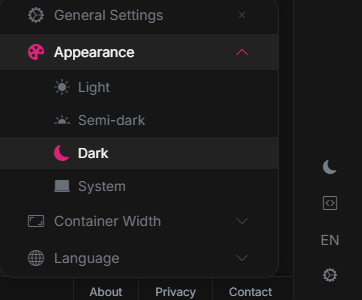 What I want to do is create a rocker/toggle like this:
that toggles between light and dark mode. But to do that, it seems like I would need to call some function that changes the mode, but I cannot find it. Is there a way to programmatically access the appearance switcher?
Markdown supported.Copy, paste, or drag & drop images and files (max 100 MB per file, 100 MB total per post) -
0
hi
window.leptonx.AppearenceSettingService.instance.changeTheme("light")
window.leptonx.AppearenceSettingService.instance.changeTheme("dark")
Markdown supported.Copy, paste, or drag & drop images and files (max 100 MB per file, 100 MB total per post) -
0
When I call that function, nothing happens, and I get these errors in the browser console:
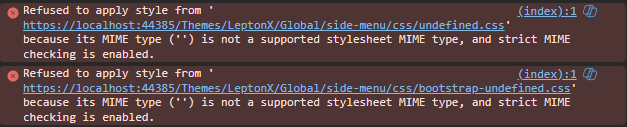
If I click the appearance modes in the toolbar settings, it still functions correctly, and there are no errors. I'm not sure why it is looking for 'undefined' css files. Do you know what might be causing this?
Markdown supported.Copy, paste, or drag & drop images and files (max 100 MB per file, 100 MB total per post) -
0
hi
Can you try that?
window.leptonx.AppearenceSettingService.instance.changeTheme({"theme": "dark"})
document.cookie = 'lpx_loaded-css=dark;';
document.cookie = 'lpx_appearance=dark;';
Thanks.
Markdown supported.Copy, paste, or drag & drop images and files (max 100 MB per file, 100 MB total per post)



