






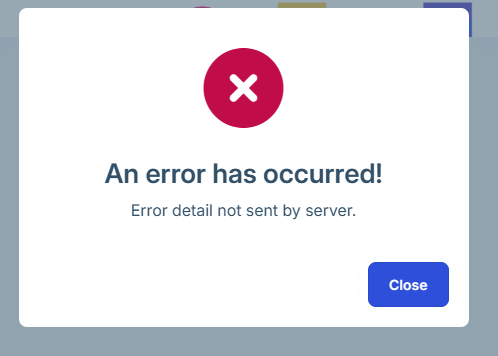
We have an ABP app built using the latest version of ABP - Angular for UI. When running the angular app locally against the .Host hosted in an Azure Web App everything works as it should. However, when pushing the Angular app to a Web App (not a static web app for reasons) everything works as well, except that we always get a "An error has occurred! Error detail not sent by server." at first page load. This regardless of which browser etc. This only happens on first full page load, after which everything works as it should.
There are no errors reported whatsoever in server logs, web browser console etc. If it had not been for this error message, you would have no idea that something isn't what it should be.
This happens regardless of if you are authenticated or now (authentication works fine also).
For obvious reasons we can't post any logs as there are none indicating any problem.
26 Answer(s)
-
0
- This popup is ABP Angular’s global HTTP error handler. On the very first full page load, the Angular UI makes a call to
AbpApplicationConfigurationAppService.GetAsync()(application configuration endpoint). If that call fails (typically 401/403/500 or a blocked request), ABP shows the generic modal “An error has occurred! Error detail not sent by server.”. - In Azure Web App deployments, the most common reason this happens only on the first load is that the very first request from the browser is being redirected or blocked (e.g., HTTP→HTTPS redirect, missing SPA rewrite, missing/incorrect CORS/AllowedHosts, or a proxy/WAF stripping ABP error details). The follow-up request then succeeds (cached config/token/cookies already set), so it “magically” works afterward.
Do the following fixes (they are safe and align with ABP Angular deployment expectations):
Ensure your Angular site serves
index.htmlfor deep links (SPA rewrite)- In Azure Web App (IIS), add/verify a
web.configin your Angular build output (same folder asindex.html) that rewrites all non-file, non-folder routes to/index.html. - Without SPA rewrite, the first navigation can hit a 404/redirect chain and the config call can fail; after you click around (client-side routing), it works.
- In Azure Web App (IIS), add/verify a
Ensure the Angular app’s
environment.prod.tspoints to the correct backend URL (HTTPS)apis.default.urlmust be the exact public URL of your Host (normallyhttps://...).- A common first-load failure is calling the API over
http://(or wrong host) which gets redirected/blocked, while later calls appear fine due to cached baseUrl/config.
If UI and Host are on different origins, fix CORS on the Host
- On the Host, set
App:CorsOriginsto include the Angular Web App origin (e.g.,https://your-angular-site.azurewebsites.net) exactly. - Also ensure
App:RedirectAllowedUrlscontains your Angular URL (important for auth redirects).
- On the Host, set
Verify the first failing request in the browser Network tab
- Reload with “Disable cache” enabled.
- Find the first request that fails (usually the application configuration call).
- Once you see its status code and whether it’s a redirect, you can map it directly to (1)-(3) above. This is the key: the popup is just a symptom of that initial failed HTTP call.
Sources (validated)
- https://abp.io/docs/latest/framework/ui/angular/quick-start
- https://abp.io/community/articles/gjcb2f1e
- https://github.com/abpframework/abp/blob/dev/npm/ng-packs/packages/theme-shared/src/lib/handlers/error.handler.ts
This response was generated by AI. If it didn’t solve your problem, feel free to post a new answer — our support team will jump in to help you soon.
- This popup is ABP Angular’s global HTTP error handler. On the very first full page load, the Angular UI makes a call to
-
0
AI response isn't valid as we have no errors and everything works fine except for first page load so should be nothing with CORS etc.
Should add that we are using Azure Web App Linux.
-
0
There are a couple of 204s for
- /openid-configuration,
- /api/abp/application-localization?cultureName=en&onlyDynamics=false
- /.well-known/jwks
- /api/abp/application-configuration?includeLocalizationResources=false
but if those are triggering this, I believe it is the error handling in ABP that is not working as it should as 204s are perfectly valid http codes to get back.
-
0
hi
Can you share your Angular website URL and test username&password?
liming.ma@volosoft.com
Thanks
-
0
[maliming] said: hi
Can you share your Angular website URL and test username&password?
liming.ma@volosoft.com
Thanks
It is currently in an internal (IP protected) Azure resource so that could turn out to be problematic.
Did try to run the Angular app locally and we are getting the 204s there as well but without the "An error has occurred".
Is there no logging behind those error messages even serverside? What/how are they triggered, something must be setting them off?
-
0
hi
Can you share the requests HAR file first?
https://abp.io/support/questions/8622/How-to-enable-Debug-logs-for-troubleshoot-problems#answer-3a1a1c4b-691e-3403-98b9-5f23fa024759
liming.ma@volosoft.com
Thanks.
-
0
Research seem to indicate that this could be OAuth related. We have noticed that when running backend in debug mode (locally) we are getting frequent Exceptions in the Use() method in the XXXHttpApiHostModule. which seem to be related to the chat module. Could perhaps be related to this but that is more of a guess....
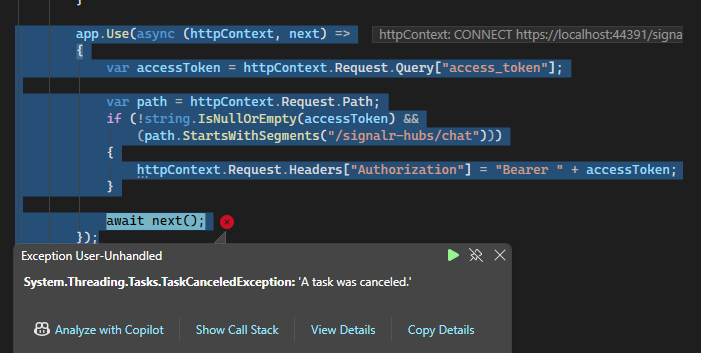 app.Use(async (httpContext, next) =>
{
var accessToken = httpContext.Request.Query["access_token"];
app.Use(async (httpContext, next) =>
{
var accessToken = httpContext.Request.Query["access_token"];var path = httpContext.Request.Path; if (!string.IsNullOrEmpty(accessToken) && (path.StartsWithSegments("/signalr-hubs/chat"))) { httpContext.Request.Headers["Authorization"] = "Bearer " + accessToken; } await next(); }); -
0
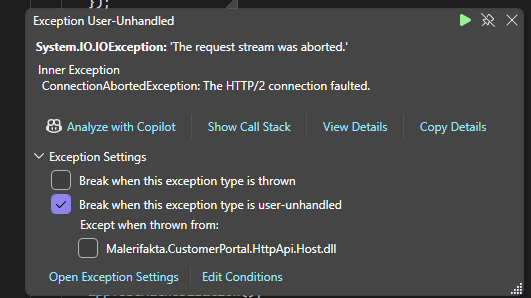
That error message above is then followed by this usually
-
0
hi
You can comment out this code and test if Angular works.
And the exception should write to logs. Can you share the logs?
Thanks.
-
0
Seems like disabling the Chat module makes the exceptions go away, it does not however seem to affect the error message being displayed in the app. So probably not related although you should considering creating a new ticket to handle the Chat related Exceptions.
-
0
[maliming] said: hi
Can you share the requests HAR file first?
https://abp.io/support/questions/8622/How-to-enable-Debug-logs-for-troubleshoot-problems#answer-3a1a1c4b-691e-3403-98b9-5f23fa024759
liming.ma@volosoft.com
Thanks.
Distributing HAR files will have to be considered as they contain a lot of information we might not want to share.
Is there no way of at least getting an idea from logs etc what is triggering this error message? I assume it cant just magically appear on its own, there has be be some ABP logic somewhere catching something and then creating the message?
-
0
I haven't encountered this issue before, so I need to reproduce it. Right now, I haven't even seen any logs, so I really have no idea where the issue is.
Do you have any ideas how I can reproduce it?
Thanks.
-
0
[maliming] said: I haven't encountered this issue before, so I need to reproduce it. Right now, I haven't even seen any logs, so I really have no idea where the issue is.
Do you have any ideas how I can reproduce it?
Thanks.
The lack of logs is kind of the problem here, especially considering that besides the error dialog, we have not really seen anything being broken :)
Since there seem to be no logging behind whatever is triggering the error message, is there perhaps a way that we could temporarily modify some code just to get a feeling for what's triggering it?
Seems to be related to Angular app being in Azure, as just calling the backend in Azure from the Angular app running locally does not produce this error message.
-
0
Would you consider making your Angular application public for 10 minutes?
That way, we can reproduce the error online and help us identify the problem.Thanks.
-
1
hi
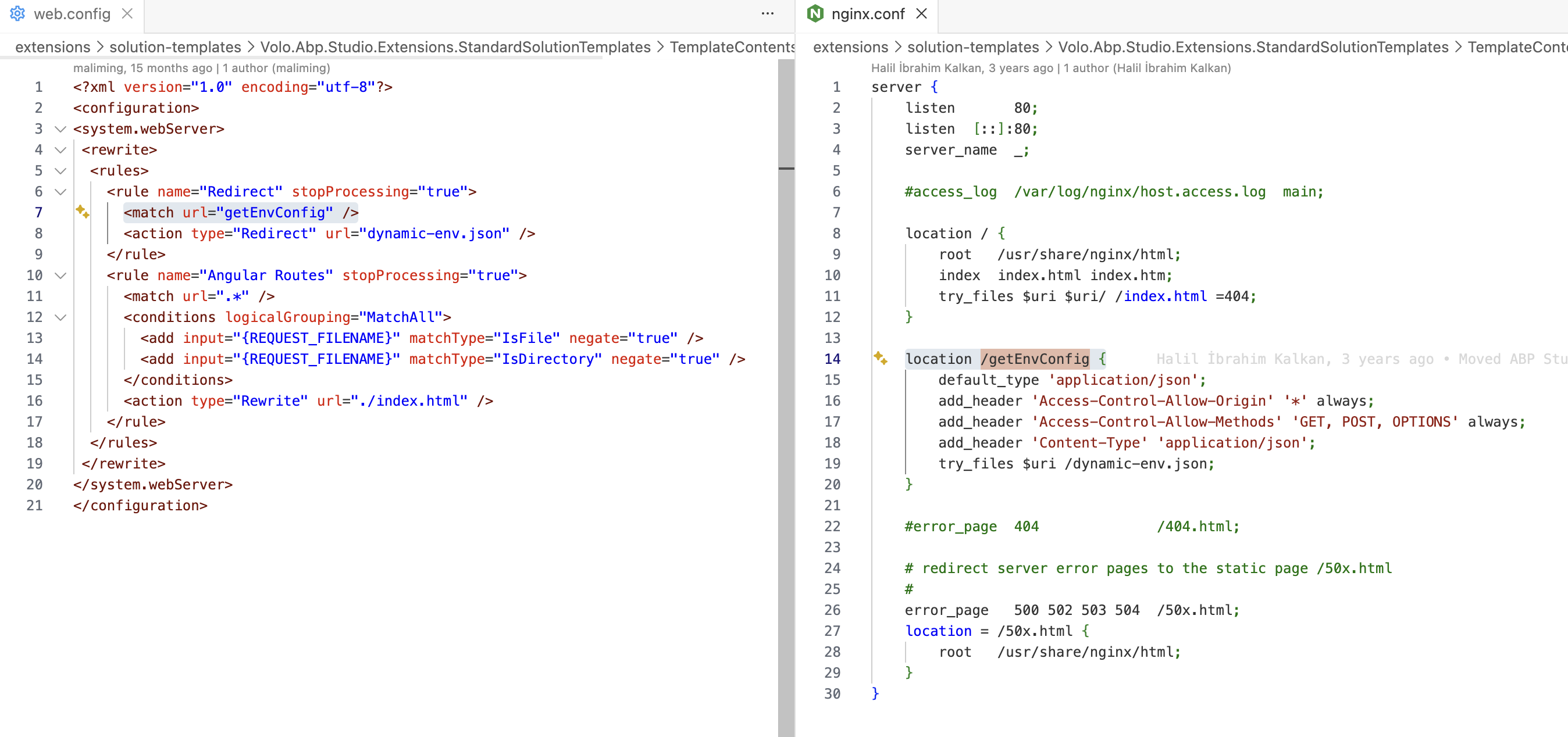
The problem is that the
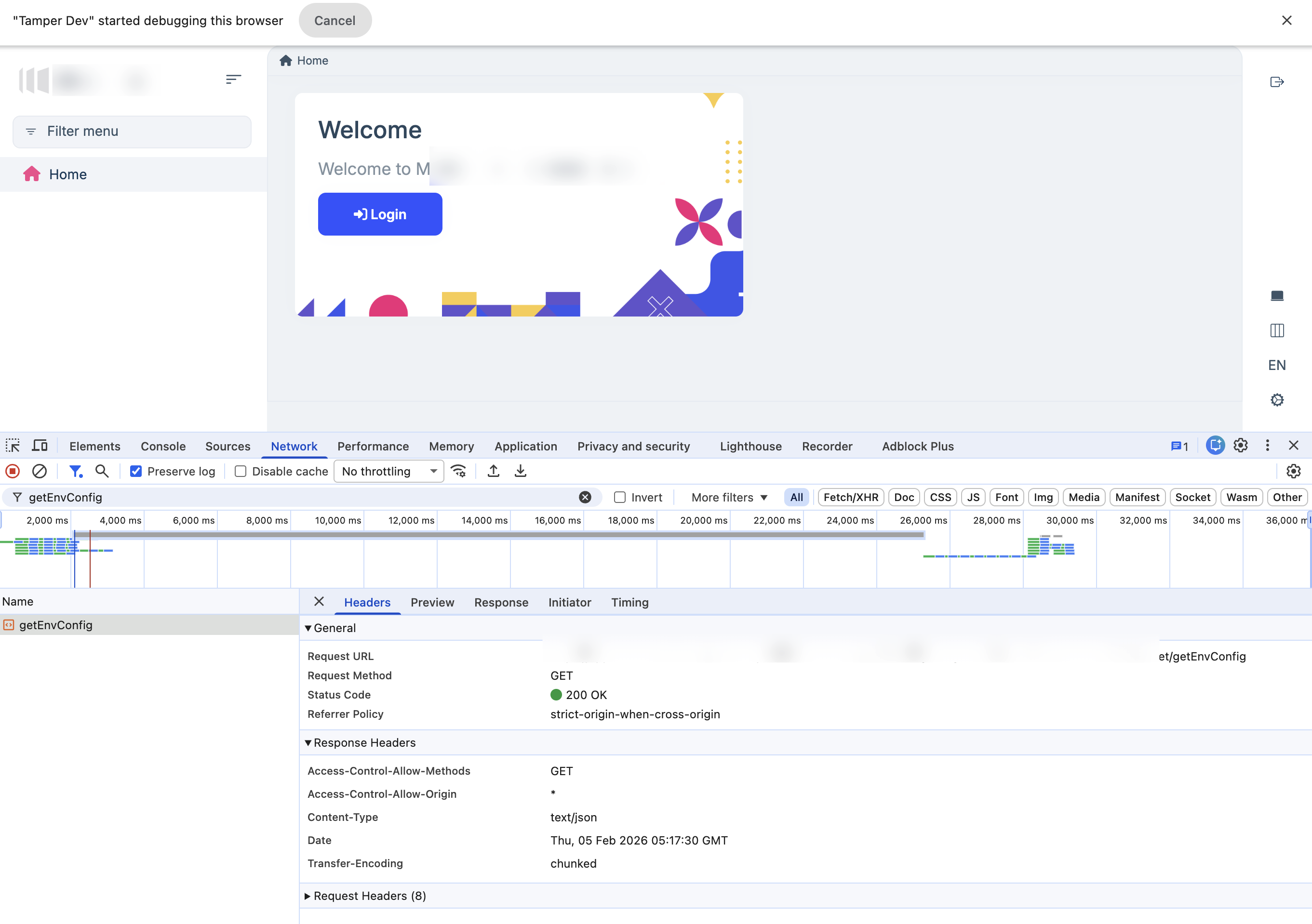
/getEnvConfigendpoint doesn't return the expected data.You can :
- Remove
remoteEnvfromenvironment.prod.tsif you don't want to use thedynamic-env.jsonfeature.
remoteEnv: {
    url: '/getEnvConfig',
    mergeStrategy: 'overwrite'
}
2, Rewrite this endpoint in your IIS or nginx..
- Remove
-
1
If I intercept the request and change the response, Angular no longer throws an error.
-
0
Thanks, will look into that. But how come this isn't, at least what we have found, more clearly logged/indicated?
Thanks
-
0
hi
We will show some in the console if this endpoint is wrong.
Thanks.
-
0
[maliming] said: hi
We will show some in the console if this endpoint is wrong.
Thanks.
Hi,
Is this something that will be changed in the future as at least we didn't see anything in console?
Also, how com this isn't working as we have not changed the URLs or paths as I know and they should be relative to the baseURLwhich seem to be working?
-
1
hi
We will output warning logs.
https://github.com/abpframework/abp/pull/24815
-
0
Thank you, that additional info in the logs will be good to have. Can confirm that the error seem to go away once we commented out this in environment.prod.ts
/* remoteEnv: { url: '/getEnvConfig', mergeStrategy: 'deepmerge' }*/
That said, I still would like to know what is actually wrong here and how to get it working. Disabling functionality seems like a workaround that isn't really a solution to the problem, and increased logging of the error probably won't solve it either.
-
0
hi
I still would like to know what is actually wrong here and how to get it working
You have to add
Rewritefor this endpoint in your IIS or nginx.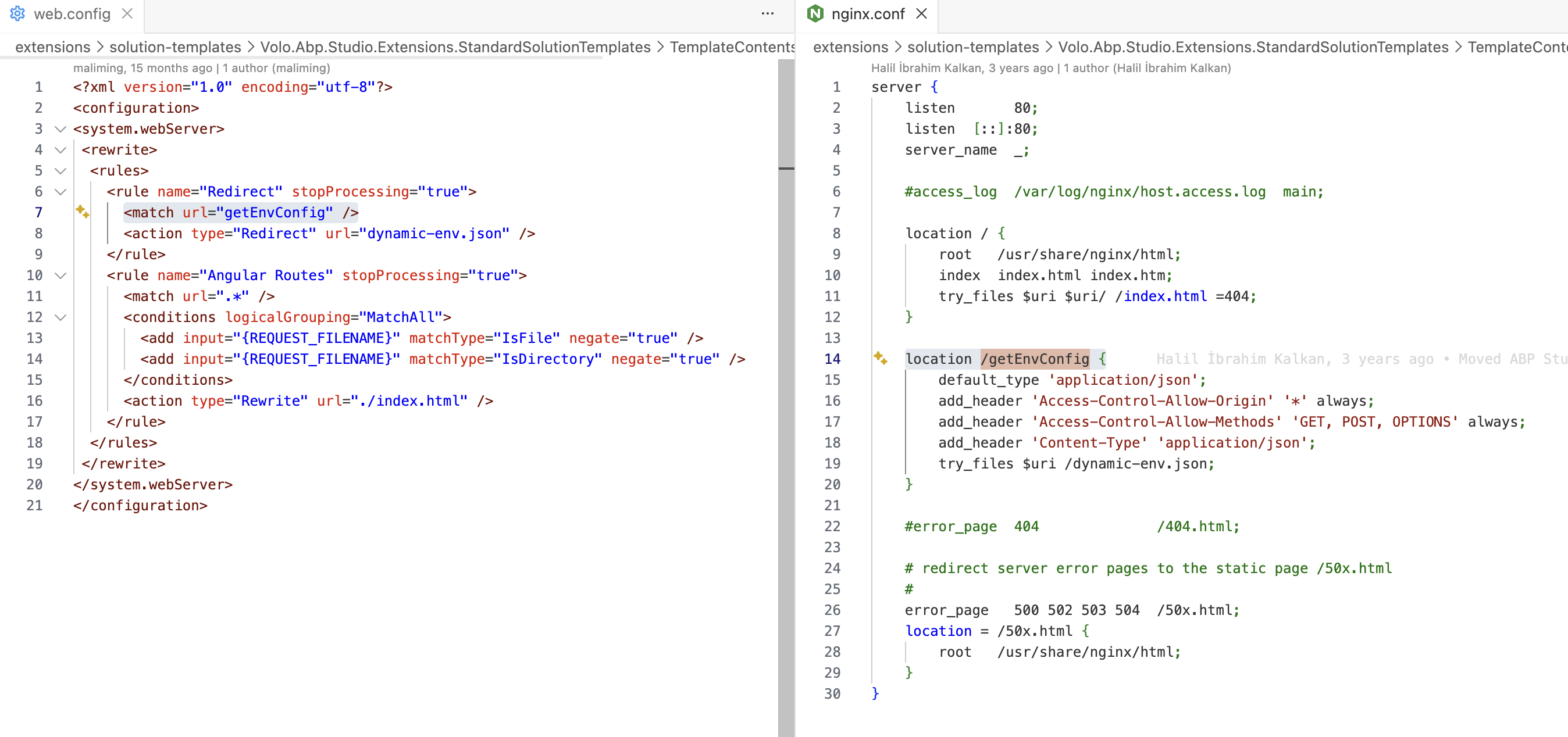
Thanks.
-
0
Thanks.
I see this is mentioned here
https://abp.io/docs/latest/framework/ui/angular/environment
but I think that the requirements for ABP should probably highlight more clearly that Nginx or IIS is a requirement (at least if you are using Angular). I believe that the problem here might be that for various reasons, we are running the Angular app from a Web App (linux) using node stack, which AFAIK uses Nginx to run the container, but not actually serve the content files. Because of this, we are using the startup command
pm2 serve /home/site/wwwroot --no-daemon --spa
Which probably does not work with remoteEnv out of the box.
What we did now was to change the environment.prod.ts to this instead as the dynamic-env.json file in wwwroot
remoteEnv: { url: '/dynamic-env.json', mergeStrategy: 'deepmerge' }
Which at least seem to not cause any problems even though the dynamic-env file is being served, but we have not really looked into it more in detail except that verifying that we are not getting this error message.
Not sure what potentia drawbacks this may have though?
The requirements should probably be updated as well to indicate that IIS or Nginx is needed (at least for it to work out of the box) if this isn't listed.
Thanks.
-
0
hi
We have changed this behavior so that, even without IIS or Nginx, it will no longer show errors.
Thanks.
-
0
[maliming] said: hi
We have changed this behavior so that, even without IIS or Nginx, it will no longer show errors.
Thanks.
Thanks.
Please also consider if there is a need to update docs to highlight this (requirements for getting dynamic envs to work) and also considering this ticket as it seem to have been valid for a needed fix. Thanks.



