






I'm migrating from AutoMapper to Mapperly. My application is based on ABPFramework, .NET 10.0, Visual Studio 2022 v. 17.14.25.
The problem is that VS generates 294 errors as shown below, one for each mapping class. I tested using VS 2026 and VS Code; they don't generate the error list, but when running the application, the missing mapping appears in the terminal.
Another issue is that when running dotnet run in the CLI, these errors don't appear, not even during compilation, but they do exist.
I've already checked the various documentation, deleted bin and obj files, and tried practically everything available, but the error persists.
https://github.com/riok/mapperly/discussions/1431
https://mapperly.riok.app/docs/getting-started/installation/
https://abp.io/docs/10.0/release-info/migration-guides/AutoMapper-To-Mapperly
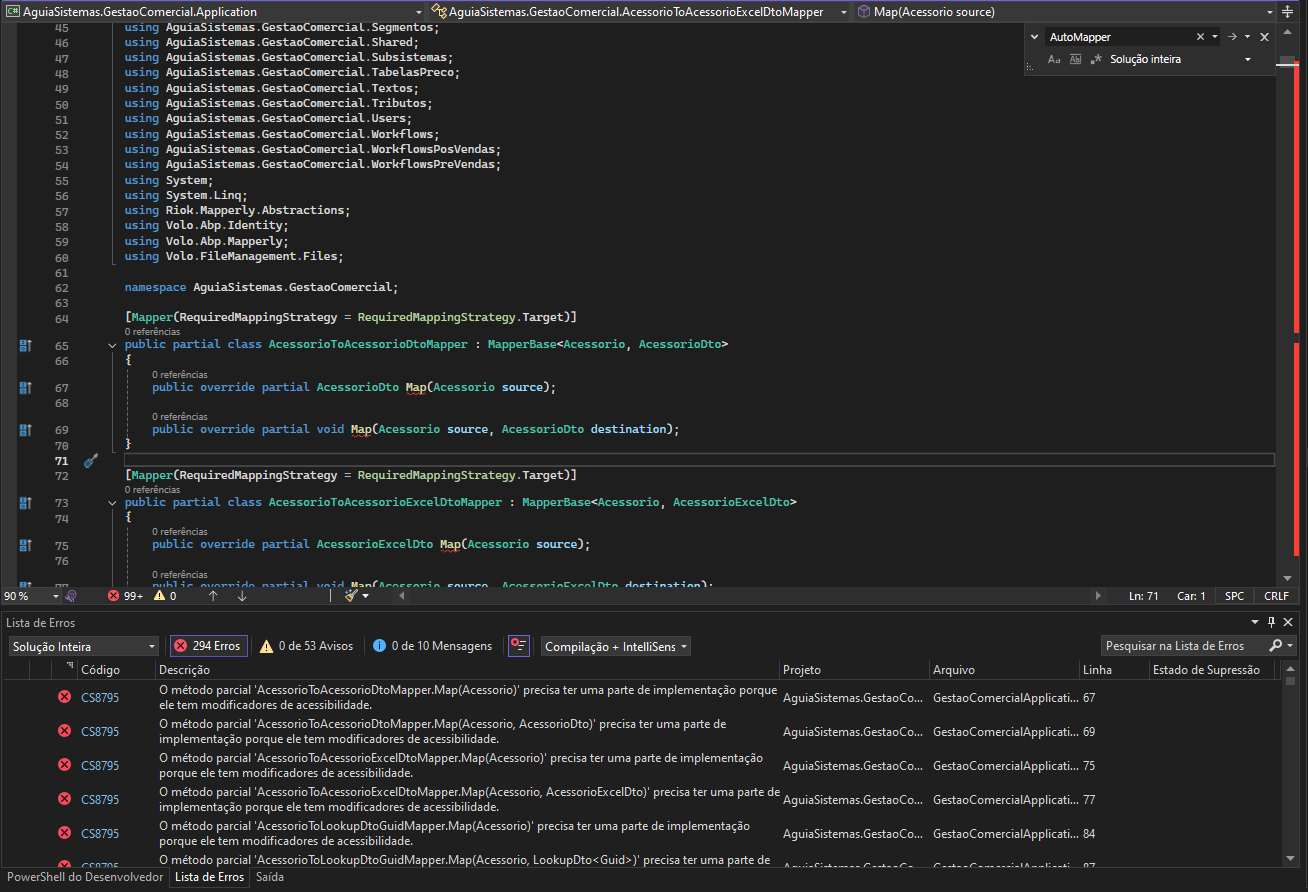
`using AguiaSistemas.GestaoComercial.WorkflowsPreVendas; using System; using System.Linq; using Riok.Mapperly.Abstractions; using Volo.Abp.Identity; using Volo.Abp.Mapperly; using Volo.FileManagement.Files;
namespace AguiaSistemas.GestaoComercial;
[Mapper(RequiredMappingStrategy = RequiredMappingStrategy.Target)] public partial class AcessorioToAcessorioDtoMapper : MapperBase<Acessorio, AcessorioDto> { public override partial AcessorioDto Map(Acessorio source);
public override partial void Map(Acessorio source, AcessorioDto destination);
}
[Mapper(RequiredMappingStrategy = RequiredMappingStrategy.Target)] public partial class AcessorioToAcessorioExcelDtoMapper : MapperBase<Acessorio, AcessorioExcelDto> { public override partial AcessorioExcelDto Map(Acessorio source);
public override partial void Map(Acessorio source, AcessorioExcelDto destination);
}
[Mapper(RequiredMappingStrategy = RequiredMappingStrategy.Target)] public partial class AcessorioToLookupDtoGuidMapper : MapperBase<Acessorio, LookupDto
[MapProperty(nameof(Acessorio.Nome), nameof(LookupDto<Guid>.DisplayName))]
public override partial void Map(Acessorio source, LookupDto<Guid> destination);
}
[Mapper(RequiredMappingStrategy = RequiredMappingStrategy.Target)] public partial class AtividadeToAtividadeDtoMapper : MapperBase<Atividade, AtividadeDto> { public override partial AtividadeDto Map(Atividade source);
public override partial void Map(Atividade source, AtividadeDto destination);
}`
AguiaSistemas.GestaoComercial.Application net10.0 êxito (2,2s) → bin\Debug\net10.0\AguiaSistemas.GestaoComercial.Application.dll
5 Answer(s)
-
0
This
CS8795in Visual Studio is caused by Mapperly source-generator output not being picked up by VS/IntelliSense, so VS thinks yourpublic override partial ...methods have no implementation part (even thoughdotnet build/runcan still succeed sometimes). In ABP v10, your mapper class shape is correct; the problem is the generator not running/being loaded by the IDE consistently.Fix it by ensuring Mapperly’s source generator is referenced as an analyzer in the project which contains the
[Mapper]classes (typically your*.Applicationproject), and by enabling compiler-generated files so VS can “see” them.
Do this (in the project that contains the mapper classes)
- Add/verify these package references in the same csproj that contains
AcessorioToAcessorioDtoMapperetc.:
<ItemGroup> <PackageReference Include="Volo.Abp.Mapperly" Version="10.0.2" /> <PackageReference Include="Riok.Mapperly" Version="*" PrivateAssets="all" /> </ItemGroup>- Make sure the Mapperly generator is actually treated as an analyzer (some setups require it explicitly). Add:
<ItemGroup> <Analyzer Include="$(NuGetPackageRoot)riok.mapperly\*\analyzers\dotnet\cs\Riok.Mapperly.Generators.dll" /> </ItemGroup>- Add these properties to help VS/IntelliSense pick up generated code and to verify generation:
<PropertyGroup> <EmitCompilerGeneratedFiles>true</EmitCompilerGeneratedFiles> <CompilerGeneratedFilesOutputPath>$(BaseIntermediateOutputPath)\Generated</CompilerGeneratedFilesOutputPath> </PropertyGroup>- Close Visual Studio, delete
.vs,bin,obj, reopen, then Rebuild.
After rebuild, you should see generated files under:
obj\Debug\net10.0\Generated\...andCS8795should disappear.ABP-side registration reminder (so runtime mapping works)
In your ABP module (Application/Blazor/Host as appropriate), ensure you are using Mapperly registration (not AutoMapper):
using Volo.Abp.Mapperly;

[DependsOn(typeof(AbpMapperlyModule))]
public class GestaoComercialApplicationModule : AbpModule
{
    public override void ConfigureServices(ServiceConfigurationContext context)
    {
        context.Services.AddMapperlyObjectMapper<GestaoComercialApplicationModule>();
        // If you want Mapperly as the default provider globally:
        // context.Services.AddMapperlyObjectMapper();
    }
}
If you still have
Volo.Abp.AutoMapperreferenced anywhere, remove it from the projects you migrated, otherwise ABP may still try to resolve mappings via AutoMapper in some contexts.- https://abp.io/docs/10.0/release-info/migration-guides/AutoMapper-To-Mapperly
- https://mapperly.riok.app/docs/getting-started/installation/
This response was generated by AI. If it didn’t solve your problem, feel free to post a new answer — our support team will jump in to help you soon.
Markdown supported.Copy, paste, or drag & drop images and files (max 100 MB per file, 100 MB total per post) -
0
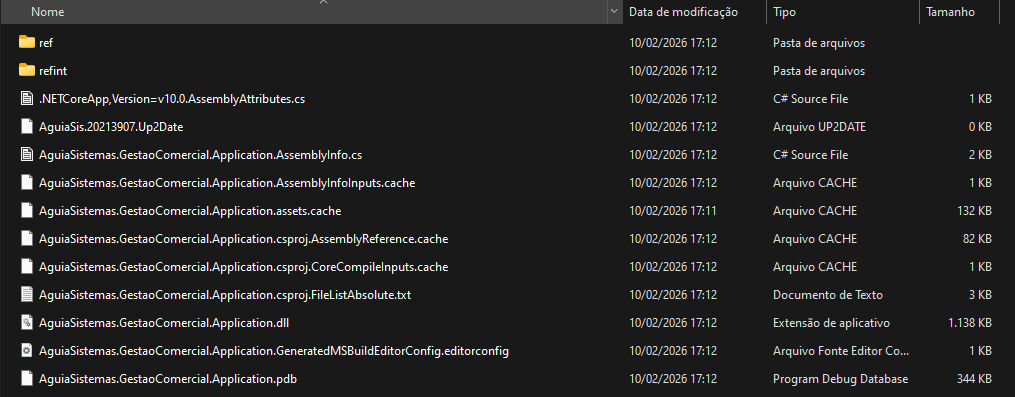
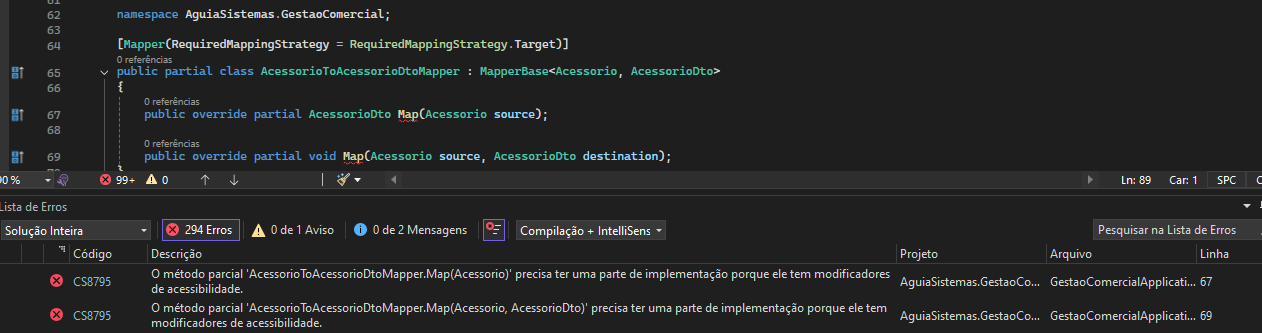
The files were not generated in AguiaSistemas.GestaoComercial.Application\obj\Debug\net10.0. And the CS8795 errors remain.
 Markdown supported.Copy, paste, or drag & drop images and files (max 100 MB per file, 100 MB total per post)
 -
0
hi
.NET 10 is only officially supported in Visual Studio 2026 and later versions
So you need to use VS 2026 to build and run your app.
Can you try to add a
global.jsonto your solution and specify the NET 10 SDK version?Run
abp cleananddotnet buildin your solution, then open it in VS 2026 and test again.{ "sdk": { "version": "10.0.100", "rollForward": "latestFeature", "allowPrerelease": true } }Thanks.
Markdown supported.Copy, paste, or drag & drop images and files (max 100 MB per file, 100 MB total per post) -
0
Hello,
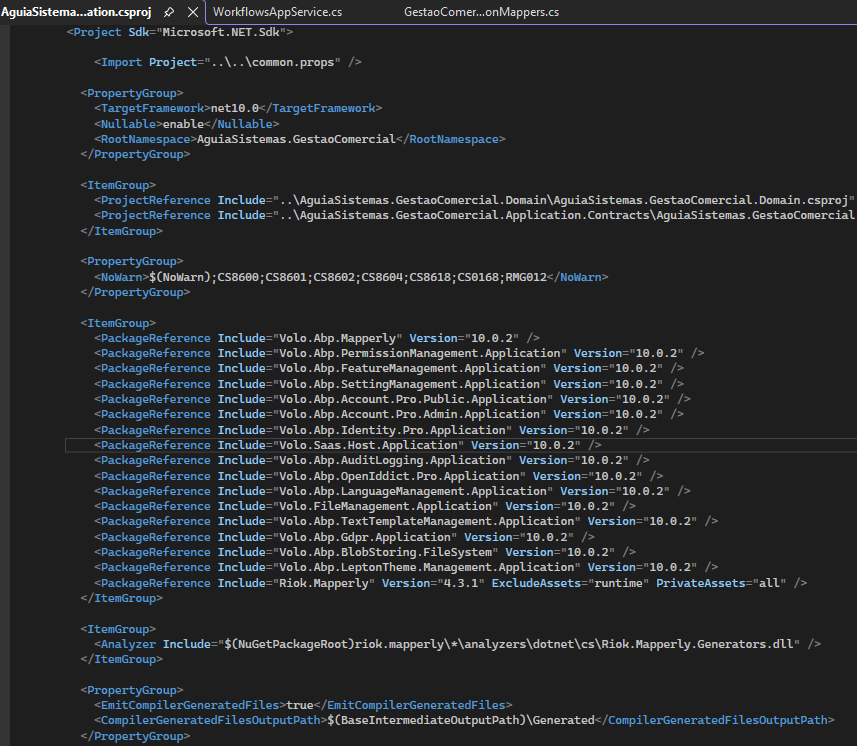
Yes, I'm using VS 2026, and the SDK is 10.0.102.
The problem is that, in the IDE 2026, it doesn't generate errors and runs the application, but, for example, when accessing a page, it generates an error about a missing mapping.
I've already tried all the steps of deleting bin, obj, and rebuilding the application, but nothing has solved it.

 Markdown supported.Copy, paste, or drag & drop images and files (max 100 MB per file, 100 MB total per post)



