






Environment Details
• ABP Framework Version: 9.2.1 • ABP Studio Version: 2.1.7 (Created with 0.9.25) • UI Framework: Blazor Server • Architecture: Tiered (Layered) • Database: SQL Server (EF Core) • Deployment: Azure App Service (Quality Environment) • Distributed Event Bus: RabbitMQ • Multi-Tenancy: Yes (Separate Tenant Schema) The application is built on ABP Framework version 9.2.1, originally created using ABP Studio version 0.9.25 and currently maintained under version 2.1.7. It utilizes a Tiered (Layered) architecture with a Blazor Server UI framework, authentication, api and webpublic servers. For data persistence, the system uses SQL Server managed via Entity Framework Core, featuring a Multi-Tenancy approach with Separate Tenant Schemas.
Description & Problem Statements
I am following the official ABP Deployment Documentation to deploy to Azure App Services, having each application “solution” its own Azure App Service. • AuthServer • HttpApiHost • BlazorServer • WebPublic
Issue 1: Azure Redis Cache Connection Failure
I am unable to establish a connection with Azure Redis Cache
- Attempts made: I have configured the Redis Firewall to allow "all IP addresses" (0.0.0.0) for testing purposes, but the connection still fails.
- Current Configuration: Previously, in local development, I used a simple IP address.
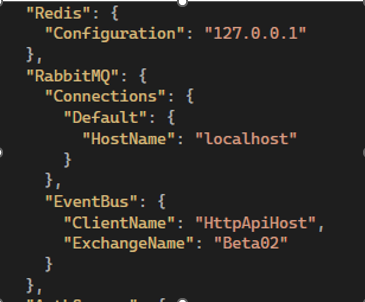
- For Azure, I am attempting to use the full connection string provided by the Azure Portal
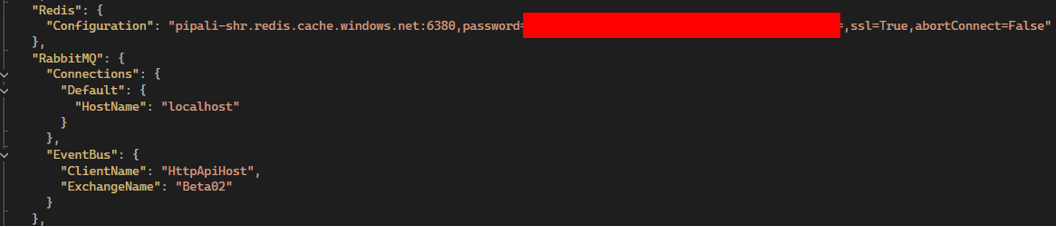
Question: Does the ABP Framework support passing the full Azure connection string directly into the standard Redis configuration field? Is there a specific format or property I should be using in the appsettings.json?
Issue 2: Disabling RabbitMQ for Single-Instance Deployment
The application is currently making constant connection attempts to RabbitMQ, leading to logs filled with connection errors. Since this is a Single-Instance deployment for a Quality environment, I do not require a distributed bus like RabbitMQ at this moment.
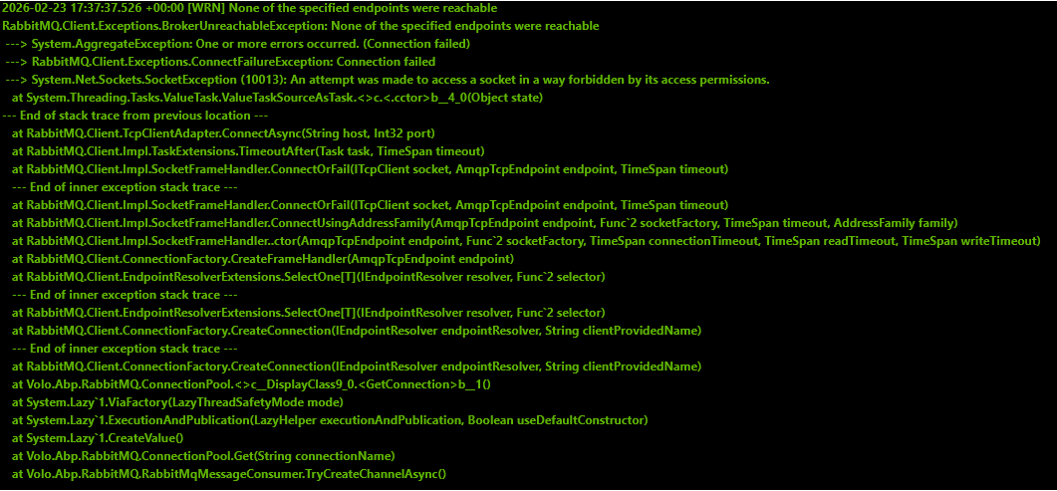 • Requirements: I need a way to disable RabbitMQ or switch to a local/in-memory event bus following best practices.
• Question 1: Is there any recommended configuration (via appsettings.json or modification of the HttpApiHostModule, AuthServerModule, and BlazorServerModule classes) to suppress RabbitMQ and use the internal memory bus?
• Question 2: Is it expected behavior for the Blazor Server UI project to attempt direct connections to RabbitMQ in a tiered architecture?
• Requirements: I need a way to disable RabbitMQ or switch to a local/in-memory event bus following best practices.
• Question 1: Is there any recommended configuration (via appsettings.json or modification of the HttpApiHostModule, AuthServerModule, and BlazorServerModule classes) to suppress RabbitMQ and use the internal memory bus?
• Question 2: Is it expected behavior for the Blazor Server UI project to attempt direct connections to RabbitMQ in a tiered architecture?
Supporting Information
• References from articles taken into consideration: o https://abp.io/docs/9.2/deployment o https://abp.io/docs/9.2/get-started/pre-requirements


