Environment Details
• ABP Framework Version: 9.2.1 • ABP Studio Version: 2.1.7 (Created with 0.9.25) • UI Framework: Blazor Server • Architecture: Tiered (Layered) • Database: SQL Server (EF Core) • Deployment: Azure App Service (Quality Environment) • Distributed Event Bus: RabbitMQ • Multi-Tenancy: Yes (Separate Tenant Schema) The application is built on ABP Framework version 9.2.1, originally created using ABP Studio version 0.9.25 and currently maintained under version 2.1.7. It utilizes a Tiered (Layered) architecture with a Blazor Server UI framework, authentication, api and webpublic servers. For data persistence, the system uses SQL Server managed via Entity Framework Core, featuring a Multi-Tenancy approach with Separate Tenant Schemas.
Description & Problem Statements
I am following the official ABP Deployment Documentation to deploy to Azure App Services, having each application “solution” its own Azure App Service. • AuthServer • HttpApiHost • BlazorServer • WebPublic
Issue 1: Azure Redis Cache Connection Failure
I am unable to establish a connection with Azure Redis Cache
- Attempts made: I have configured the Redis Firewall to allow "all IP addresses" (0.0.0.0) for testing purposes, but the connection still fails.
- Current Configuration: Previously, in local development, I used a simple IP address.
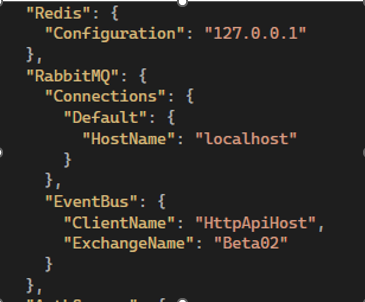
- For Azure, I am attempting to use the full connection string provided by the Azure Portal
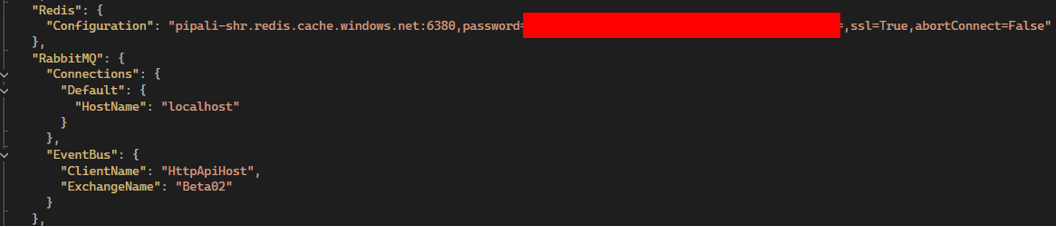
Question: Does the ABP Framework support passing the full Azure connection string directly into the standard Redis configuration field? Is there a specific format or property I should be using in the appsettings.json?
Issue 2: Disabling RabbitMQ for Single-Instance Deployment
The application is currently making constant connection attempts to RabbitMQ, leading to logs filled with connection errors. Since this is a Single-Instance deployment for a Quality environment, I do not require a distributed bus like RabbitMQ at this moment.
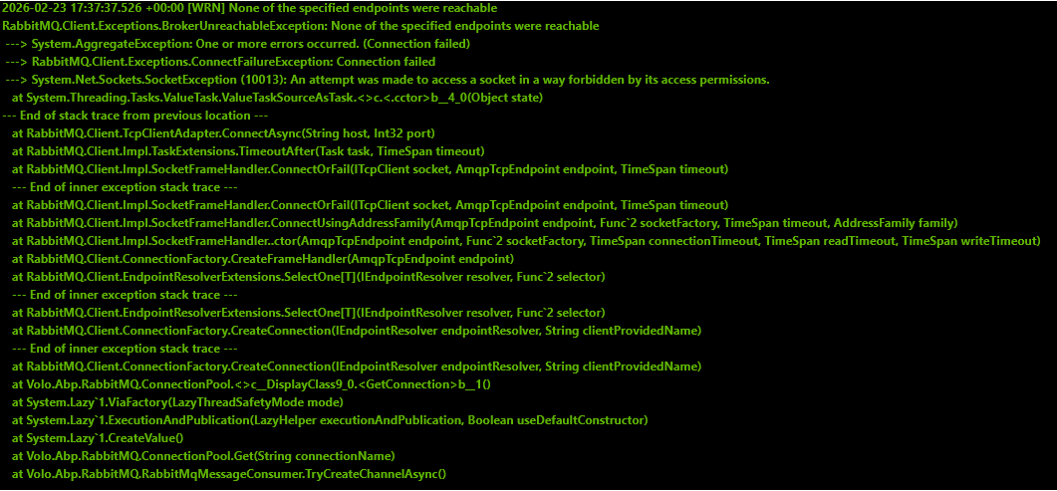 • Requirements: I need a way to disable RabbitMQ or switch to a local/in-memory event bus following best practices.
• Question 1: Is there any recommended configuration (via appsettings.json or modification of the HttpApiHostModule, AuthServerModule, and BlazorServerModule classes) to suppress RabbitMQ and use the internal memory bus?
• Question 2: Is it expected behavior for the Blazor Server UI project to attempt direct connections to RabbitMQ in a tiered architecture?
• Requirements: I need a way to disable RabbitMQ or switch to a local/in-memory event bus following best practices.
• Question 1: Is there any recommended configuration (via appsettings.json or modification of the HttpApiHostModule, AuthServerModule, and BlazorServerModule classes) to suppress RabbitMQ and use the internal memory bus?
• Question 2: Is it expected behavior for the Blazor Server UI project to attempt direct connections to RabbitMQ in a tiered architecture?
Supporting Information
• References from articles taken into consideration: o https://abp.io/docs/9.2/deployment o https://abp.io/docs/9.2/get-started/pre-requirements
38 Answer(s)
-
0
Issue 1 (Azure Redis Cache): Yes, ABP supports passing the full Azure Redis connection string via
Redis:Configuration.
In ABP’s Azure deployment guidance for the layered (tiered) template, Redis is configured like this (note it’s the same “full string” format Azure provides, includingpassword=...,ssl=true, etc.):appsettings.json (each app/service you deploy that uses distributed cache / data-protection):
{
    "Redis": {
      "Configuration": "your-cache-name.redis.cache.windows.net:6380,password=YOUR_KEY,ssl=true,abortConnect=False"
    }
  }
So you should use
Redis:Configuration(notRedis:Host) and put the full Azure connection string value there.Important practical notes for Azure Cache for Redis:
Use port
6380+ssl=true(Azure Redis typically requires TLS).The “firewall allow all IPs” setting is not always the only gate; if you use Private Endpoint / VNET, the public endpoint won’t be reachable from App Service unless networking is configured accordingly. (This is Azure-side, not ABP-side.)
Issue 2 (Disable RabbitMQ / use in-memory bus): No verified source available in the provided context/tools for an ABP 9.2.1 “official/best-practice switch” to turn off RabbitMQ via only
appsettings.json.
What can be stated definitively:- If your solution references/configures the RabbitMQ distributed event bus, the processes that include that module/config will attempt to connect.
- In a tiered setup, it can be expected that multiple apps (including the UI host like Blazor Server) may try to connect if they also include the RabbitMQ event bus module/configuration, because distributed events can be published/consumed from different tiers.
Since I couldn’t verify the exact supported “disable RabbitMQ / fall back to in-memory” switch for ABP 9.2.1 from the available sources, I will not provide an unverified config/code change here.
Sources (validated)
- https://abp.io/docs/latest/solution-templates/layered-web-application/deployment/azure-deployment/step2-configuration-application
- https://abp.io/docs/latest/framework/fundamentals/redis-cache
- https://abp.io/community/articles/94old5rm
This response was generated by AI. If it didn’t solve your problem, feel free to post a new answer — our support team will jump in to help you soon.
Markdown supported.Copy, paste, or drag & drop images and files (max 100 MB per file, 100 MB total per post) -
0
hi
Does the ABP Framework support passing the full Azure connection string directly into the standard Redis configuration field? Is there a specific format or property I should be using in the appsettings.json?
Yes. Abp will call the
AddStackExchangeRedisCacheto set up Rediscontext.Services.AddStackExchangeRedisCache(options => { var redisConfiguration = configuration["Redis:Configuration"]; options.Configuration = redisConfiguration; });See https://stackexchange.github.io/StackExchange.Redis/Configuration.html
Markdown supported.Copy, paste, or drag & drop images and files (max 100 MB per file, 100 MB total per post) -
0
hi
Issue 2: Disabling RabbitMQ for Single-Instance Deployment
Your application is tiered, so you need a distributed event bus. However, if you need to disable it, you can replace
AbpEventBusRabbitMqModulewithAbpEventBusModulein your module dependencies.Thanks.
Markdown supported.Copy, paste, or drag & drop images and files (max 100 MB per file, 100 MB total per post) -
0
Issue 3: ABP Library Installation and Azure Deployment
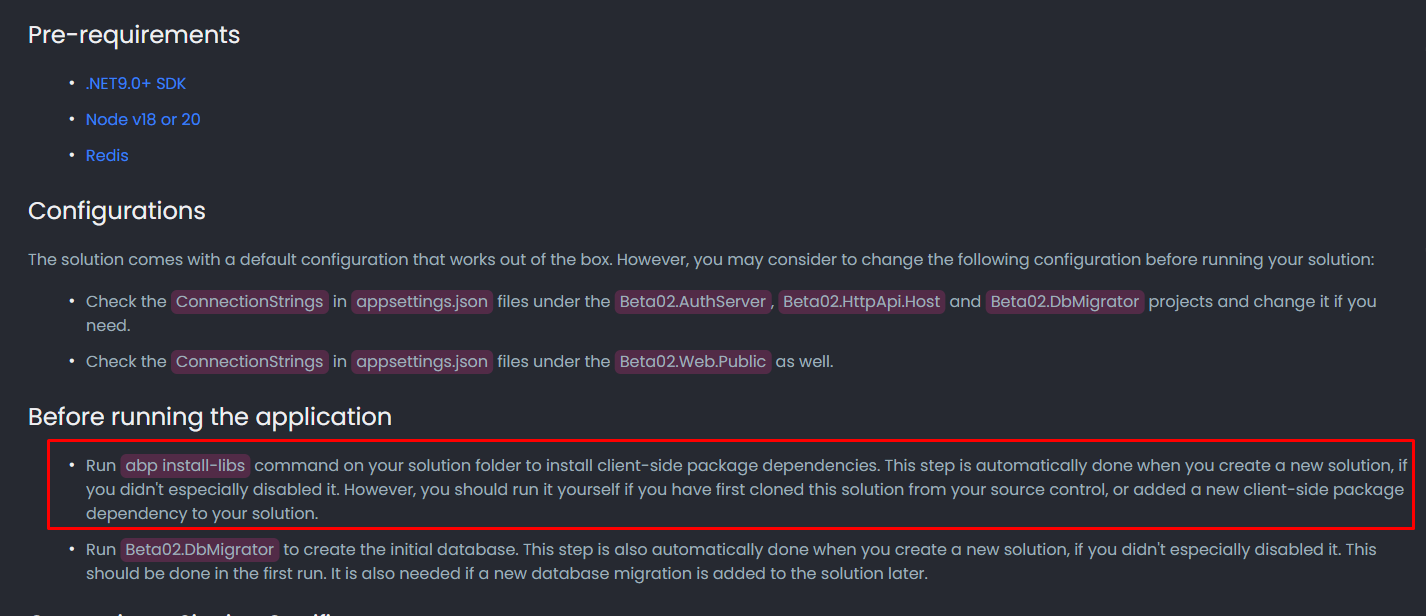
Context: The application is being published directly from Microsoft Visual Studio to an Azure App Service. The goal is to ensure that all necessary ABP libraries and client-side dependencies are correctly included in the remote server.
Core Question: What is the proper procedure to ensure all required libraries are bundled and sent to the remote server during the Visual Studio publish process?
References: https://abp.io/docs/9.2/get-started/pre-requirements
 Markdown supported.Copy, paste, or drag & drop images and files (max 100 MB per file, 100 MB total per post)
 -
0
[maliming] said: hi
Issue 2: Disabling RabbitMQ for Single-Instance Deployment
Your application is tiered, so you need a distributed event bus. However, if you need to disable it, you can replace
AbpEventBusRabbitMqModulewithAbpEventBusModulein your module dependencies.Thanks.
Hi Support Team,
Following up on the second issue (EventBus configuration).
Per your recommendation, we are temporarily switching from RabbitMQ to the default ABP EventBus (in-process) to move forward. However, our plan is to adopt the recommended best-practice setup in the near future, likely using RabbitMQ as the distributed event bus.
The attached image shows the current
appsettings.jsonfrom our Blazor Server WebApp, which still includes RabbitMQ-related settings (for example,RabbitMQ:Connections:Default:HostName = "localhost").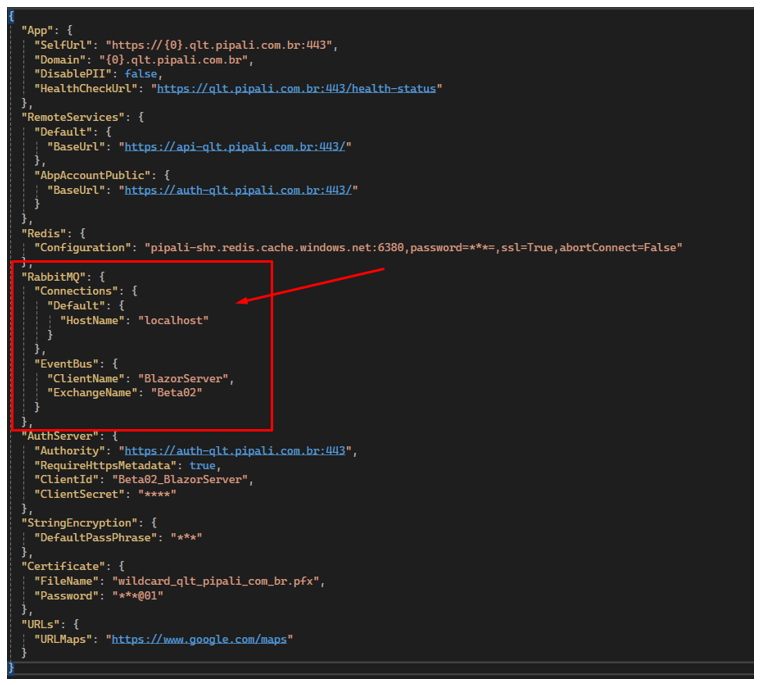
Questions (short term – ABP EventBus)
After switching to the default ABP EventBus, what exactly should we remove or change in the configuration files (
appsettings.jsonand environment-specific settings) for:- Blazor Server WebApp
- API/HttpApi.Host
- AuthServer (if applicable)
With the default ABP EventBus, does any server/service (AuthServer vs API) need to host the event bus, or is it purely in-process per application (meaning no endpoint/host configuration is required)?
Questions (near future – RabbitMQ best practice)
- When we move back to RabbitMQ, we’ll need to run it as an external/shared infrastructure component. Since our infrastructure is hosted on Azure, we would prefer an Azure-friendly option.
- What hosting approach or managed service do you recommend for RabbitMQ in production (Azure-first if possible)?
- If Azure isn’t ideal for managed RabbitMQ, are there external providers/services you commonly recommend based on your experience (ease of setup, reliability, maintenance)?
Thanks in advance for confirming the correct configuration changes now, and for advising on the best RabbitMQ hosting option for our upcoming production-ready setup.
Markdown supported.Copy, paste, or drag & drop images and files (max 100 MB per file, 100 MB total per post) -
0
[maliming] said: hi
You can run the
abp install-libscommand before publishing, or add this command to your publish pipeline.Thanks.
Following up on the Libs issue, the screenshot below shows the related error:
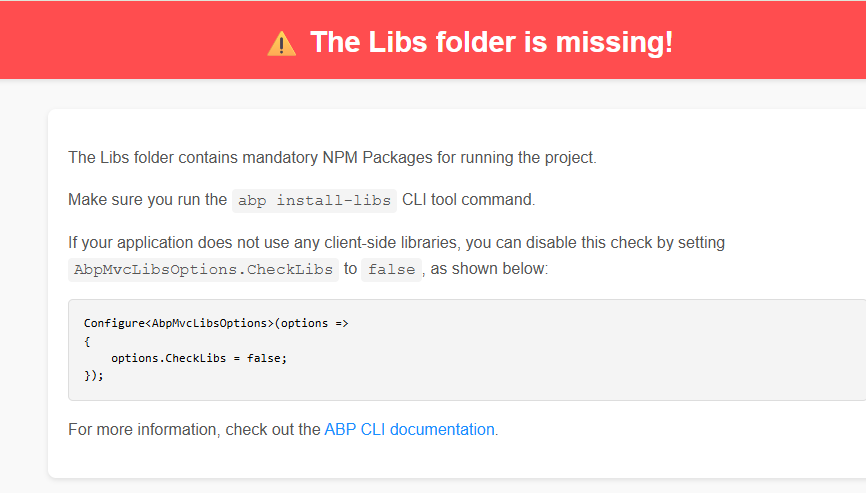
The application works correctly in my Development environment because the abp install-libs command was executed when the solution was created.
For troubleshooting, I checked the published Blazor Server application on Azure App Service, and the wwwroot/libs folder does exist in the deployed files, as shown below:
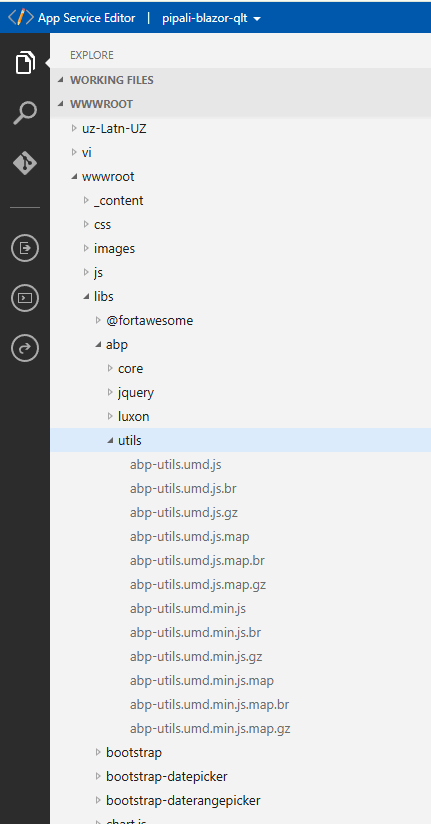
Given that the folder is present after publishing, could you please advise what else might cause ABP to report that the Libs folder is missing in this environment (e.g., path resolution, static file configuration, deployment slot/file sync, or any ABP setting that affects the libs check)?
Markdown supported.Copy, paste, or drag & drop images and files (max 100 MB per file, 100 MB total per post) -
0
hi
- Can you restart the app to test again after installing the libraries?
- What is the value of your
webHostEnvironment.WebRootPath? You can see it in your app startup debug logs. - You can also try to disable it and test again
Configure<AbpMvcLibsOptions>(options =>
{
    options.CheckLibs = false;
});
Thanks.
Markdown supported.Copy, paste, or drag & drop images and files (max 100 MB per file, 100 MB total per post) -
0
Issue 3rd. Libs is Missing.
[maliming] said: hi
- Can you restart the app to test again after installing the libraries?
- What is the value of your
webHostEnvironment.WebRootPath? You can see it in your app startup debug logs. - You can also try to disable it and test again Configure<AbpMvcLibsOptions>(options => { options.CheckLibs = false; }); Thanks.
Hi maliming,
Sorry for the confusion in my previous message — we have three hosts published now:
- Blazor Server UI Host (serves UI/static files)
- HttpApi.Host (API server)
- AuthServer
The screenshot where I verified the
wwwroot\libsfolder exists was from the Blazor Server UI Host file system.However, the red banner error “The Libs folder is missing!” is happening when accessing the HttpApi.Host (API server). In the API server deployment, the libs folder is not present.
- Restart / install-libs
This is the first deployment to Azure (no previous version existed), and the App Service has been restarted multiple times.
We also ran
abp install-libsagain locally (development machine) to ensure libs are installed. Then we published again using Visual Studio Publish to the Azure Windows App Service, which restarts the app after deployment.
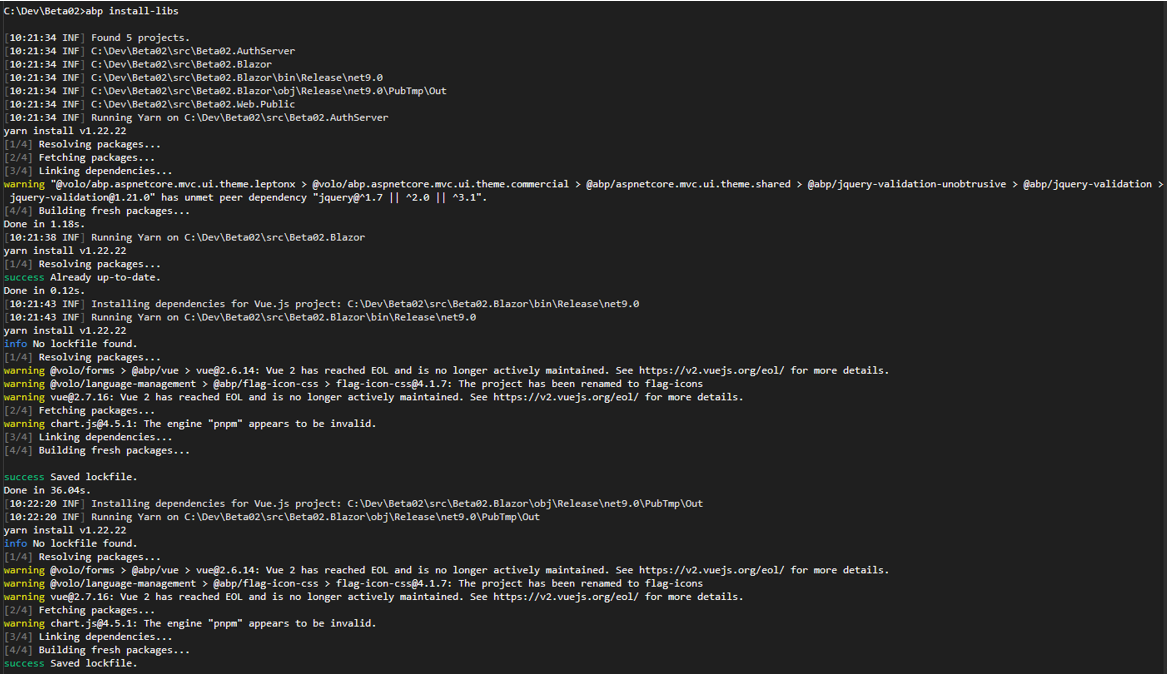
I requested from you what else might cause ABP to report that the Libs folder is missing in this environment. There is no option to install libs on Azure Application Service, so I´m considering that the deploy process will package all the files needed to upload to Azure App Service.
The LIBs subfolder doesn´t exist on API server.
- webHostEnvironment.WebRootPath
We added logging in Program.cs to print environment paths.
On the API host,
IWebHostEnvironment.WebRootPathis:C:\home\site\wwwroot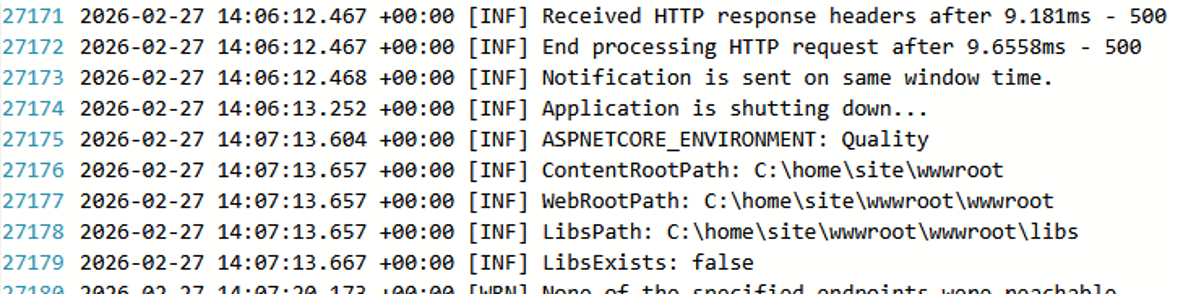
Here is the code snippet added to Program.cs
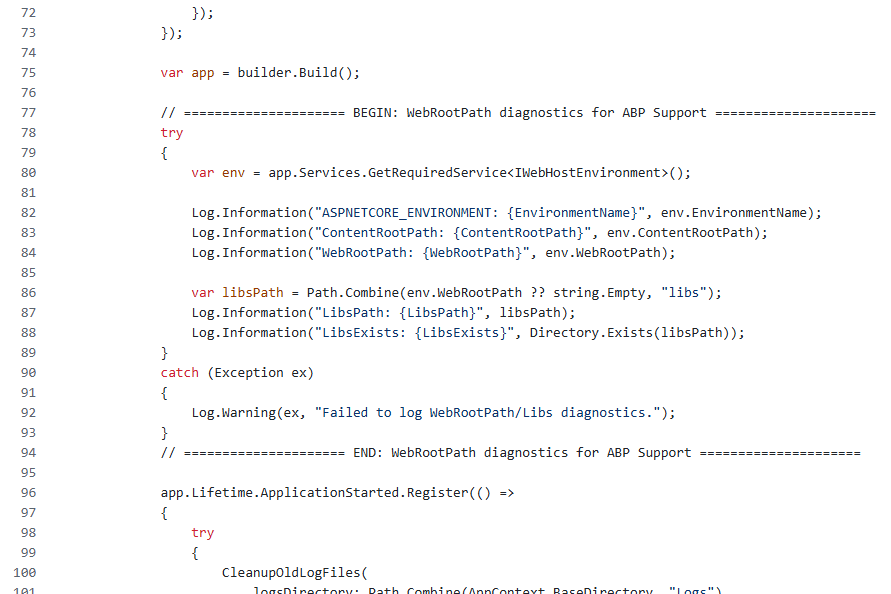
- Changing
CheckLibsIn Development the application runs correctly with the CheckLibs = True, and my understanding of the publish/deploy process is basically transferring the built application and its static files to another environment. So I’m trying to understand why the libs check would need to be disabled in QA/Production.
As a troubleshooting step, I set:
Configure<AbpMvcLibsOptions>(options =>
{
     options.CheckLibs = false;
});
After disabling
CheckLibs, the API host loads Swagger normally and the “The Libs folder is missing!” banner disappears.Could you please clarify:
- In a 3-host (AuthServer + HttpApi.Host + Blazor) tiered deployment, is it expected that the HttpApi.Host (API) must contain
wwwroot/libsand pass this check? - If the API host is not expected to serve UI/static assets in Quality/Production, why disabling
CheckLibson the API host is the recommended/best-practice approach for Quality while keeping the check enabled on Development environment? - If it is expected, what is the correct way to include/install libs for the API host during publish to Azure App Service?
Markdown supported.Copy, paste, or drag & drop images and files (max 100 MB per file, 100 MB total per post) -
0
hi
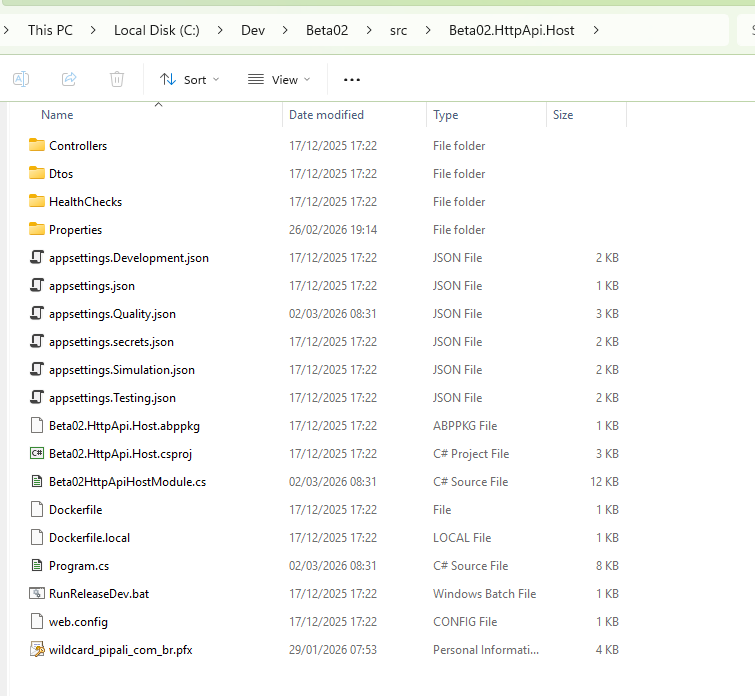
The api website has no
wwwroot/libsfolder by default. If you api website has them, you should disableCheckLibs.Configure<AbpMvcLibsOptions>(options => { options.CheckLibs = false; });If you api website has a
packages.jsonfile. Can you share the content?Thanks.
Markdown supported.Copy, paste, or drag & drop images and files (max 100 MB per file, 100 MB total per post) -
0
Hi! Here is the root folder of the HttpApi.Host API project. Where this packages.json should be located so I can send to you?
 Markdown supported.Copy, paste, or drag & drop images and files (max 100 MB per file, 100 MB total per post)
 -
0
[chrisalves] said:
[maliming] said:
hi
Issue 2: Disabling RabbitMQ for Single-Instance Deployment
Your application is tiered, so you need a distributed event bus. However, if you need to disable it, you can replace
AbpEventBusRabbitMqModulewithAbpEventBusModulein your module dependencies.Thanks.
Hi Support Team,
Following up on the second issue (EventBus configuration).
Per your recommendation, we are temporarily switching from RabbitMQ to the default ABP EventBus (in-process) to move forward. However, our plan is to adopt the recommended best-practice setup in the near future, likely using RabbitMQ as the distributed event bus.
The attached image shows the current
appsettings.jsonfrom our Blazor Server WebApp, which still includes RabbitMQ-related settings (for example,RabbitMQ:Connections:Default:HostName = "localhost").Questions (short term – ABP EventBus)
- After switching to the default ABP EventBus, what exactly should we remove or change in the configuration files (
appsettings.jsonand environment-specific settings) for:
- Blazor Server WebApp
- API/HttpApi.Host
- AuthServer (if applicable)
- With the default ABP EventBus, does any server/service (AuthServer vs API) need to host the event bus, or is it purely in-process per application (meaning no endpoint/host configuration is required)?
Questions (near future – RabbitMQ best practice)
- When we move back to RabbitMQ, we’ll need to run it as an external/shared infrastructure component. Since our infrastructure is hosted on Azure, we would prefer an Azure-friendly option.
- What hosting approach or managed service do you recommend for RabbitMQ in production (Azure-first if possible)?
- If Azure isn’t ideal for managed RabbitMQ, are there external providers/services you commonly recommend based on your experience (ease of setup, reliability, maintenance)?
Thanks in advance for confirming the correct configuration changes now, and for advising on the best RabbitMQ hosting option for our upcoming production-ready setup.
Hi!
This question was missed to be returned. Can you give as an explanation about the ABPEventBus also a recomendation of RabbitMQ Services as we requested? Please be as detailed as possible.
Markdown supported.Copy, paste, or drag & drop images and files (max 100 MB per file, 100 MB total per post) - After switching to the default ABP EventBus, what exactly should we remove or change in the configuration files (
-
0
hi
You can disable the
CheckLibs, It won't affect anything, just remeind developer to run theinstall-libscommandConfigure<AbpMvcLibsOptions>(options => { options.CheckLibs = false; });Thanks.
Markdown supported.Copy, paste, or drag & drop images and files (max 100 MB per file, 100 MB total per post) -
0
Hi,
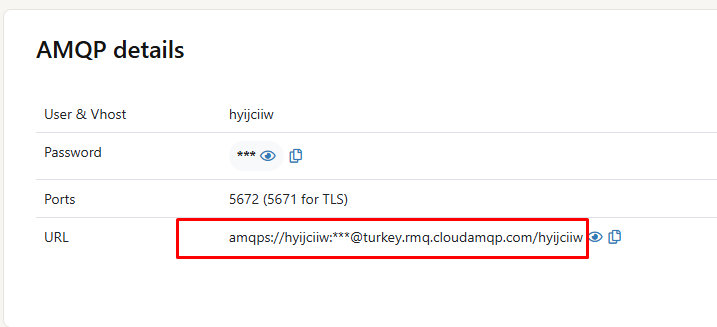
I’ve set up a RabbitMQ SaaS instance and I now have the AMQPS connection URL for our environment (example format below):
amqps://<user>:<password>@<host>/<vhost>
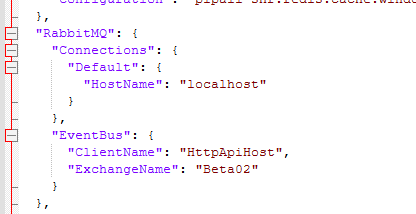
In our ABP configuration we currently have:
"RabbitMQ": { "Connections": { "Default": { "HostName": "localhost" } }, "EventBus": { "ClientName": "HttpApiHost", "ExchangeName": "Beta02" } }
For the Quality environment, what is the correct way to configure ABP/RabbitMQ to use the SaaS URL?
Specifically:
- Can I replace
HostName: "localhost"with the full connection string (amqps://...) or should I set the fields separately (HostName, Port, UserName, Password, VirtualHost, Ssl)? - Since the provider requires TLS (AMQPS / port 5671), what exact JSON settings are required to enable SSL/TLS in ABP’s RabbitMQ configuration?
- Will ABP automatically read the username/password/vhost from the connection string, or do they need to be mapped explicitly to configuration keys?
If you can share a minimal recommended
appsettings.jsonexample for AMQPS, that would help ensure we configure it correctly.Thanks!
 Markdown supported.Copy, paste, or drag & drop images and files (max 100 MB per file, 100 MB total per post)
 - Can I replace
-
0
[maliming] said: hi
You can disable the
CheckLibs, It won't affect anything, just remeind developer to run theinstall-libscommandConfigure<AbpMvcLibsOptions>(options => { options.CheckLibs = false; });Thanks.
I applied this change Thank you.
Markdown supported.Copy, paste, or drag & drop images and files (max 100 MB per file, 100 MB total per post) -
0
UI issue
When running locally everything works. After deploying to Azure App Service, the home page loads with a wrong/broken layout (CSS not applied). After a few seconds the Blazor Server circuit disconnects and the app breaks.
We are using custom CSS files called user.css and bootstrap-user.css (see the screenshot 5 bellow).
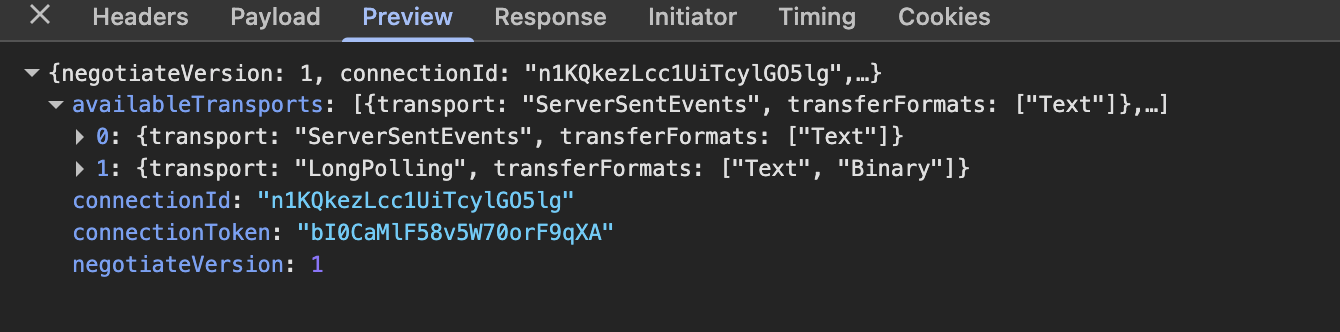
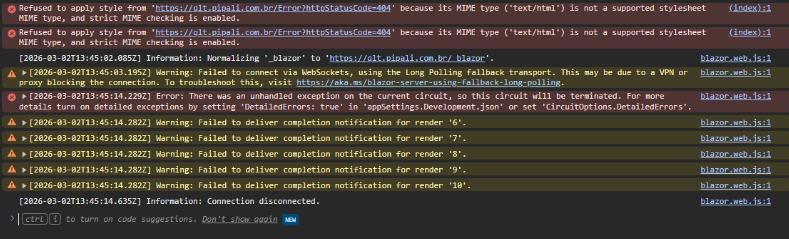
Browser console (dev tools) shows CSS being blocked due to MIME mismatch (HTML served instead of CSS) and Blazor Server transport issues (WebSockets failing, fallback to long polling, then circuit termination).
Evidence (Browser DevTools)
1) CSS / MIME errors
Refused to apply style from 'https://<domain>/Error?httpStatusCode=404' because its MIME type ('text/html') is not a supported stylesheet MIME type, and strict MIME checking is enabled.
2) Network -> CSS
Some stylesheets return 200, but these return redirect:
bootstrap-user.css-> 302 Redirectuser.css-> 302 Redirect
3) Response headers (for bootstrap-user.css / user.css)
- Status: 302
Location: /Error?httpStatusCode=404Server: Microsoft-IIS/10.0Content-Length: 0
So the browser requests CSS but gets redirected to
/Error(HTML), which is then blocked as a stylesheet.4) Blazor Server console logs
Warning: Failed to connect via WebSockets, using the Long Polling fallback transport...Error: There was an unhandled exception on the current circuit, so this circuit will be terminated...Information: Connection disconnected.
Server-side (Azure App Service) file structure observation
Using Kudu file explorer, there is a nested
wwwrootdirectory:- Root:
site/wwwroot - Nested:
site/wwwroot/wwwroot/css/bootstrap-user.css - Nested:
site/wwwroot/wwwroot/css/user.css - Also
.brand.gzvariants exist.
However, public URL requests still result in 302 ->
/Error?httpStatusCode=404even when trying:https://<domain>/bootstrap-user.css(or/css/bootstrap-user.css)https://<domain>/wwwroot/css/bootstrap-user.css
Program.cs (Blazor project)
We use ABP startup:
await builder.AddApplicationAsync<Beta02BlazorModule>();await app.InitializeApplicationAsync();We also added WebRootPath diagnostics logs (ContentRootPath/WebRootPath + libs folder existence).
(If needed, I can provide the full Program.cs.)
Questions
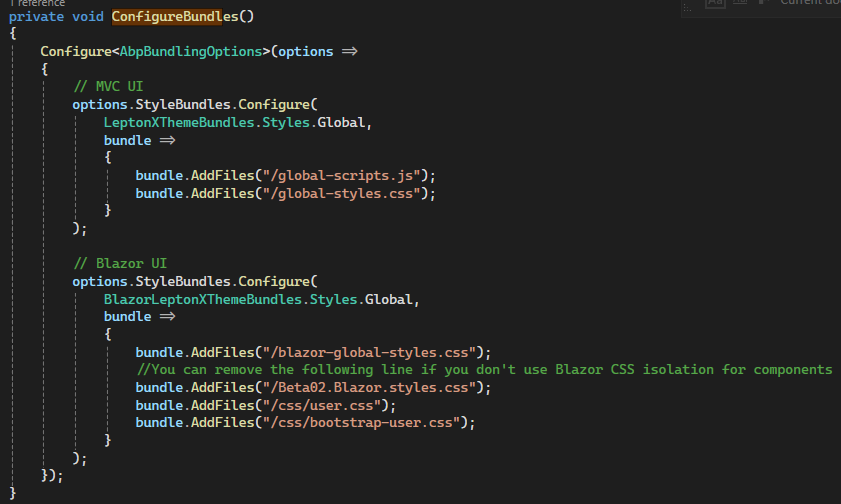
- For ABP Blazor Server on Azure App Service, what is the recommended structure for the customized css files location so the static web assets (including theme assets and custom CSS like
bootstrap-user.css/user.css) are deployed correctly? - Why would static CSS requests return 302 redirect to
/Error?httpStatusCode=404on Azure after publish, while working locally (using abp studio)? - How should we configure ABP/Blazor Server on Azure App Service to ensure WebSockets are properly used and the circuit does not disconnect?
- Is there any ABP-specific configuration required for static web assets in tiered Blazor Server solutions when deployed to Azure App Service?
Attachments / Screenshots
- Screenshot 2: Console errors showing MIME /Error?httpStatusCode=404 and Blazor circuit disconnect
- Screenshot 3: Network tab showing 302 redirects for
bootstrap-user.cssanduser.css
- Screenshot 4: Response headers showing
Location: /Error?httpStatusCode=404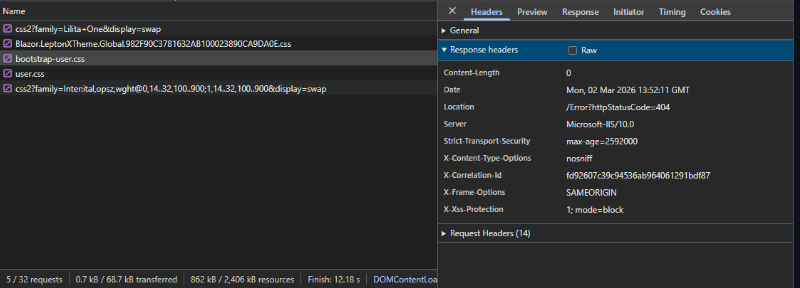
- Screenshot 5: Kudu file explorer showing nested
wwwroot/wwwroot/css/*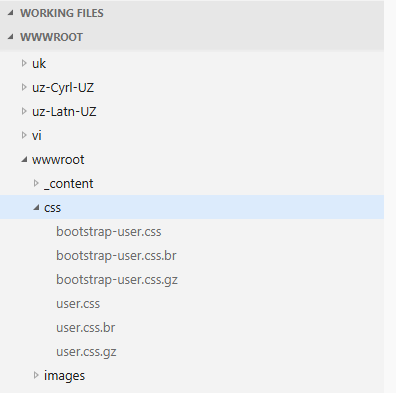
Markdown supported.Copy, paste, or drag & drop images and files (max 100 MB per file, 100 MB total per post) -
0
[maliming] said: hi
Can you share an online URL?
liming.ma@volosoft.com
Thanks.
Hi!
Here is: https://qlt.pipali.com.br Admin Username and password are the default for ABP application
Markdown supported.Copy, paste, or drag & drop images and files (max 100 MB per file, 100 MB total per post) -
0
[maliming] said: hi
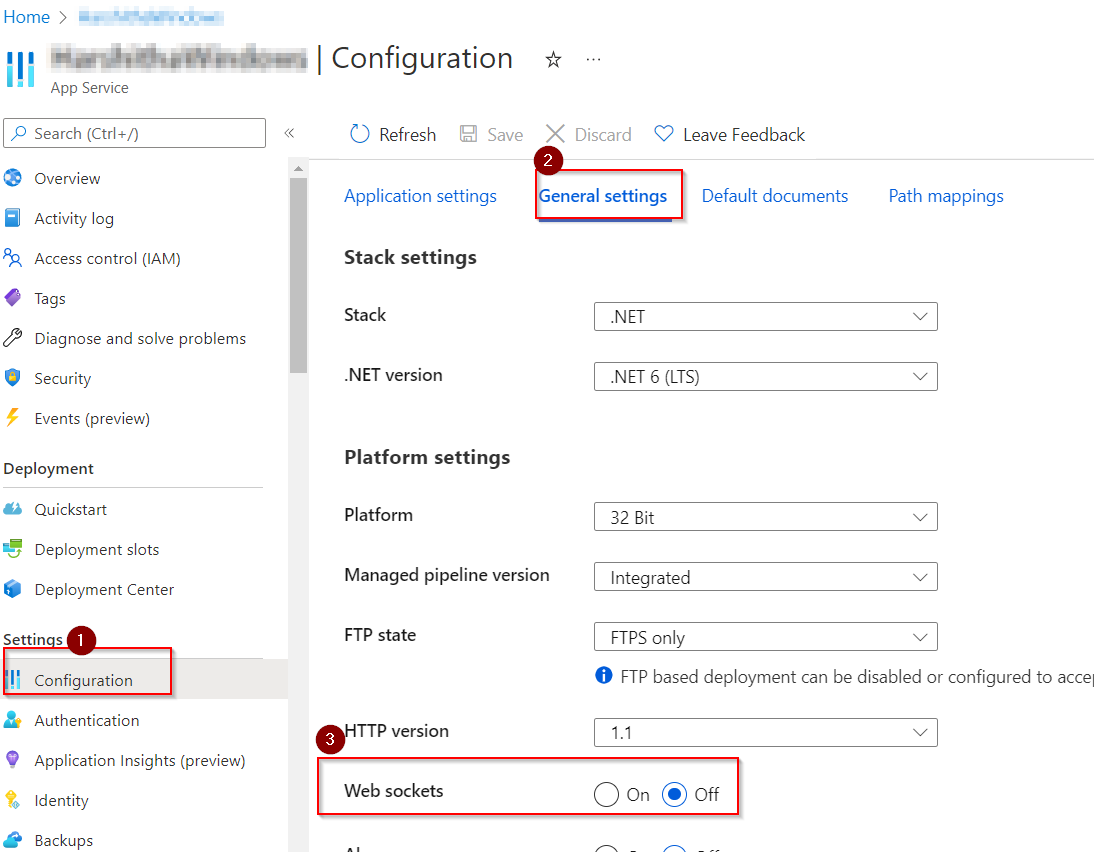
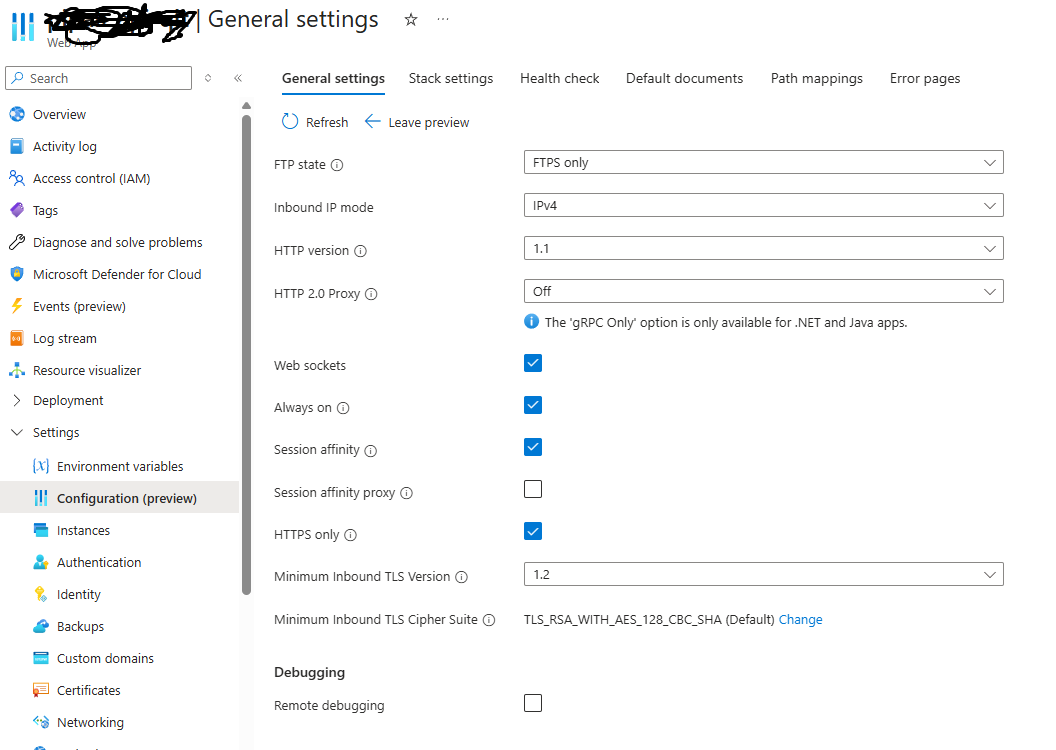
There is no CSS problem in the browser. You should enable the Web sockets feature on your Azure platform.
Hi, The WebSockets option is enabled, but the application is still hanging after being published. On the development machine it runs normally, so the issue seems to occur only in the deployed environment.
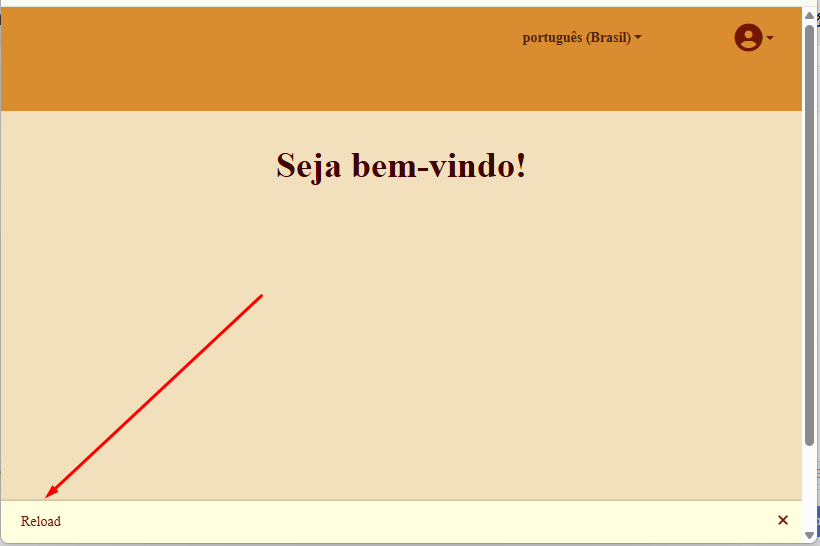
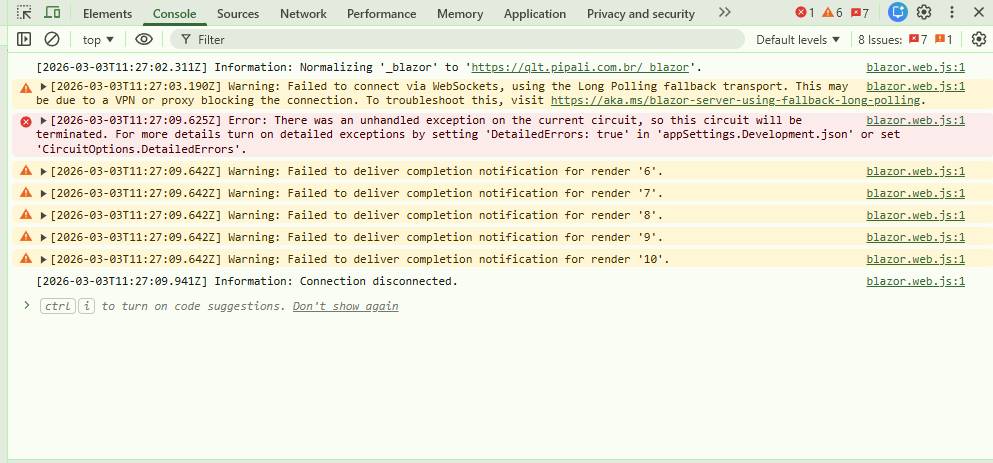
The errors appear immediately after login. At this point, the application should load the graphical elements (wizard with styled cards), but the CSS files are not being found and the UI fails to render.
Could you please log into the application to verify it directly? The admin credentials are the default ABP ones.

The missing files are: user.css and bootstrap-user.css. These files provide the custom visual identity for the Lepton X components and work correctly in the local environment, but they are not being reached in the Azure App Service deployment. Could you please log into the application to verify this directly? The admin credentials are the default ABP ones. Below are the relevant code references from our BlazorModule:
ConfigureTheme
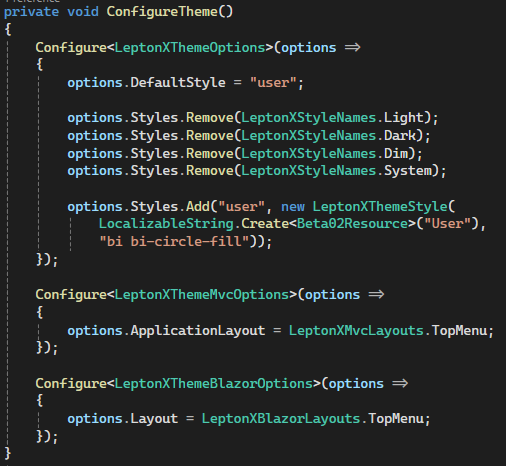 ConfigureBundles
 ConfigureVirtualFileSystem
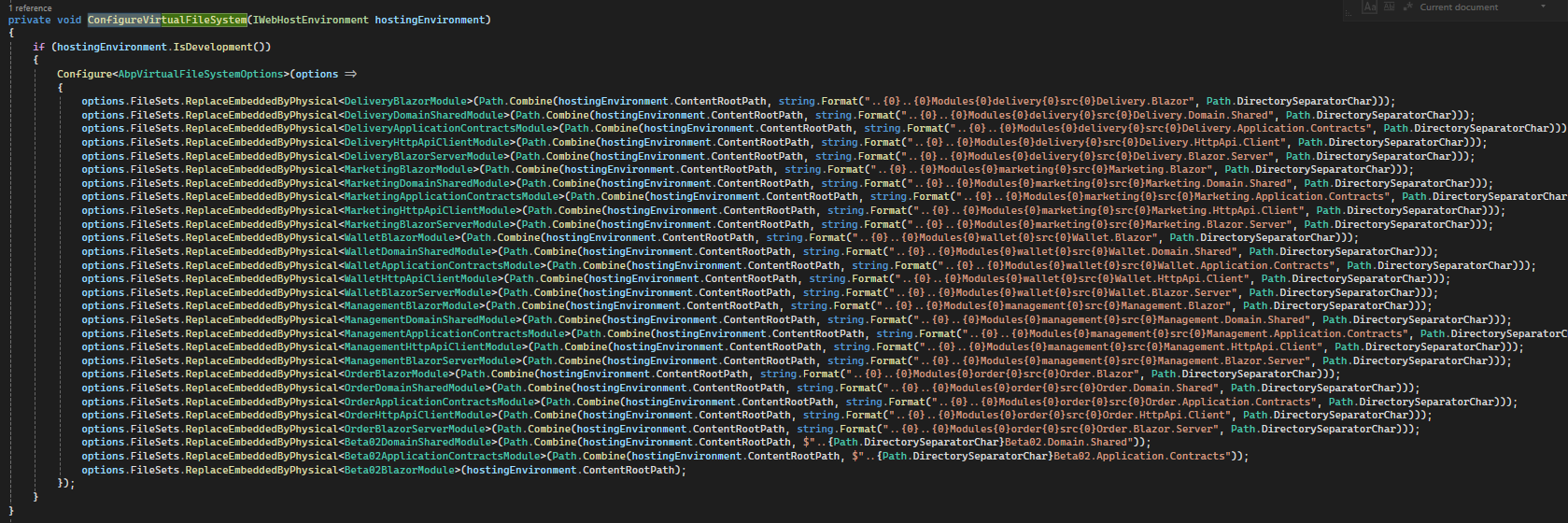
We appreciate your help in identifying why these CSS files are not being resolved in the published environment.
Markdown supported.Copy, paste, or drag & drop images and files (max 100 MB per file, 100 MB total per post) -
0
hi
Your web server does not support web sockets now, Please check and change it in your Azure, and restar IIS and app.
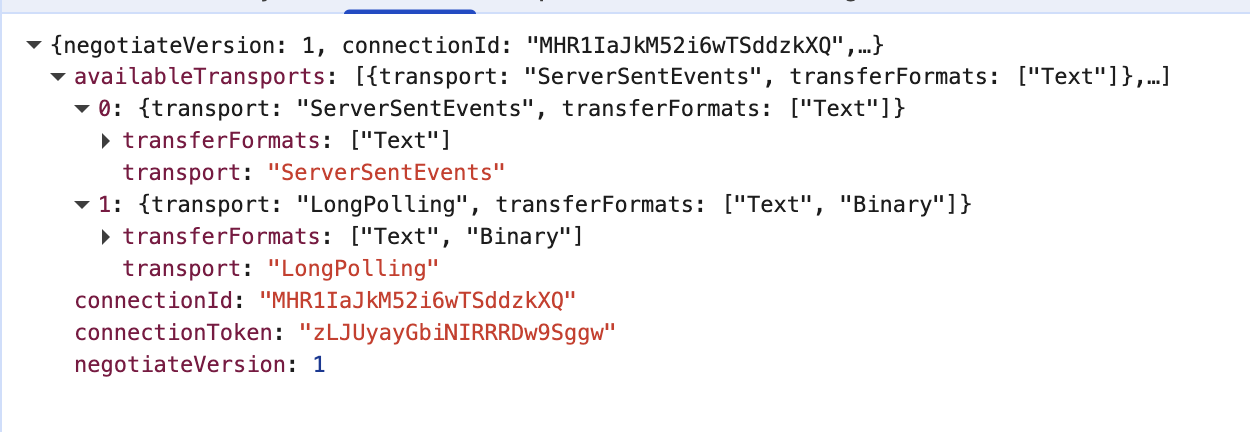
The 404 CSS because your LeptonX
lpx_loaded-cssis set asuserhttps://qlt.pipali.com.br/_content/Volo.Abp.AspNetCore.Components.Web.LeptonXTheme/top-menu/css/bootstrap-user.css https://qlt.pipali.com.br/_content/Volo.Abp.AspNetCore.Components.Web.LeptonXTheme/top-menu/css/user.css
Can you remove this?

Thanks.
Markdown supported.Copy, paste, or drag & drop images and files (max 100 MB per file, 100 MB total per post) -
0
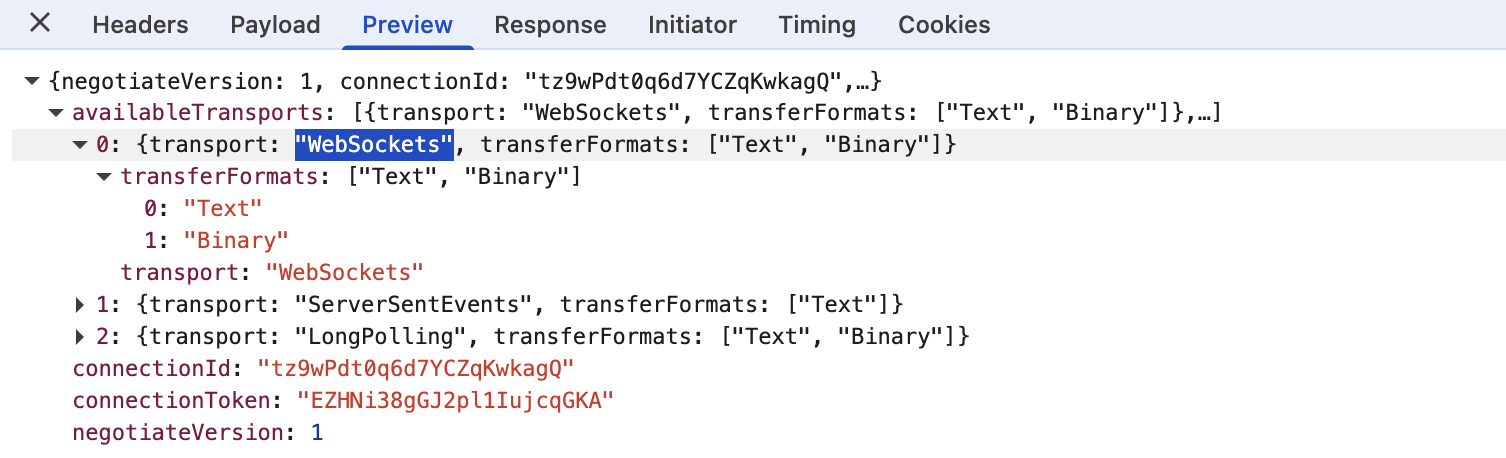
Hi! it seems that WebSocket is now working as picture below.
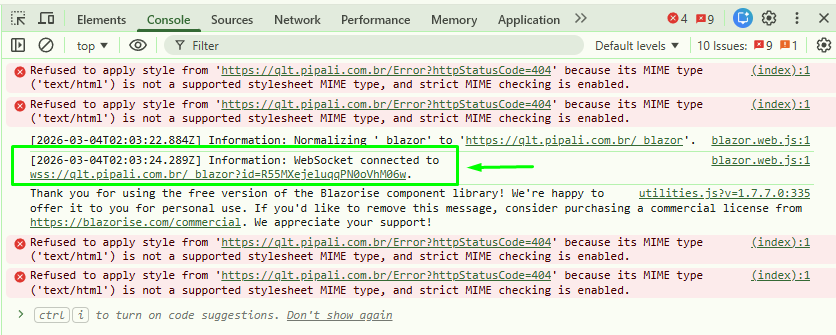 Markdown supported.Copy, paste, or drag & drop images and files (max 100 MB per file, 100 MB total per post)
 -
0
Hello,
I have made the requested change according to the feedback below:
[maliming] said: Can you remove this?
Thanks.Despite this change, the behavior of the application hosted on Azure App Service remains the same.
We created the
bootstrap-user.cssanduser.cssfiles to apply custom styling to the Bootstrap and Lepton-X components. After a successful WebSocket connection, the styling works as expected in both remote production and local development environment.However, the Blazor Server application continues to request both CSS files from incorrect paths, which triggers a redirection to the error page and results in an HTTP 302 status code.
Incorrect paths generated by the Blazor request:
https://qlt.pipali.com.br/_content/Volo.Abp.AspNetCore.Components.Web.LeptonXTheme/top-menu/css/bootstrap-user.csshttps://qlt.pipali.com.br/_content/Volo.Abp.AspNetCore.Components.Web.LeptonXTheme/top-menu/css/user.css
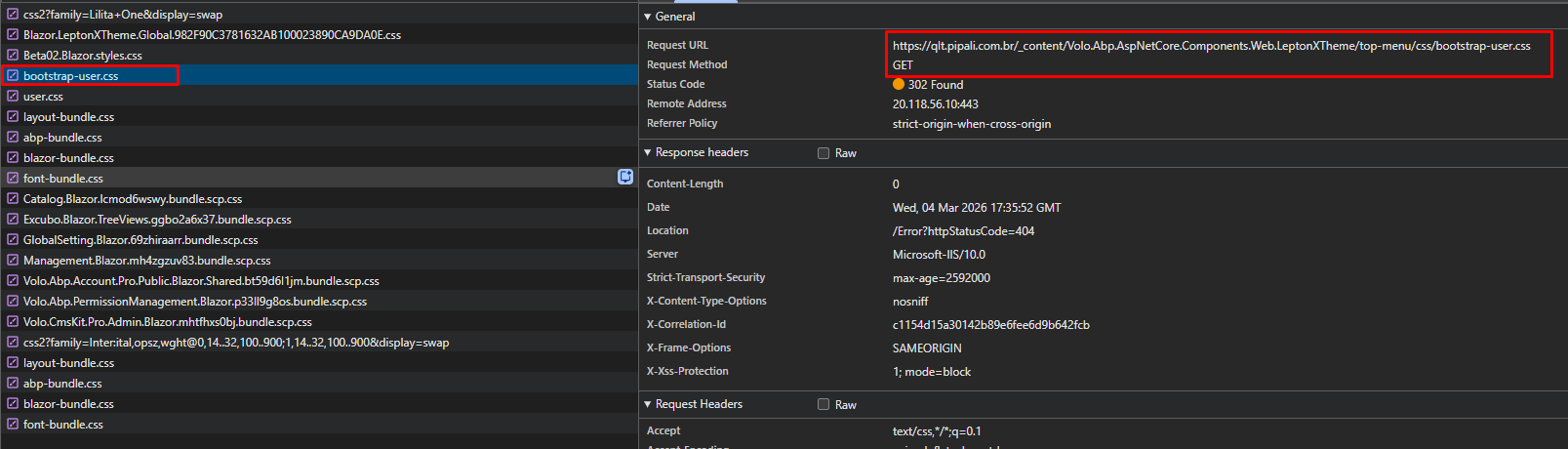

Expected paths from where the files should be successfully accessible via the browser:
https://qlt.pipali.com.br/css/bootstrap-user.csshttps://qlt.pipali.com.br/css/user.css
The only single reference to the files exists in BlazorModule.cs located at the project "src\Blazor".
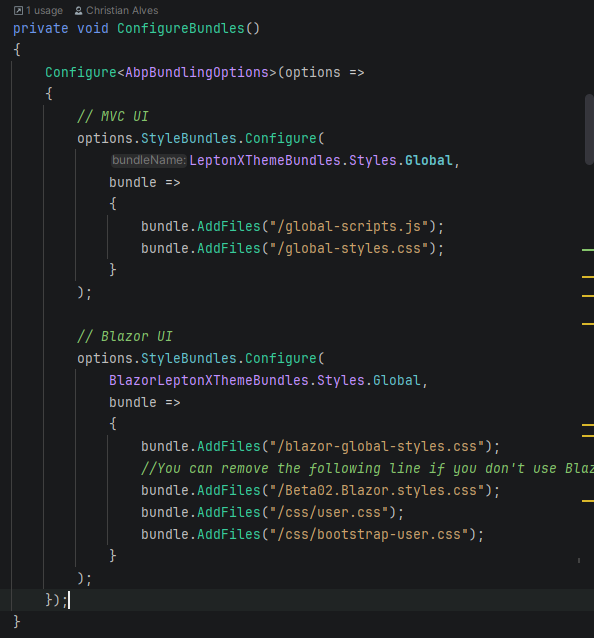
Can you help me to fix the paths for these two CSS files to resolve the error currently visible in the DevTools (
_content/Volo.Abp.AspNetCore.Components.Web.LeptonXTheme/top-menu/css/user.css)?Markdown supported.Copy, paste, or drag & drop images and files (max 100 MB per file, 100 MB total per post)