






Hello ABP team,
I checked the docs/samples/search before opening this request.
We are using ABP Commercial and hosting the server as an IIS sub-application under /server (not at site root). We found that the Account Manage/Profile Picture UI generates an image URL without the app pathbase, which breaks under sub-application hosting.
We validated this on package version Volo.Abp.Account.Pro.Public.Web 10.1.1 (same behavior as 10.0.2).
Environment
- ABP Commercial
- Server: ASP.NET Core on IIS
- Hosted under subpath:
https://<host>/server/ - Frontend under subpath:
https://<host>/web/ - Package: Volo.Abp.Account.Pro.Public.Web 10.1.1
Exception message and full stack trace:
No server exception is thrown. This is a client-side URL generation issue resulting in 404 for profile picture image requests under https://<host>/server/Account/Manage (please note this is not web but server side app)
Steps to reproduce the issue:
- Create/use ABP Commercial solution with Account Pro module.
- Deploy server as IIS sub-application (e.g., /server) and web as /web.
- Ensure app pathbase/base href is correctly set (/server/).
- Login and open Account Manage page (
https://<host>/server/Account/Manage). - Go to Profile Picture section.
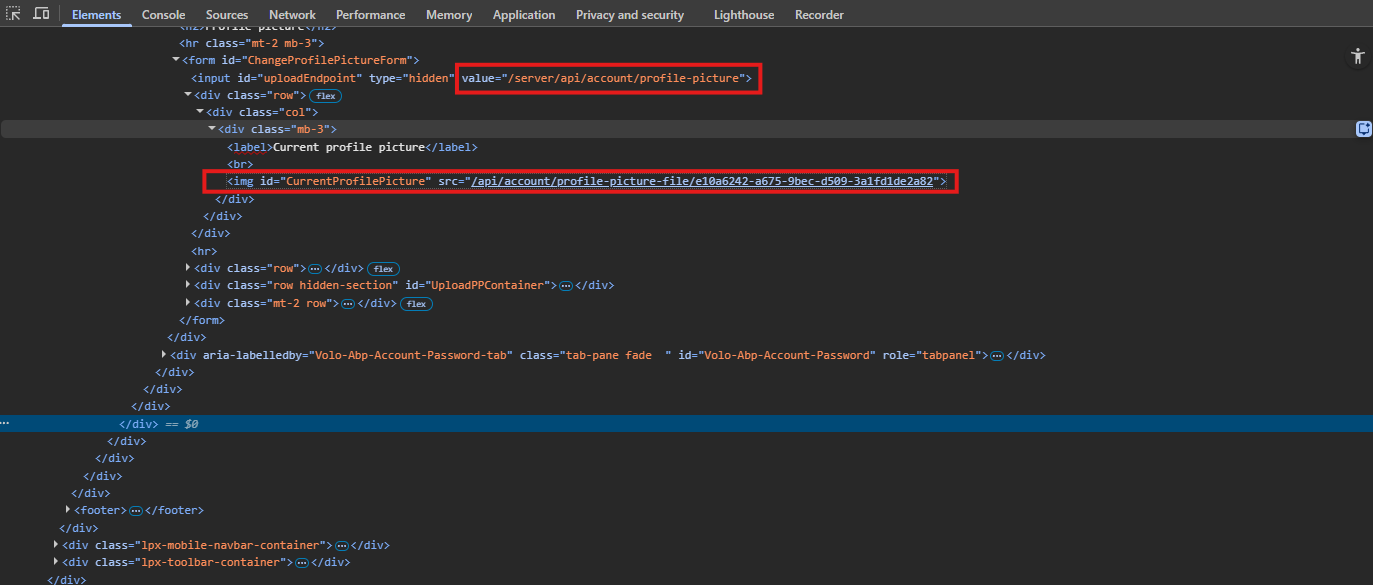
- Observe generated HTML/request for current profile image:
- Actual request URL:
https://<host>/api/account/profile-picture-file/{id}(missing /server) - Expected URL:
https://<host>/server/api/account/profile-picture-file/{id}
Observed behavior
<img id="CurrentProfilePicture" ...>points to root-relative/api/account/profile-picture-file/{id}.- Under sub-application hosting, this causes 404.
Expected behavior
- Generated URL should respect app pathbase (e.g., /server) or use
~/api/... /pathbase-aware URL generation.
Additional notes
abp.appPathand<base href>are correctly set to /server/.- Other assets became pathbase-correct after our config changes.
- The profile-picture image URL remains root-relative.
Please advise whether this is a known issue and if there is an official fix/workaround planned.
5 Answer(s)
-
0
- This looks like a bug in the Account Pro (MVC) Manage/Profile Picture UI where the current image
srcis rendered as a root-relative URL (/api/account/profile-picture-file/{id}) instead of being generated with ASP.NET Core’s pathbase-aware helpers (e.g.,Url.Content("~/...")) when the app is hosted under an IIS sub-application (e.g.,/server). - With an IIS sub-application, root-relative URLs will always resolve to the site root, so the request becomes
https://<host>/api/...and 404s as you observed.
Workaround (no framework change required): override the Manage page UI and make the image URL pathbase-aware
- Copy the Account Manage page that renders the profile picture into your application (override the razor page/view provided by the module).
- Change the
<img>srcgeneration to be pathbase-aware usingUrl.Content("~...")(or an equivalent ABP/ASP.NET helper). Example fix:
<img id="CurrentProfilePicture"
     src="@Url.Content($"~/api/account/profile-picture-file/{Model.ProfilePictureId}")"
     alt="Current profile picture" />
or (if the
idis in a hidden field and set via JS) build it via the app’s base path instead of hardcoding/api/...:// example: prefix with abp.appPath (should be "/server/") const url = abp.appPath + 'api/account/profile-picture-file/' + id; document.getElementById('CurrentProfilePicture').src = url;That will produce
https://<host>/server/api/account/profile-picture-file/{id}whenabp.appPathis/server/.Notes
- I could not verify the exact upstream file/line in
Volo.Abp.Account.Pro.Public.Webfrom the available indexed repositories here (no repository source was available via the tooling), so I’m providing the workaround pattern rather than a verified patch/PR reference. - If you maintain the module as source (Account Pro source code added to solution), apply the same change directly in the module’s Manage/Profile Picture page where the
<img id="CurrentProfilePicture"...>is rendered.
This response was generated by AI. If it didn’t solve your problem, feel free to post a new answer — our support team will jump in to help you soon.
Markdown supported.Copy, paste, or drag & drop images and files (max 100 MB per file, 100 MB total per post) - This looks like a bug in the Account Pro (MVC) Manage/Profile Picture UI where the current image
-
0
Thanks for the workaround suggestion.
In our case, this workaround is problematic because the affected Manage/Profile Picture UI is inside the ABP Pro package and we don’t have practical source-level access to patch that page directly in a maintainable way.
For this reason, we would strongly prefer an official bug fix in the module instead of a local workaround.
Could you please confirm this as a product bug in Volo.Abp.Account.Pro.Public.Web.
Markdown supported.Copy, paste, or drag & drop images and files (max 100 MB per file, 100 MB total per post) -
0
hi
We will fix it in the account pro module.
Please send an email to liming.ma@volosoft.com
I will share the cshtml source code for
account/src/Volo.Abp.Account.Pro.Public.Web/Pages/Account/Components/ProfileManagementGroup/ProfilePicture/Default.cshtml, and then you can customize it to fix it.Thanks.
Markdown supported.Copy, paste, or drag & drop images and files (max 100 MB per file, 100 MB total per post) -
0
Hi,
Thanks for the reply.
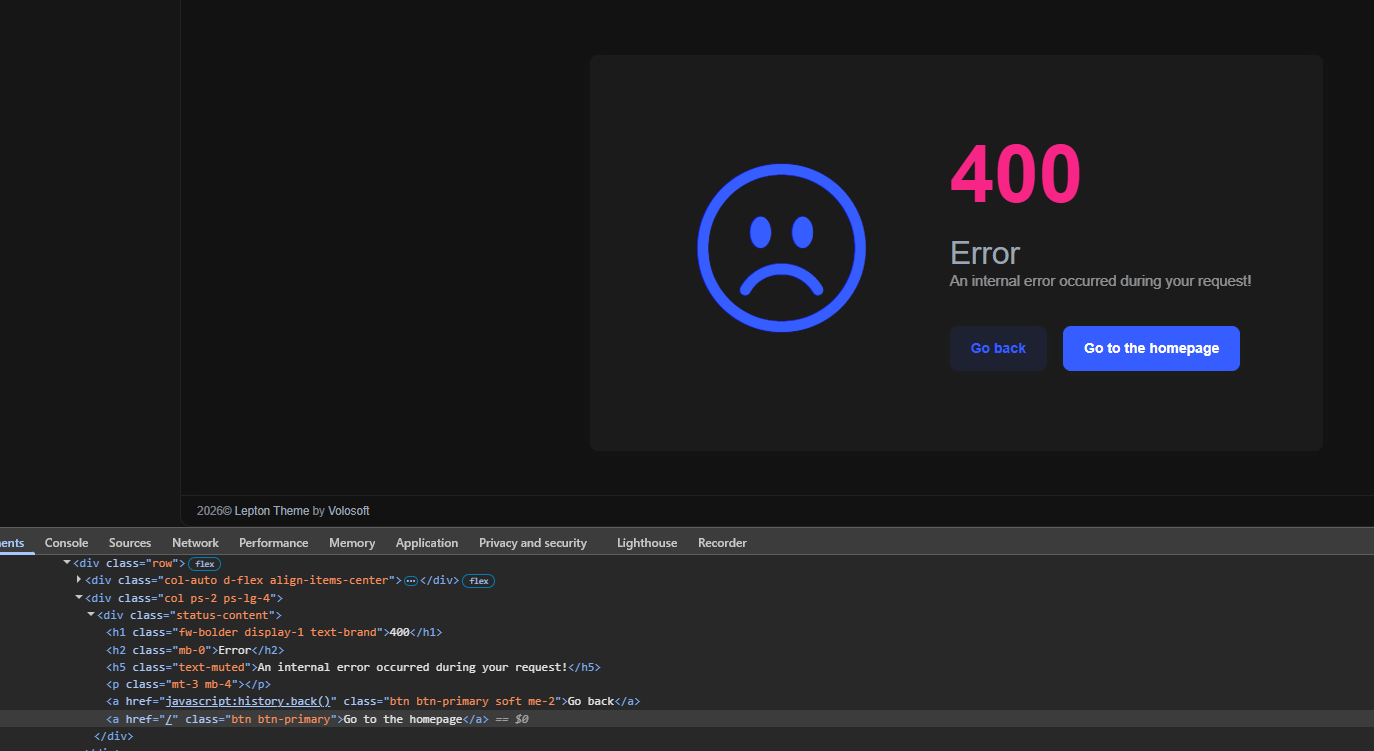
We found another sub-application/pathbase issue, this time on the Error page in the LeptonX MVC theme.
Problem: When the application is hosted as an IIS sub-application under
/server, the Error page button "Go to the homepage" redirects to root/instead of/server/.It's probably coming from the installed theme package:
Volo.Abp.AspNetCore.Mvc.UI.Theme.LeptonX 5.0.2
The homepage link is most probably hardcoded.
So this appears to be another pathbase/sub-application bug in the ABP commercial UI/theme layer.
Could you please confirm:
- whether this is a known bug,
- whether it will also be fixed.
Thanks.
 Markdown supported.Copy, paste, or drag & drop images and files (max 100 MB per file, 100 MB total per post)



