






Hi! We have a project with a BlazorWASM UI with LeptonX. When the app starts, it sends a request to https://fonts.googleapis.com/css2?family=Inter:ital,opsz,wght@0,14..32,100..900;1,14..32,100..900&display=swap to get the fonts.
Since some of our users don't have internet access, they get an error at this point. So, I downloaded and saved the fonts to MyProjectBlazorClient/wwwroot/fonts/inter and added @font-faces to main.css to store and use them locally. Now they're being fetched locally, but the internet request is still being sent.
I searched and found that in the font-bundle.css file, which is located at _content/Volo.Abp.AspNetCore.Components.Web.LeptonXTheme/side-menu/css there's a line: @import url("https://fonts.googleapis.com/css2?family=Inter:ital,opsz,wght@0,14..32,100..900;1,14..32,100..900&display=swap"); , which is what sends the request to get the fonts.
My question is: What can I do to use only local fonts? Are there ready-made solutions for this?
9 Answer(s)
-
0
- Don’t edit
_content/Volo.Abp.AspNetCore.Components.Web.LeptonXTheme/.../font-bundle.css(it comes from the NuGet package and will be regenerated/overwritten). - Instead, override the theme’s
font-bundle.csswith your own file (same virtual path) so the@import url("https://fonts.googleapis.com/...")line is never shipped to the browser.
Step-by-step
- Create a local replacement file in your Blazor WASM client project:
MyProjectBlazorClient/wwwroot/_content/Volo.Abp.AspNetCore.Components.Web.LeptonXTheme/side-menu/css/font-bundle.cssPut your local
@font-facedeclarations there (pointing to your local.woff2/.wofffiles underwwwroot/fonts/inter/...) and do not include any@importto Google Fonts.Example skeleton (adjust paths to your real files):
/* MyProjectBlazorClient/wwwroot/_content/Volo.Abp.AspNetCore.Components.Web.LeptonXTheme/side-menu/css/font-bundle.css */ @font-face { font-family: "Inter"; font-style: normal; font-weight: 100 900; font-display: swap; src: url("/fonts/inter/Inter-VariableFont.woff2") format("woff2"); } /* add italic, opsz variants as needed... */- (Optional but recommended) Also override RTL if your app uses RTL:
MyProjectBlazorClient/wwwroot/_content/Volo.Abp.AspNetCore.Components.Web.LeptonXTheme/side-menu/css/font-bundle.rtl.css(Usually it can be identical to
font-bundle.css.)- Rebuild and redeploy. The browser will still request
font-bundle.css, but it will now be served from your app and will not contain the Google Fonts import, so no request tofonts.googleapis.comwill be triggered.
This works because ABP serves static files from your app’s
wwwroot, and a file placed under the exact same_content/{packageId}/...path effectively overrides the packaged static resource at runtime.
Sources (verified)
- https://abp.io/docs/latest/framework/ui/mvc-razor-pages/bundling-minification#bundle-contributors
- https://abp.io/docs/latest/release-info/migration-guides/abp-7-0
This response was generated by AI. If it didn’t solve your problem, feel free to post a new answer — our support team will jump in to help you soon.
Markdown supported.Copy, paste, or drag & drop images and files (max 100 MB per file, 100 MB total per post) - Don’t edit
-
0
Hi, we're using LeptonX, not LeptonX Lite. Is this solution also compatible with LeptonX?
Markdown supported.Copy, paste, or drag & drop images and files (max 100 MB per file, 100 MB total per post) -
0
Hi,
Can you share your project structure screenshot?
You can try the steps below:
Step 1: Download the Inter font files from https://github.com/rsms/inter/releases and place them in your project:
wwwroot/fonts/InterVariable.woff2
wwwroot/fonts/InterVariable-Italic.woff2
Step 2: Create a local font CSS file at
wwwroot/fonts/local-fonts.cssin the Host/Server project:@font-face { font-family: "Inter"; font-style: normal; font-weight: 100 900; font-display: swap; src: url("/fonts/InterVariable.woff2") format("woff2"); } @font-face { font-family: "Inter"; font-style: italic; font-weight: 100 900; font-display: swap; src: url("/fonts/InterVariable-Italic.woff2") format("woff2"); }Step 3: Add URL rewriting middleware in your Blazor module to redirect
font-bundle.cssrequests to your local file. This must run beforeUseStaticFiles:public override void OnApplicationInitialization(ApplicationInitializationContext context) { var app = context.GetApplicationBuilder(); app.Use(async (httpContext, next) => { var path = httpContext.Request.Path.Value; if (path != null && path.EndsWith("/font-bundle.css", StringComparison.OrdinalIgnoreCase)) { httpContext.Request.Path = "/fonts/local-fonts.css"; } await next(); }); // ... rest of your middleware configuration }Thanks
Markdown supported.Copy, paste, or drag & drop images and files (max 100 MB per file, 100 MB total per post) -
0
Here's our project structure:
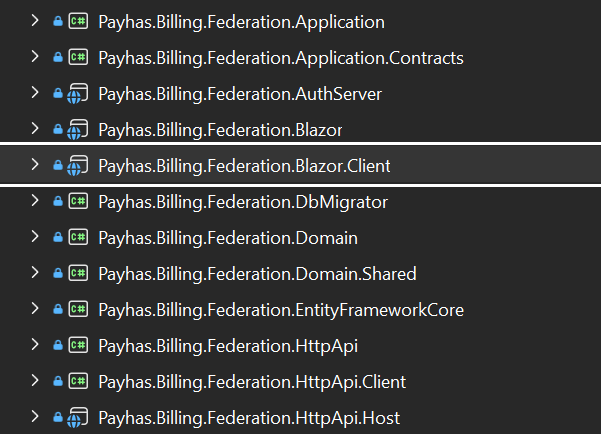
The
wwwrootfolder is located in BlazorClient: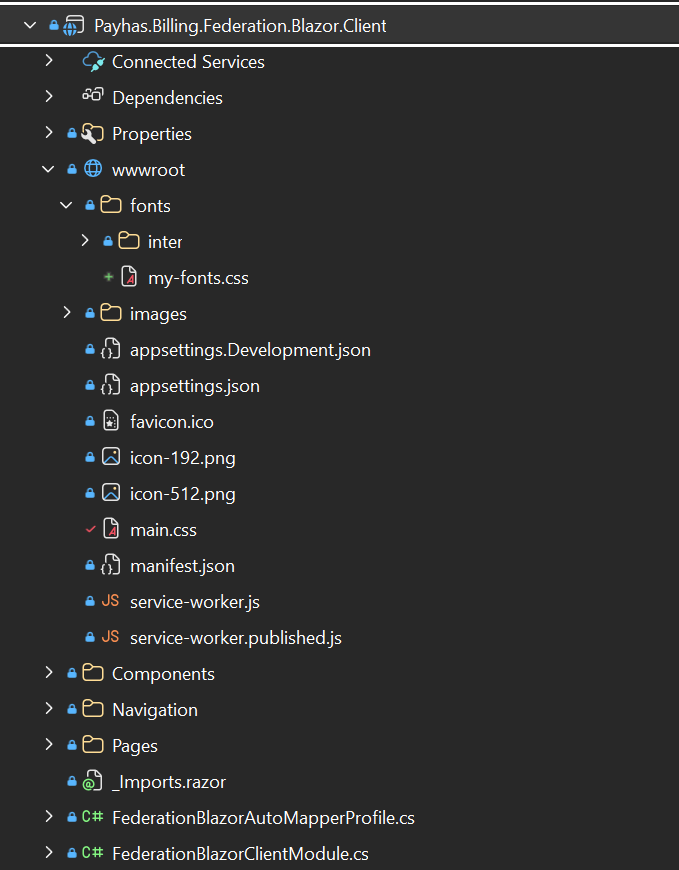
I used
main.cssand local fonts worked. Now I createdmy-fonts.cssand use it for local fonts, but now they stopped working despite the fact that I added them inC# public class FederationStyleBundleContributor : BundleContributor { public override void ConfigureBundle(BundleConfigurationContext context) { context.Files.Add(new BundleFile("/fonts/my-fonts", true)); context.Files.Add(new BundleFile("main.css", true)); } }which is located in the
Federation.Blazor.Markdown supported.Copy, paste, or drag & drop images and files (max 100 MB per file, 100 MB total per post) -
0
I intercepted the request as you showed
app.Use(async (httpContext, next) =>
{
    var path = httpContext.Request.Path.Value;
    if (path != null && path.EndsWith("/font-bundle.css", StringComparison.OrdinalIgnoreCase))
    {
        httpContext.Request.Path = "/fonts/my-fonts.css";
    }
    await next();
});
but judging by what I see in DevTools (if I'm not mistaken), the request is still going there.
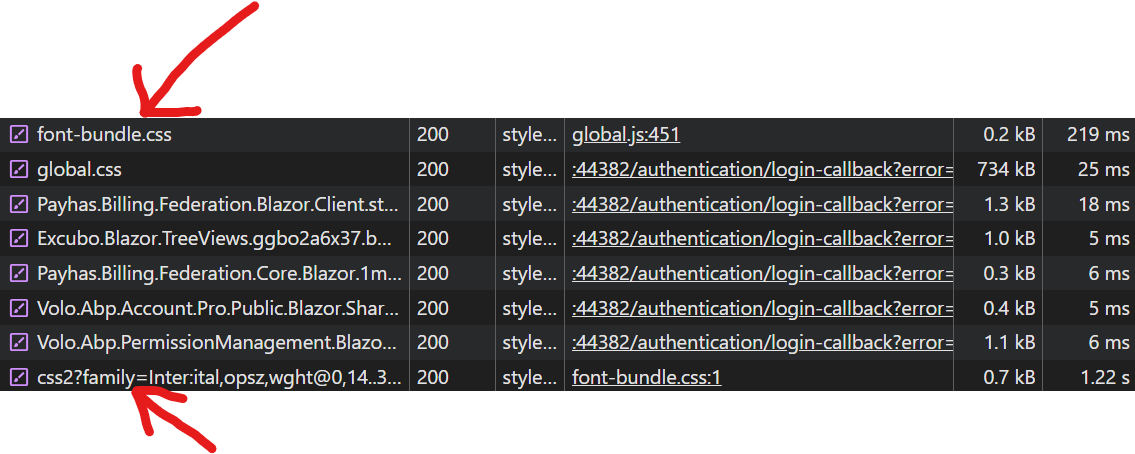 Markdown supported.Copy, paste, or drag & drop images and files (max 100 MB per file, 100 MB total per post)
 -
0
Hi,
I created a test project using ABP Studio with the Blazor WebAssembly template and LeptonX theme to reproduce and verify the fix. The project structure is:
AbpSolution4.Blazor— Blazor Server Host projectAbpSolution4.Blazor.Client— Blazor WebAssembly Client project
Step 1: Download the Inter font files from https://github.com/rsms/inter/releases and place
InterVariable.woff2andInterVariable-Italic.woff2in the Blazor Server Host project'swwwroot/fonts/directory (e.g.AbpSolution4.Blazor/wwwroot/fonts/).Step 2: In your Blazor module's
OnApplicationInitialization, add the following middleware beforeMapAbpStaticAssets():// Intercept font-bundle.css requests and return local font definitions app.Use(async (httpContext, next) => { if (httpContext.Request.Path.Value != null && httpContext.Request.Path.Value.EndsWith("/font-bundle.css", StringComparison.OrdinalIgnoreCase)) { httpContext.Response.ContentType = "text/css"; await httpContext.Response.WriteAsync( """ @font-face { font-family: "Inter"; font-style: normal; font-weight: 100 900; font-display: swap; src: url("/fonts/InterVariable.woff2") format("woff2"); } @font-face { font-family: "Inter"; font-style: italic; font-weight: 100 900; font-display: swap; src: url("/fonts/InterVariable-Italic.woff2") format("woff2"); } """ ); return; } await next(); }); app.MapAbpStaticAssets();I verified this on the test project — after the change, requesting
https://localhost:44302/_content/Volo.Abp.AspNetCore.Components.Web.LeptonXTheme/side-menu/css/font-bundle.cssreturns the local font definitions with no Google Fonts reference.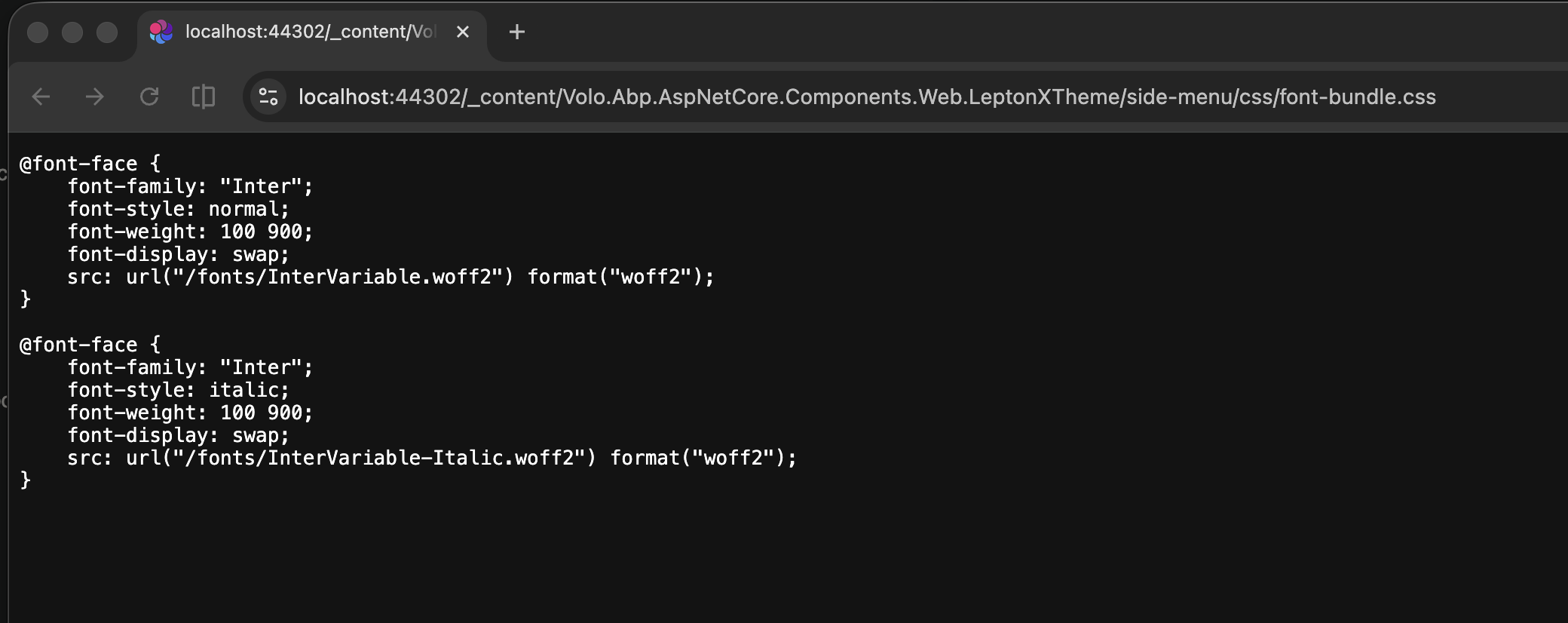
Thanks
Markdown supported.Copy, paste, or drag & drop images and files (max 100 MB per file, 100 MB total per post) -
0
It worked, thanks!
Markdown supported.Copy, paste, or drag & drop images and files (max 100 MB per file, 100 MB total per post)



