






ABP Support Ticket: abp-modal z-index and contentChild Issues After ABP 10.6 + Angular 22 Upgrade
Date: 2026-10-27
Product: ABP Commercial (Angular UI)
ABP Version: 10.6.0
Angular Version: 22.1.4
Affected Package: @abp/ng.theme.shared v10.6.0
Priority: High
Related JIRA Tickets: VL-246XX (Issue 4), VL-246XX
1. Executive Summary
After upgrading from ABP 8.3 + Angular 17 to ABP 10.6 + Angular 22, <abp-modal> exhibits two critical issues when used inside components that are themselves opened as Angular Material (MatDialog) or CDK overlay-based dialogs:
- Z-index stacking conflict: The
abp-modal(ng-bootstrap modal) renders behind the CDK overlay container, making it invisible/inaccessible to the user. contentChild('abpBody')signal query fails: When<ng-template #abpBody>is conditionally wrapped with*ngIf, ABP 10.6's new signal-basedcontentChild()query cannot find the template reference, resulting in an empty modal body.
These issues did not exist in ABP 8.3 + Angular 17. They are regressions introduced by the ABP 10.6 migration to Angular Signals-based content queries and the interaction between ng-bootstrap's modal z-index and CDK overlay z-index.
2. Upgrade Context
2.1 Project Background
TASConnect Litmus is a multi-tenant Supply Chain Finance (SCF) and Trade Finance SaaS platform. The upgrade was a full-stack migration:
| Component | Before | After | |-----------|--------|-------| | Angular | 17.3.12 | 22.1.4 | | ABP Framework (Angular) | 8.3.0 | 10.6.0 | | ABP Framework (.NET) | 8.3.1 | 10.6.0 | | TypeScript | 5.3.0 | 6.0.0 | | .NET | 8.0 | 10.0 | | Angular Material | 17.3.10 | 22.1.4 | | Angular CDK | 17.3.10 | 22.1.4 | | ng-bootstrap | 16.0.0 | 21.0.0 | | ng-zorro-antd | 17.4.1 | 22.0.1 |
2.2 Upgrade Scale
740 files modified, ~738 components updated, 50+ DTOs fixed, 17 modules refactored, 272 .csproj files updated on backend.
3. Issue 1: abp-modal Appears Behind CDK Overlay (Z-index Conflict)
3.1 Description
When <abp-modal> is used inside a component that is itself opened as a MatDialog (Angular Material dialog), the abp-modal renders behind the MatDialog overlay and is completely inaccessible to the user. The user sees the parent dialog but cannot see or interact with the abp-modal that should appear on top.
3.2 JIRA References
- VL-246XX (Issue 4): "The document screen opens behind the Batch details screen and user won't be able to see it."
- Flow: Payment In Progress tab → View Batch (Actions) → Batch Details dialog → Click "View documents" → abp-modal should show documents on top → abp-modal appears behind
- VL-246XX: "Delete Documents confirmation popup appears behind the upload screen"
- Flow: Supply Chain Financing → View Documents → Click Delete icon → Confirmation popup appears behind upload screen
3.3 Steps to Reproduce
- Open a component as a
MatDialog(CDK overlay-based dialog) - Inside that dialog, trigger an
<abp-modal>to open (e.g., click "View Documents") - Expected:
abp-modalappears on top of the MatDialog - Actual:
abp-modalappears behind the MatDialog and is inaccessible
3.4 Root Cause Analysis
The issue is a z-index conflict between three CSS systems:
CDK Overlay Container (Angular Material)
The application's global stylesheet (dark.css) sets the CDK overlay container z-index:
/* dark.css, line 1163 */
.cdk-overlay-container {
  z-index: 10000 !important;
  left: 0px !important;
  position: fixed !important;
}
ng-bootstrap Modal (ABP's modal backend)
The application's global stylesheet also sets ng-bootstrap modal z-index:
/* dark.css, line 3340-3348 */
ngb-modal-backdrop.modal-backdrop {
  z-index: 9999 !important;
  transition: none !important;
}

ngb-modal-window.modal {
  z-index: 9999 !important;
  transition: none !important;
}
ng-bootstrap Backdrop Inline Style
Additionally, NgbModalBackdrop has a hardcoded inline style in its @Component host metadata:
// @ng-bootstrap/ng-bootstrap - NgbModalBackdrop component
@Component({
  selector: 'ngb-modal-backdrop',
  host: {
    '[class]': '"modal-backdrop" + (backdropClass ? " " + backdropClass : "")',
    style: 'z-index: 1055',  // ← Hardcoded inline style
  },
})
The Conflict
| Layer | Element | z-index | Source |
|-------|---------|---------|--------|
| CDK overlay container | .cdk-overlay-container | 10000 !important | dark.css line 1163 |
| ng-bootstrap modal window | ngb-modal-window.modal | 9999 !important | dark.css line 3345 |
| ng-bootstrap modal backdrop | ngb-modal-backdrop.modal-backdrop | 9999 !important | dark.css line 3340 |
| ng-bootstrap backdrop inline | ngb-modal-backdrop | 1055 | Hardcoded host style |
Since 9999 < 10000, the ng-bootstrap modal (used by abp-modal) always renders behind the CDK overlay container (used by MatDialog). This means any abp-modal opened from within a MatDialog is invisible.
In ABP 8.3 + Angular 17, this was not an issue because:
- The older Angular Material (v17) CDK overlay had different z-index defaults
- The application did not have the same z-index escalation in global CSS
- The ng-bootstrap version (16.x) may have had different stacking behavior
3.5 ABP ModalComponent Source Analysis
From @abp/ng.theme.shared v10.6.0 (fesm2022 bundle), the ModalComponent.toggle() method:
// @abp/ng.theme.shared - ModalComponent.toggle() (line ~1826) — simplified
this.modalRef = this.modal.open(this.modalContent(), {
    size: 'md', centered: false, keyboard: false, scrollable: true,
    ...this.options(),  // ← Spreads user options to ng-bootstrap
    windowClass: `${this.options().windowClass || ''} ${this.modalIdentifier}`,
});
this.options() is spread into ng-bootstrap's modal.open(). This means windowClass and backdropClass from [options] input pass through to ng-bootstrap. This is the only mechanism to influence the modal's z-index from the consumer side.
3.6 Why ABP Should Address This
abp-modaldoes not expose any z-index configuration — consumers cannot set z-index through the component API.- ng-bootstrap appends modal elements to
document.body— outside the component's view encapsulation, making scoped CSS impossible without::ng-deep. - The ng-bootstrap backdrop has a hardcoded inline
style: 'z-index: 1055'— this cannot be overridden by CSS classes without!important. - CDK overlay + ng-bootstrap modal is a common combination — many ABP applications use both Angular Material and ABP's modal system. ABP should provide a supported way to handle z-index stacking when these systems coexist.
3.7 Our Workaround
We pass custom CSS classes via [options] and use ::ng-deep with !important to override z-index:
<!-- alert.component.html -->
<abp-modal
  [options]="{
    size: 'md',
    windowClass: 'above-cdk-overlay',
    backdropClass: 'above-cdk-overlay-backdrop'
  }"
  [(visible)]="openViewDocument"
>
  <!-- modal content -->
</abp-modal>
/* alert.component.scss */
::ng-deep ngb-modal-window.above-cdk-overlay {
    z-index: 10001 !important;
}

::ng-deep ngb-modal-backdrop.above-cdk-overlay-backdrop {
    z-index: 10001 !important;
}
Problems with this workaround:
- Requires
::ng-deep(deprecated in Angular, may be removed in future versions) - Requires
!importantto override both the stylesheet rule and inline style - Must be applied individually to every
<abp-modal>that could appear above a CDK overlay - Not discoverable — had to read ABP source code to find that
[options]passes through to ng-bootstrap
3.8 Suggested Fix from ABP
- Add a
zIndexinput toModalComponentthat sets z-index on both the modal window and backdrop. - Add a
containeroption that allows specifying a container element (ng-bootstrap supports this). If the modal could be appended inside the CDK overlay container, it would inherit the CDK z-index context. - Document the
windowClass/backdropClasspassthrough — this is currently undocumented but is the only workaround available. - Consider using CDK overlay instead of ng-bootstrap for modal rendering, since ABP already depends on
@angular/cdk. This would eliminate the z-index conflict entirely.
4. Issue 2: contentChild('abpBody') Signal Query Fails with *ngIf on <ng-template>
4.1 Description
ABP 10.6's ModalComponent uses Angular Signals-based contentChild() queries:
// @abp/ng.theme.shared v10.6.0 - ModalComponent
this.abpBody = contentChild('abpBody', /* ... */);
In ABP 8.3, this was a @ContentChild decorator-based query. The migration to contentChild() signal introduces a breaking behavioral change when *ngIf is used on <ng-template>.
4.2 Code Pattern That Breaks
This pattern worked in ABP 8.3 + Angular 17 but breaks in ABP 10.6 + Angular 22:
<!-- BROKEN in ABP 10.6 + Angular 22 -->
<abp-modal [(visible)]="openViewDocument">
  <ng-template *ngIf="!isFxPayModule" #abpBody>
    <app-component-a [IsViewOnly]="true"></app-component-a>
  </ng-template>
  <ng-template *ngIf="isFxPayModule" #abpBody>
    <app-component-b [IsViewOnly]="false"></app-component-b>
  </ng-template>
</abp-modal>
4.3 Root Cause
In Angular 22, *ngIf is syntactic sugar for an implicit <ng-template> wrapper. When *ngIf is placed on a <ng-template>, Angular creates a nested template structure:
<!-- What Angular 22 actually creates: -->
<ng-template [ngIf]="!isFxPayModule">
  <ng-template #abpBody>
    <app-component-a></app-component-a>
  </ng-template>
</ng-template>
The #abpBody template reference is now inside an outer *ngIf template. Angular's contentChild() signal query searches the direct content children of the component. Since #abpBody is wrapped inside the *ngIf template, it's no longer a direct content child — contentChild('abpBody') returns undefined.
ABP's ModalComponent template uses:
<!-- ABP ModalComponent template -->
@if (abpBody()) {
  <div id="abp-modal-body" class="modal-body">
    <ng-container *ngTemplateOutlet="abpBody()"></ng-container>
  </div>
}
Since abpBody() is undefined, the @if block evaluates to false, and the modal body is never rendered — the modal opens but appears empty.
4.4 Our Workaround
Consolidate into a single <ng-template #abpBody> and move the *ngIf to the child components:
<!-- WORKING in ABP 10.6 + Angular 22 -->
<abp-modal [(visible)]="openViewDocument">
  <ng-template #abpBody>
    <app-component-a *ngIf="!isFxPayModule" [IsViewOnly]="true"></app-component-a>
    <app-component-b *ngIf="isFxPayModule" [IsViewOnly]="false"></app-component-b>
  </ng-template>
</abp-modal>
4.5 Why This Is a Breaking Change from ABP
- ABP 8.3 used
@ContentChilddecorator which could find#abpBodyeven when wrapped in structural directives in some cases, or the pattern was resilient to it. - ABP 10.6 switched to
contentChild()signal which has stricter matching behavior for content projection. - This is not documented in ABP 10.6 migration guide — there is no mention that
*ngIfon<ng-template #abpBody>will break. - The pattern of conditionally showing different modal bodies is common — many applications use
*ngIfto switch between view/edit modes, different user roles, etc.
4.6 Suggested Fix from ABP
- Document this breaking change in the ABP 8.x → 10.x migration guide with clear examples.
- Consider using
contentChildren()(plural) with a filter, or@ContentChildwith{ descendants: true }equivalent, to find#abpBodyeven when wrapped in structural directives. - Add a runtime warning when
abpBody()returnsundefinedbut the modal is visible — this would help developers diagnose the issue faster.
5. Environment Details
5.1 Package Versions (from package.json)
{
  "@angular/core": "~22.1.4",
  "@angular/material": "~22.1.4",
  "@angular/cdk": "~22.1.4",
  "@abp/ng.theme.shared": "~10.6.0",
  "@abp/ng.core": "~10.6.0",
  "@ng-bootstrap/ng-bootstrap": "^21.0.0",
  "ng-zorro-antd": "^22.0.1"
}
5.2 ABP Theme Shared Internal Dependencies
@abp/ng.theme.shared v10.6.0 bundles its own @ng-bootstrap/ng-bootstrap v20.0.0.
5.3 Key Source Locations
abp-ng.theme.shared.mjsline 1775:contentChild('abpBody')signal queryabp-ng.theme.shared.mjsline 1826:toggle()spreadsoptions()to ng-bootstrapng-bootstrap-ng-bootstrap-modal.mjsline 83: Backdropstyle: 'z-index: 1055'hardcoded
5.4 Browser
Tested in Chrome 130+ and Edge 130+. Issue is CSS z-index stacking, not browser-specific.
6. Minimal Reproduction
6.1 Z-index Issue
Open a component via this.dialog.open(AlertComponent, { data, width: '80%' }). Inside that MatDialog component:
<abp-modal [(visible)]="openViewDocument">
  <ng-template #abpBody><p>Content here</p></ng-template>
</abp-modal>
Result: abp-modal renders behind the MatDialog overlay — invisible to the user.
6.2 contentChild Issue
<abp-modal [(visible)]="showModal">
  <ng-template *ngIf="isEditMode" #abpBody>
    <app-edit-form></app-edit-form>
  </ng-template>
  <ng-template *ngIf="!isEditMode" #abpBody>
    <app-view-only></app-view-only>
  </ng-template>
</abp-modal>
Result: Modal opens but body is empty — contentChild('abpBody') returns undefined.
7. Summary of Requests
| # | Request | Severity |
|---|---------|----------|
| 1 | Document the contentChild breaking change for *ngIf on <ng-template #abpBody> in migration guide | Critical |
| 2 | Add z-index configuration to ModalComponent (e.g., zIndex input or CSS custom property) | High |
| 3 | Document windowClass/backdropClass passthrough via [options] input | High |
| 4 | Add runtime warning when abpBody() signal returns undefined but modal is visible | Medium |
| 5 | Consider CDK overlay for modal rendering instead of ng-bootstrap to avoid z-index conflicts with other CDK-based components | Low (long-term) |
Reported by: TASConnect Platform Team Contact: Pradeep Pradyumna Attachments: Screenshots available from JIRA tickets VL-246XX and VL-246XX
2 Answer(s)
-
-1
- Issue 1 (z-index / MatDialog overlay):
abp-modalis implemented on top of ng-bootstrap’sNgbModal, which appendsngb-modal-window/ngb-modal-backdroptodocument.body. When your app (or theme) sets.cdk-overlay-container { z-index: 10000 !important; }and ng-bootstrap modal/backdrop stays at a lower z-index (e.g.,9999), the modal will render behind the CDK overlay stack.
Supported ABP-side workaround (no need to fork ABP): passwindowClass/backdropClassvia the[options]input (ABP spreadsoptions()intoNgbModal.open(...)), then override z-index globally.
<abp-modal
    [(visible)]="openViewDocument"
    [options]="{
      windowClass: 'abp-above-cdk',
      backdropClass: 'abp-above-cdk-backdrop'
    }"
  >
    <ng-template #abpBody>...</ng-template>
  </abp-modal>
Put the CSS in a global stylesheet (recommended), so you don’t need
::ng-deep:ngb-modal-window.abp-above-cdk { z-index: 10001 !important; } ngb-modal-backdrop.abp-above-cdk-backdrop { z-index: 10001 !important; }Notes:
Using a component-scoped stylesheet forces you into
::ng-deepbecause the modal elements are not inside the component’s DOM tree (they’re appended tobody).Your current CSS values confirm the root cause: 9999 < 10000, so it will always lose against
.cdk-overlay-container.Issue 2 (
contentChild('abpBody')+*ngIfon<ng-template>): In ABP 10.6,abp-modaluses Angular’s signal-basedcontentChild('abpBody'). That query will not reliably find a template reference that is structurally wrapped (like<ng-template *ngIf ... #abpBody>), because*ngIfon an<ng-template>creates an additional outer template layer.
Fix in application code: keep exactly one projected<ng-template #abpBody>and move conditional logic inside it (as you already did):
<abp-modal [(visible)]="showModal">
    <ng-template #abpBody>
      <app-edit-form *ngIf="isEditMode"></app-edit-form>
      <app-view-only *ngIf="!isEditMode"></app-view-only>
    </ng-template>
  </abp-modal>
This pattern aligns with how ABP’s modal is documented/used (single
#abpBodytemplate projected into the component).- About your requested ABP changes (what is verifiable from sources):
- From the ABP Angular modal docs, the modal is expected to be used by projecting
#abpHeader/#abpBody/#abpFootertemplates (single templates) into<abp-modal>. Your “two#abpBodytemplates toggled by*ngIf” is not a documented usage pattern, and it becomes fragile with signal-based content queries. - There is no verified, official ABP documentation (in the retrieved sources) that mentions a
zIndexinput,containeroption, or a migration note specifically aboutcontentChild()+*ngIfon<ng-template #abpBody>.
- From the ABP Angular modal docs, the modal is expected to be used by projecting
Sources (verified)
- https://abp.io/docs/latest/framework/ui/angular/modal
- https://github.com/abpframework/abp/blob/dev/npm/ng-packs/packages/theme-shared/src/lib/components/modal/modal.component.ts
- https://github.com/abpframework/abp/tree/dev/npm/ng-packs/packages/theme-shared
This response was generated by AI. If it didn’t solve your problem, feel free to post a new answer — our support team will jump in to help you soon.
Markdown supported.Copy, paste, or drag & drop images and files (max 100 MB per file, 100 MB total per post) - Issue 1 (z-index / MatDialog overlay):
-
0
[AI-Bot] said:
- Issue 1 (z-index / MatDialog overlay):
abp-modalis implemented on top of ng-bootstrap’sNgbModal, which appendsngb-modal-window/ngb-modal-backdroptodocument.body. When your app (or theme) sets.cdk-overlay-container { z-index: 10000 !important; }and ng-bootstrap modal/backdrop stays at a lower z-index (e.g.,9999), the modal will render behind the CDK overlay stack.
Supported ABP-side workaround (no need to fork ABP): passwindowClass/backdropClassvia the[options]input (ABP spreadsoptions()intoNgbModal.open(...)), then override z-index globally.
<abp-modal
    [(visible)]="openViewDocument"
    [options]="{
      windowClass: 'abp-above-cdk',
      backdropClass: 'abp-above-cdk-backdrop'
    }"
  >
    <ng-template #abpBody>...</ng-template>
  </abp-modal>
Put the CSS in a global stylesheet (recommended), so you don’t need
::ng-deep:ngb-modal-window.abp-above-cdk { z-index: 10001 !important; } ngb-modal-backdrop.abp-above-cdk-backdrop { z-index: 10001 !important; }Notes:
- Using a component-scoped stylesheet forces you into
::ng-deepbecause the modal elements are not inside the component’s DOM tree (they’re appended tobody). - Your current CSS values confirm the root cause: 9999 < 10000, so it will always lose against
.cdk-overlay-container. > - Issue 2 (
contentChild('abpBody')+*ngIfon<ng-template>): In ABP 10.6,abp-modaluses Angular’s signal-basedcontentChild('abpBody'). That query will not reliably find a template reference that is structurally wrapped (like<ng-template *ngIf ... #abpBody>), because*ngIfon an<ng-template>creates an additional outer template layer.
Fix in application code: keep exactly one projected<ng-template #abpBody>and move conditional logic inside it (as you already did):
<abp-modal [(visible)]="showModal">
    <ng-template #abpBody>
      <app-edit-form *ngIf="isEditMode"></app-edit-form>
      <app-view-only *ngIf="!isEditMode"></app-view-only>
    </ng-template>
  </abp-modal>
This pattern aligns with how ABP’s modal is documented/used (single
#abpBodytemplate projected into the component).- About your requested ABP changes (what is verifiable from sources):
- From the ABP Angular modal docs, the modal is expected to be used by projecting
#abpHeader/#abpBody/#abpFootertemplates (single templates) into<abp-modal>. Your “two#abpBodytemplates toggled by*ngIf” is not a documented usage pattern, and it becomes fragile with signal-based content queries. - There is no verified, official ABP documentation (in the retrieved sources) that mentions a
zIndexinput,containeroption, or a migration note specifically aboutcontentChild()+*ngIfon<ng-template #abpBody>.
- From the ABP Angular modal docs, the modal is expected to be used by projecting
Sources (verified)
- https://abp.io/docs/latest/framework/ui/angular/modal
- https://github.com/abpframework/abp/blob/dev/npm/ng-packs/packages/theme-shared/src/lib/components/modal/modal.component.ts
- https://github.com/abpframework/abp/tree/dev/npm/ng-packs/packages/theme-shared
This response was generated by AI. If it didn’t solve your problem, feel free to post a new answer — our support team will jump in to help you soon.
No AI response, please!
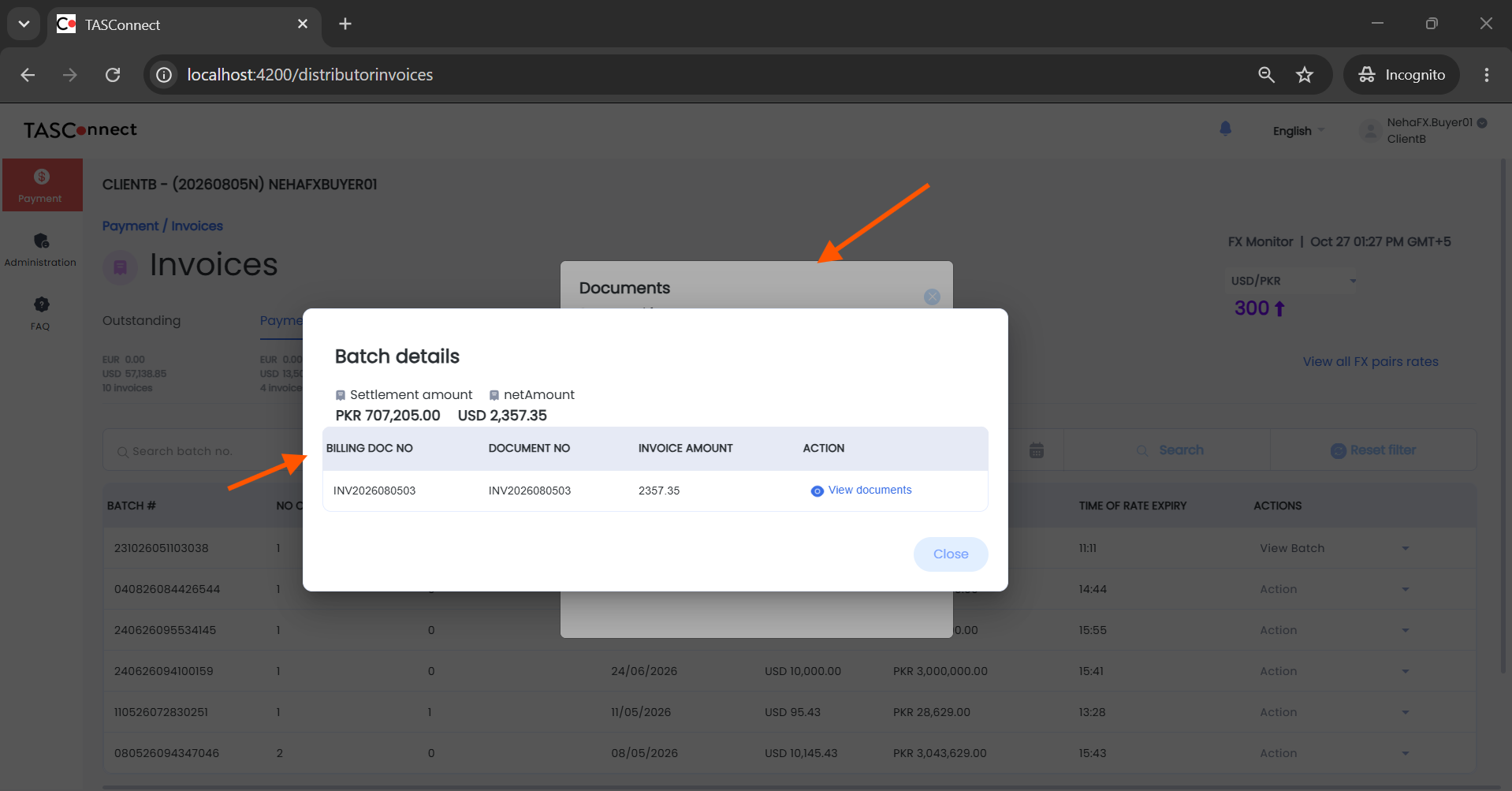
I applied the changes, I still see the abp-modal appears begin the custom pop-up. you can refer to the screenshot below
 Markdown supported.Copy, paste, or drag & drop images and files (max 100 MB per file, 100 MB total per post)
 - Issue 1 (z-index / MatDialog overlay):



