






I’ve updated my project to 10.7.0 and regenerated the entities using the suite. Thanks in advance for the fixes included in the new version.
However, I now have a new problem. The new Server.Tests.Application.txt template now references a class called LimitedResultRequestDto, which I don’t yet have in my project.
In my opinion, this should be included in Volo.Abp.Application.Dtos, just like PagedResultRequestDto, but it doesn’t seem to be there.
18 Answer(s)
-
0
LimitedResultRequestDtois an ABP Framework type and it should come from theVolo.Abp.Application.Dtosnamespace (same place asPagedResultRequestDto).- In ABP 10.7,
PagedResultRequestDtoinherits fromLimitedResultRequestDto(so Suite templates referencingLimitedResultRequestDtois consistent with the framework DTO hierarchy).
What to do in your solution (ABP 10.7.0):
Ensure your projects reference the correct ABP package(s)
- The DTO base classes (
LimitedResultRequestDto,PagedResultRequestDto, etc.) come from ABP’s application contracts layer packages (transitively or directly). - Make sure the project where the template is compiled (typically
*.Application.Contractsand/or*.TestBase/*.Tests) references ABP 10.7.0 packages consistently (no mixed versions).
- The DTO base classes (
Clean and restore to eliminate stale assemblies
- Delete
bin/objfor the solution (or rundotnet clean+ deletebin/obj). - Run
dotnet restore - Rebuild the whole solution.
- Delete
If you still can’t compile because the type is missing
- That indicates your solution is not actually resolving the ABP 10.7 assemblies that contain the DTOs (e.g., package downgrade, pinned central package version, or inconsistent package graph).
- Fix by aligning all
Volo.Abp.*package versions to 10.7.0 (including test projects).
Reference (contains the
LimitedResultRequestDtoand shows its relationship toPagedResultRequestDto/PagedAndSortedResultRequestDto):- https://abp.io/docs/10.7/framework/architecture/domain-driven-design/data-transfer-objects
This response was generated by AI. If it didn’t solve your problem, feel free to post a new answer — our support team will jump in to help you soon.
Markdown supported.Copy, paste, or drag & drop images and files (max 100 MB per file, 100 MB total per post) -
0
Could you make these test classes (such as the one mentioned above) partial in future, so that we can add our own extended class for further tests? I’ve now had to adapt this in my template.
Markdown supported.Copy, paste, or drag & drop images and files (max 100 MB per file, 100 MB total per post) -
0
Hi,
Thanks for the suggestion. We'll make the generated test classes
partialin the next release: the abstract*AppServiceTests<TStartupModule>, the EF Core/MongoDB*AppServiceTestsclasses, and*RepositoryTests.Until then, you can keep the
partialchange in your customized template.Thanks
Markdown supported.Copy, paste, or drag & drop images and files (max 100 MB per file, 100 MB total per post) -
0
Great thank you!
One more request: I’ve created a base class for the two DbContexts (Host & Tenant) and moved the shared EF model definition there (I don’t like duplicate code). And for tables that I only want in the Hosts database, I still have the option of defining them there alone.
As these are table definitions, I otherwise see a risk that discrepancies could arise if a manual change is made, because the change is only made in one place.
Could you please consider whether you might want to do the same for the generated code?
public abstract class BpoDbContextBase<TDbContext> : AbpDbContext<TDbContext>
    where TDbContext : DbContext
{
...
}
[ConnectionStringName("Default")] public class BpoDbContext : BpoDbContextBase<BpoDbContext> { public DbSet<Kunde> Kunden { get; set; } = null!; public BpoDbContext(DbContextOptions<BpoDbContext> options) : base(options) { } protected override void OnModelCreating(ModelBuilder builder) { builder.SetMultiTenancySide(MultiTenancySides.Both); base.OnModelCreating(builder); // Configure mappings like that for the entities only available in the host side, but should not be in the tenant databases. if (builder.IsHostDatabase()) { builder.Entity<Kunde>(b => { b.ToTable(BpoConsts.DbTablePrefix + "Kunde", BpoConsts.DbSchema); b.ConfigureByConvention(); b.Property(x => x.Kundennummer).HasColumnName(nameof(Kunde.Kundennummer)); b.Property(x => x.Name).HasColumnName(nameof(Kunde.Name)).IsRequired().HasMaxLength(KundeConsts.NameMaxLength); }); } } }[ConnectionStringName("Default")] public class BpoTenantDbContext : BpoDbContextBase<BpoTenantDbContext> { public BpoTenantDbContext(DbContextOptions<BpoTenantDbContext> options) : base(options) { } protected override void OnModelCreating(ModelBuilder builder) { builder.SetMultiTenancySide(MultiTenancySides.Tenant); base.OnModelCreating(builder); } }Markdown supported.Copy, paste, or drag & drop images and files (max 100 MB per file, 100 MB total per post) -
0
One more thing I’ve noticed. I think the new feature
“RemoveUnusedUsings”: truedoesn’t seem to be working. I’ve set it to true, but I still have a lot of unused usings after generation.Here are a few examples (this list is not complete):
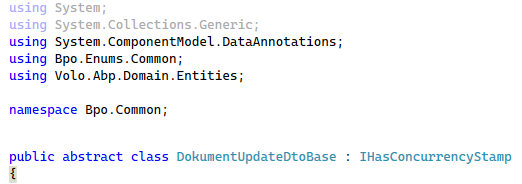
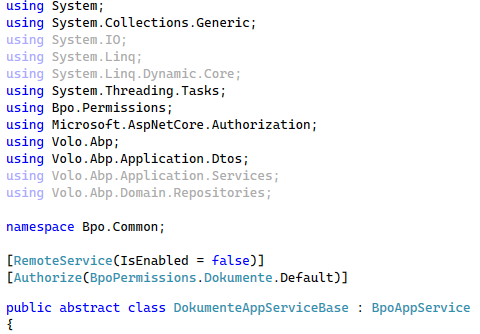
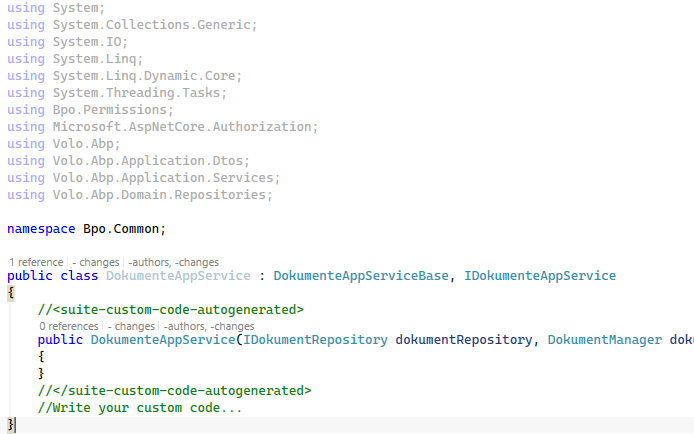 Markdown supported.Copy, paste, or drag & drop images and files (max 100 MB per file, 100 MB total per post)
 -
0
To this end, changes are made to the formatting in the extended file (which do not comply with our style guidelines).
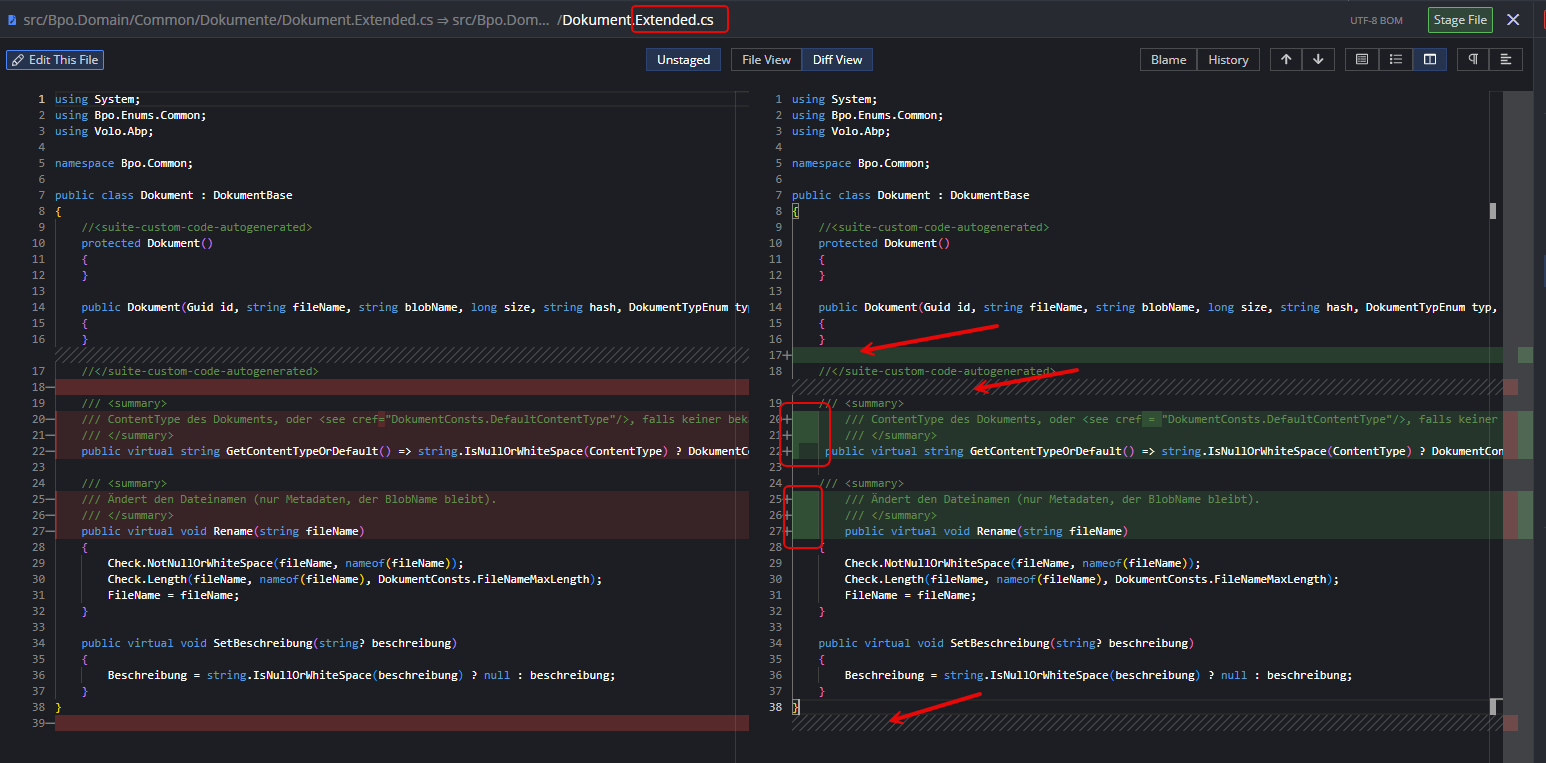
I have seen this in the following classes:
Domain:
- Entity.Extended.cs
- EntityManager.Extended.cs
Markdown supported.Copy, paste, or drag & drop images and files (max 100 MB per file, 100 MB total per post) -
0
Unfortunately, there’s another error… when generating
EfCore…Repository.cs, there’s a mix-up with theusingstatements: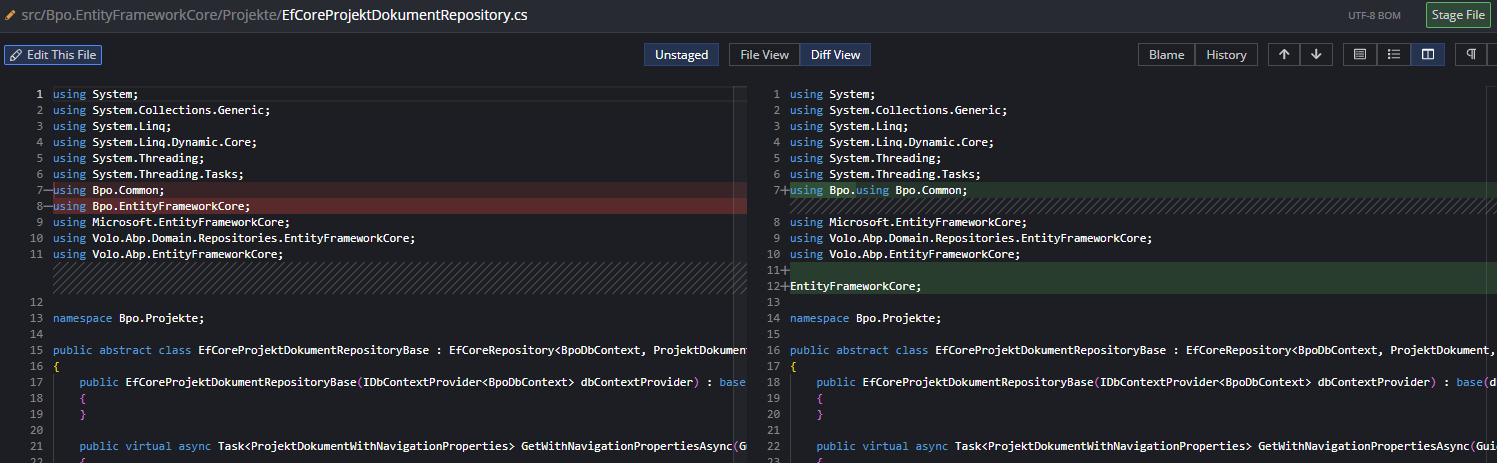
I couldn’t figure out what was causing the problem. The template appears to be the same as before (I haven’t customised anything here). Nor did the
RemoveUnusedUsingsparameter have any effect when I set it to false.Markdown supported.Copy, paste, or drag & drop images and files (max 100 MB per file, 100 MB total per post) -
0
One more thing: Why is a required navigation property now made nullable?
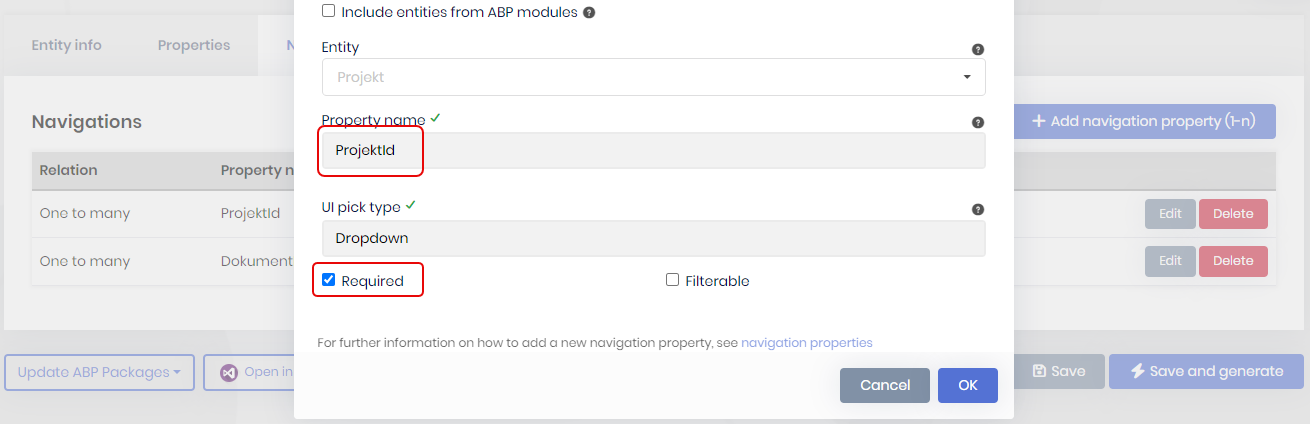
It's a master entity with two navigation properties (1:n). Both are required. In version 10.4, this was generated correctly.

 Markdown supported.Copy, paste, or drag & drop images and files (max 100 MB per file, 100 MB total per post)
 -
0
Sorry for all the different findings. I’d like to help improve the product. I’ve deliberately split it into six separate posts so that you can reply to them more easily. Thank you very much.
Markdown supported.Copy, paste, or drag & drop images and files (max 100 MB per file, 100 MB total per post) -
0
Hi,
The app template already generates a
BpoDbContextBase<TDbContext>like yours when you choose a separate tenant database. Suite doesn't use it yet. For a multi-tenant entity, it writes the mapping into both DbContexts.For now, you can make Suite write the mappings into one place:
- Add a
BpoDbContextModelCreatingExtensions.csfile to theEntityFrameworkCoreproject. When this file exists, Suite writes the entity mappings into its firstConfigure...method instead ofBpoDbContext:
using Microsoft.EntityFrameworkCore; namespace Bpo.EntityFrameworkCore; public static class BpoDbContextModelCreatingExtensions { public static void ConfigureBpo(this ModelBuilder builder) { } }- Call it in
BpoDbContextBase.OnModelCreating, after the module configurations:
builder.ConfigureBpo();- Move your existing entity mappings into
ConfigureBpo.
Suite puts the host-only entities inside
if (builder.IsHostDatabase())in this method. For a multi-tenant entity, it still adds a second copy of the mapping toBpoTenantDbContext. Delete that copy after you generate the entity. The tenant model is the same without it.We'll consider using the base class directly in Suite.
Thanks
Markdown supported.Copy, paste, or drag & drop images and files (max 100 MB per file, 100 MB total per post) - Add a
-
0
Hi,
About the broken usings in
EfCoreProjektDokumentRepository.cs: Suite 10.7.0 breaks theusing Bpo.EntityFrameworkCore;line when it adds the usings of the navigation properties. TheRemoveUnusedUsingsoption doesn't change it. We've fixed it, and the fix will be in the next patch release.Until then, you can change the Suite template once:
- Open the
Templatespage in Suite, search forServer.Repository.EfCoreRepository.txtand edit it. - Replace this line:
using %%solution-namespace%%.%%dbcontext-namespace%%;with:
using Bpo.EntityFrameworkCore;- Save it and generate the entity again.
The change only applies to this solution. You can restore the template to default after you upgrade.
Thanks
Markdown supported.Copy, paste, or drag & drop images and files (max 100 MB per file, 100 MB total per post) - Open the
-
0
Hi,
About
RemoveUnusedUsings: Suite keeps the cleanup only if the solution builds after it. Apply the template change from my previous reply, make sure the solution builds, then generate the entity again. Existing.Extended.csfiles are excluded from this cleanup because they contain your own code, so you can clean up their unused usings in your IDE.About the
.Extended.csformatting: Suite 10.7.0 reformats the whole file when it updates the generated constructor. We're working on a fix so Suite only changes the generated constructor and keeps the rest of your code as it is. It isn't released yet.About the consts: the consts files are regenerated each time. Thanks for the suggestion, we'll pass it to the Suite team.
About the nullable navigation properties: in 10.7, the navigation properties in
*WithNavigationPropertiesand its DTO are nullable on purpose. The list query loads them with a left join, so they can be null when the related record is soft-deleted. The foreign key itself is still required.Thanks
Markdown supported.Copy, paste, or drag & drop images and files (max 100 MB per file, 100 MB total per post) -
0
Thank you for all your replies. For most things, I can wait for the next release.
One more question regarding your reply:
About RemoveUnusedUsings: Suite keeps the cleanup only if the solution builds after it. Apply the template change from my previous reply, make sure the solution builds, then generate the entity again. Existing .Extended.cs files are excluded from this cleanup because they contain your own code, so you can clean up their unused usings in your IDE.
Is this only the case when generating via the UI, or does it do the same when I trigger the generation via the CLI?
abp suite generate -e $file.FullName -s $SolutionPathOr should it work even then, and is the only problem I’m having that it couldn’t be compiled?Markdown supported.Copy, paste, or drag & drop images and files (max 100 MB per file, 100 MB total per post) -
0
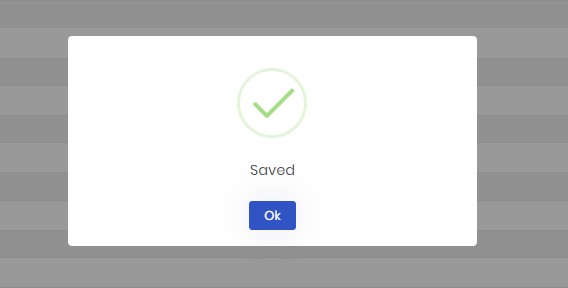
What really annoys me when working in the Suite is the pop-up that appears after saving. A toast notification would be enough.
Sometimes I go through all the entities and make a few changes, save them, and want to move straight on to the next one without having to click OK every time. For example, when I enabled ‘Remove unused usings’ for all of them.
 Markdown supported.Copy, paste, or drag & drop images and files (max 100 MB per file, 100 MB total per post)
 -
0
Hi,
About the CLI:
abp suite generateuses the same cleanup as the UI when"RemoveUnusedUsings": trueis set in the entity JSON you pass with-e. Apply the template change from my earlier reply, make sure the solution builds, then generate the entity again with the CLI. If unused usings are still there, check the Suite log in%USERPROFILE%\.abp\suite\logsfor the cleanup warning.About the pop-up after saving: we'll pass your suggestion for a toast to the Suite team.
Thanks
Markdown supported.Copy, paste, or drag & drop images and files (max 100 MB per file, 100 MB total per post)



