


Hi ,
I come across the article https://abp.io/docs/latest/suite/customizing-the-generated-code that customization can be protected using placeholder and it mention below.
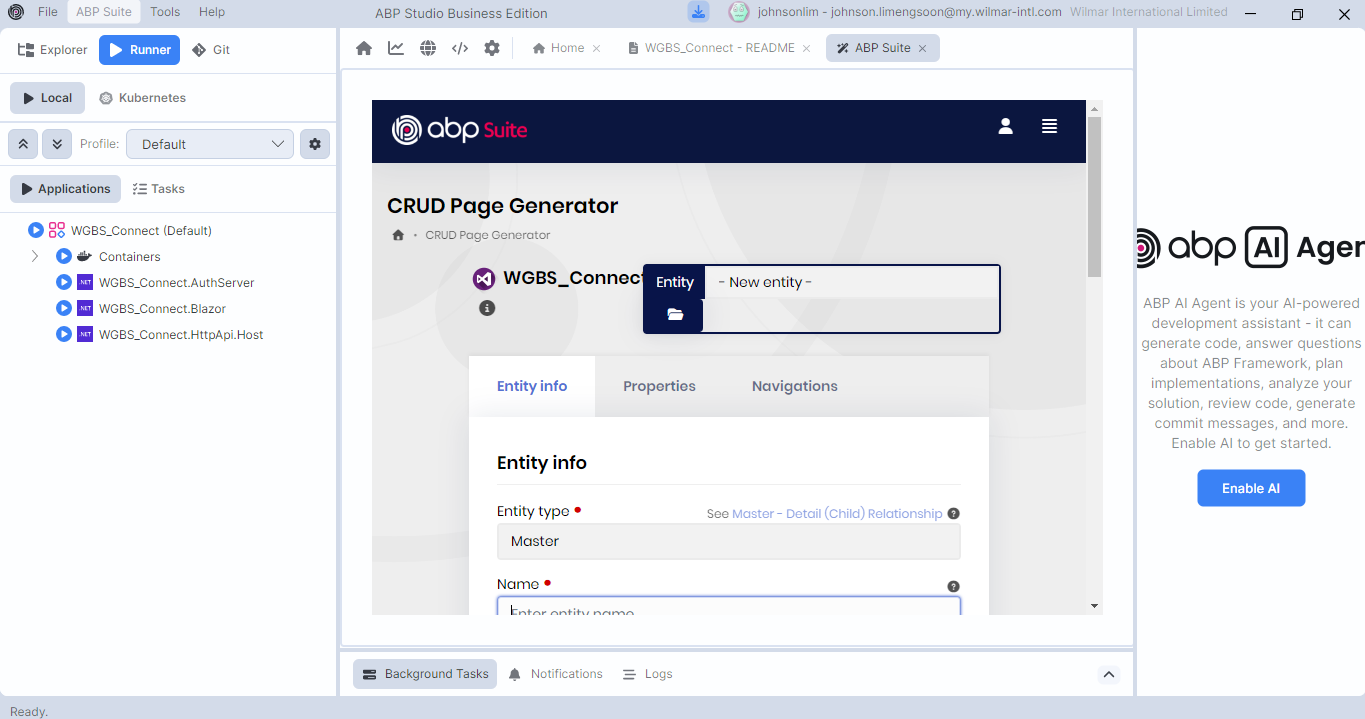
I am using ABP 10.4.1, refer to below picture.
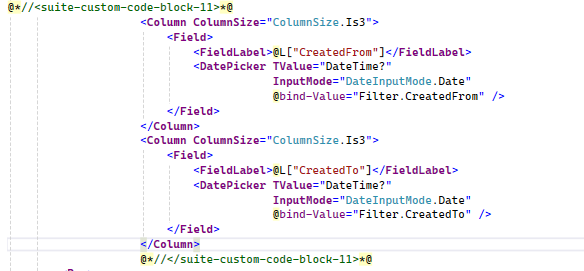
I find out that the code is overwritten when using ABP Studio to regenerate code for new column,the place holder i use is @*//<suite-custom-code-block-11>*@ .refer to picture below
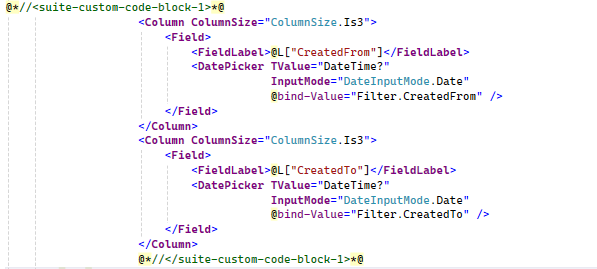
I try to use @*//<suite-custom-code-block-1>*@, the customization code is protected but moved to the original location of @*//<suite-custom-code-block-1>*@
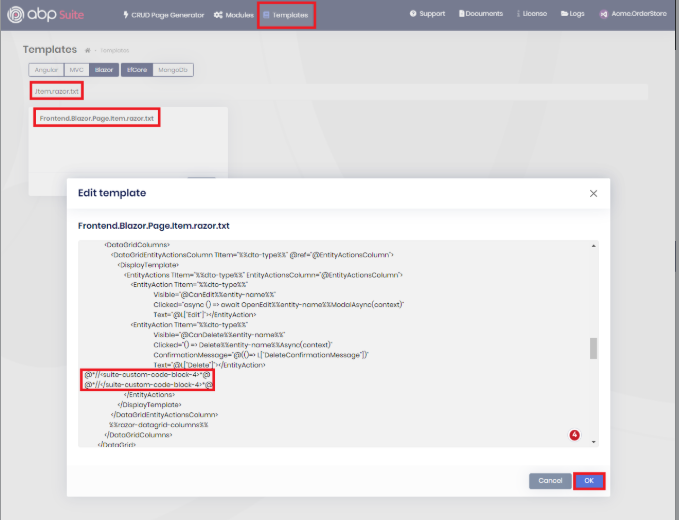
So my question is how to protect the customization code in razor page. I do not see the highlighted read functionality in my abp studio
12 Answer(s)
-
0
In ABP Suite/Studio, custom code is only preserved inside placeholders that already exist in the template.
If you manually add a new placeholder like@*//<suite-custom-code-block-11>*@ ... @*//</suite-custom-code-block-11>*@but the Razor template doesn’t contain that same block, regeneration will not treat it as a protected region and it can be overwritten.That’s why:
suite-custom-code-block-1is preserved (because it exists in the template), but your code may be moved to where block-1 is located in the generated output (because Suite re-inserts the captured content into the template’s block-1 position).suite-custom-code-block-11is overwritten (because your project’s template likely doesn’t define block-11 for that Razor file).
Definitive way to protect custom code in Razor pages/components (ABP 10.4.1):
- Open ABP Suite/Studio Templates for the relevant UI and file (e.g. the Razor/Blazor page template that generates your
.razorfile). - Ensure the template contains the placeholder(s) you want to use, e.g.:
- Open ABP Suite/Studio Templates for the relevant UI and file (e.g. the Razor/Blazor page template that generates your
@*//<suite-custom-code-block-11>*@ @*//</suite-custom-code-block-11>*@- Put your custom code between the same placeholder tags in the generated file.
- Regenerate: Suite will preserve the content inside those known blocks and place it into the same blocks in the newly generated output.
- About the “highlighted red functionality” you saw in the docs/screenshots: that is essentially about template-defined customizable regions. If your ABP Studio version/UI doesn’t show it, you can still achieve the same result by editing the templates so the placeholders exist where you need them.
Sources (validated):
- https://abp.io/docs/latest/suite/customizing-the-generated-code
- https://abp.io/docs/10.4/suite/customizing-the-generated-code
This response was generated by AI. If it didn’t solve your problem, feel free to post a new answer — our support team will jump in to help you soon.
Markdown supported.Copy, paste, or drag & drop images and files (max 100 MB per file, 100 MB total per post) -
0
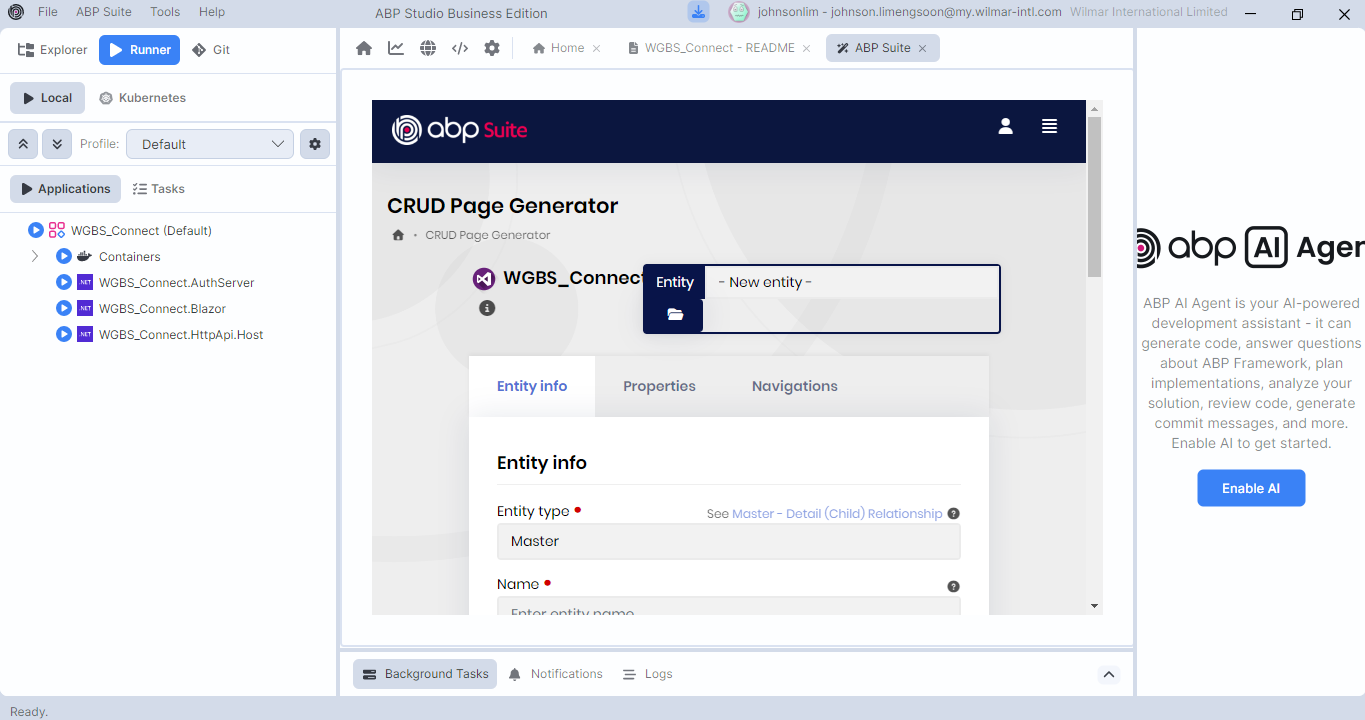
The question is there is no template functionality availble in my abp studio. Please advise
 Markdown supported.Copy, paste, or drag & drop images and files (max 100 MB per file, 100 MB total per post)
-
0
Hi,
When you regenerate, Suite puts each custom code block where the template has the same block. The default Blazor page template has block-1 above the search form and no block-11. So block-11 was dropped and block-1 moved up.
The filter section already has block-2, right below the generated filter fields. Wrap your columns in a
<Row>and put them there:@*//<suite-custom-code-block-2>*@ <Row> <Column ColumnSize="ColumnSize.Is3"> <Field> <FieldLabel>@L["CreatedFrom"]</FieldLabel> <DatePicker TValue="DateTime?" InputMode="DateInputMode.Date" @bind-Value="Filter.CreatedFrom" /> </Field> </Column> <Column ColumnSize="ColumnSize.Is3"> <Field> <FieldLabel>@L["CreatedTo"]</FieldLabel> <DatePicker TValue="DateTime?" InputMode="DateInputMode.Date" @bind-Value="Filter.CreatedTo" /> </Field> </Column> </Row> @*//</suite-custom-code-block-2>*@It stays there when you add new properties and regenerate, as long as "Customizable code" is still enabled for the entity.
If you want these fields in the same row as the generated filters, edit the
Frontend.Blazor.Page.Partials.Item.razor.AdvancedFiltersSection.txttemplate and add block-11 right after%%item-razor-filter-inputs%%:<Row> %%item-razor-filter-inputs%% @*//<suite-custom-code-block-11>*@ @*//</suite-custom-code-block-11>*@ </Row>Save the template, then put your columns back inside block-11 in the page, like you had before. Suite keeps them in that row after regenerating.
About the Templates menu: when the Suite page is narrower than 992px, the menu collapses into the ☰ button, and that button doesn't open it. That's why you can't see it in ABP Studio.
While ABP Studio is running Suite, you can open it in your browser at
http://localhost:3000/Templates(3000 is the default port, use your Suite port if it's different). Select your solution, choose Blazor and search for the template name above. The change is saved in your solution, so the Suite inside ABP Studio uses it too.We'll fix the ☰ button in an upcoming release.
Thanks
Markdown supported.Copy, paste, or drag & drop images and files (max 100 MB per file, 100 MB total per post) -
0
I have question below. 1.Is there any documentation for this?Is it true that we need to raise ticket for every placeholder to add? 2.The added placeholder will be available for use for all the pages?Does the palceholder will be added to every new generated page?
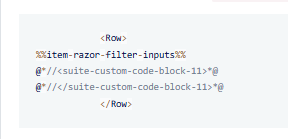 3.For my previous coding, i have too much customization already in razor page. How to to protect the whole header razor page whenever a new child entity is created?
4.For every time code generated using ABP Suites, the code behind that has customization will be overwritten if they are not written in .extended.cs?Markdown supported.Copy, paste, or drag & drop images and files (max 100 MB per file, 100 MB total per post)
-
0
Hi,
You don't need a ticket for this. You can add your own blocks on the Templates page, the same way as the block-11 example. These two documents cover it:
- https://abp.io/docs/10.4/suite/editing-templates
- https://abp.io/docs/10.4/suite/customizing-the-generated-code
Yes, for this solution. After you save the template, every Blazor page that has the filter section gets the same block when Suite generates it. Pages that don't use it just have an empty pair.
When you generate a child entity, Suite also regenerates the master entity's page to add the child tab. Only the code inside the custom code blocks is kept. So before you generate the child entity, move your changes into blocks, and keep "Customizable code" enabled for the master entity. You can use an existing block, or add one to the
Frontend.Blazor.Page.Item.razor.txttemplate where you need it. If the code is large, you can move it into your own Razor component and put only the component tag inside the block.Yes.
YourPage.razor.csis overwritten every time Suite regenerates that page.YourPage.Extended.razor.csis only created when it doesn't exist, so Suite never overwrites it. Both are the same partial class, so add your own fields and methods in the Extended file.
Thanks
Markdown supported.Copy, paste, or drag & drop images and files (max 100 MB per file, 100 MB total per post) -
0
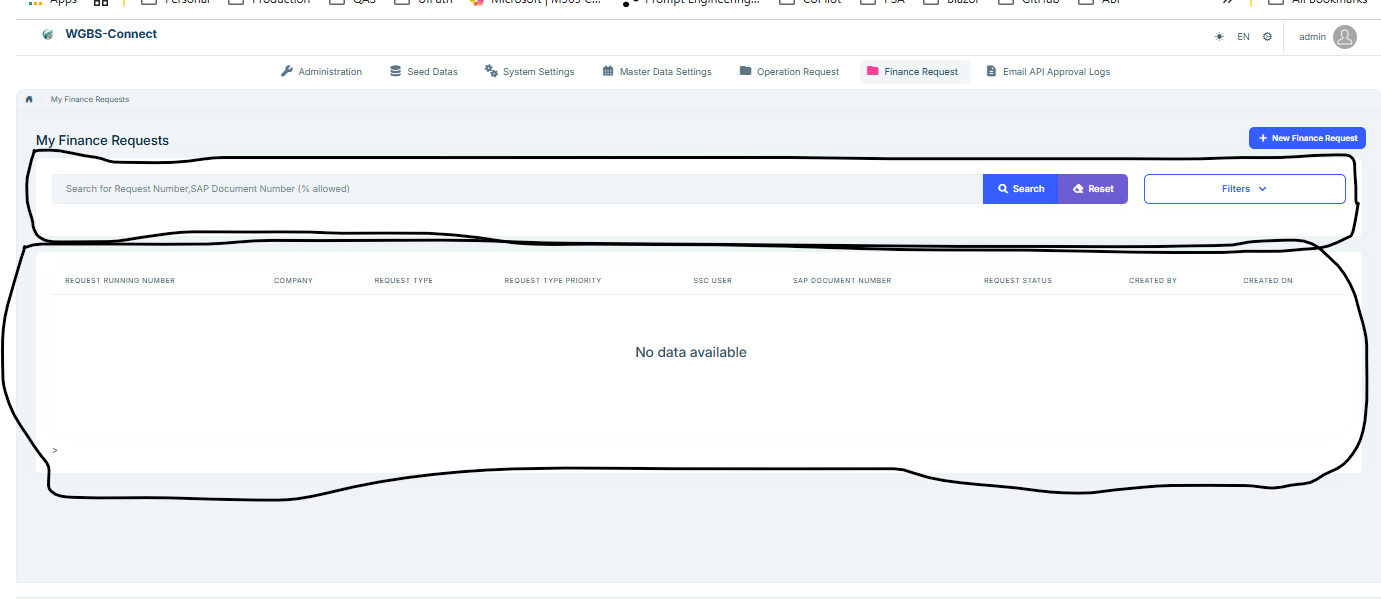
Hi maliming, 1.Please correct me if my understanding is correct. For my version, i have 20 placeholder to use but 10 already in fix places which i cannot change the location. So i am left with balance 10 only. Is that correct? 2. For my situation, my code customiztion is offen written in below 2 area.Is there any placeholder i can write to always protect this 2 whole block?
 Markdown supported.Copy, paste, or drag & drop images and files (max 100 MB per file, 100 MB total per post)
-
0
Hi,
Suite 10.4.1 keeps blocks 1 to 19, block 20 is not kept. The default Blazor page uses 1 to 10. If you added block-11 from the earlier example, 12 to 19 are left. You can also move the default blocks in the template, just use each number only once in a page.
You can wrap the two cards in blocks, but I don't recommend it. The template is shared by all entities, so on every page that uses it, Suite keeps the old cards and stops adding new filters, columns and child tabs there. And if "Customizable code" is off for an entity, both cards are removed from its page.
For your page I'd keep the generated cards and use small blocks for your own parts:
- Date filters: block-2 (own row) or block-11 from the earlier example (same row).
- Extra row actions: block-4.
- Reset button: in
Frontend.Blazor.Page.Item.razor.txt, add a block before</Addons>of the search form:
</Addon> @*//<suite-custom-code-block-12>*@ @*//</suite-custom-code-block-12>*@ </Addons>- Extra grid columns: add a block after
%%razor-datagrid-columns%%in the same template:
%%razor-datagrid-columns%%
@*//<suite-custom-code-block-13>*@
@*//</suite-custom-code-block-13>*@
Before you regenerate, back up the page and keep "Customizable code" enabled. Add the same block pairs around your Reset button and extra columns in the existing
.razorpage, otherwise they are overwritten the first time. Put the Reset click handler in the.Extended.razor.csfile. Changes to generated markup outside blocks, like the search placeholder text, are overwritten too. Change those in the template instead, which affects all pages.Thanks
Markdown supported.Copy, paste, or drag & drop images and files (max 100 MB per file, 100 MB total per post) -
0
Hi maliming, Step 2 is what i needed, can u advise how to add placeholder for this 2 block?
Markdown supported.Copy, paste, or drag & drop images and files (max 100 MB per file, 100 MB total per post) -
0
Hi,
The example below uses block-14 and block-15, because block-13 was used for the extra columns in my last reply. If you already use any of them, pick other free numbers between 1 and 19.
- Select your solution on the Templates page, choose Blazor and edit
Frontend.Blazor.Page.Item.razor.txt. Add the markers around the search card and the data grid card, then click OK:
@* ************************* SEARCH ************************* *@
@*//<suite-custom-code-block-14>*@
<Card>
    ...
</Card>
@*//</suite-custom-code-block-14>*@

@* ************************* DATA GRID ************************* *@
@*//<suite-custom-code-block-15>*@
<Card>
    ...
</Card>
@*//</suite-custom-code-block-15>*@
Only add these four lines. Keep everything between them as it is.
Back up your existing
.razorpage, then add the same four lines around the same two cards in it. Without this, your current changes in these cards are overwritten the first time.If your Reset click handler or other code is in the generated
.razor.csfile, move it to.Extended.razor.cs. The.razor.csfile is still regenerated.Keep "Customizable code" enabled and regenerate. Check the page diff after the first run.
After this, Suite reuses the existing cards on the page. This applies to every page in the solution that uses this template, and an entity with "Customizable code" turned off loses both cards. As mentioned before, new filters, grid columns and child entity tabs need to be added by hand.
Keep the blocks that are already inside these cards where they are in the template. Moving one of them out of the cards leaves two copies in the page.
Thanks
Markdown supported.Copy, paste, or drag & drop images and files (max 100 MB per file, 100 MB total per post) - Select your solution on the Templates page, choose Blazor and edit
-
0
Hi Maliming, It is not working.The button and column i added for customization still gone after adding new attribute using ABP Suite.Can you advise?
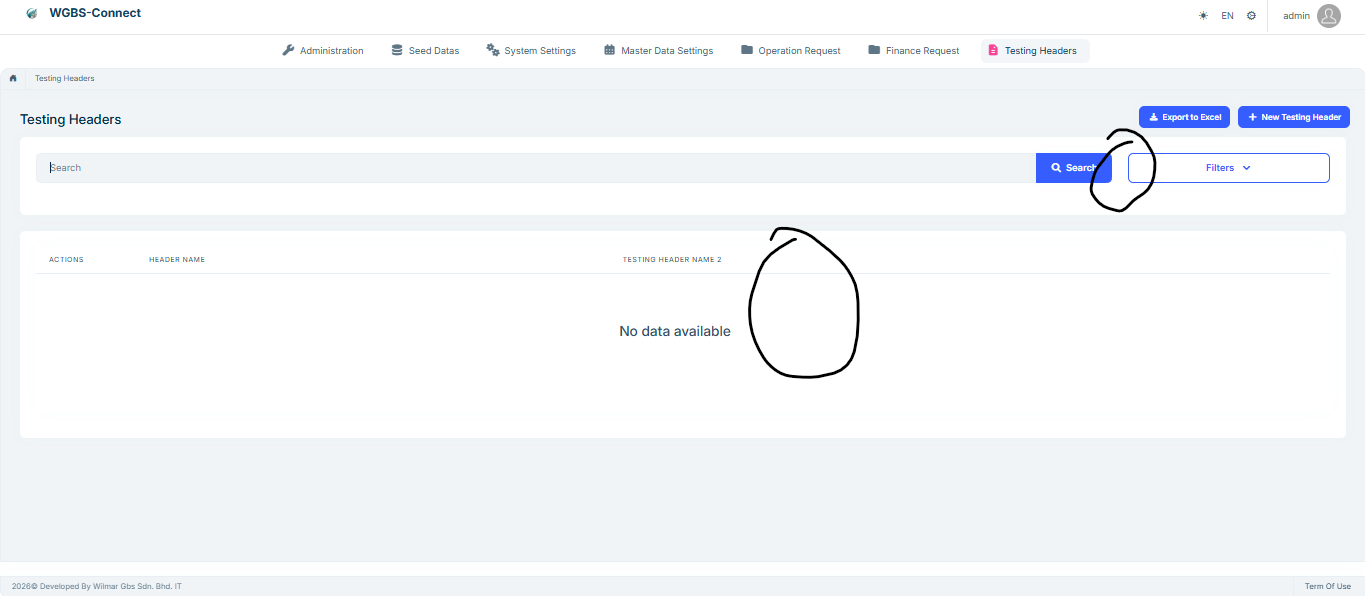
Below is the template txt for your reference. I use @//<suite-custom-code-block-11>@ and @//<suite-custom-code-block-12>@ for this is the only 2 placeholder used in template %%<if:IsModuleOrMicroservice>%%@page "/%%only-project-name%%/%%entity-name-plural%%"%%</if:IsModuleOrMicroservice>%%
%%<if:IsAppOrAppNoLayered>%%@page "/%%entity-name-plural-kebabcase%%"%%</if:IsAppOrAppNoLayered>%%
@attribute [Authorize(%%only-project-name%%Permissions.%%entity-name-plural%%.Default)] @using %%<if:IsModule>%%global::%%</if:IsModule>%%%%project-name%%.%%<if:IsMicroserviceNoLayerProject>%%%%microservice-dtos-namespace-prefix%%%%</if:IsMicroserviceNoLayerProject>%%%%entity-namespace%% @using %%<if:IsModule>%%global::%%</if:IsModule>%%%%project-name%%.%%<if:IsMicroserviceNoLayerProject>%%%%microservice-services-namespace-prefix%%%%</if:IsMicroserviceNoLayerProject>%%%%entity-namespace%% @using %%<if:IsModule>%%global::%%</if:IsModule>%%%%project-name%%.Localization @using %%<if:IsModule>%%global::%%</if:IsModule>%%%%solution-namespace%%%%<if:IsMicroserviceNoLayerProject>%%.%%microservice-dtos-namespace-prefix%%%%</if:IsMicroserviceNoLayerProject>%%%%<if:ApplicationContractsNotExists>%%.AppServices%%</if:ApplicationContractsNotExists>%%%%<if:IsNotMicroserviceNoLayerProject>%%.%%</if:IsNotMicroserviceNoLayerProject>%%Shared @using Microsoft.AspNetCore.Authorization @using Microsoft.Extensions.Localization @using Microsoft.AspNetCore.Components.Web @using Blazorise @using Blazorise.Components @using Blazorise.DataGrid @using Volo.Abp.BlazoriseUI @using Volo.Abp.BlazoriseUI.Components @using Volo.Abp.ObjectMapping @using Volo.Abp.AspNetCore.Components.Messages @using Volo.Abp.AspNetCore.Components.Web.Theming.Layout %%child-entities-namespaces-razor%% @using %%<if:IsModule>%%global::%%</if:IsModule>%%%%project-name%%.Permissions @using Volo.Abp.AspNetCore.Components.Web @using Volo.Abp.AspNetCore.Components %%<if:ExportExcel>%%@using Microsoft.AspNetCore.Components%%</if:ExportExcel>%% %%<if:ExportExcel>%%@using Volo.Abp.Http.Client%%</if:ExportExcel>%% @inherits %%component-base-name%%ComponentBase @inject I%%entity-name-plural%%AppService %%entity-name-plural%%AppService %%child-entities-appservice-injections%% @inject IUiMessageService UiMessageService @inject AbpBlazorMessageLocalizerHelper<%%only-project-name%%Resource> LH %%<if:ExportExcel>%%@inject IRemoteServiceConfigurationProvider RemoteServiceConfigurationProvider%%</if:ExportExcel>%% %%<if:ExportExcel>%%@inject NavigationManager NavigationManager%%</if:ExportExcel>%% %%enum-namespaces%% @* ************************* PAGE HEADER ************************* *@ <PageHeader Title="@L["%%entity-page-title%%"]" BreadcrumbItems="BreadcrumbItems" Toolbar="Toolbar">
</PageHeader>
<style> tr.table-row-selectable:hover { cursor: default; } </style>
@* ************************* SEARCH ************************* @ @//<suite-custom-code-block-11>@ <Card> <CardBody> @//<suite-custom-code-block-1>@ @//</suite-custom-code-block-1>*@ <Row> <div class="col%%<if:HasAnyFilterableProperties>%% col-md-8 col-lg-10%%</if:HasAnyFilterableProperties>%%"> <div class="mb-3"> <Form id="%%entity-name%%SearchForm"> <Addons> <Addon AddonType="AddonType.Body"> <TextInput @bind-Value="@Filter.FilterText" Autofocus="true" Placeholder="@L["Search"]"> </TextInput> </Addon> <Addon AddonType="AddonType.End"> <SubmitButton Form="%%entity-name%%SearchForm" Clicked="Get%%entity-name-plural%%Async"> <Icon Name="IconName.Search" Class="me-1"></Icon>@L["Search"] </SubmitButton> </Addon> </Addons> </Form> </div> </div>
%%advanced-filters-section%% </Row>@//<suite-custom-code-block-3>@ @//</suite-custom-code-block-3>@ </CardBody> </Card> @//<suite-custom-code-block-11>@ @* ************************* DATA GRID ************************* @ @//<suite-custom-code-block-12>@ <Card> <CardBody>%%bulk-delete-control-panel%% <DataGrid TItem="%%dto-type%%" @ref="DataGridRef" Data="%%entity-name%%List" %%bulk-delete-datagrid-options%% %%<if:IsMasterWithChildEntities>%%DetailRowTrigger="DetailRowTriggerHandler"%%</if:IsMasterWithChildEntities>%% %%<if:IsMasterWithChildEntities>%%DetailRowStartsVisible="false"%%</if:IsMasterWithChildEntities>%% ReadData="OnDataGridReadAsync" TotalItems="TotalCount" ShowPager="true" Responsive="true" PageSize="PageSize" Class="datagrid-detail"> <LoadingTemplate> <Row Class="w-100 align-items-center" Style="height: 150px;"> <Column> <RadarSpinner /> </Column> </Row> </LoadingTemplate> <EmptyTemplate> <Row Class="w-100 align-items-center" Style="height: 150px;"> <Column> <Heading Size="HeadingSize.Is4" TextAlignment="TextAlignment.Center">@L["NoDataAvailable"]</Heading> </Column> </Row> </EmptyTemplate>
<DataGridColumns> %%multi-select-column%% %%detail-row-toggle%% <DataGridEntityActionsColumn TItem="%%dto-type%%" @ref="@EntityActionsColumn"> <DisplayTemplate> <EntityActions TItem="%%dto-type%%" EntityActionsColumn="@EntityActionsColumn"> <EntityAction TItem="%%dto-type%%" Visible="@CanEdit%%entity-name%%" Clicked="async () => await OpenEdit%%entity-name%%ModalAsync(context.Item)" Text="@L["Edit"]"></EntityAction> <EntityAction TItem="%%dto-type%%" Visible="@CanDelete%%entity-name%%" Clicked="() => Delete%%entity-name%%Async(context.Item)" ConfirmationMessage="@(()=> L["DeleteConfirmationMessage"])" Text="@L["Delete"]"></EntityAction> @//<suite-custom-code-block-4>@ @//</suite-custom-code-block-4>*@ </EntityActions> </DisplayTemplate> </DataGridEntityActionsColumn> %%razor-datagrid-columns%% </DataGridColumns>%%child-entity-detail-row%% </DataGrid> </CardBody></Card> @//<suite-custom-code-block-12>@ @* ************************* CREATE MODAL ************************* @ <Modal @ref="Create%%entity-name%%Modal" Closing="@Create%%entity-name%%Modal.CancelClosingModalWhenFocusLost" Centered="true"> <ModalContent> @//<suite-custom-code-block-5>@ @//</suite-custom-code-block-5>@ <Form id="Create%%entity-name%%Form"> <ModalHeader> <ModalTitle>@L["New%%entity-name%%"]</ModalTitle> <CloseButton Clicked="CloseCreate%%entity-name%%ModalAsync" /> </ModalHeader> <ModalBody>%%tab-header-create%% <Validations @ref="@New%%entity-name%%Validations" Mode="ValidationMode.Auto" Model="@New%%entity-name%%" ValidateOnLoad="false"> %%main-create-tab-opener%% %%razor-modal-fields-create%% %%main-create-tab-closer%% %%razor-modal-navigation-connection-fields-new%% </Validations>%%create-tab-closer%% </ModalBody> <ModalFooter> <Button Color="Color.Secondary" Clicked="CloseCreate%%entity-name%%ModalAsync"> @L["Cancel"] </Button> <SubmitButton Form="Create%%entity-name%%Form" Clicked="Create%%entity-name%%Async"%%<if:HasFileProperty>%% Disabled="@IsCreateFormDisabled()"%%</if:HasFileProperty>%%/> @//<suite-custom-code-block-6>@ @//</suite-custom-code-block-6>@ </ModalFooter> </Form> @//<suite-custom-code-block-7>@ @//</suite-custom-code-block-7>*@ </ModalContent> </Modal>
@* ************************* EDIT MODAL ************************* @ <Modal @ref="Edit%%entity-name%%Modal" Closing="@Edit%%entity-name%%Modal.CancelClosingModalWhenFocusLost" Centered="true"> <ModalContent> @//<suite-custom-code-block-8>@ @//</suite-custom-code-block-8>@ <Form id="Edit%%entity-name%%Form"> <ModalHeader> <ModalTitle>@L["Update"]</ModalTitle> <CloseButton Clicked="CloseEdit%%entity-name%%ModalAsync" /> </ModalHeader> <ModalBody>%%tab-header-edit%% <Validations @ref="@Editing%%entity-name%%Validations" Mode="ValidationMode.Auto" Model="@Editing%%entity-name%%" ValidateOnLoad="false"> %%main-edit-tab-opener%% %%razor-modal-fields-edit%% %%main-edit-tab-closer%% %%razor-modal-navigation-connection-fields-editing%% </Validations>%%edit-tab-closer%% </ModalBody> <ModalFooter> <Button Color="Color.Secondary" Clicked="CloseEdit%%entity-name%%ModalAsync"> @L["Cancel"] </Button> <SubmitButton Form="Edit%%entity-name%%Form" Clicked="Update%%entity-name%%Async"%%<if:HasFileProperty>%% Disabled="@IsEditFormDisabled()"%%</if:HasFileProperty>%% /> @//<suite-custom-code-block-9>@ @//</suite-custom-code-block-9>@ </ModalFooter> </Form> @//<suite-custom-code-block-10>@ @//</suite-custom-code-block-10>*@ </ModalContent> </Modal>
%%child-entities-create-edit-modals%%
Markdown supported.Copy, paste, or drag & drop images and files (max 100 MB per file, 100 MB total per post) -
0
Hi,
The lines after the two
</Card>tags in your template are opening markers again. A closing marker needs the/beforesuite-custom-code-block, so Suite can't find the pairs and regenerates both cards.In
Frontend.Blazor.Page.Item.razor.txt, replace the marker lines around the two cards with these pairs. I use 14 and 15 here so they don't clash with block-11, which may already be in your filters template from my first reply. If 14 or 15 is already used, pick other free numbers between 1 and 19.@*//<suite-custom-code-block-14>*@ <Card> ... </Card> @*//</suite-custom-code-block-14>*@ @*//<suite-custom-code-block-15>*@ <Card> ... </Card> @*//</suite-custom-code-block-15>*@The first pair goes around the search card and the second around the data grid card. Keep the card contents as they are and click OK to save the template.
Then put the same pairs around the same two cards in your existing
.razorpage. If the button or column is missing from that file now, copy it back from your backup or source control: the button inside the search card, the column inside<DataGridColumns>. If the button has a click handler, put it in.Extended.razor.cs.Keep "Customizable code" enabled, regenerate and check the page diff.
Thanks
Markdown supported.Copy, paste, or drag & drop images and files (max 100 MB per file, 100 MB total per post) -
0
It is working now. But i have other questions below
- What will be the impact if i remove the placeholder in template in future? The code in the tag of the existing razor page will be replaced when ABP Suite is used again to update/add/remove attribute?
- Can i update and remove the placeholder in the template frequnetly? For example, i remove the placeholder and create the child entity so that the code for child entity can be created in header page. After adding all the customization code, i add the placeholder in template and manually add the placeholder in the header page so that my customization code is protected for new code generation. Can this be done?
Markdown supported.Copy, paste, or drag & drop images and files (max 100 MB per file, 100 MB total per post)



