






Update the ABP CLI:
dotnet tool update -g Volo.Abp.Cli
Update the ABP Suite:
abp suite update or dotnet tool update -g Volo.Abp.Suite
- Release notes https://docs.abp.io/en/commercial/latest/release-notes
105 Answer(s)
-
0
Hi armanozak I refer to the extensions documentation updated for v3. But I think
IdentityConfigModule.forRoot()call to IdentityModule not IdentityExtendModule so it had error My app-routing.module:
 Markdown supported.Copy, paste, or drag & drop images and files (max 100 MB per file, 100 MB total per post)
 -
0
Hi edelivery,
The route should either load
IdentityModuledirectly and call its staticforLazymethod or should load your custom module (i.e.IdentityExtendModule) and which callsIdentityModule.forChildin its imports metadata.Markdown supported.Copy, paste, or drag & drop images and files (max 100 MB per file, 100 MB total per post) -
0
@NgModule({
  imports: [
    // other imports...

    IdentityModule.forChild({
      entityActionContributors: identityEntityActionContributors,
    }),
  ],
})
export class IdentityExtendModule { }
Markdown supported.Copy, paste, or drag & drop images and files (max 100 MB per file, 100 MB total per post) -
0
Hello!
I have noticed that logs of user logouts in the abpscuritylogs table sometimes doesn't register which user actually logged out. I would like to use this information of which user logged out of the system, so its important that the value is never null.

Project is using abp 3.1.0
Markdown supported.Copy, paste, or drag & drop images and files (max 100 MB per file, 100 MB total per post) -
0
hi DanielAndreasen,
I see that Logout action called when there's no logged in user. this will happen in 2 ways,
- the user might click the logout twice (browser sends both actions and the second one will be without UserId)
- or the user clicks the Logout link from a bookmark or copy-paste the logout URL to the browser.
Markdown supported.Copy, paste, or drag & drop images and files (max 100 MB per file, 100 MB total per post) -
0
Hello @alper,
In the example I included in my previous post, it was neither of the 2 scenarios you described that resulted in "userid" and "UserName" getting a Null value in my database table. The issue seems to occur randomly in a session where I repeatedly login/logout (for the purpose of testing).
I also find it it problematic that a UserId might not be logged if the user accidently presses the logout button twice. Is this intentional?
Markdown supported.Copy, paste, or drag & drop images and files (max 100 MB per file, 100 MB total per post) -
0
@Daniel, I created a new topic for this, can you write your finding under this topic, https://support.abp.io/QA/Questions/434/UserId-and-Username-is-null-in-Logout-action
Markdown supported.Copy, paste, or drag & drop images and files (max 100 MB per file, 100 MB total per post) -
0
Hi, I am updating 3.0.5 to 3.1.2, But Login button of home page not work. I can't login. Is there any config I don't know? And then I have created a empty project. The problem continues.
"@volo/abp.ng.account": "~3.1.2",
"@volo/abp.ng.audit-logging": "~3.1.2",
"@volo/abp.ng.identity": "~3.1.2",
"@volo/abp.ng.identity-server": "~3.1.2",
"@volo/abp.ng.language-management": "~3.1.2",
"@volo/abp.ng.saas": "~3.1.2",
"@volo/abp.ng.text-template-management": "~3.1.2",
"@volo/abp.ng.theme.lepton": "~3.1.2",
This code is not redirect and not push login page!
login() {
    this.authService.initLogin();
  }
I wrote account/login a[href] tag on home page, but not work!
This is my env.
import { Config } from '@abp/ng.core';

const baseUrl = 'http://localhost:4200';

export const environment = {
  production: false,
  application: {
    baseUrl,
    name: 'XXX',
  },
  oAuthConfig: {
    issuer: 'http://localhost:5002',
    redirectUri: baseUrl,
    clientId: 'XXX_App',
    responseType: 'code',
    scope: 'offline_access XXX',
  },
  apis: {
    default: {
      url: 'http://localhost:5001',
      rootNamespace: 'XXX',
    },
  },
} as Config.Environment;
Markdown supported.Copy, paste, or drag & drop images and files (max 100 MB per file, 100 MB total per post) -
0
Hi @murat.kebabci
Unfortunately, the authorization code flow does not work with a backend that running on HTTP. You should run your backend on HTTPS URL or change the oAuthConfig for resource owner password flow.
oAuthConfig for resource owner password flow:
  oAuthConfig: {
    issuer: 'http://localhost:5002',
    clientId: 'XXX_App',
    dummyClientSecret: '1q2w3e*',
    scope: 'XXX',
    oidc: false,
    requireHttps: false,
  },
See that question related to this: https://support.abp.io/QA/Questions/411/how-to-config-oAuthConfig-in-angular
Markdown supported.Copy, paste, or drag & drop images and files (max 100 MB per file, 100 MB total per post) -
0
I have customized the tenant property of the saas module, adding several properties.
In ZiplineModuleExtensionConfigurator, I added the following:
tenant.AddOrUpdateProperty<ServerType>(
            "ServerType",
            property =>
            {
                property.Attributes.Add(new RequiredAttribute());
                property.DisplayName = LocalizableString.Create<ZiplineResource>("ServerType");
            });
In ZiplineEfCoreEntityExtensionMappings, I added the following:
ObjectExtensionManager.Instance.MapEfCoreProperty<Tenant, ServerType>("ServerType");
The drop down list shows up correctly. However, when I attempt to save the tenant (either on New or Edit), I get an invalid cast exception.
The stack trace is provided below: 2020-09-21 18:06:06.905 -04:00 [ERR] Invalid cast from 'System.Int64' to 'OtisEd.Zipline.Environments.EnvironmentType'. System.InvalidCastException: Invalid cast from 'System.Int64' to 'OtisEd.Zipline.Environments.EnvironmentType'. at System.Convert.DefaultToType(IConvertible value, Type targetType, IFormatProvider provider) at System.Int64.System.IConvertible.ToType(Type type, IFormatProvider provider) at System.Convert.ChangeType(Object value, Type conversionType, IFormatProvider provider) at Volo.Abp.EntityFrameworkCore.AbpDbContext
1.HandleExtraPropertiesOnSave(EntityEntry entry) at Volo.Abp.EntityFrameworkCore.AbpDbContext1.ApplyAbpConcepts(EntityEntry entry, EntityChangeReport changeReport) at Volo.Abp.EntityFrameworkCore.AbpDbContext1.ApplyAbpConcepts() at Volo.Abp.EntityFrameworkCore.AbpDbContext1.SaveChangesAsync(Boolean acceptAllChangesOnSuccess, CancellationToken cancellationToken) at Volo.Abp.Uow.UnitOfWork.SaveChangesAsync(CancellationToken cancellationToken) at Volo.Saas.Host.TenantAppService.CreateAsync(SaasTenantCreateDto input) at Castle.DynamicProxy.AsyncInterceptorBase.ProceedAsynchronous[TResult](IInvocation invocation, IInvocationProceedInfo proceedInfo) at Volo.Abp.Castle.DynamicProxy.CastleAbpMethodInvocationAdapterWithReturnValue1.ProceedAsync() at Volo.Abp.Authorization.AuthorizationInterceptor.InterceptAsync(IAbpMethodInvocation invocation) at Volo.Abp.Castle.DynamicProxy.CastleAsyncAbpInterceptorAdapter1.InterceptAsync[TResult](IInvocation invocation, IInvocationProceedInfo proceedInfo, Func3 proceed) at Castle.DynamicProxy.AsyncInterceptorBase.ProceedAsynchronous[TResult](IInvocation invocation, IInvocationProceedInfo proceedInfo) at Volo.Abp.Castle.DynamicProxy.CastleAbpMethodInvocationAdapterWithReturnValue1.ProceedAsync() at Volo.Abp.Auditing.AuditingInterceptor.InterceptAsync(IAbpMethodInvocation invocation) at Volo.Abp.Castle.DynamicProxy.CastleAsyncAbpInterceptorAdapter1.InterceptAsync[TResult](IInvocation invocation, IInvocationProceedInfo proceedInfo, Func3 proceed) at Castle.DynamicProxy.AsyncInterceptorBase.ProceedAsynchronous[TResult](IInvocation invocation, IInvocationProceedInfo proceedInfo) at Volo.Abp.Castle.DynamicProxy.CastleAbpMethodInvocationAdapterWithReturnValue1.ProceedAsync() at Volo.Abp.Validation.ValidationInterceptor.InterceptAsync(IAbpMethodInvocation invocation) at Volo.Abp.Castle.DynamicProxy.CastleAsyncAbpInterceptorAdapter1.InterceptAsync[TResult](IInvocation invocation, IInvocationProceedInfo proceedInfo, Func3 proceed) at Castle.DynamicProxy.AsyncInterceptorBase.ProceedAsynchronous[TResult](IInvocation invocation, IInvocationProceedInfo proceedInfo) at Volo.Abp.Castle.DynamicProxy.CastleAbpMethodInvocationAdapterWithReturnValue1.ProceedAsync() at Volo.Abp.Uow.UnitOfWorkInterceptor.InterceptAsync(IAbpMethodInvocation invocation) at Volo.Abp.Castle.DynamicProxy.CastleAsyncAbpInterceptorAdapter1.InterceptAsync[TResult](IInvocation invocation, IInvocationProceedInfo proceedInfo, Func3 proceed) at lambda_method(Closure , Object ) at Microsoft.Extensions.Internal.ObjectMethodExecutorAwaitable.Awaiter.GetResult() at Microsoft.AspNetCore.Mvc.Infrastructure.ActionMethodExecutor.AwaitableObjectResultExecutor.Execute(IActionResultTypeMapper mapper, ObjectMethodExecutor executor, Object controller, Object[] arguments) at Microsoft.AspNetCore.Mvc.Infrastructure.ControllerActionInvoker.<InvokeActionMethodAsync>g__Awaited|12_0(ControllerActionInvoker invoker, ValueTask`1 actionResultValueTask) at Microsoft.AspNetCore.Mvc.Infrastructure.ControllerActionInvoker.Markdown supported.Copy, paste, or drag & drop images and files (max 100 MB per file, 100 MB total per post) -
0
Exposed Plaintext passwords in GUI and Database
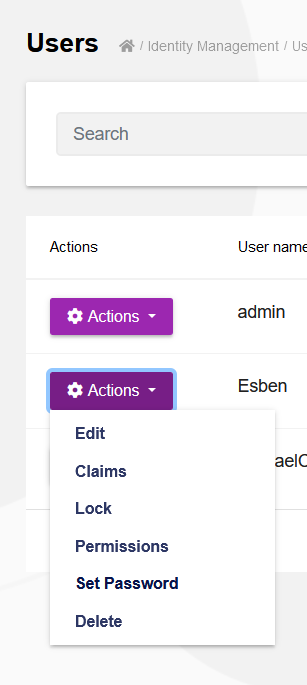
Setting a new password from the web GUI (in Administration --> Identity management --> Users) will log the password in plain text.
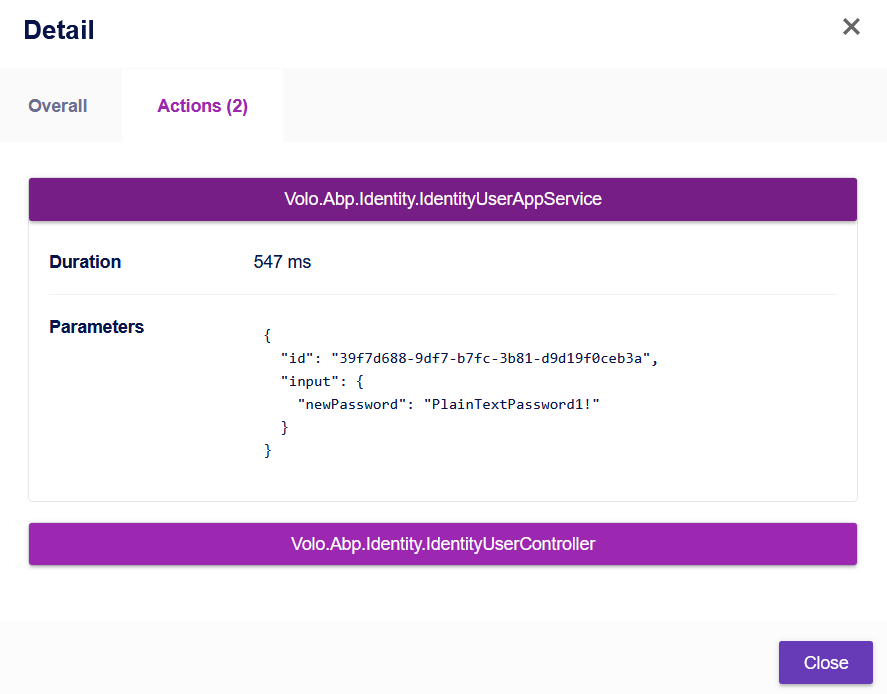
 After setting the new password for a user, I am able to see it in the details of an audit log:
 This log will of course also be present in the corresponding database table:

I consider this a critical security flaw - user passwords should never be stored as plaintext even if it is just in a log.
<br>
ABP Framework version: v3.1.0 UI type: Angular Tiered (MVC) or Identity Server Seperated (Angular): No
Markdown supported.Copy, paste, or drag & drop images and files (max 100 MB per file, 100 MB total per post) -
0
When adding a new sub unit to a organization tree, an error will occur that prevents the action from succeeding:
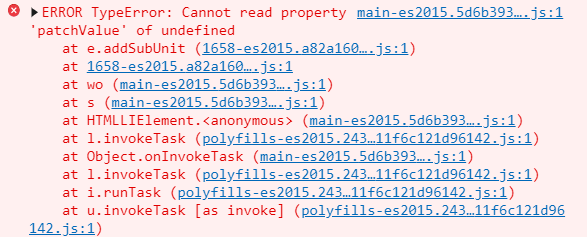 Adding a new root unit to the organization tree will solve the issue momentarily until a user has re-entered the "Organization unit" page.
ABP Framework version: v3.1.0 UI type: Angular Browser: Chrome Tiered (MVC) or Identity Server Seperated (Angular): No
Markdown supported.Copy, paste, or drag & drop images and files (max 100 MB per file, 100 MB total per post) -
0
When selecting multiple datepicker input in a CRUD-page the previously selected datepicker window is not closed which results in multiple windows overlapping eachother:
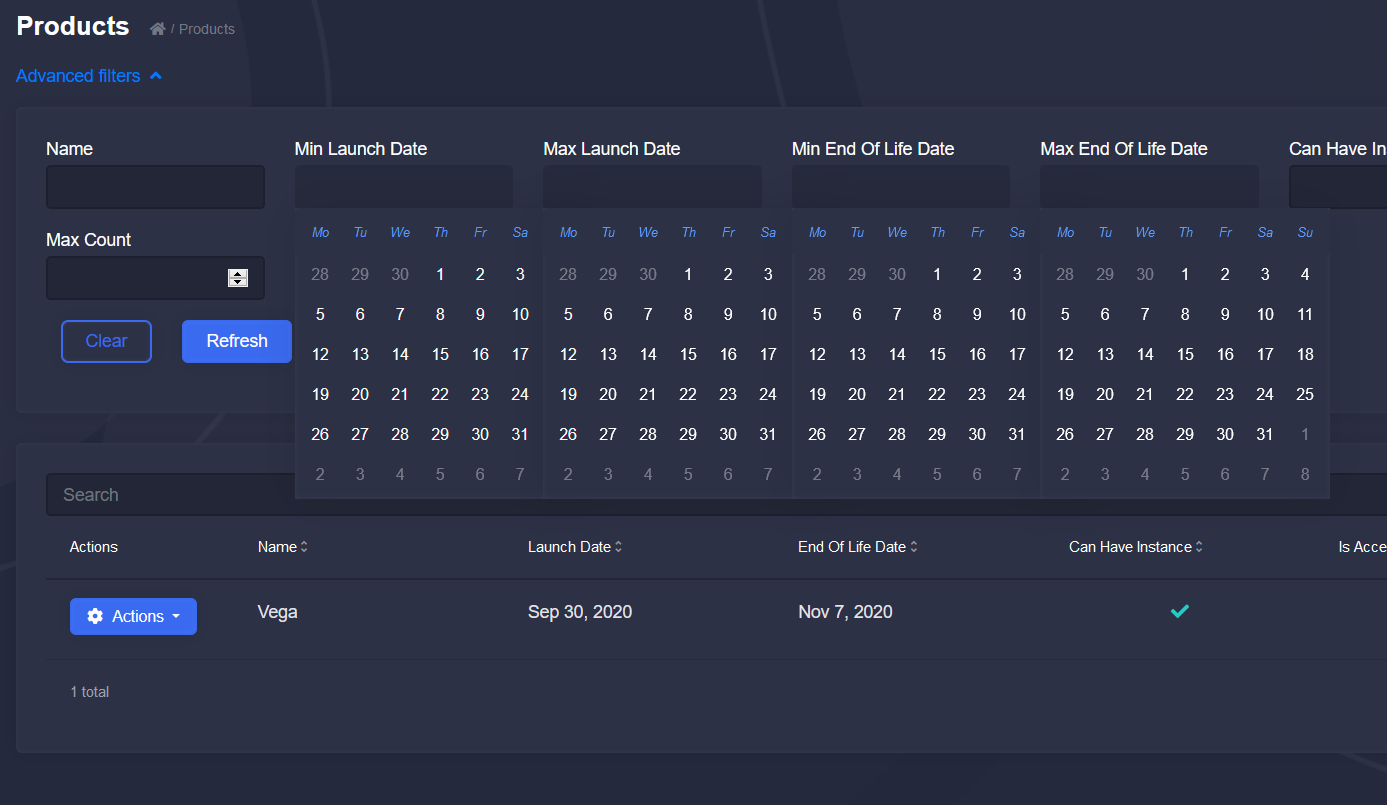
This issue also occurs when selecting multiple datepicker input fields on the window that is presented when creating new entities in the standard CRUD-pages:
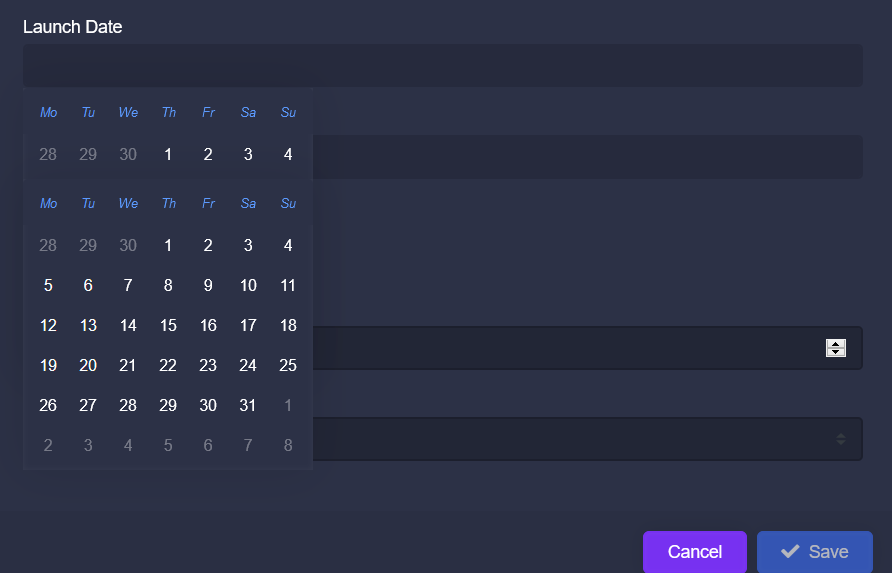
Additionally, there is no obvious way for the user to navigate between months or years in the datepicker.
Markdown supported.Copy, paste, or drag & drop images and files (max 100 MB per file, 100 MB total per post) -
0
@alper Yes we are still running v3.1 with plans to upgrade to v3.3 when it releases, however I was not able find anyone mentioning this issue in any thread or as part of the release notes so I wanted to know if it has been resolved.
Fronted is Angular.
Markdown supported.Copy, paste, or drag & drop images and files (max 100 MB per file, 100 MB total per post) -
0
Hello, I have a background hangfire Job that checks a directory and if there is a specific file in that directory it sets a bool in the DB. My issue is, I though the UniteOfWork.SaveChangesAsync would commit the transaction after each save so that it didn't lock the DB. But it is not working and still locks the DB. This job itterates large numbers of files, like around 500,000 or so. so it takes a very long time to run. What am I doing wrong? I tried COmpleteAsync but that threw a Object not set to an instance exception. I am not entirely sure what CompleteAsync does as I did not find much documentation on it.
Thank you for any help
Markdown supported.Copy, paste, or drag & drop images and files (max 100 MB per file, 100 MB total per post) -
0
joe@tronactive.com can you create a new topic. this doesn't seem lke a bug. and many people are registed to this topic and gets unrelated email notifications.
Markdown supported.Copy, paste, or drag & drop images and files (max 100 MB per file, 100 MB total per post) -
0
Hi, It seems like there is a problem with getting the 'modal' function in navigation to work on 3.1.0. We tried upgrading it to 3.3.0, and update all we could, but when we want to use the window we get this:
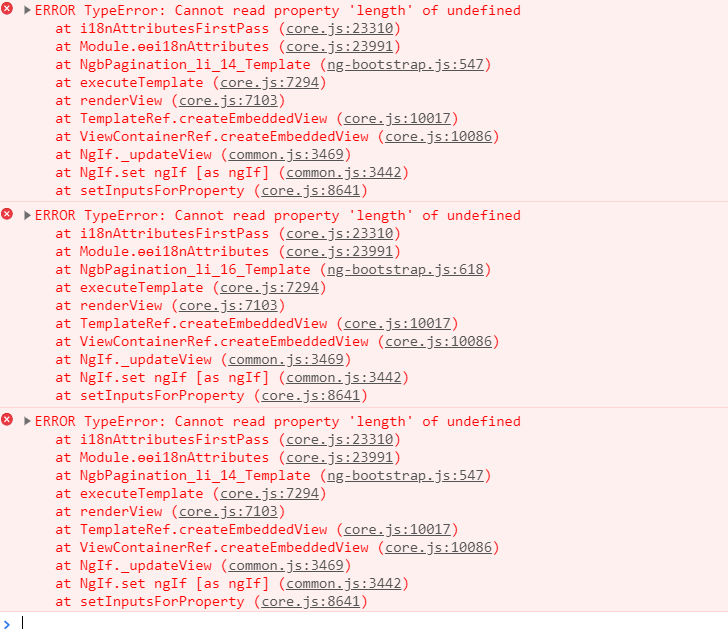 Admittedly, it's not being use the normal way, but it doesn't work if we try to generate a class with no editing to the class.
However in a vanilla 3.3.0 projet, with just two entitites, one navigating to the other, it works perfect.
Is there a length property somewhere that's missing?Markdown supported.Copy, paste, or drag & drop images and files (max 100 MB per file, 100 MB total per post)
Admittedly, it's not being use the normal way, but it doesn't work if we try to generate a class with no editing to the class.
However in a vanilla 3.3.0 projet, with just two entitites, one navigating to the other, it works perfect.
Is there a length property somewhere that's missing?Markdown supported.Copy, paste, or drag & drop images and files (max 100 MB per file, 100 MB total per post) -
0
Hi @Esben_Dalgaard
What code is causing this error? Can you share HTML and TypeScript code with us?
Can you run the following command in the
angularfolder and share the result?yarn why @ng-bootstrap/ng-bootstrapMarkdown supported.Copy, paste, or drag & drop images and files (max 100 MB per file, 100 MB total per post) -
0
[1/4] Why do we have the module "@ng-bootstrap/ng-bootstrap"...? [2/4] Initialising dependency graph... warning @volo/abp.ng.identity > @abp/ng.components > ng-zorro-antd@9.3.0: please warning @angular-devkit/build-angular > webpack-dev-server > chokidar@2.1.8: Chokidar 2 will break on node v14+. Upgrade to chokidar 3 with 15x less dependencies. warning @angular-devkit/build-angular > webpack-dev-server > chokidar > fsevents@1.2.13: fsevents 1 will break on node v14+ and could be using insecure binaries. Upgrade to fsevents 2. warning @angular-devkit/build-angular > webpack > watchpack > watchpack-chokidar2 > chokidar@2.1.8: Chokidar 2 will break on node v14+. Upgrade to chokidar 3 with 15x less dependencies. warning @angular-devkit/build-angular > resolve-url-loader > rework > css > urix@0.1.0: Please see https://github.com/lydell/urix#deprecated warning @angular-devkit/build-angular > resolve-url-loader > rework > css > source-map-resolve > urix@0.1.0: Please see https://github.com/lydell/urix#deprecated warning @angular-devkit/build-angular > resolve-url-loader > rework > css > source-map-resolve > resolve-url@0.2.1: https://github.com/lydell/resolve-url#deprecated warning @angular/cli > universal-analytics > request@2.88.2: request has been deprecated, see https://github.com/request/request/issues/3142 warning @angular/cli > universal-analytics > request > har-validator@5.1.5: this library is no longer supported warning protractor > webdriver-manager > request@2.88.2: request has been deprecated, see https://github.com/request/request/issues/3142 warning tslint@6.1.3: TSLint has been deprecated in favor of ESLint. Please see https://github.com/palantir/tslint/issues/4534 for more information. [3/4] Finding dependency... [4/4] Calculating file sizes... => Found "@ng-bootstrap/ng-bootstrap@7.0.0" info Reasons this module exists
- "@volo#abp.ng.account#@abp#ng.theme.shared" depends on it
- Hoisted from "@volo#abp.ng.account#@abp#ng.theme.shared#@ng-bootstrap#ng-bootstrap" info Disk size without dependencies: "6.93MB" info Disk size with unique dependencies: "7MB" info Disk size with transitive dependencies: "7MB" info Number of shared dependencies: 1 Done in 19.60s.
Html:
  <div class="col-auto">
    <h1 class="content-header-title">{{ '::TerminalCommands' | abpLocalization}}</h1>
  </div>
  <div class="col-lg-auto pl-lg-0">
    <abp-breadcrumb></abp-breadcrumb>
  </div>
  <div class="col">
    <div class="text-lg-right pt-2">
      <button
        *abpPermission="'Stella.TerminalCommands.Create'"
        class="btn btn-primary btn-sm"
        type="button"
        (click)="create()"
      >
        <i class="fa fa-plus mr-1"></i>
        {{ '::NewTerminalCommand' | abpLocalization }}
      </button>
    </div>
  </div>
</div>

<div class="card">
  <div class="card-body">
    <div class="col-12 col-sm-auto">
        <div class="form-group">
            <label>
              {{ '::ProductInstance' | abpLocalization }}
            </label>
            <abp-lookup-input
              [getFn]="terminalCommandsService.productInstanceLookup"
              [ngModelOptions]="{ standalone: true }"
              displayNameProp="stellaId"
              lookupNameProp="displayName"
              [(ngModel)]="filters.productInstanceId"
            ></abp-lookup-input>
          </div>
    </div>

    <ngx-datatable [rows]="data.items" [count]="data.totalCount" [list]="list" default>

      <ngx-datatable-column name="{{ '::IsIncoming' | abpLocalization }}" prop="terminalCommand.isIncoming">
        <ng-template let-row="row" ngx-datatable-cell-template>
          <ng-template [ngIf]="row.terminalCommand?.isIncoming" [ngIfThen]="yes" [ngIfElse]="no"></ng-template>

          <ng-template #yes>
            <div class="text-center text-success">
              <i [title]="'AbpUi::Yes' | abpLocalization" class="fa fa-check"></i>
            </div>
          </ng-template>

          <ng-template #no>
            <div class="text-center text-danger">
              <i [title]="'AbpUi::No' | abpLocalization" class="fa fa-times"></i>
            </div>
          </ng-template>
        </ng-template>
      </ngx-datatable-column>
      <ngx-datatable-column name="{{ '::Source' | abpLocalization }}" prop="terminalCommand.source">
        <ng-template let-row="row" ngx-datatable-cell-template>
          {{ '::Enum:TerminalMessageType:' + row.terminalCommand?.source | abpLocalization }}
        </ng-template>
      </ngx-datatable-column>
      <ngx-datatable-column name="{{ '::Status' | abpLocalization }}" prop="terminalCommand.status">
        <ng-template let-row="row" ngx-datatable-cell-template>
          {{ '::Enum:TerminalMessageStatus:' + row.terminalCommand?.status | abpLocalization }}
        </ng-template>
      </ngx-datatable-column>
      <ngx-datatable-column name="{{ '::ErrorMessage' | abpLocalization }}" prop="terminalCommand.errorMessage">
        <ng-template let-row="row" ngx-datatable-cell-template>
          {{ row.terminalCommand?.errorMessage }}
        </ng-template>
      </ngx-datatable-column>
      <ngx-datatable-column name="{{ '::CommandText' | abpLocalization }}" prop="terminalCommand.commandText">
        <ng-template let-row="row" ngx-datatable-cell-template>
          {{ row.terminalCommand?.commandText }}
        </ng-template>
      </ngx-datatable-column>

      <ngx-datatable-column name="{{ '::ProductInstance' | abpLocalization }}" prop="productInstance.stellaId">
        <ng-template let-row="row" ngx-datatable-cell-template>
          {{ row.productInstance?.stellaId }}
        </ng-template>
      </ngx-datatable-column>

    </ngx-datatable>
  </div>
</div>

<abp-modal [busy]="isModalBusy" [(visible)]="isModalOpen">
  <ng-template #abpHeader>
    <h3>{{ (selected?.terminalCommand.id ? 'AbpUi::Edit' : '::NewTerminalCommand') | abpLocalization }}</h3>
  </ng-template>

  <ng-template #abpBody>
    <form [formGroup]="form" (ngSubmit)="submitForm()" validateOnSubmit>
      <div class="mt-2 fade-in-top">

        <div class="form-group">
          <label for="terminalCommand-source">
            {{ '::Source' | abpLocalization }}
          </label>

          <select
            id="terminalCommand-source"
            formControlName="source"
            class="custom-select form-control"
          >

            <option *ngFor="let x of terminalMessageTypeArr; trackBy: track.by('key')" [ngValue]="x.key">
              {{ '::Enum:TerminalMessageType:' + x.key  | abpLocalization }}
            </option>
          </select>
        </div>

        <div class="form-group">
          <label for="terminalCommand-commandText">
            {{ '::CommandText' | abpLocalization }}
          </label>

          <input
            type="text"
            id="terminalCommand-commandText"
            formControlName="commandText"
            class="form-control"/>
        </div>
        <div class="form-group">
          <label for="ProductInstance-StellaId">
            {{ '::ProductInstance' | abpLocalization }}
          </label>

          <abp-lookup-input
            [getFn]="terminalCommandsService.productInstanceLookup"
            [editingData]="selected.productInstance"
            displayNameProp="stellaId"
            lookupNameProp="displayName"
            formControlName="productInstanceId">
           </abp-lookup-input>
        </div>
      </div>
    </form>
  </ng-template>

  <ng-template #abpFooter>
    <button type="button" class="btn btn-secondary" #abpClose>
      {{ 'AbpUi::Cancel' | abpLocalization }}
    </button>

    <abp-button
      iconClass="fa fa-check"
      (click)="submitForm()"
      [disabled]="form?.invalid"
    >
      {{ 'AbpUi::Save' | abpLocalization }}
    </abp-button>
  </ng-template>
</abp-modal>
Markdown supported.Copy, paste, or drag & drop images and files (max 100 MB per file, 100 MB total per post)



