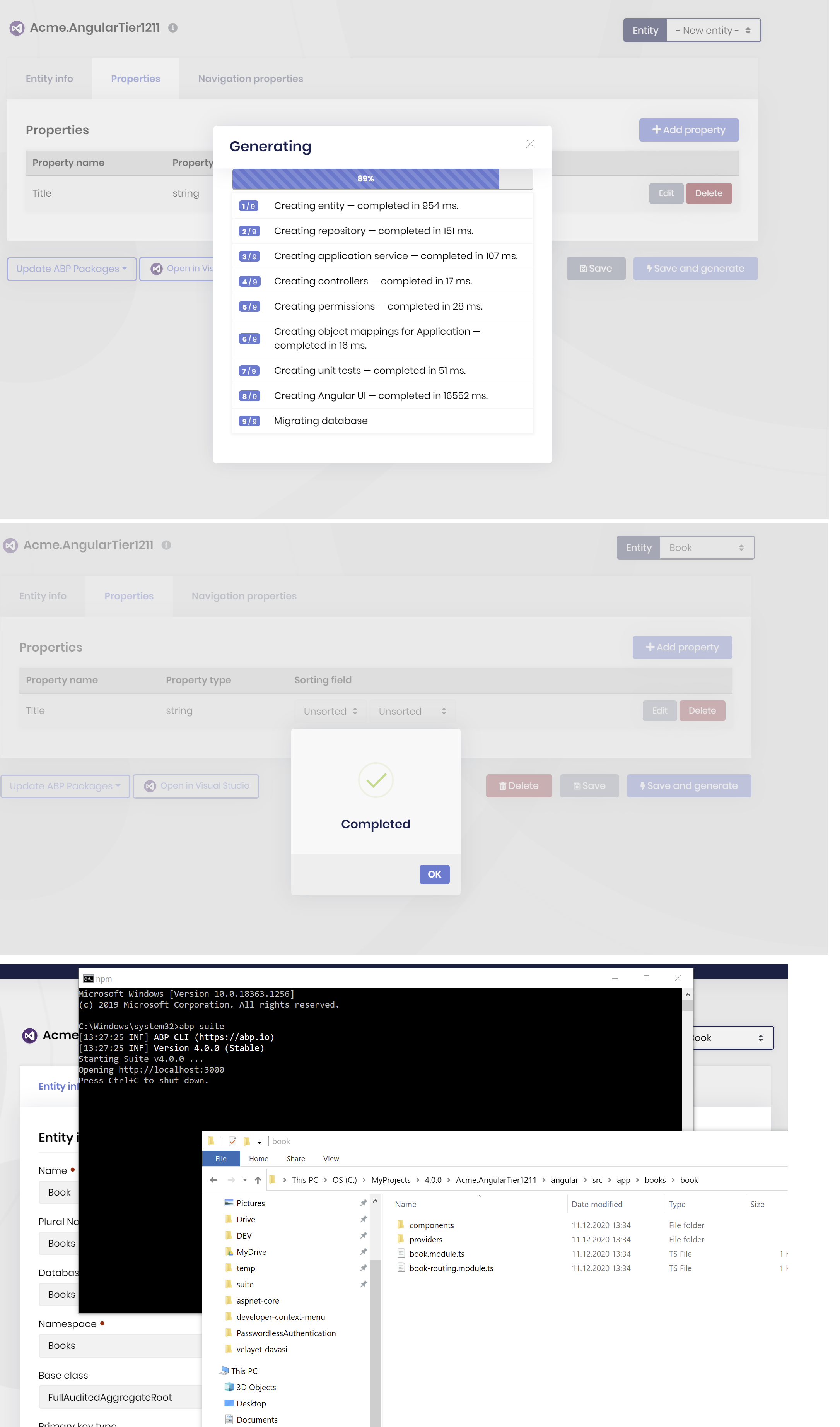
Production release of version 4.0.0 has been released on 2020-12-03 Use the below command to update both ABP CLI and ABP Suite
dotnet tool update -g Volo.Abp.Cli && abp suite update
- Framework Release notes: https://docs.abp.io/en/commercial/latest/release-notes#4-0-0-2020-11-26
- Commercial Release notes: https://docs.abp.io/en/commercial/latest/release-notes
- Blog post https://blog.abp.io/abp/ABP.IO-Platform-v4.0-RC-Has-Been-Released-based-on-.NET-5.0
- Migration guides https://docs.abp.io/en/abp/latest/Migration-Guides/Index
Migration guide from 3x to 4x => https://docs.abp.io/en/abp/latest/Migration-Guides/Abp-4_0
108 Answer(s)
-
0
@dmeagor Problem with
Shout.Crmnamespace is a bug. It will be fixed in next release v4.0.1 (next week)Open module .sln file and all the host projects fail to open as they are not created (did you intend to create them.)
They shouldn't exist. But it seems like somehow they are still in solution file. We'll check.
Markdown supported.Copy, paste, or drag & drop images and files (max 100 MB per file, 100 MB total per post) -
0
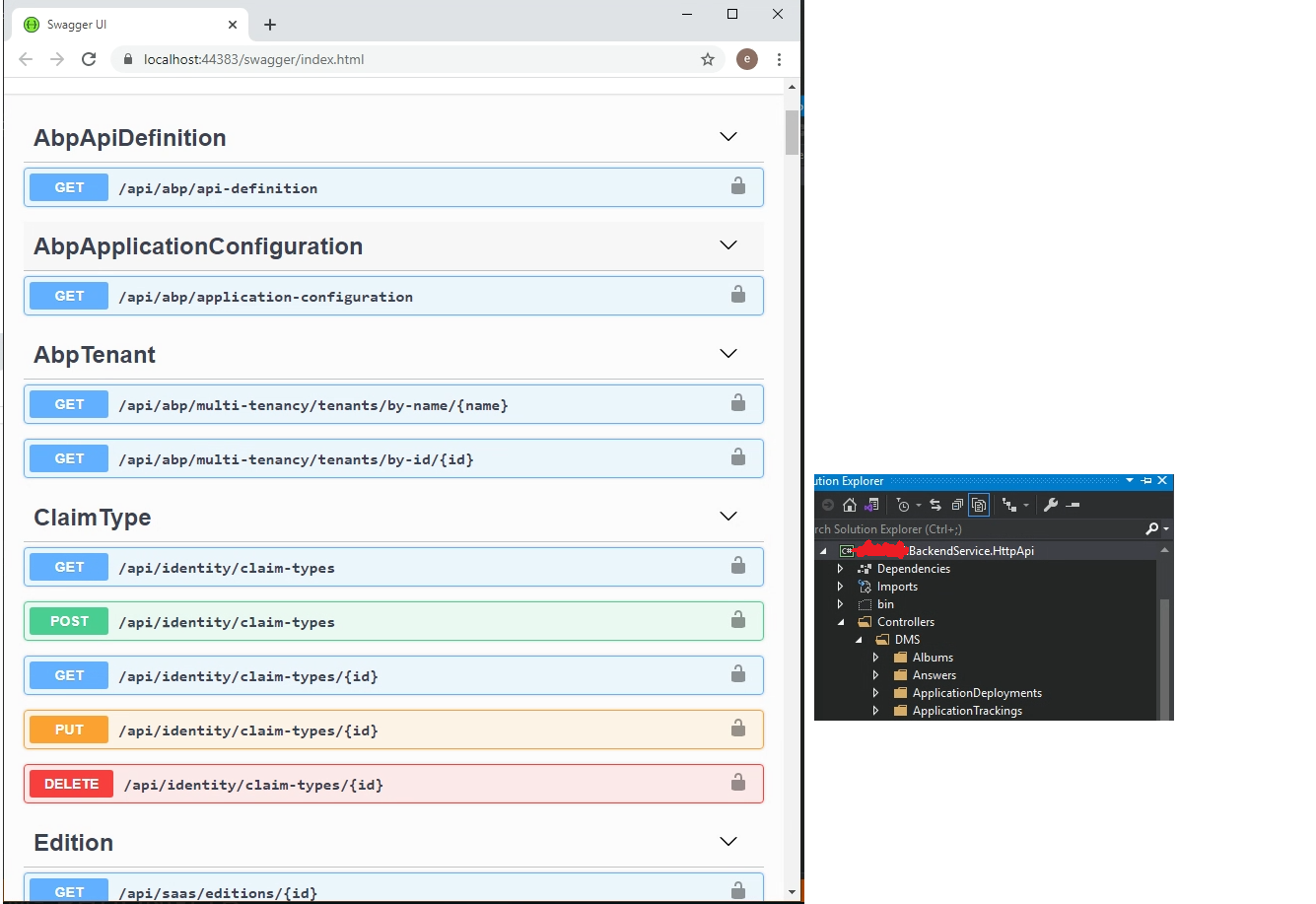
@thanhvl1 can you give more details about not seeing your endpoints in Swagger? your project type: mvc, angular, blazor . tiered or seperated identity server? is it AppService or normal Controller? can you compare the Suite generated code with your existing?
Markdown supported.Copy, paste, or drag & drop images and files (max 100 MB per file, 100 MB total per post) -
0
@yekalkan
Open module .sln file and all the host projects fail to open as they are not created (did you intend to create them.)
They shouldn't exist. But it seems like somehow they are still in solution file. We'll check.
If this is the case then doesn't the module project folders need to be added to the application solution. Otherwise how do you run and test the module? I think they should be added into a "modules" solution folder.
Markdown supported.Copy, paste, or drag & drop images and files (max 100 MB per file, 100 MB total per post) -
0
Bug 1: abp suite
For modules created inside an application which do not have the host folder, an error appears when opening the module solution
Cannot find the directory C:\Users\xxx\RiderProjects\yyy\Shout\aspnet-core\modules\Shout.Mailer\host
Bug 2:
Abp suite hardcoded to show that modules are installed when they are not (eg blazor identity server UI)
Bug 3: abp commercial module page does not list where blazor is compatable.
Much more testing of the create new module system is needed! Basicially i was trying to find a way to install the Identity Server UI since it appars to be missing for blazor (no warning.) Wondered if I could install the mvc IS UI into a module but got the above errors.
Markdown supported.Copy, paste, or drag & drop images and files (max 100 MB per file, 100 MB total per post) -
0
After upgrade to v4.0.0, I cannot generate Angular UI in folder angular by Abp Suite. The AppService, Dto , UnitTest, Permission are still fine.
Do you have solution to revert Abp Suite to previous version? Should I do that?
Thank team.
Markdown supported.Copy, paste, or drag & drop images and files (max 100 MB per file, 100 MB total per post) -
0
@huy.quan for Angular code generation, you need to do this workaround until v4.0.1 https://support.abp.io/QA/Questions/626#answer-f02d209c-0bb8-e1bd-a4d6-39f940b19df6
Markdown supported.Copy, paste, or drag & drop images and files (max 100 MB per file, 100 MB total per post) -
0
@dmeagor created an internal issue for docs search. alternatively you can use google search with site parameter until it gets fixed.
google.com
your-search-words site:https://docs.abp.ioMarkdown supported.Copy, paste, or drag & drop images and files (max 100 MB per file, 100 MB total per post) -
0
When I generate a Blazor Project (Using ABP4.0.0 stable) to Publish, compiler show me this error: System.Runtime.CompilerServices.SuppressIldasmAttribute.SuppressIldasmAttribute(): Error processing method 'System.Runtime.CompilerServices.SuppressIldasmAttribute.SuppressIldasmAttribute()' in assembly That's error doesn't appear when i compile to release or debug. Only show me that when i go to Publish Option. To avoid that i put Publish Trimmed option in false. <PublishTrimmed>false</PublishTrimmed> But when i deploy on testing server i got this console error. Failed to find a valid digest in the 'integrity' attribute for resource '<URL>' with computed SHA-256 integrity. When i run app on IDE Mode every thing it's Ok
Markdown supported.Copy, paste, or drag & drop images and files (max 100 MB per file, 100 MB total per post) -
0
@david.hurtado
adding the following line to your Blazor.csproj is a requirement because Blazor has problems when treeshaking reflection objects.
<PublishTrimmed>false</PublishTrimmed>Failed to find a valid digest in the 'integrity' attribute for resource '<URL>' with computed SHA-256 integrity
This error might be related with your firewall. It says the hash of the DLL files on your browser doesn't match the official hashes. So some firewalls may block your *.dll because they think it's a malicious file. In this post, he's also facing the same issue https://github.com/dotnet/aspnetcore/issues/5477#issuecomment-619261730
adding the following line to your Blazor.csproj ... this disables integrity check.
<BlazorCacheBootResources>false</BlazorCacheBootResources>but I guess this will also not correct it if your DLL is being blocked.
secondly you can ask your system admin to add a firewall rule to allow *.DLL
lastly you can rename your Blazor DLLs. See https://docs.microsoft.com/en-us/aspnet/core/blazor/host-and-deploy/webassembly?view=aspnetcore-5.0#change-the-filename-extension-of-dll-files
Markdown supported.Copy, paste, or drag & drop images and files (max 100 MB per file, 100 MB total per post) -
0
@alper Thanks for your recomendations. I follow and make steps incate for you. Except rename Blazor Dll's No I get a vareity of error but Blazor App don't star. On Opera I get this conosole log message: Uncaught SyntaxError: Unexpected token '<' On Edge i get something like: Failed to load resource: net::ERR_HTTP2_PROTOCOL_ERROR :51113/_framework/System.Numerics.dll:1 Failed to load resource: net::ERR_HTTP2_PROTOCOL_ERROR 2galacweb.galac.com/:1 Uncaught (in promise) TypeError: Failed to fetch :51113/_framework/System.Reflection.Emit.ILGeneration.dll:1 Failed to load resource: net::ERR_HTTP2_PROTOCOL_ERROR Do you have any suggest?
Markdown supported.Copy, paste, or drag & drop images and files (max 100 MB per file, 100 MB total per post) -
0
Bug: Advanced filters doesn't work from 2nd page toward. It only work on 1st page
Btw, I read from document site that AbpIO Angular had built-in primeng, but I cannot use it on project. Do I have to install it with npm? Or any configuration?
Thanks!
Markdown supported.Copy, paste, or drag & drop images and files (max 100 MB per file, 100 MB total per post) -
0
Looks like even if logged in as a host ... the previous tentant name is not refreshing on the application.
 Markdown supported.Copy, paste, or drag & drop images and files (max 100 MB per file, 100 MB total per post)
 -
0
sorry forgot to add above that this is an angular client.
Markdown supported.Copy, paste, or drag & drop images and files (max 100 MB per file, 100 MB total per post) -
0
Hi @Alper,
I answer your questions below.
your project type: angular. tiered or seperated identity server?: seperated identity server is it AppService or normal Controller?: It's in the Controller inherrit from IAppService can you compare the Suite generated code with your existing? I do the migration by generating the new code with the same Namespace and the same project name, so that I can copy all and replase by check the diff in the subversion.
My controller project and swagger as below
 Markdown supported.Copy, paste, or drag & drop images and files (max 100 MB per file, 100 MB total per post)
 -
0
- ABP Framework version: v3.3.0
- UI type: Angular
- Tiered (MVC) or Identity Server Seperated (Angular): yes
Hi All I have seperate module with differrent link and i want to use single sign on to login. I used angular-oauth2-oidc and call function loadDiscoveryDocumentAndLogin to skip the Login Form but it return to error page like This
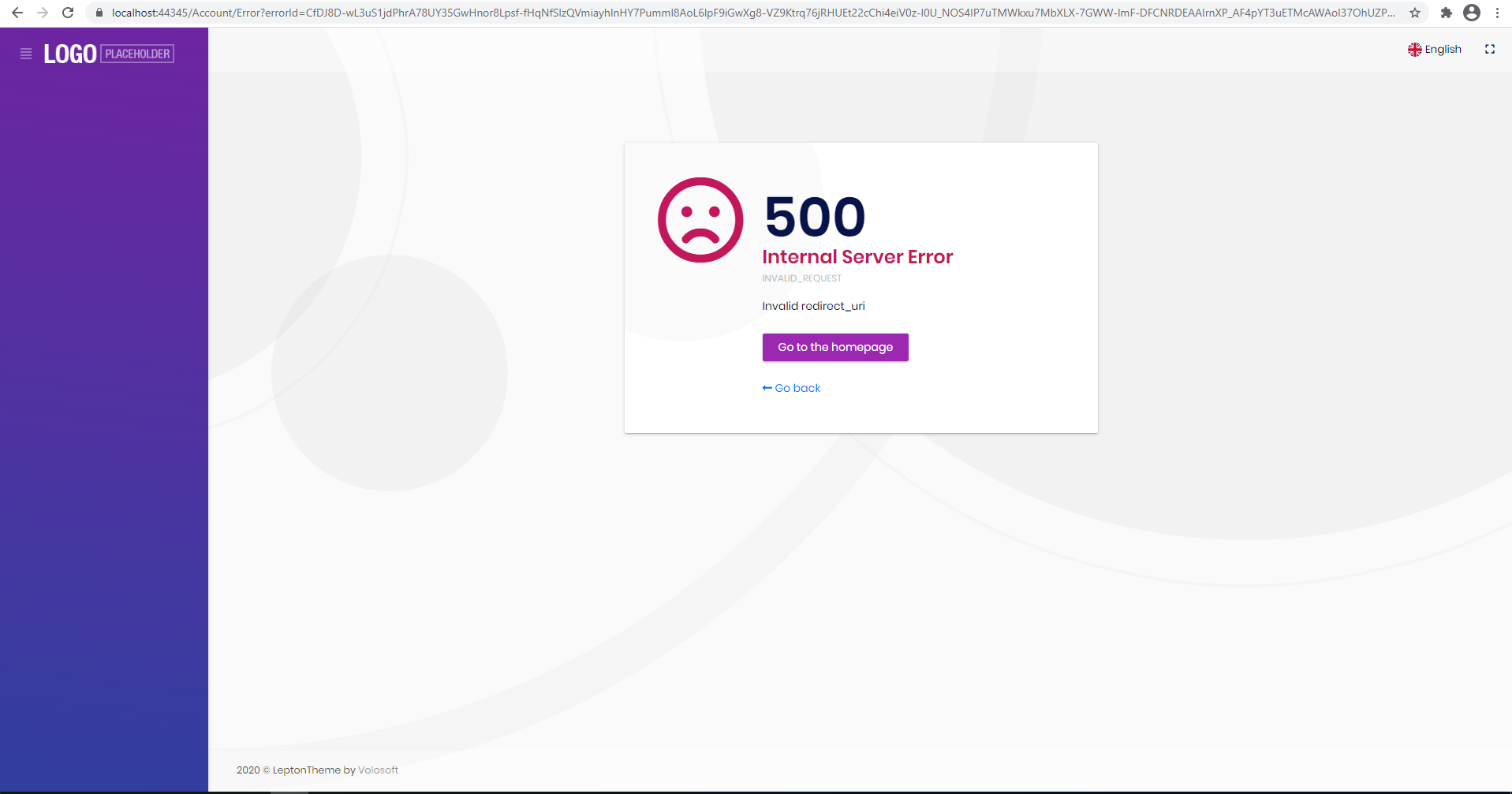 Please help me how to solve itMarkdown supported.Copy, paste, or drag & drop images and files (max 100 MB per file, 100 MB total per post)
 -
0
Hi, I got this issue when generate CRUD with Augular UI and seperated Identity Server options:
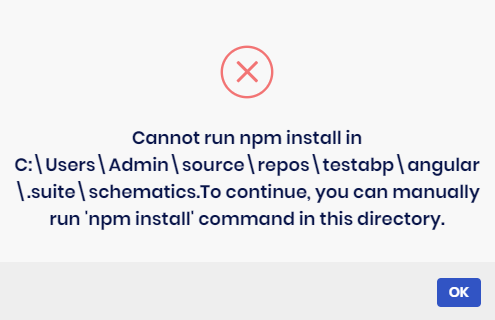
I had tried to manually run 'npm install' in that folder and generated again, it showed successfully but the Angular UI was not updated, I did try @Alper work around as well but no luck: https://support.abp.io/QA/Questions/626#answer-f02d209c-0bb8-e1bd-a4d6-39f940b19df6
Below is the log content:
2020-12-11 15:57:38.101 +08:00 [WRN] Cannot run npm install in C:\Users\Admin\source\repos\TestAbp\angular.suite\schematics.To continue, you can manually run 'npm install' command in this directory. Volo.Abp.UserFriendlyException: Cannot run npm install in C:\Users\Admin\source\repos\TestAbp\angular.suite\schematics.To continue, you can manually run 'npm install' command in this directory. at Volo.Abp.Suite.Areas.AbpSuite.CrudPageGenerator.Services.AngularSchematicsService.unfJM7yjv7(String ) at Volo.Abp.Suite.Areas.AbpSuite.CrudPageGenerator.Services.AngularSchematicsService.lnAJAtU9SV(String , Solution ) at Volo.Abp.Suite.Areas.AbpSuite.CrudPageGenerator.Services.AngularSchematicsService.SetupSchematicsAsync(Solution solution) at Volo.Abp.Suite.Areas.AbpSuite.CrudPageGenerator.Commands.AngularUiGenerateWithSchematicsCommand.ExecuteAsync(CrudPageCommandOptions options) at Volo.Abp.Suite.Areas.AbpSuite.CrudPageGenerator.CommandManager.ExecuteAllAsync(CrudPageCommandOptions options) at Volo.Abp.Suite.Areas.AbpSuite.CrudPageGenerator.Commands.CrudPageGenerator.GenerateAsync(EntityModel entity, Solution solution) at Volo.Abp.Suite.Controllers.CrudPageGeneratorController.SaveAndGenerateEntityAsync(Guid solutionId, EntityModel entity) at lambda_method1472(Closure , Object ) at Microsoft.AspNetCore.Mvc.Infrastructure.ActionMethodExecutor.TaskOfActionResultExecutor.Execute(IActionResultTypeMapper mapper, ObjectMethodExecutor executor, Object controller, Object[] arguments) at Microsoft.AspNetCore.Mvc.Infrastructure.ControllerActionInvoker.<InvokeActionMethodAsync>g__Awaited|12_0(ControllerActionInvoker invoker, ValueTask`1 actionResultValueTask) at Microsoft.AspNetCore.Mvc.Infrastructure.ControllerActionInvoker.
Markdown supported.Copy, paste, or drag & drop images and files (max 100 MB per file, 100 MB total per post) -
0
@christianharo can you provide us your template type ? angular / mvc / blazor (tier or seperated identity server)
guys there are several ABP templates, so you should tell us which type of project you have created. otherwise it's getting more time to understand your issue!
Markdown supported.Copy, paste, or drag & drop images and files (max 100 MB per file, 100 MB total per post) -
0
@david.hurtado can we discuss your issue in the following question.. other people who are not interested in Blazor also gets notification emails. write https://support.abp.io/QA/Questions/662/Blazor---'SystemRuntimeCompilerServicesSuppressIldasmAttributeSuppressIldasmAttribute'-in-assembly
Markdown supported.Copy, paste, or drag & drop images and files (max 100 MB per file, 100 MB total per post) -
0
@edelivery this topic is just for bug reports. for other discussions and other questions you can create a new question. there are a lot of people in this topic who gets email notifications, so topics which needs long lasting conversations should be opened as a new question.
Markdown supported.Copy, paste, or drag & drop images and files (max 100 MB per file, 100 MB total per post) -
0
@nhontran I created a brand new Angular + Seperated Identity Server project with the following command:
abp new Acme.AngularSeperated1211 -t app-pro -u angular -m none --separate-identity-server -csfThen created a book entity via Suite 4.0 As expected the Angular UI is not generated, then I made this workaround and back to Suite, check only
Create user interfaceoption and re-generated. I see that there's no problem. image.png
In this step, Suite runs
npm installcommand to install NPM packages in your Schematics directory. What I saw from your logs, you have an invalid directory path!Cannot run npm install in
C:\Users\Admin\source\repos\TestAbp\angular.suite\schematics.To continue, you can manually run 'npm install' command in this directory.Normally this must be
C:\Users\Admin\source\repos\TestAbp\angular\.suite\schematics. did you change any paths in your config files?
you can create a new question for the further discussion.
Markdown supported.Copy, paste, or drag & drop images and files (max 100 MB per file, 100 MB total per post) -
0
Hi @huy.quan,
Thank you for informing us about the bug with advanced filters. This PR fixes it (will be available as of v4.0.1): https://github.com/abpframework/abp/pull/6605
Where did you read about PrimeNG? I don't think we have anything about it.
Markdown supported.Copy, paste, or drag & drop images and files (max 100 MB per file, 100 MB total per post)