






Production release of version 4.0.0 has been released on 2020-12-03 Use the below command to update both ABP CLI and ABP Suite
dotnet tool update -g Volo.Abp.Cli && abp suite update
- Framework Release notes: https://docs.abp.io/en/commercial/latest/release-notes#4-0-0-2020-11-26
- Commercial Release notes: https://docs.abp.io/en/commercial/latest/release-notes
- Blog post https://blog.abp.io/abp/ABP.IO-Platform-v4.0-RC-Has-Been-Released-based-on-.NET-5.0
- Migration guides https://docs.abp.io/en/abp/latest/Migration-Guides/Index
Migration guide from 3x to 4x => https://docs.abp.io/en/abp/latest/Migration-Guides/Abp-4_0
108 Answer(s)
-
0
AzureAD compile issue.
I've created a new MVC solution using 4.0 and I'm trying to test the AzureAD integration.
https://community.abp.io/articles/how-to-use-the-azure-active-directory-authentication-for-mvc-razor-page-applications-4603b9cf
When I try to follow this article or look at the sample code presented for the MVC AzureAD integration I get this compile error.
authenticationbuilder does not contain a definition for addidentityserverauthenticationThe current documentation https://docs.abp.io/en/abp/latest/Modules/IdentityServer#identityserver-module
Just says TODO. Any pointers here.
Markdown supported.Copy, paste, or drag & drop images and files (max 100 MB per file, 100 MB total per post) -
0
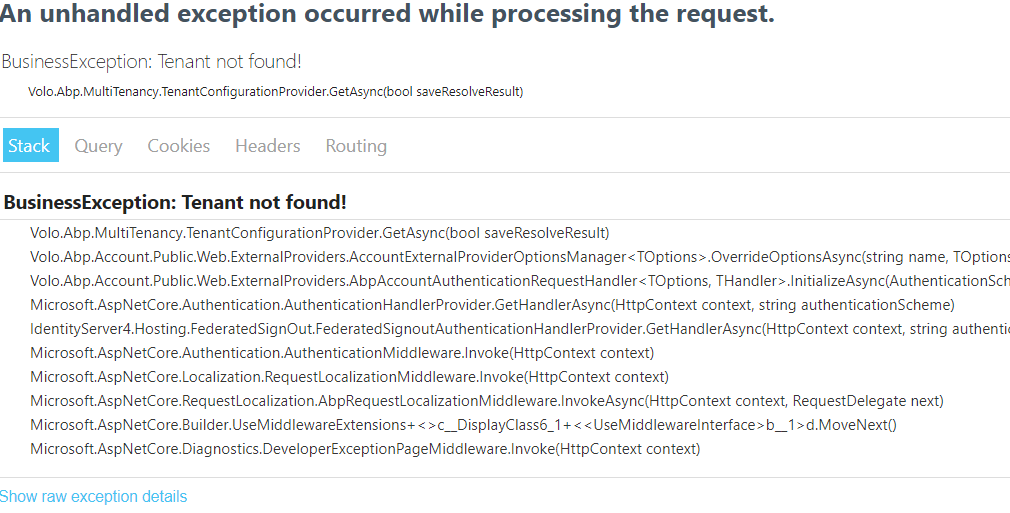
Created a brand new project Tier - Blazor as UI
Run the dbmigratior applicaiton Run the Host application and get the following error:
 Markdown supported.Copy, paste, or drag & drop images and files (max 100 MB per file, 100 MB total per post)
 -
1
Hi @christianharo You can bypass that error Clenning Browser cache history, Or Star the app in the browser private mode.
Markdown supported.Copy, paste, or drag & drop images and files (max 100 MB per file, 100 MB total per post) -
0
Thanks @david.hurtado. Thta did the trick however concerned about end users getting the same issue.
Markdown supported.Copy, paste, or drag & drop images and files (max 100 MB per file, 100 MB total per post) -
0
@armanozak Thanks for your fixing bug of advanced filters.
About PrimeNG, I read it from this blog: https://blog.abp.io/abp/ABP-v0-19-Release-With-New-Angular-UI
We've created the template, document and infrastructure based on the latest Angular tools and trends:
- Uses NgBootstrap and PrimeNG as the UI component libraries. You can use your favorite library, no problem, but pre-built modules work with these libraries.
- Uses NGXS as the state management library.
Markdown supported.Copy, paste, or drag & drop images and files (max 100 MB per file, 100 MB total per post) -
0
Hi @huy.quan,
This is an old blog post. PrimeNG components were removed before v2 release. Built-in modules use NgBootstrap (with NgxDatatable and a few NgZorro components) now.
Markdown supported.Copy, paste, or drag & drop images and files (max 100 MB per file, 100 MB total per post) -
0
@clearlaunch
if you're saying this project doesn't build https://github.com/abpframework/abp-samples/tree/master/Authentication-Customization I can build it even with
AddAzureAD()enabled. It just warns about the obsolote method. And we'll update this obsolote method. Otherwise it seems to be building successfully.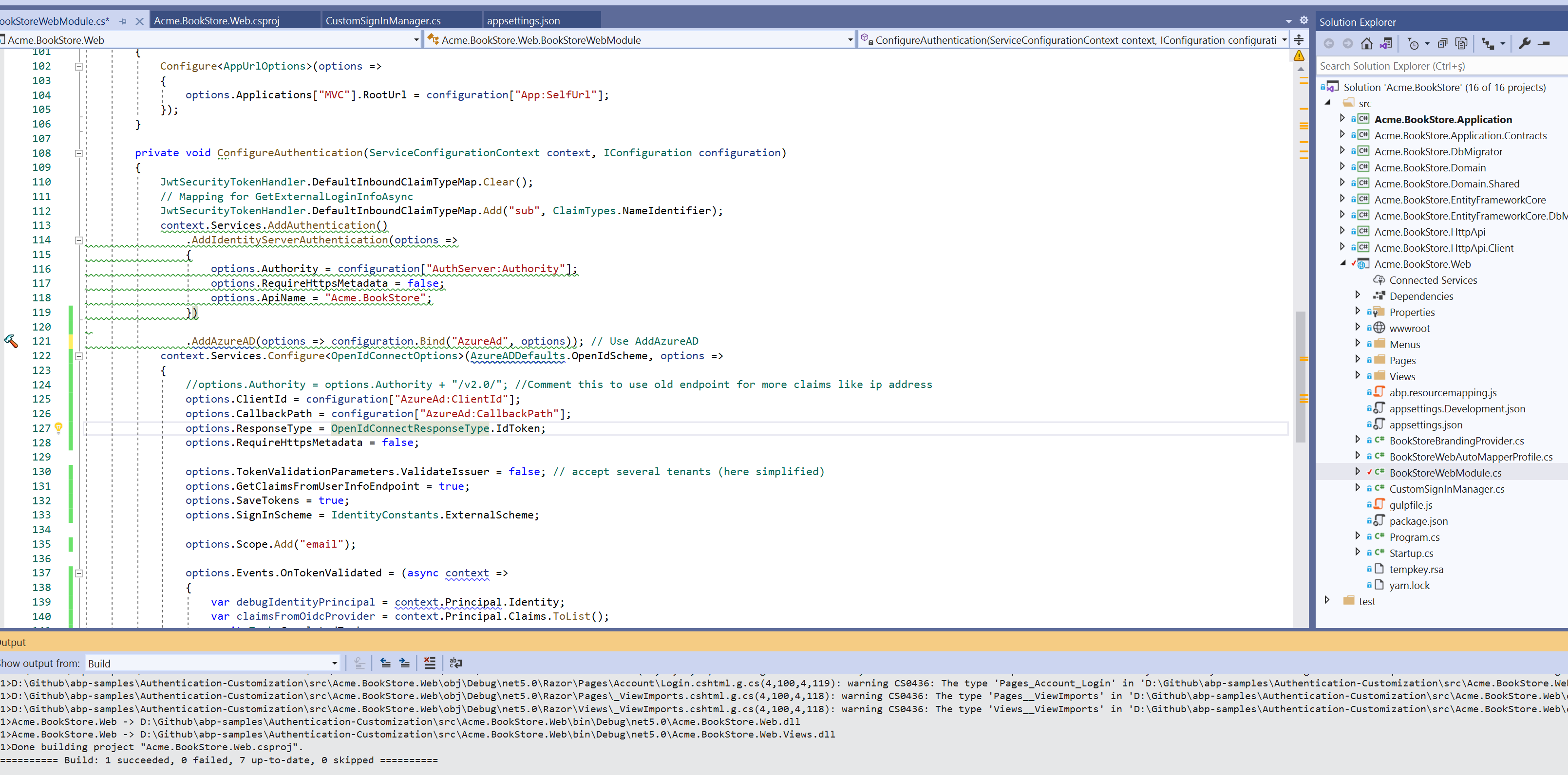 Markdown supported.Copy, paste, or drag & drop images and files (max 100 MB per file, 100 MB total per post)
 -
0
@christianharo clear your browser cookies to solve
Tenant not foundissue. The customers will never see this issue because you'll never delete the tenant. But in your development environment, you drop your database or delete the test tenants. So it's just a development time issue.Markdown supported.Copy, paste, or drag & drop images and files (max 100 MB per file, 100 MB total per post) -
0
thanhvl1@fsoft.com.vn we haven't got any feedback about not showing API endpoints in Swagger. This might be related to misconfiguration of module dependencies. You can create a new question as this might be related with your project. Also you can send us your project.
Markdown supported.Copy, paste, or drag & drop images and files (max 100 MB per file, 100 MB total per post) -
0
Looks like even if logged in as a host ... the previous tentant name is not refreshing on the application.
@christianharo, the problem has resolved. You can see PR: https://github.com/abpframework/abp/pull/6626
Thanks for the reporting.
Markdown supported.Copy, paste, or drag & drop images and files (max 100 MB per file, 100 MB total per post) -
1
Newly created projects are not working
CLI: 4.0.1 Suite: 4.0.1 Frontend: Angular Db: MongoDb
After successfull compiling, migrating and seeding data into aplication everything is started correctly. Under login page i confirm my credentials into app, then app is hanging out.
Under investigation i have found error "loading discovery document TypeError: value is null" in my browser. Error is causing by call loadDiscoveryDocument method when try to get configuration.
Do i missing something in my angular enviroment?
With regards.
Markdown supported.Copy, paste, or drag & drop images and files (max 100 MB per file, 100 MB total per post) -
0
Hi @jurec
The problem has been resolved. We are going to release v4-1-rc.1 today. You can create a preview template after the new version released or apply this for workaround: https://support.abp.io/QA/Questions/678#answer-0c965758-2a20-a382-8274-39f9778d361f
Markdown supported.Copy, paste, or drag & drop images and files (max 100 MB per file, 100 MB total per post) -
0
Dear @Jurec I tried the same scenario,
This issue looks because you use version 4.0.1 try to downgrade to v 4.0.0 it will works fine.
I tried the same scanrio with EF , and tried it with identity seperated and with merge identity with the host, the same issue
You can try to downgrade your font end packages (replace 4.0.1 with 4.0.0 and then yarn) If did not work, try to downgrade abp to version 4.0.0
Markdown supported.Copy, paste, or drag & drop images and files (max 100 MB per file, 100 MB total per post) -
0
Mehmet and bqabani
thank you both for your fast answers. Downgrading angular package @abp/ng.core to version 4.0.0. and clearing browser cache will do the trick. Issue is now temporary resolved.
With regards,
Jure
Markdown supported.Copy, paste, or drag & drop images and files (max 100 MB per file, 100 MB total per post) -
1
I am having issues getting the angular web client to work when creating a new solution with Suite 4.0.1.
Steps to reproduce.
- Create a new solution
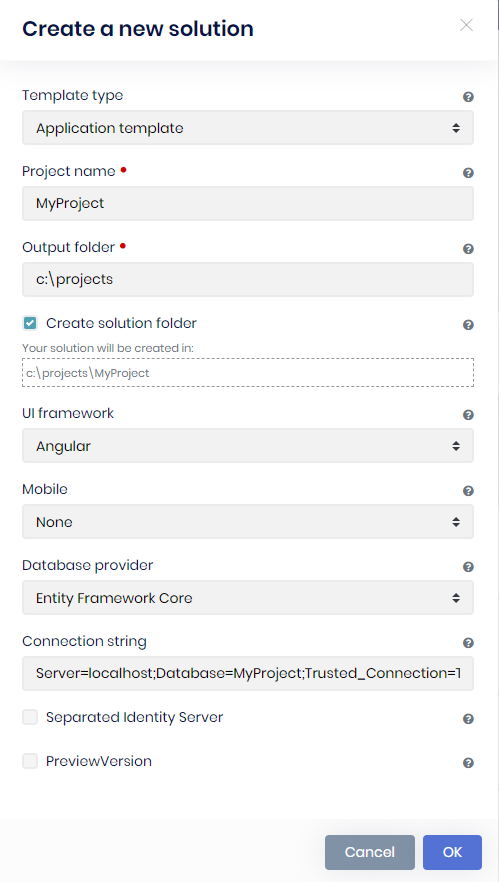
- Ran DbMigrator project
- Run Host project (test swagger api)
- Build Angular project
- Start Angular project
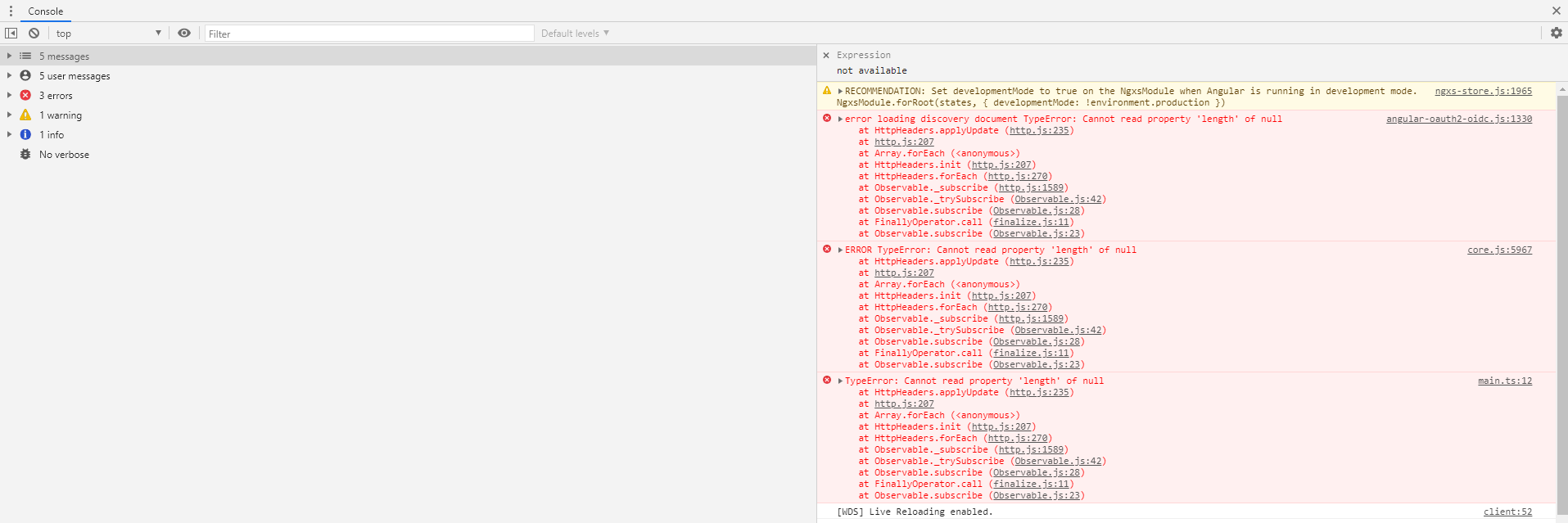
This does not happen with projects created with Suite 3.3.1.
Markdown supported.Copy, paste, or drag & drop images and files (max 100 MB per file, 100 MB total per post) - Create a new solution
-
0
I'm also facing same issue with 4.0.1 as @scott7106.
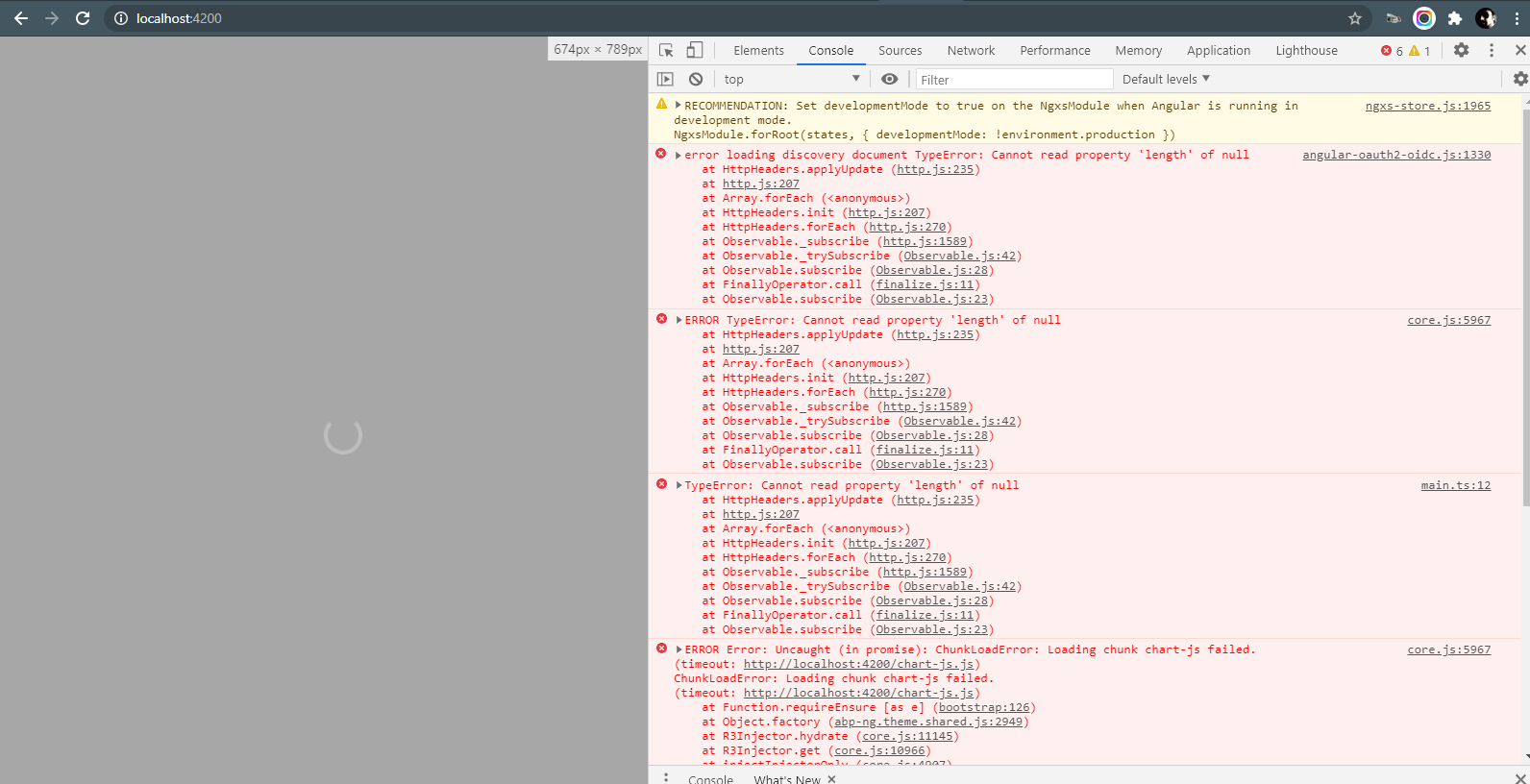
PS: Today is my First Day with Abp.io Commercial After spending ages with Asp.Net Zero i must say i was very excited to start... But than i realized the angular client contains only around 26 .ts files and and all the code is in module packages and customizing what is available out of the box is not even possible Because my current license does not support downloading the source... BAM!! :@ than i tried to calm down for a moment and wanted to cherish myself be looking at the running project and BAM!! this error. than i thought i might have the nightly build or something in the suite UI, i noticed that menu and than i realized i am already having a stable release version...
 Markdown supported.Copy, paste, or drag & drop images and files (max 100 MB per file, 100 MB total per post)
 -
0
Bug: I cannot adjust page size or Pagination feature. For example, I add input.MaxResultCount = 5 in ngOnInit():
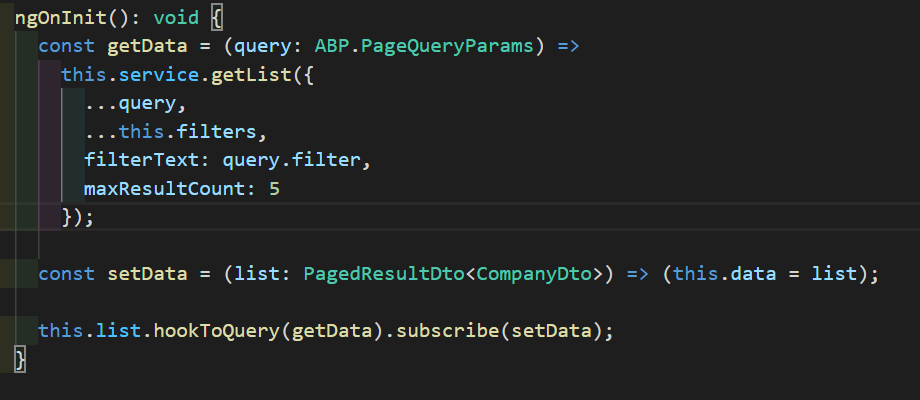
Then, the list is okay, but page number is incorrec. It should be 3 on below image. I check the page size of page button is still 10.
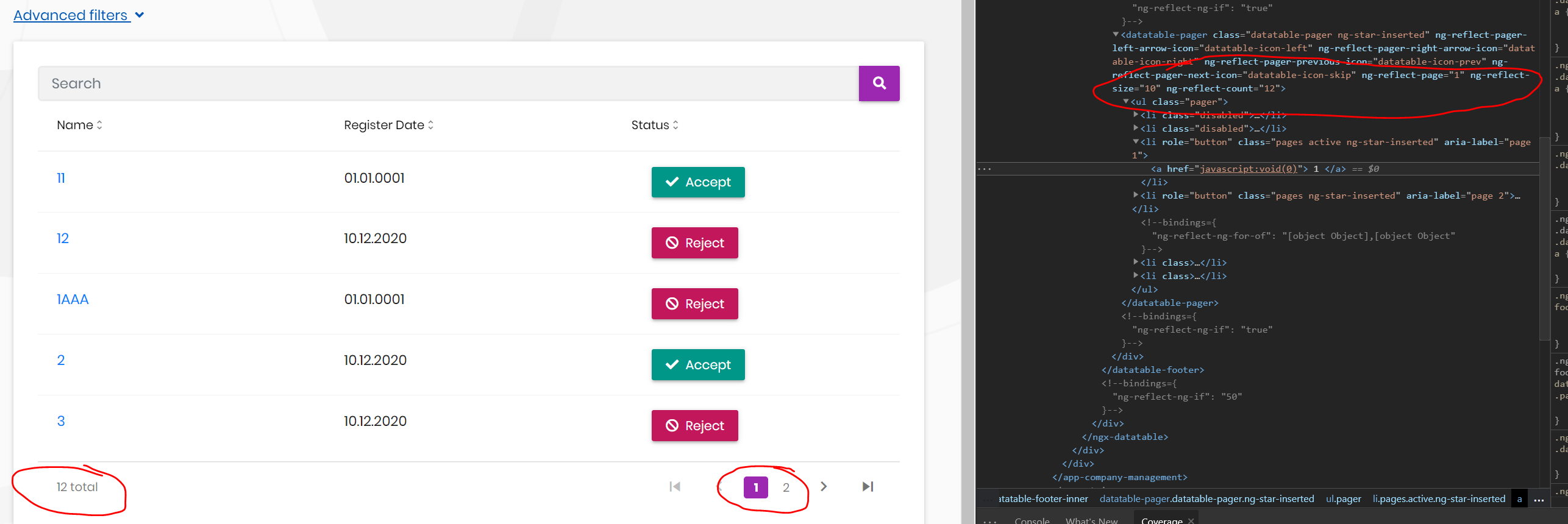
Is this a bug? Or what was I missing something here?
Thanks team.
Markdown supported.Copy, paste, or drag & drop images and files (max 100 MB per file, 100 MB total per post) -
0
ABP Framework version: v4.0.1 UI type: Angular Tiered (MVC) or Identity Server Seperated (Angular): yes
I have config in enviroment.ts to read from appsetting.json
export const environment = {
  production: false,
  hmr: false,
  remoteEnv: {
    url: '/assets/appsettings.json',
    method: 'GET',
    headers: {}
  }
} as Config.Environment;
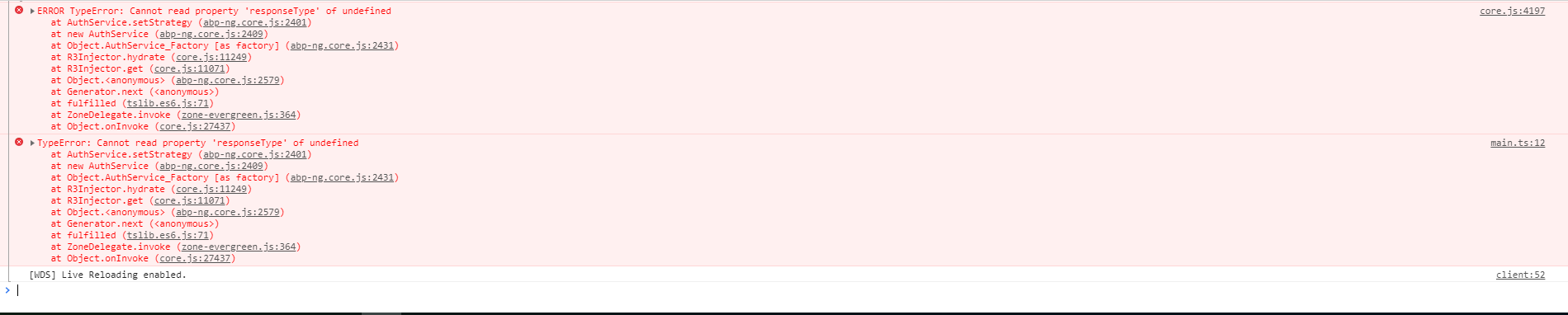
but when start web it has error like this:
 Markdown supported.Copy, paste, or drag & drop images and files (max 100 MB per file, 100 MB total per post)
 -
0
Hi @edelivery
You have to specify the
oAuthConfigin the environment. See the default environment file and addoAuthConfigproperty to the your environment by modifying it with your own configuration:import { Environment } from '@abp/ng.core'; const baseUrl = 'http://localhost:4200'; export const environment = { production: false, application: { baseUrl, name: 'MyProjectName', }, oAuthConfig: { issuer: 'https://localhost:44305', redirectUri: baseUrl, clientId: 'MyProjectName_App', responseType: 'code', scope: 'offline_access MyProjectName', }, apis: { default: { url: 'https://localhost:44305', rootNamespace: 'MyCompanyName.MyProjectName', }, }, } as Environment;Markdown supported.Copy, paste, or drag & drop images and files (max 100 MB per file, 100 MB total per post) -
0
@scott7106 this is not directly related to Suite. Angular 4.0.1 has this issue. See https://support.abp.io/QA/Questions/626#answer-f3fa08ce-4fde-bd00-28fb-39f981e5f56d
Markdown supported.Copy, paste, or drag & drop images and files (max 100 MB per file, 100 MB total per post) -
0
Dears, Yesterday I updated npm packages to (4.0.2), and got this error: (the project is did not change, it is as was generated from suite)!
ERROR NullInjectorError: R3InjectorError(AppModule)[LocalizationService -> AbpApplicationConfigurationService -> RestService -> InjectionToken CORE_OPTIONS -> InjectionToken CORE_OPTIONS -> InjectionToken CORE_OPTIONS]: NullInjectorError: No provider for InjectionToken CORE_OPTIONS! at NullInjector.get (http://localhost:4200/vendor.js:61902:27) at R3Injector.get (http://localhost:4200/vendor.js:62069:33) at R3Injector.get (http://localhost:4200/vendor.js:62069:33) at R3Injector.get (http://localhost:4200/vendor.js:62069:33) at injectInjectorOnly (http://localhost:4200/vendor.js:55999:33) at ɵɵinject (http://localhost:4200/vendor.js:56003:61) at Object.RestService_Factory [as factory] (http://localhost:4200/vendor.js:129224:223) at R3Injector.hydrate (http://localhost:4200/vendor.js:62237:35) at R3Injector.get (http://localhost:4200/vendor.js:62058:33) at injectInjectorOnly (http://localhost:4200/vendor.js:55999:33)
<br> <br>
Markdown supported.Copy, paste, or drag & drop images and files (max 100 MB per file, 100 MB total per post) -
0
Hello,
Don't know if this is specific to 4.0.0 or before but abp suite is not compatible with using comment in enum that will be used in a property type.
We have error when we browse the file that say that there is duplication in the file and abp suite don't know how to parse it.
And with Angular UI if enums have no integer values the generate typescript enum are not correct.
export enum eTest {
  None = ,
  Standard = ,
  Anonymous = ,
}
Thanks
Markdown supported.Copy, paste, or drag & drop images and files (max 100 MB per file, 100 MB total per post) -
0
Having an issue with using
[UnitOfWork(IsDisabled = true)]after upgrading to v4.0.2. In an application service method with the unit of work disabled, querying a repository like_repository.Where(x => x.Id == id)throws a 500 error with the following message:2020-12-22 17:01:26.918 -05:00 [ERR] Cannot access a disposed context instance. A common cause of this error is disposing a context instance that was resolved from dependency injection and then later trying to use the same context instance elsewhere in your application. This may occur if you are calling 'Dispose' on the context instance, or wrapping it in a using statement. If you are using dependency injection, you should let the dependency injection container take care of disposing context instances. Object name: 'WebPlatformDbContext'. System.ObjectDisposedException: Cannot access a disposed context instance. A common cause of this error is disposing a context instance that was resolved from dependency injection and then later trying to use the same context instance elsewhere in your application. This may occur if you are calling 'Dispose' on the context instance, or wrapping it in a using statement. If you are using dependency injection, you should let the dependency injection container take care of disposing context instances. Object name: 'WebPlatformDbContext'. at Microsoft.EntityFrameworkCore.DbContext.CheckDisposed() at Microsoft.EntityFrameworkCore.DbContext.get_InternalServiceProvider() at Microsoft.EntityFrameworkCore.DbContext.get_ChangeTracker() at Microsoft.EntityFrameworkCore.Query.CompiledQueryCacheKeyGenerator.GenerateCacheKeyCore(Expression query, Boolean async) at Microsoft.EntityFrameworkCore.Query.RelationalCompiledQueryCacheKeyGenerator.GenerateCacheKeyCore(Expression query, Boolean async) at Microsoft.EntityFrameworkCore.SqlServer.Query.Internal.SqlServerCompiledQueryCacheKeyGenerator.GenerateCacheKey(Expression query, Boolean async) at Microsoft.EntityFrameworkCore.Query.Internal.QueryCompiler.Execute[TResult](Expression query) at Microsoft.EntityFrameworkCore.Query.Internal.EntityQueryProvider.Execute[TResult](Expression expression) at System.Linq.Queryable.FirstOrDefault[TSource](IQueryable`1 source) at Company.WebPlatform.WorkItems.WorkItemAppService.ExampleGetAsync(Guid id) in C:\Users\Jack\source\repos\WebPlatform\aspnet-core\src\Company.WebPlatform.Application\WorkItems\WorkItemAppService.cs:line 112 ... ... ... at Microsoft.AspNetCore.Mvc.Infrastructure.ControllerActionInvoker.InvokeInnerFilterAsync() --- End of stack trace from previous location ---To reproduce, query a repository in a method with unit of work disabled like so:
Controller:
[UnitOfWork(IsDisabled = true)]
[HttpGet]
[Route("test/{id}")]
public virtual Task<WorkItemDto> ExampleGetAsync(Guid id)
{
    return _workItemAppService.ExampleGetAsync(id);
}
AppService:
[UnitOfWork(IsDisabled = true)]
[AllowAnonymous]
public virtual async Task<WorkItemDto> ExampleGetAsync(Guid id)
{
    var test = _workItemRepository.Where(w => w.Id == id).FirstOrDefault(); //<<-- Error thrown here

    return ObjectMapper.Map<WorkItem, WorkItemDto>(test);
}
Execute the route from swagger and notice the error when the uow is disabled. It's worth noting the built in methods like
_repository.GetAsync()still work.Thanks for the help!
Markdown supported.Copy, paste, or drag & drop images and files (max 100 MB per file, 100 MB total per post)



