Hello, In a Blazor Server application, I want to refresh the access token using a refresh token when the token expires. How can I do this?
24 Answer(s)
-
0
To refresh the access token using a refresh token in a Blazor Server application with ABP, follow these steps:
- Request the offline_access scope:
- In your authentication configuration (typically in Startup.cs or the module class), add the offline_access scope to the OpenIdConnect options:
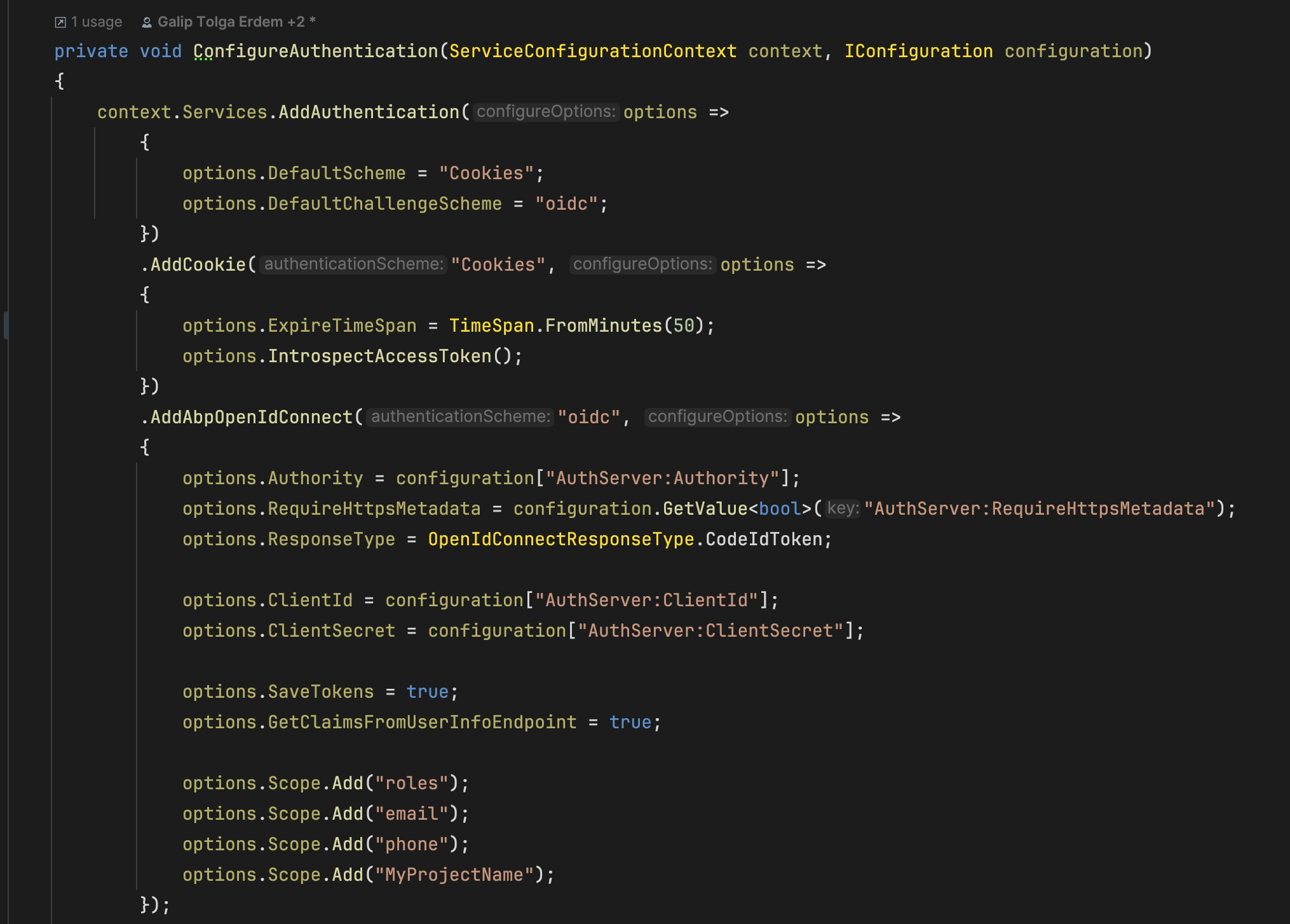
options.Scope.Add("offline_access");- This ensures the refresh_token is issued by the server.
- Ensure cookie and refresh token lifetimes are aligned:
- The default ABP Blazor Server template uses cookie authentication. Set the cookie expiration to match the refresh token lifetime:
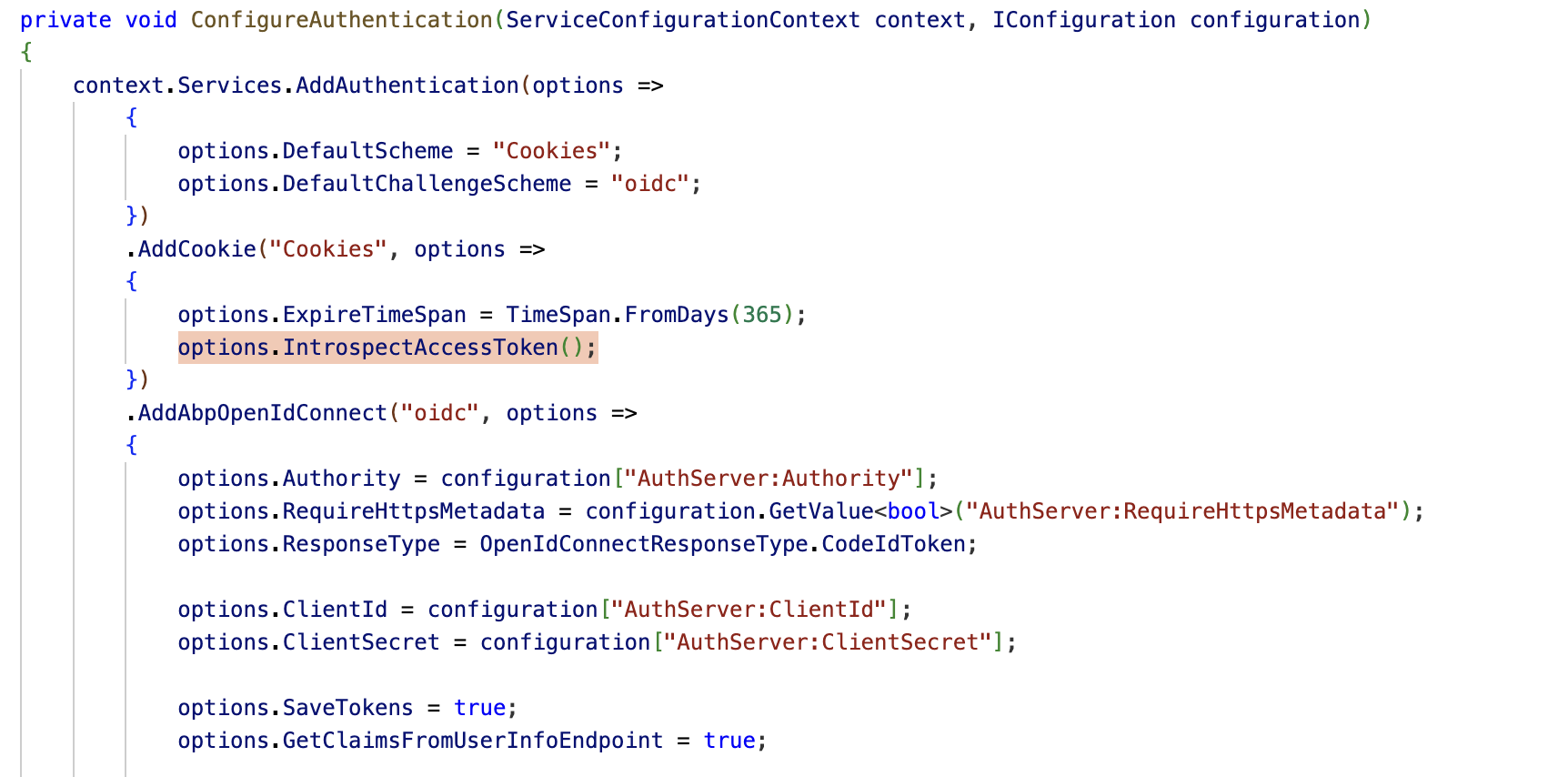
.AddCookie("Cookies", options => { options.ExpireTimeSpan = TimeSpan.FromDays(365); // Example: 1 year })- It is recommended to keep Cookie ExpireTimeSpan and the Refresh Token lifetime the same.
Handle token expiration and refresh:
- ABP does not automatically refresh the access token in Blazor Server. You need to implement logic to detect token expiration and use the refresh token to obtain a new access token.
- You can use the OidcClient or similar libraries to perform the refresh token flow, or call the token endpoint manually with the refresh_token grant type.
Sign out users after token expiration (optional but recommended):
- ABP provides extension methods to sign out users after the access token expires. This ensures the UI reflects the authentication state correctly.
- See the following PR for reference and code you can adapt:
https://github.com/abpframework/abp/pull/15876
Example: Adding offline_access and configuring OpenIdConnect in Blazor Server
services.AddAuthentication(options => { options.DefaultScheme = CookieAuthenticationDefaults.AuthenticationScheme; options.DefaultChallengeScheme = OpenIdConnectDefaults.AuthenticationScheme; }) .AddCookie("Cookies", options => { options.ExpireTimeSpan = TimeSpan.FromDays(365); }) .AddOpenIdConnect(options => { // ... other options ... options.Scope.Add("offline_access"); });- Refreshing the token:
- When the access token expires, use the refresh token to request a new access token from the token endpoint:
var response = await httpClient.RequestRefreshTokenAsync(new RefreshTokenRequest { Address = disco.TokenEndpoint, ClientId = "your-client-id", ClientSecret = "your-client-secret", RefreshToken = "your-refresh-token" });- Store the new access and refresh tokens securely.
For a complete example and more details, see the official ABP documentation and community articles below.
Sources:
- ABP OpenIddict Pro: Refresh Token
- Integrating MAUI Client via using OpenID Connect (refresh token section)
- ABP Support: Authentication token duration and expiration handling
This response was generated by AI. If it didn’t solve your problem, feel free to post a new answer — our support team will jump in to help you soon.
Markdown supported.Copy, paste, or drag & drop images and files (max 100 MB per file, 100 MB total per post) - Request the offline_access scope:
-
0
In my Blazor Server application, I want to redirect the user to the /Account/Login page automatically when the access token expires. Instead of implementing refresh token logic, I prefer to end the session and force the user to log in again.
How can I detect token expiration and trigger a redirect to the login page? For example, is there a recommended way in ABP to handle 401 responses from HTTP requests and redirect accordingly?
Is there a built-in mechanism in ABP for this use case?
Markdown supported.Copy, paste, or drag & drop images and files (max 100 MB per file, 100 MB total per post) -
0
Hi, The options.IntrospectAccessToken(); line is already present, but the redirect to the login page still doesn't happen when the token is invalid.
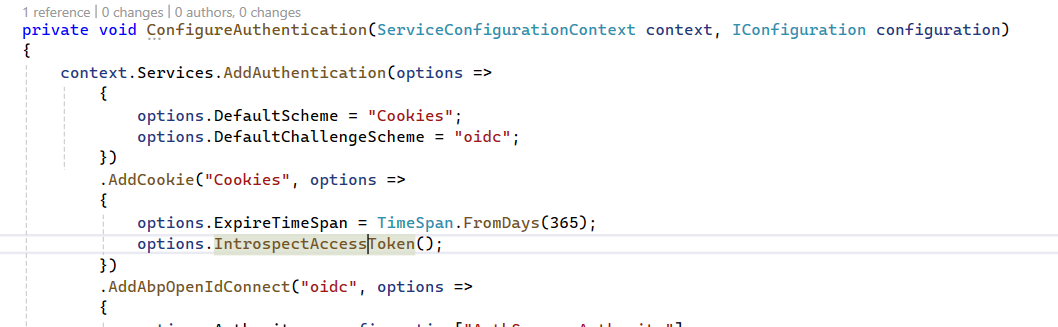 Markdown supported.Copy, paste, or drag & drop images and files (max 100 MB per file, 100 MB total per post)
 -
0
I’m using Blazor Server and my project is targeting .NET 7. Currently, I’m getting the error shown in the attached screenshot.
 Markdown supported.Copy, paste, or drag & drop images and files (max 100 MB per file, 100 MB total per post)
 -
0
Hi, I’ve shared the requested Blazor Server module class via email.
Markdown supported.Copy, paste, or drag & drop images and files (max 100 MB per file, 100 MB total per post) -
0
Unfortunately, I’m still getting the same error.
Markdown supported.Copy, paste, or drag & drop images and files (max 100 MB per file, 100 MB total per post) -
0
In the project, I log in and navigate to any page. After waiting for a certain period of time, when I try to perform an action like a list search or call any GET method again, I receive an error at the bottom saying 'An unhandled exception has occurred. See browser dev tools for details. Reload'. The error description shows a 401 error.
Markdown supported.Copy, paste, or drag & drop images and files (max 100 MB per file, 100 MB total per post) -
0
The system is currently live. If you’d like, I can show you the issue via Zoom.
Markdown supported.Copy, paste, or drag & drop images and files (max 100 MB per file, 100 MB total per post) -
0
I’m unable to share the full project at this time, and unfortunately, we don’t have a demo available either. How do you suggest we proceed?
Markdown supported.Copy, paste, or drag & drop images and files (max 100 MB per file, 100 MB total per post) -
0
hi
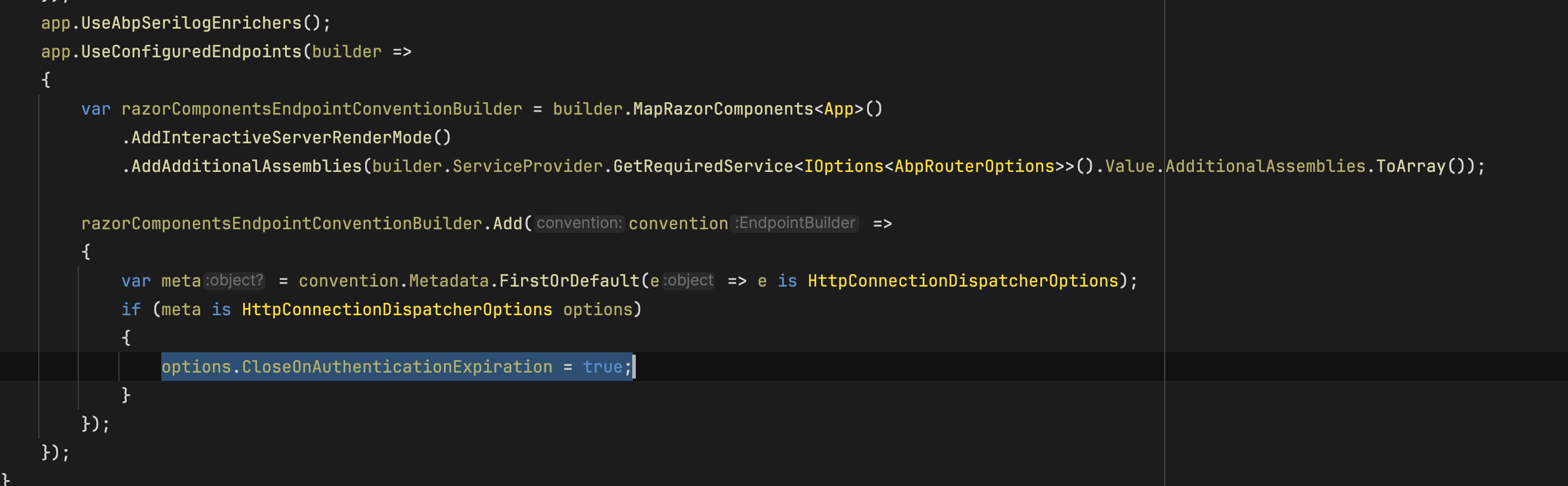
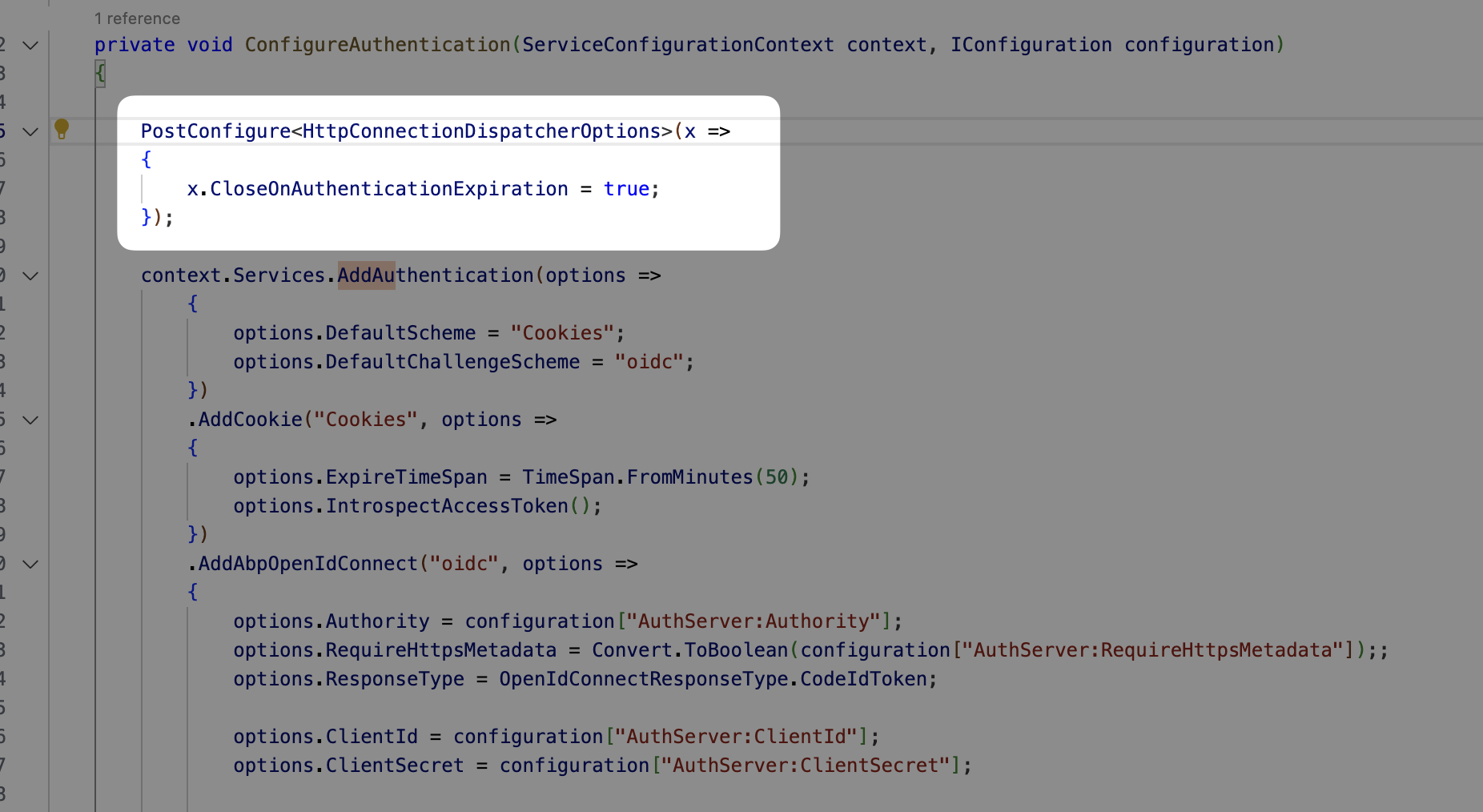
Can you try to use
PreConfigure?PreConfigure<HttpConnectionDispatcherOptions>(x => { x.CloseOnAuthenticationExpiration = true; });You can also output the
AuthenticateResult?.Properties?.ExpiresUtcto logs by adding a custom middleware afterUseAuthenticationapp.UseAuthentication(); app.Use(async (httpContext, next) => { var logger = httpContext.RequestServices.GetRequiredService<ILogger<YourModule>>(); var authenticateResultFeature = context.Features.Get<IAuthenticateResultFeature>(); if (authenticateResultFeature is not null) { logger.LogError("ExpiresUtc: " + authenticateResultFeature.AuthenticateResult?.Properties?.ExpiresUtc); } else { logger.LogError("authenticateResultFeature is null"); } await next(httpContext); });Thanks.
Markdown supported.Copy, paste, or drag & drop images and files (max 100 MB per file, 100 MB total per post) -
0
I've added the code you mentioned. Should I send the log file?
Markdown supported.Copy, paste, or drag & drop images and files (max 100 MB per file, 100 MB total per post) -
0
Thanks. Can you also set the
SlidingExpirationtofalse.AddCookie("Cookies", options => { options.ExpireTimeSpan = TimeSpan.FromDays(365); options.SlidingExpiration = false; options.IntrospectAccessToken(); })And set
.MinimumLevel.Debug()inProgram.csvar loggerConfiguration = new LoggerConfiguration() .MinimumLevel.Debug() .MinimumLevel.Override("Microsoft.EntityFrameworkCore", LogEventLevel.Warning) .Enrich.FromLogContext() .WriteTo.Async(c => c.File("Logs/logs.txt"))Thanks again.
Markdown supported.Copy, paste, or drag & drop images and files (max 100 MB per file, 100 MB total per post) -
0
hi
What is your current Cookie and AccessToken lifetime(minutes)?
Can you test your case in a version 7.2.2 template project?
If you can reproduce, you can share it.
Thanks.
Markdown supported.Copy, paste, or drag & drop images and files (max 100 MB per file, 100 MB total per post)