Can you add the DomainTenantResolveContributor to TenantResolvers and try again?
DomainTenantResolveContributor: Tries to resolve tenancy name from an url, generally from a domain or subdomain.
Configure<AbpTenantResolveOptions>(options =>
{
    options.AddDomainTenantResolver("{0}.somedomain.com");

    options.TenantResolvers.Add(new DomainTenantResolveContributor()); //add DomainTenantResolveContributor
    //...
});
Hi Bernardo, can you remove the $ sign and try again? Because when you define it with $ sign it converts string (because of string interpolation) as "0.somedomain.com" instead of "{0}.somedomain.com".
{0} is the placeholder to determine current tenant's unique name. => https://docs.abp.io/en/abp/4.4/Multi-Tenancy#domain-subdomain-tenant-resolver
Hi @ChetanKumbhar, can you share your ProfileManagementEntityFrameworkCoreTestModule class?
Hi @mrall, probably you are using IHtmlLocalizer<MyResource> please change it to IStringLocalizer<MyResource>. After that change, your localization value won't be html-encoded, it will be view as raw text.
@inject IStringLocalizer<MyResource>
Can I have an update on the progress for this issue.
My client is waiting for this issue to be resovled.This issue is closed: https://github.com/abpframework/abp/issues/9589
I don't have acces to view this: https://github.com/volosoft/volo/issues/7206
Thank you
Hi @cellero, the issue will be resolved in v5.0. (Planned release date for v5.0 is November 18)
[Dependency(ReplaceServices = true)]
[ExposeServices(typeof(AbpSignInManager), typeof(SignInManager<IdentityUser>))]
public class LitmusSiginManager : AbpSignInManager
{
    private readonly IRepository<AppUser, Guid> _appUserRepository;

    public LitmusSiginManager(IdentityUserManager userManager,
        IHttpContextAccessor contextAccessor,
        IUserClaimsPrincipalFactory<Volo.Abp.Identity.IdentityUser> claimsFactory,
        IOptions<IdentityOptions> optionsAccessor,
        ILogger<SignInManager<Volo.Abp.Identity.IdentityUser>> logger,
        IAuthenticationSchemeProvider schemes,
        IUserConfirmation<Volo.Abp.Identity.IdentityUser> confirmation,
        IOptions<AbpIdentityOptions> options,
        IRepository<AppUser, Guid> appUserRepository
        ) : base(userManager,
            contextAccessor,
            claimsFactory,
            optionsAccessor,
            logger,
            schemes,
            confirmation,
            options)
    {
        _appUserRepository = appUserRepository;
    }

    public override async Task<SignInResult> PasswordSignInAsync(Volo.Abp.Identity.IdentityUser user, string password, bool isPersistent, bool lockoutOnFailure)
    {
        var appUser = await _appUserRepository.FirstOrDefaultAsync(x => x.Id == user.Id);

        if (appUser != null)
        {
            if (appUser.Status == AbpUserStatusEnum.InActive)
                throw new AbpAuthorizationException("User is in InActive state.");
        }

        return base.PasswordSignInAsync(user, password, isPersistent, lockoutOnFailure).Result;
    }
}
IdentityServerModule :
public class LitmusIdentityServerModule : AbpModule
{
    public override void PreConfigureServices(ServiceConfigurationContext context)
    {
        PreConfigure<IdentityBuilder>(identityBuilder =>
        {
            identityBuilder.AddSignInManager<LitmusSiginManager>();
        });
    }
}
Can you move the related changes to your separated identity module? And also can you check the IdentityUser's namespace?
It is important to use Volo.Abp.Identity.IdentityUser type for SignInManager.
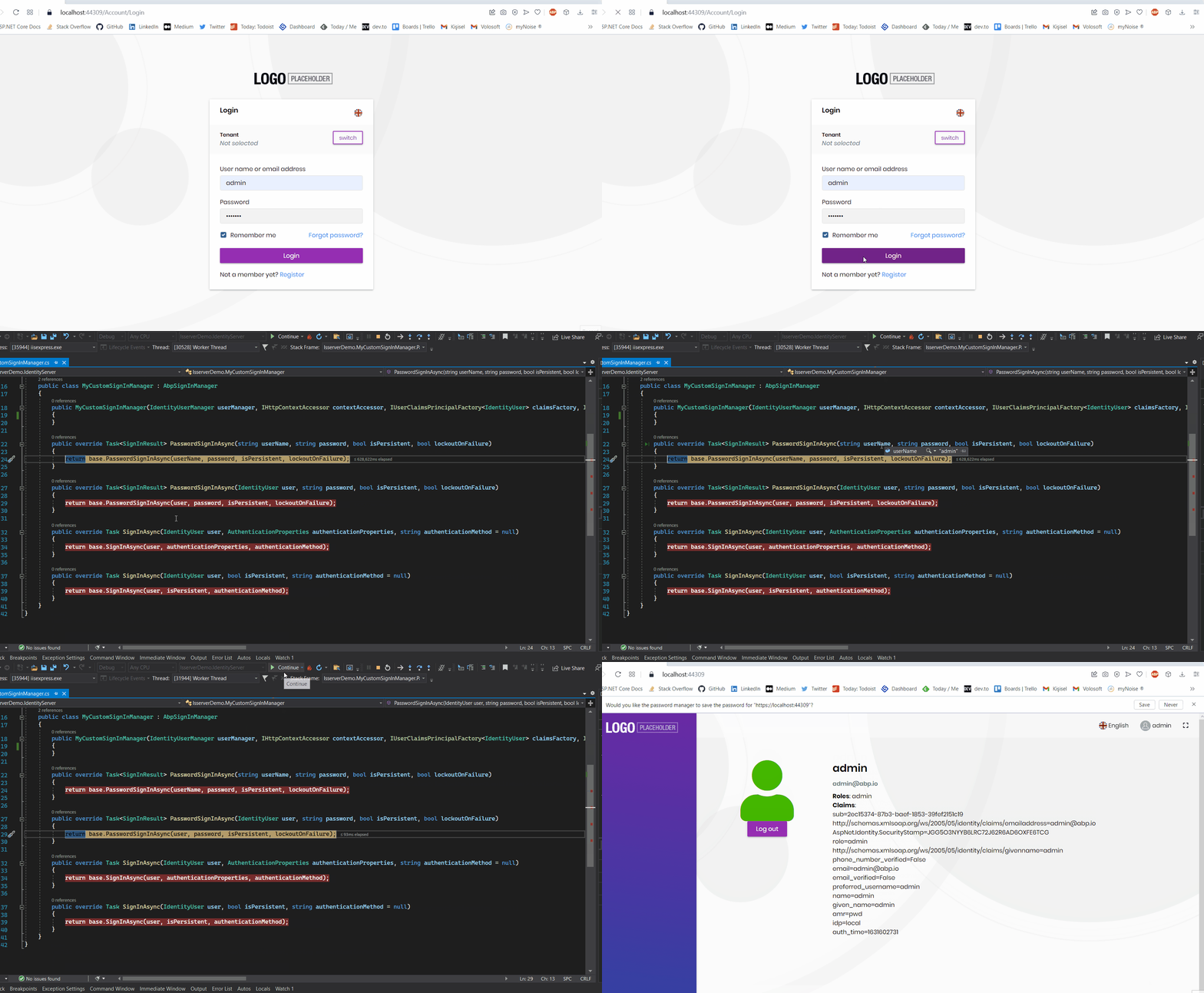
Can you also expose SignInManager<IdentityUser> as below?
[Dependency(ReplaceServices = true)]
[ExposeServices(typeof(AbpSignInManager), typeof(SignInManager<IdentityUser>))]
public class LitmusSiginManager : AbpSignInManager
{
    public override Task<SignInResult> PasswordSignInAsync(string userName, string password, bool isPersistent, bool lockoutOnFailure)
    {
        //your logic
        return base.PasswordSignInAsync(userName, password, isPersistent, lockoutOnFailure);
    }

    public override Task<SignInResult> PasswordSignInAsync(IdentityUser user, string password, bool isPersistent, bool lockoutOnFailure)
    {
        //your logic
        return base.PasswordSignInAsync(user, password, isPersistent, lockoutOnFailure);
    }
}
Do you use separated identity server? If you use, you can add the .IdentityServer project's reference to the project (SCV.Litmus.LitmusIdentity)
Don't forget to add DependsOn.
You're welcome.
It seems your ABP Commercial NuGet Source added with wrong url. (it should be nuget.abp.io not nugut.abp.io)
Please run the dotnet nuget remove source "ABP Commercial NuGet Source" on your terminal and then run the following command
dotnet tool install -g Volo.Abp.Suite --add-source https://nuget.abp.io/xxxxxxxx-xxxx-xxxx-xxxx-xxxxxxxxxxxx/v3/index.json --version 4.4.2.
change the xxxxxxxx-xxxx-xxxx-xxxx-xxxxxxxxxxxx part with your api-key









