Activities of "ademaygun"

We found the problem. There was a line in en.json:

"": "",

I think in this case the error message doesn't describe exactly what the problem is.

  • ABP Framework version: v4.3.3
    • ABP Suite version: v4.3.0
  • UI type: Angular
  • DB provider: EF Core
  • Tiered (MVC) or Identity Server Separated (Angular): no
  • **Volo.Abp.AbpException: The key is empty in given json string. at Volo.Abp.Localization.Json.JsonLocalizationDictionaryBuilder.BuildFromJsonString(String jsonString) at Volo.Abp.Localization.VirtualFiles.Json.JsonVirtualFileLocalizationResourceContributor.CreateDictionaryFromFileContent(String jsonString) at Volo.Abp.Localization.VirtualFiles.VirtualFileLocalizationResourceContributorBase.CreateDictionaryFromFile(IFileInfo file) at Volo.Abp.Localization.VirtualFiles.VirtualFileLocalizationResourceContributorBase.CreateDictionaries() at Volo.Abp.Localization.VirtualFiles.VirtualFileLocalizationResourceContributorBase.GetDictionaries() at Volo.Abp.Localization.VirtualFiles.VirtualFileLocalizationResourceContributorBase.GetOrNull(String cultureName, String name) at Volo.Abp.Localization.LocalizationResourceContributorList.GetOrNull(String cultureName, String name) at Volo.Abp.Localization.AbpDictionaryBasedStringLocalizer.GetLocalizedStringOrNull(String name, String cultureName, Boolean tryDefaults) at Volo.Abp.Localization.AbpDictionaryBasedStringLocalizer.GetLocalizedString(String name, String cultureName) at Volo.Abp.Localization.AbpDictionaryBasedStringLocalizer.GetLocalizedString(String name) at Volo.Abp.Localization.AbpDictionaryBasedStringLocalizer.get_Item(String name) at Volo.Abp.AspNetCore.Mvc.AbpDataAnnotationAutoLocalizationMetadataDetailsProvider.<>c__DisplayClass4_0.<CreateDisplayMetadata>b__0() at Microsoft.AspNetCore.Mvc.ModelBinding.Metadata.DefaultModelMetadata.get_DisplayName() at Microsoft.AspNetCore.Mvc.ModelBinding.ModelMetadata.GetDisplayName() at Microsoft.AspNetCore.Mvc.DataAnnotations.DataAnnotationsModelValidator.Validate(ModelValidationContext validationContext) at Microsoft.AspNetCore.Mvc.ModelBinding.Validation.ValidationVisitor.ValidateNode() at Microsoft.AspNetCore.Mvc.ModelBinding.Validation.ValidationVisitor.VisitSimpleType() at Microsoft.AspNetCore.Mvc.ModelBinding.Validation.ValidationVisitor.VisitImplementation(ModelMetadata& metadata, String& key, Object model) at Microsoft.AspNetCore.Mvc.ModelBinding.Validation.ValidationVisitor.Visit(ModelMetadata metadata, String key, Object model) at Microsoft.AspNetCore.Mvc.ModelBinding.Validation.ValidationVisitor.VisitChildren(IValidationStrategy strategy) at Microsoft.AspNetCore.Mvc.ModelBinding.Validation.ValidationVisitor.VisitComplexType(IValidationStrategy defaultStrategy) at Microsoft.AspNetCore.Mvc.ModelBinding.Validation.ValidationVisitor.VisitImplementation(ModelMetadata& metadata, String& key, Object model) at Microsoft.AspNetCore.Mvc.ModelBinding.Validation.ValidationVisitor.Visit(ModelMetadata metadata, String key, Object model) at Microsoft.AspNetCore.Mvc.ModelBinding.Validation.ValidationVisitor.Validate(ModelMetadata metadata, String key, Object model, Boolean alwaysValidateAtTopLevel, Object container) at Microsoft.AspNetCore.Mvc.ModelBinding.ObjectModelValidator.Validate(ActionContext actionContext, ValidationStateDictionary validationState, String prefix, Object model, ModelMetadata metadata, Object container) at Microsoft.AspNetCore.Mvc.ModelBinding.ParameterBinder.EnforceBindRequiredAndValidate(ObjectModelValidator baseObjectValidator, ActionContext actionContext, ParameterDescriptor parameter, ModelMetadata metadata, ModelBindingContext modelBindingContext, ModelBindingResult modelBindingResult, Object container) at Microsoft.AspNetCore.Mvc.ModelBinding.ParameterBinder.BindModelAsync(ActionContext actionContext, IModelBinder modelBinder, IValueProvider valueProvider, ParameterDescriptor parameter, ModelMetadata metadata, Object value, Object container) at Microsoft.AspNetCore.Mvc.Controllers.ControllerBinderDelegateProvider.<>c__DisplayClass0_0.<<CreateBinderDelegate>g__Bind|0>d.MoveNext() --- End of stack trace from previous location --- at Microsoft.AspNetCore.Mvc.Infrastructure.ControllerActionInvoker.<InvokeInnerFilterAsync>g__Awaited|13_0(ControllerActionInvoker invoker, Task lastTask, State next, Scope scope, Object state, Boolean isCompleted) at Microsoft.AspNetCore.Mvc.Infrastructure.ResourceInvoker.<InvokeNextExceptionFilterAsync>g__Awaited|25_0(ResourceInvoker invoker, Task lastTask, State next, Scope scope, Object state, Boolean isCompleted) **:

I created entities with Abp Suite. I am trying to post entity with postman. But I got above error although name has value in json. If I remove [Required] exception losts.

public class ServiceBalanceChangeReasonCreateDto
{
    [Required]
    public string Name { get; set; }
}
public virtual async Task<ServiceBalanceChangeReasonDto> CreateAsync(ServiceBalanceChangeReasonCreateDto input)
{
...
...
}

EDIT : This error occurs on all Required usages in CreateOrUpdate..Dtos (all AppService methods) we got this error in all enviroments(debug,stage and prod)

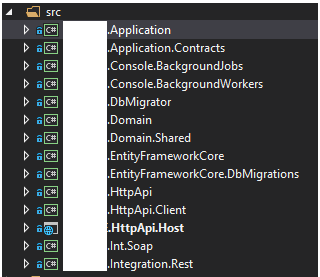
Hi Maliming, There is not a .Web project (csproj) in our solution. How can we override it? We don't know which project it is in.
Answer

Create new CRUD by CRUD Generator

ABP Framework version: v4.3.0 UI type: Angular DB provider: EF Core **Tiered (MVC) or Identity Server Separated (Angular): **no

When I create a new CRUD entity I get this error:

[11:40:08 INF] Running the Angular Schematics command: npx "C:/Workspace/OrderManagementSystem/src/angular/.suite/schematics/node_modules/.bin/ng" g ".suite/schematics/collection.json:entity" app-pro Neuca.OrderManagementSystem "C:/Workspace/OrderManagementSystem/src/aspnet-core/.suite/entities/Sample.json" [11:40:18 INF] Angular Schematics command failed. npm ERR! code ENOENT npm ERR! syscall open npm ERR! path C:/Workspace/OrderManagementSystem/src/angular/.suite/schematics/node_modules/.bin/ng/package.json npm ERR! errno -4058 npm ERR! enoent ENOENT: no such file or directory, open 'C:\Workspace\OrderManagementSystem\src\angular.suite\schematics\node_modules.bin\ng\package.json' npm ERR! enoent This is related to npm not being able to find a file. npm ERR! enoent

Hi @tomasz.lewandowski,

We had same problem and solved via below method :

Can you check npm and node version ,

npm -v
node -v

node version should be 14 and npm version should be 6.*

  1. rename .suite directory which is under angular directory
  2. restart ABP Suite and try again to create UI

see also:

https://support.abp.io/QA/Questions/807/Bugs--Issues-v42X#answer-a3396338-ee7a-4f99-4f78-39fae1635298

@armanozak It would be nice if Abp suite did the version check (npm and node)

Hi @gvnuysal,

It isn't related with your license, it's related to ABP version. You should upgrade to latest stable version.

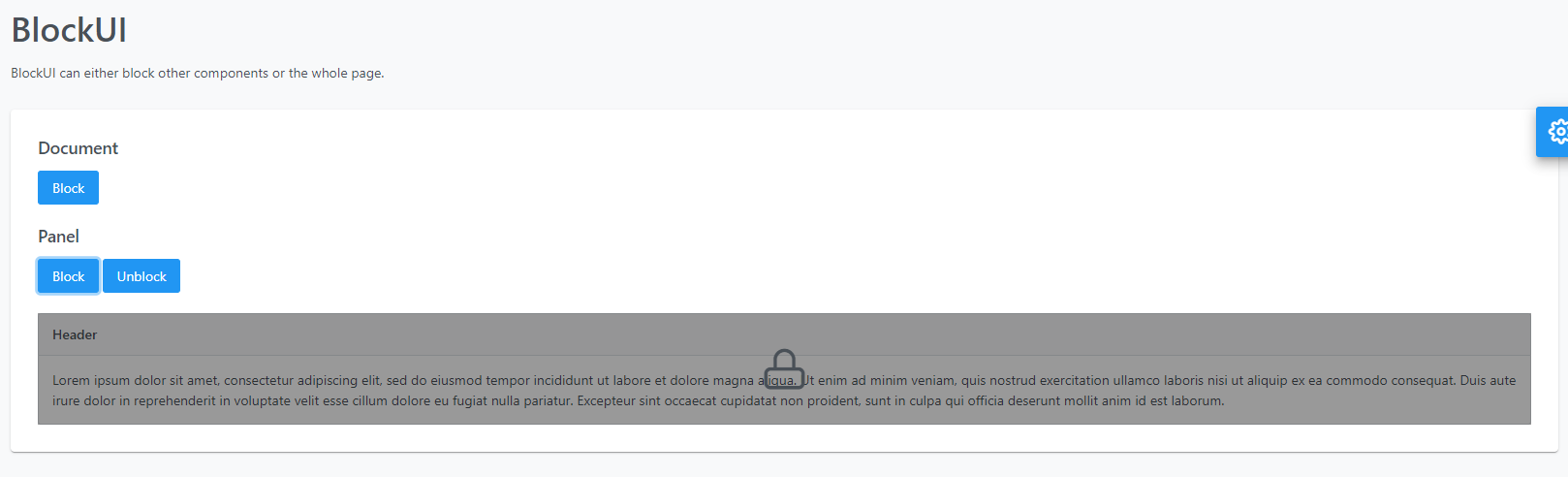
we tried abploading directive, it shows a very small spinner center of screen, we need blur affect like below
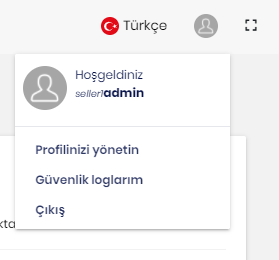
Tenant name seems under profile popup after V4.1.2, it is a bit small, but does the job
  • ABP Framework version: v4.1.2
  • UI type: Angular
  • DB provider: EF Core
  • Tiered (MVC) or Identity Server Separated (Angular): no

Does ABP(Angular) UI have a functionality after click on a button (save,load,delete) gives processing information and block some part of page with a spinning animation?

Answer

Hello, We cannot find any UI page about Background Jobs in commercial (angular) web panel. Is there your a roadmap planning about Background Jobs Management UI page(s)

Answer

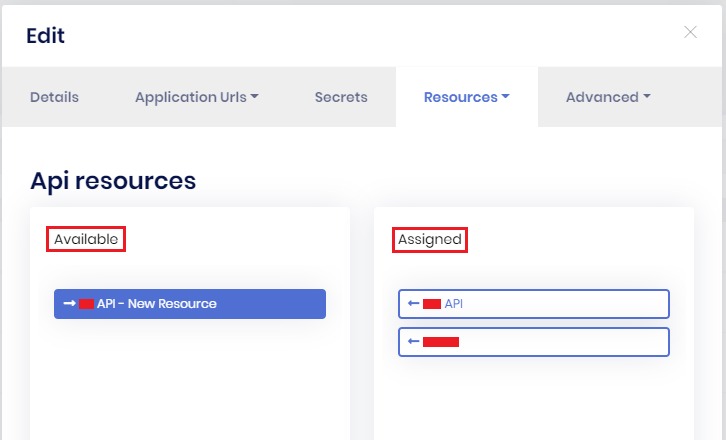
Hi, In the below screen "Available" and "Assign" captions are mismatched. Screens : Identity Resources, API Resources (Administration->IdentityServer->Clients->Actions->Edit->Resources->Api Resources)

Showing 101 to 110 of 113 entries
Boost Your Development
ABP Live Training
Packages
See Trainings
Mastering ABP Framework Book
The Official Guide
Mastering
ABP Framework
Learn More
Mastering ABP Framework Book
Made with ❤️ on ABP v10.8.0-preview. Updated on October 21, 2026, 11:09
1
ABP Assistant
🔐 You need to be logged in to use the chatbot. Please log in first.


