Hi,
This issue doesn't seem to be related to us. Do you see the same errors when you try it in Chrome?
See more: https://github.com/dotnet/runtime/issues/98288
Hi,
I understand your problem and now I can reproduce it in ABP's startup template. I will create an internal issue related to the subject. In this process, you can apply the following method as a workaround solution.
Use InteractiveServer instead of InteractiveAuto for Routes component in MyApp.Blazor/Components/App.razor like below:
@using System.Globalization
@using Microsoft.Extensions.Hosting
@using Volo.Abp.AspNetCore.Components.Server.LeptonXTheme.Bundling
@using Volo.Abp.AspNetCore.Components.Server.LeptonXTheme.Components
@using Volo.Abp.Localization
@using Volo.Abp.AspNetCore.Components.Web.Theming.Bundling
@inject IHostEnvironment Env
@{
    var rtl = CultureHelper.IsRtl ? "rtl" : string.Empty;
}

<!DOCTYPE html>
<html lang="@CultureInfo.CurrentCulture.Name" dir="@rtl">
<head>
    <meta charset="utf-8" />
    <meta name="viewport" content="width=device-width, initial-scale=1.0" />
    <title>NewBlazorWebApp</title>
    <base href="/" />

    <AbpStyles BundleName="@BlazorLeptonXThemeBundles.Styles.Global" WebAssemblyStyleFiles="GlobalStyles" @rendermode="InteractiveAuto" />

    <HeadOutlet @rendermode="InteractiveAuto" />

    <AppearanceStyles/>

</head>
<body class="abp-application-layout @rtl">

    <Routes @rendermode="InteractiveServer" /> // this line changed

    <div id="blazor-error-ui">
        @if (Env.IsDevelopment())
        {
            <text>An unhandled exception has occurred. See browser dev tools for details.</text>
        }
        else if (Env.IsStaging() || Env.IsProduction())
        {
            <text>An error has occurred. This application may no longer respond until reloaded.</text>
        }
        <a href="" class="reload">Reload</a>
        <a class="dismiss">🗙</a>
    </div>

    <AbpScripts BundleName="@BlazorLeptonXThemeBundles.Scripts.Global" WebAssemblyScriptFiles="GlobalScripts" @rendermode="InteractiveAuto" />

    <script src="_framework/blazor.web.js"></script>

</body>
</html>

@code{
    private List<string> GlobalStyles =>
    [
        "global.css",
        "main.css",
        "blazor-global-styles.css"
    ];

    private List<string> GlobalScripts =>
    [
        "global.js"
    ];
}
Closing the issue. Feel free to re-open or create a new issue if you have further questions.
Hi,
I will try to review the sample application you sent tomorrow afternoon.
Thanks.
Hi,
Thank you for the information. I understand your problem.
If you use UseStaticFiles middleware instead of MapStaticAssets you will see that there is no problem. The problem is that the MapStaticAssets middleware does not support modifying static files after build/publishing.
You can use UseStaticFiles middleware instead of MapStaticAssets if you want to solve the problem. Or you can follow the steps below:
Create AbpStaticFileProvider:
public class AbpStaticFileProvider : IFileProvider
{
    private readonly Matcher _matcher;
    private readonly IFileProvider _fileProvider;

    /// <param name="fileProvider">The file provider to be used to get the files.</param>
    /// <param name="fileNamePatterns">The file name patterns to include when serving static files (e.g., "appsettings*.json").
    /// Supports glob patterns. See <see href="https://learn.microsoft.com/en-us/dotnet/core/extensions/file-globbing">Glob patterns documentation</see>.
    /// </param>
    public AbpStaticFileProvider(IReadOnlyList<string> fileNamePatterns, IFileProvider fileProvider)
    {
        _fileProvider = fileProvider;
        _matcher = new Matcher(StringComparison.OrdinalIgnoreCase);
        _matcher.AddIncludePatterns(fileNamePatterns);
    }

    public IDirectoryContents GetDirectoryContents(string subpath)
    {
        return new NotFoundDirectoryContents();
    }

    public IFileInfo GetFileInfo(string subpath)
    {
        return _matcher.Match(Path.GetFileName(subpath)).HasMatches ?
            _fileProvider.GetFileInfo(subpath) :
            new NotFoundFileInfo(subpath);
    }

    public IChangeToken Watch(string filter)
    {
        return NullChangeToken.Singleton;
    }
}
You can then invoke the UseStaticAssets middleware before the MapStaticAssets middleware as follows:
app.UseStaticFiles(new StaticFileOptions
{
    ~~~~FileProvider = new AbpStaticFileProvider(["appsettings*.json"], env.WebRootFileProvider)
});
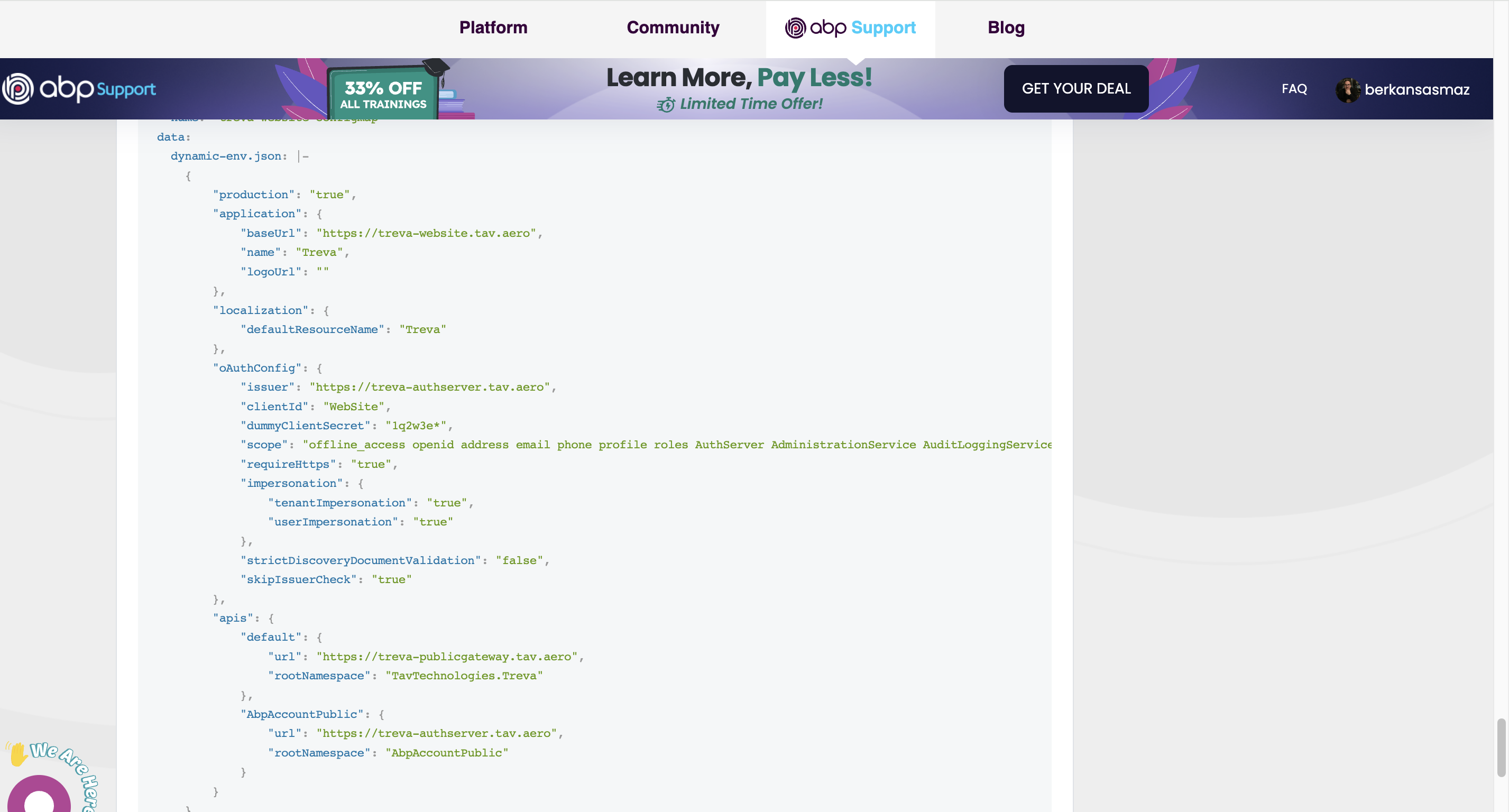
I don't see that you override any CorsOrigins variable in your ConfigMap, am I missing something? Where do you set CorsOrigins for values in production environment?
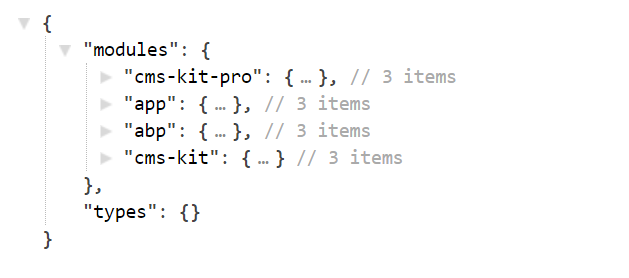
abp generate-proxy -t csharp -u https://localhost:44361/ -m YourModuleName
You can get the modules on https://YourWebsite/api/abp/api-definition
eg https://abp.io//api/abp/api-definition
Hi again,
For this, you can create the file Themes/LeptonX/Layouts/Application/_Footer.cshtml and customize its content as follows:
<div class="lpx-footbar-container">
    <div class="lpx-footbar">
        <div class="lpx-footbar-copyright">
            <span>@DateTime.UtcNow.Year©</span>
            <a href="https://leptontheme.com/" target="_blank">Lepton Theme</a>
            <span>by</span>
            <a href="https://volosoft.com/" target="_blank">Volosoft</a>
        </div>
        <div class="lpx-footbar-solo-links">
            <a href="#">About</a>
            <a href="#">Privacy</a>
            <a href="#">Contact</a>
        </div>
    </div>
</div>
I am closing this question. If you have any other questions, you can open a new question.
As far as I understand, the problem does not seem to be related to ABP. I found a content like below in ASP.NET's Blazor documentation:
To prevent developer code in OnInitializedAsync from running twice when prerendering, see the Stateful reconnection after prerendering section. The content in the section focuses on Blazor Web Apps and stateful SignalR reconnection. To preserve state during the execution of initialization code while prerendering, see Prerender ASP.NET Core Razor components.
Reference: https://learn.microsoft.com/en-us/aspnet/core/blazor/components/lifecycle?view=aspnetcore-9.0#component-initialization-oninitializedasync
You can also look here on how to prevent this.
Hi,
I can reproduce the problem according to the information you provided. I am opening an internal issue to fix this problem in the code generated by Suite.









