It is easy to replicate. Have you tried?
Just create a new Blazor Server project using ABP Suite.
Create a simple entity.
Add a record
Export. Fail.
I'll share via Google Drive later.
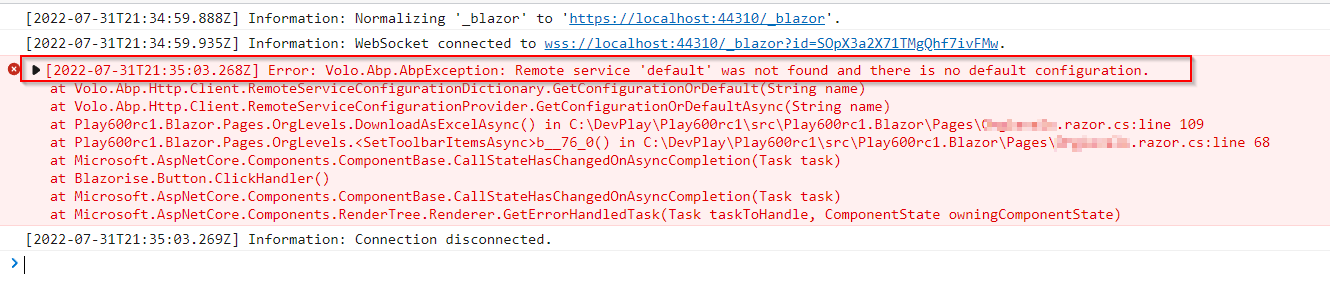
When clicking on the Export to Excel Button.

The following error is given:

<ItemGroup> <PackageReference Include="AspNetCore.HealthChecks.UI" Version="6.0.1-rc2.4" /> <PackageReference Include="AspNetCore.HealthChecks.UI.Client" Version="6.0.1-rc2.4" /> <PackageReference Include="AspNetCore.HealthChecks.UI.InMemory.Storage" Version="6.0.1-rc2.4" /> <PackageReference Include="Serilog.AspNetCore" Version="4.0.0" /> <PackageReference Include="Serilog.Sinks.Async" Version="1.5.0" /> <PackageReference Include="Blazorise.Bootstrap5" Version="1.0.2" /> <PackageReference Include="Blazorise.Icons.FontAwesome" Version="1.0.2" /> <PackageReference Include="Microsoft.AspNetCore.Authentication.Google" Version="6.0.0" /> <PackageReference Include="Microsoft.AspNetCore.Authentication.MicrosoftAccount" Version="6.0.0" /> <PackageReference Include="Microsoft.AspNetCore.Authentication.Twitter" Version="6.0.0" /> <PackageReference Include="Volo.Abp.AspNetCore.Components.Server.LeptonXTheme" Version="1.0.0-beta.1" /> <PackageReference Include="Volo.Abp.AspNetCore.Mvc.UI.Theme.LeptonX" Version="1.0.0-beta.1" /> </ItemGroup>
<ItemGroup> <ProjectReference Include="..\Cellero522.Application\Cellero522.Application.csproj" /> <ProjectReference Include="..\Cellero522.HttpApi\Cellero522.HttpApi.csproj" /> <ProjectReference Include="..\Cellero522.EntityFrameworkCore\Cellero522.EntityFrameworkCore.csproj" /> <PackageReference Include="Volo.Abp.Autofac" Version="5.2.2" /> <PackageReference Include="Volo.Abp.Swashbuckle" Version="5.2.2" /> <PackageReference Include="Volo.Abp.AspNetCore.Serilog" Version="5.2.2" /> <PackageReference Include="Volo.Abp.AspNetCore.Mvc.UI.Theme.Lepton" Version="5.2.2" /> <PackageReference Include="Volo.Abp.AspNetCore.Components.Server.LeptonTheme" Version="5.2.2" /> <PackageReference Include="Volo.Abp.Account.Pro.Public.Web.IdentityServer" Version="5.2.2" /> <PackageReference Include="Volo.Abp.Account.Pro.Public.Blazor.Server" Version="5.2.2" /> <PackageReference Include="Volo.Abp.Account.Pro.Admin.Blazor.Server" Version="5.2.2" /> <PackageReference Include="Volo.Abp.Account.Pro.Public.Web.Impersonation" Version="5.2.2" /> <PackageReference Include="Volo.Abp.AuditLogging.Blazor.Server" Version="5.2.2" /> <PackageReference Include="Volo.Abp.Identity.Pro.Blazor.Server" Version="5.2.2" /> <PackageReference Include="Volo.Abp.LeptonTheme.Management.Blazor.Server" Version="5.2.2" /> <PackageReference Include="Volo.Abp.IdentityServer.Blazor.Server" Version="5.2.2" /> <PackageReference Include="Volo.Abp.LanguageManagement.Blazor.Server" Version="5.2.2" /> <PackageReference Include="Volo.Saas.Host.Blazor.Server" Version="5.2.2" /> <PackageReference Include="Volo.Abp.TextTemplateManagement.Blazor.Server" Version="5.2.2" /> </ItemGroup>
The project is newly created using 5.2.2 templates:


I see 5.2.2 has been released and the LeptonX instructions have had some updates so I have tried again.
Instructions: https://docs.abp.io/en/commercial/5.3/themes/lepton-x/commercial/blazor?UI=BlazorServer
Updates still required on instructions:
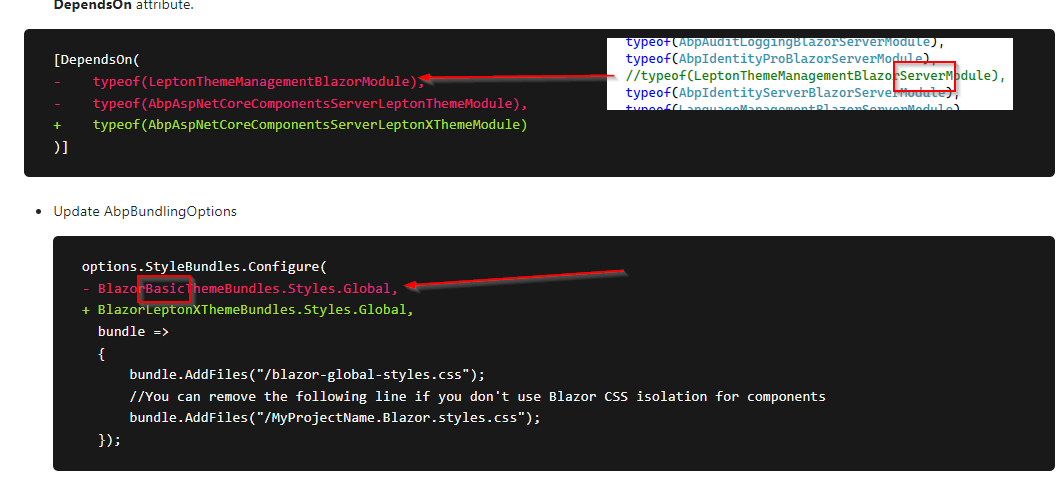

I created a new Blazor Server 5.2.2 project using ABP Suite and followed the instructions for LeptonX, but still get this error:
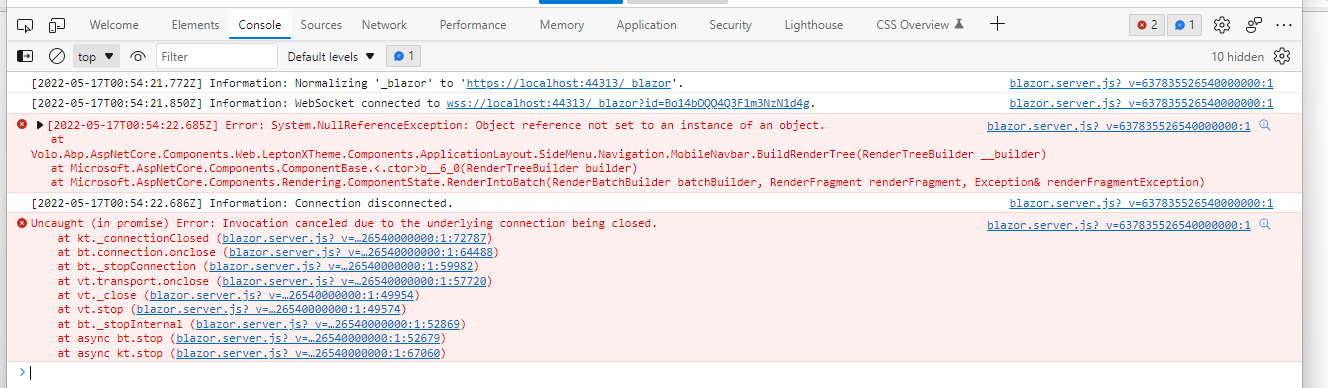
Error: System.NullReferenceException: Object reference not set to an instance of an object. at Volo.Abp.AspNetCore.Components.Web.LeptonXTheme.Components.ApplicationLayout.SideMenu.Navigation.MobileNavbar.BuildRenderTree(RenderTreeBuilder __builder) at Microsoft.AspNetCore.Components.ComponentBase.<.ctor>b__6_0(RenderTreeBuilder builder) at Microsoft.AspNetCore.Components.Rendering.ComponentState.RenderIntoBatch(RenderBatchBuilder batchBuilder, RenderFragment renderFragment, Exception& renderFragmentException)
@malik.masis you offered to help solve this - yes please.
Since my original attempts, I've updated ABP Suite to 5.3.0-rc1 and tried again. I'm now getting a different issue. Here are the steps followed both on 5.3.0-rc1 and 5.2.1
Create fresh project using ABP Suite. V5.3.0-rc.1
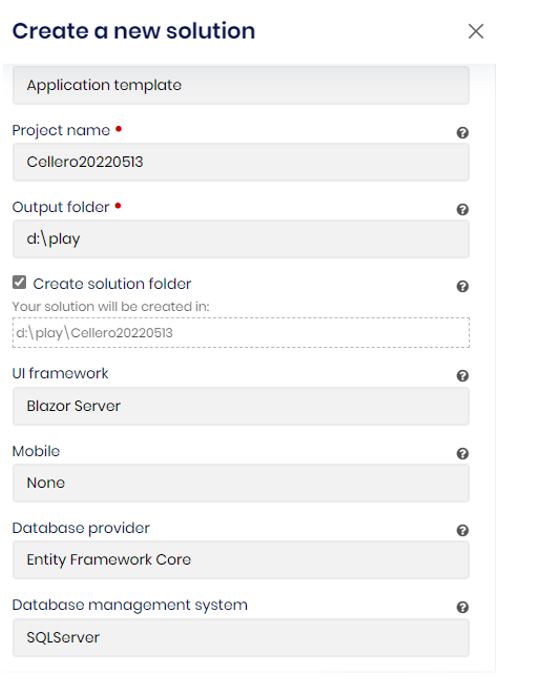

Run DbMigrator, abp install-libs and then Blazor project to confirm running ok
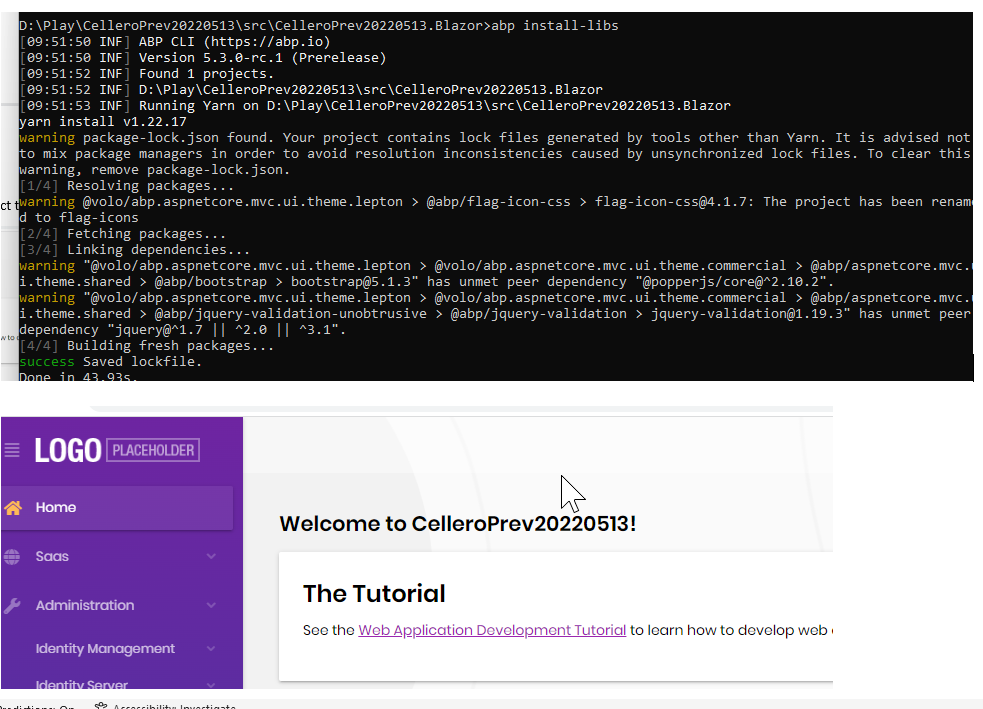
NB: abp install-libs required as nothing exists in wwwrooot\libs folder
LeptonX Setup Following these instructions: https://docs.abp.io/en/commercial/5.3/themes/lepton-x/commercial/blazor?UI=BlazorServer
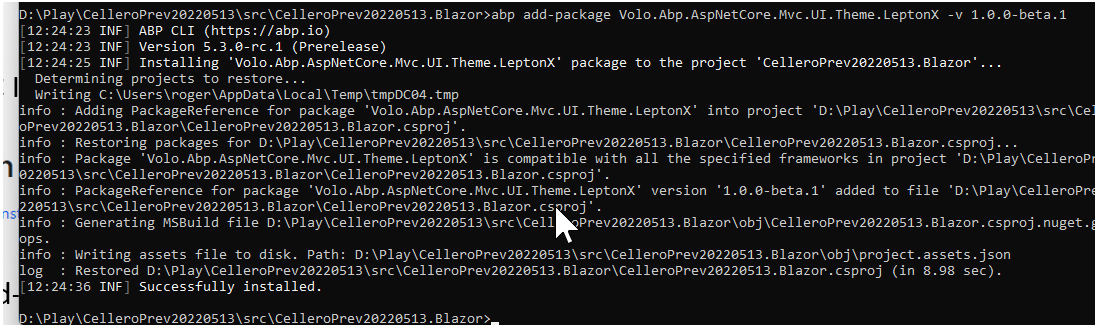
Modified add-package command to include version number:
abp add-package Volo.Abp.AspNetCore.Mvc.UI.Theme.LeptonX -v 1.0.0-beta.1
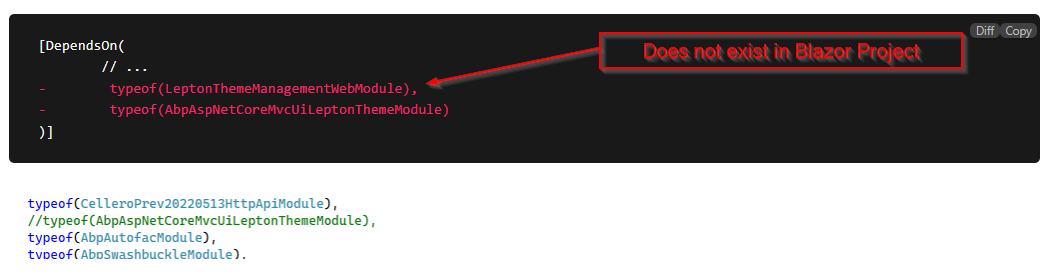
Comment out DependsOn:
End of MVC instructions

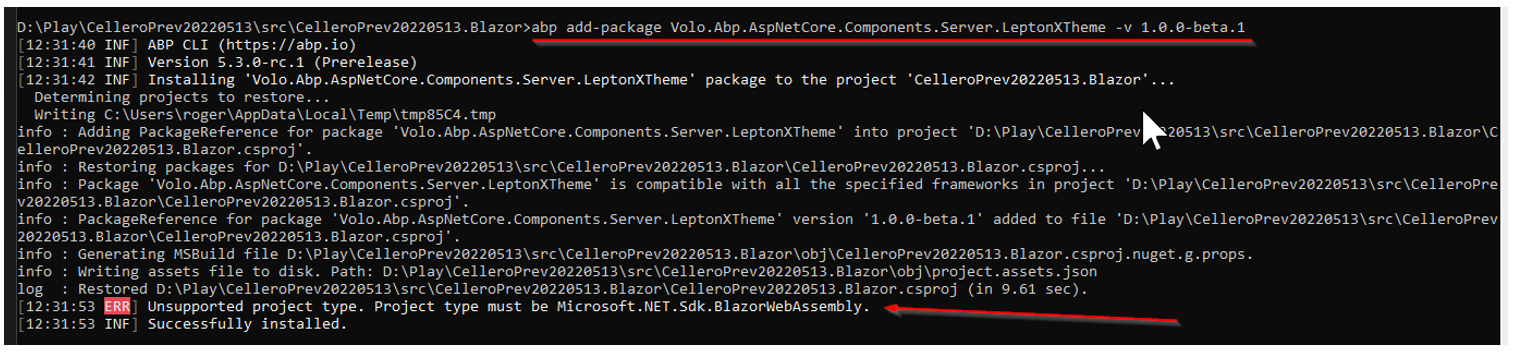 Repeat commenting out of the MVC DependsOn as the step above reinstates:
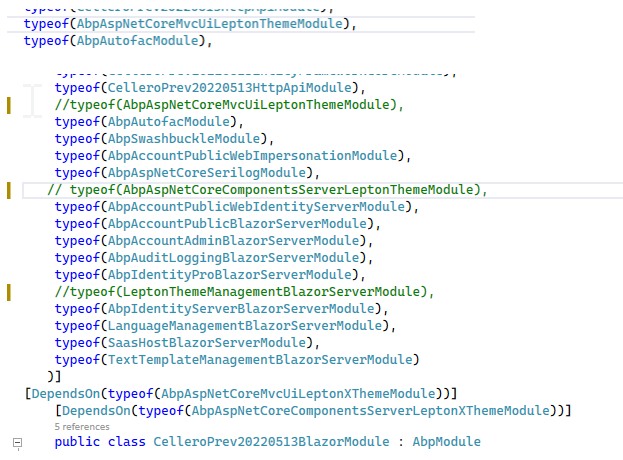
ConfigureBundles
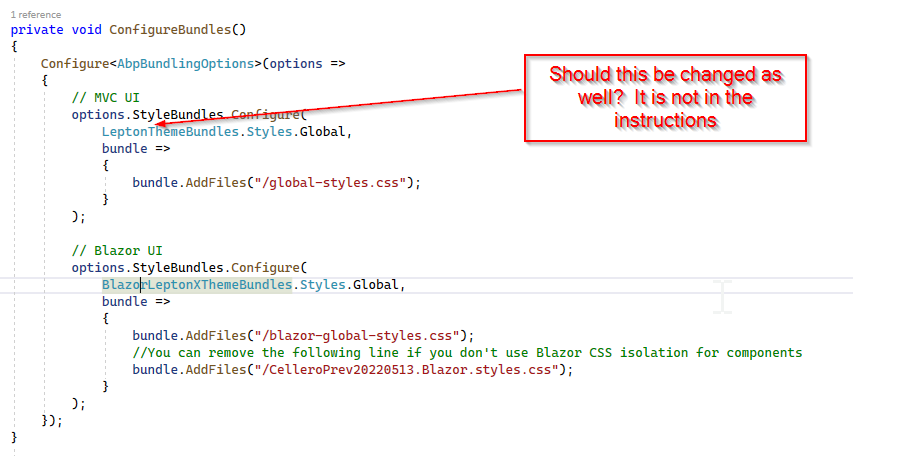
Update _Host.cshtml
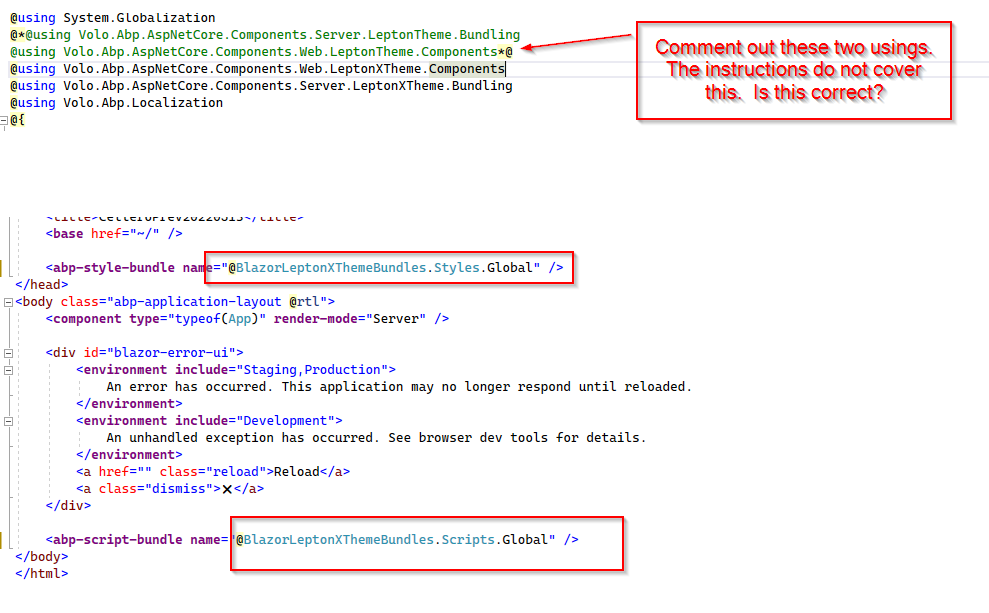
Installation complete.
Run project and its broken:
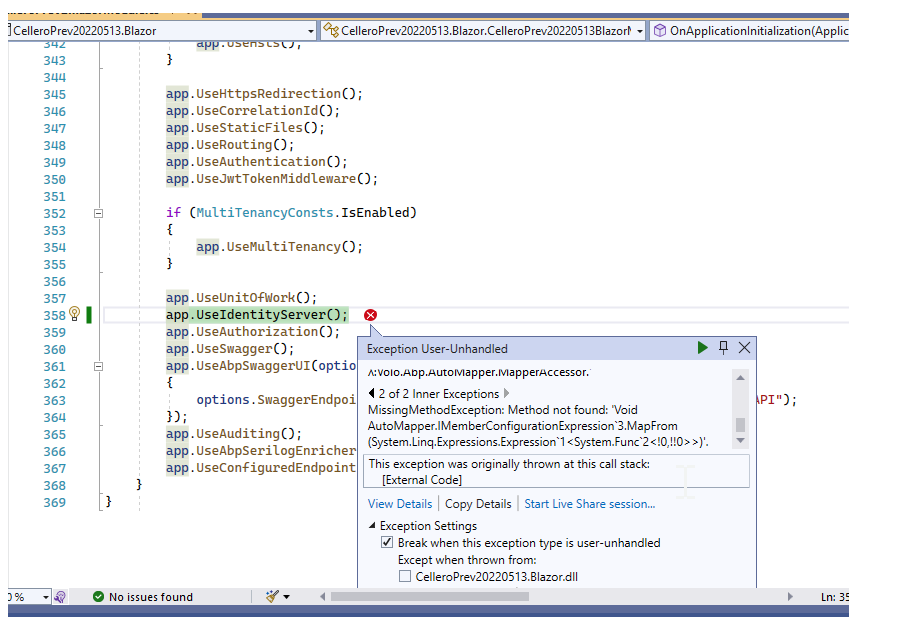 Autofac.Core.DependencyResolutionException
HResult=0x80131500
Message=An exception was thrown while activating Volo.Abp.IdentityServer.Grants.PersistedGrantStore -> Volo.Abp.ObjectMapping.DefaultObjectMapper
Autofac.Core.DependencyResolutionException
HResult=0x80131500
Message=An exception was thrown while activating Volo.Abp.IdentityServer.Grants.PersistedGrantStore -> Volo.Abp.ObjectMapping.DefaultObjectMapper1[[Volo.Abp.IdentityServer.AbpIdentityServerDomainModule, Volo.Abp.IdentityServer.Domain, Version=5.3.0.0, Culture=neutral, PublicKeyToken=null]] -> Volo.Abp.AutoMapper.AutoMapperAutoObjectMappingProvider1[[Volo.Abp.IdentityServer.AbpIdentityServerDomainModule, Volo.Abp.IdentityServer.Domain, Version=5.3.0.0, Culture=neutral, PublicKeyToken=null]] -> λ:Volo.Abp.AutoMapper.IMapperAccessor -> λ:Volo.Abp.AutoMapper.MapperAccessor.
Source=Autofac
StackTrace:
at Autofac.Core.Resolving.Middleware.ActivatorErrorHandlingMiddleware.Execute(ResolveRequestContext context, Action1 next) at Autofac.Core.Resolving.Pipeline.ResolvePipelineBuilder.<>c__DisplayClass14_0.<BuildPipeline>b__1(ResolveRequestContext ctxt) at Autofac.Core.Pipeline.ResolvePipeline.Invoke(ResolveRequestContext ctxt) at Autofac.Core.Resolving.Middleware.RegistrationPipelineInvokeMiddleware.Execute(ResolveRequestContext context, Action1 next)
at Autofac.Core.Resolving.Pipeline.ResolvePipelineBuilder.<>c__DisplayClass14_0.<BuildPipeline>b__1(ResolveRequestContext ctxt)
at Autofac.Core.Resolving.Middleware.SharingMiddleware.Execute(ResolveRequestContext context, Action1 next) at Autofac.Core.Resolving.Pipeline.ResolvePipelineBuilder.<>c__DisplayClass14_0.<BuildPipeline>b__1(ResolveRequestContext ctxt) at Autofac.Core.Resolving.Pipeline.ResolvePipelineBuilder.<>c__DisplayClass14_0.<BuildPipeline>b__1(ResolveRequestContext ctxt) at Autofac.Core.Resolving.Middleware.CircularDependencyDetectorMiddleware.Execute(ResolveRequestContext context, Action1 next)
at Autofac.Core.Resolving.Pipeline.ResolvePipelineBuilder.<>c__DisplayClass14_0.<BuildPipeline>b__1(ResolveRequestContext ctxt)
at Autofac.Core.Pipeline.ResolvePipeline.Invoke(ResolveRequestContext ctxt)
at Autofac.Core.Resolving.ResolveOperation.InvokePipeline(ResolveRequest request, DefaultResolveRequestContext requestContext)
at Autofac.Core.Resolving.ResolveOperation.GetOrCreateInstance(ISharingLifetimeScope currentOperationScope, ResolveRequest request)
at Autofac.Core.Resolving.ResolveOperation.ExecuteOperation(ResolveRequest request)
at Autofac.Core.Resolving.ResolveOperation.Execute(ResolveRequest request)
at Autofac.Core.Lifetime.LifetimeScope.ResolveComponent(ResolveRequest request)
at Autofac.ResolutionExtensions.TryResolveService(IComponentContext context, Service service, IEnumerable1 parameters, Object& instance) at Autofac.ResolutionExtensions.ResolveOptionalService(IComponentContext context, Service service, IEnumerable1 parameters)
at Autofac.ResolutionExtensions.ResolveOptional(IComponentContext context, Type serviceType, IEnumerable`1 parameters)
at Autofac.ResolutionExtensions.ResolveOptional(IComponentContext context, Type serviceType)
at Autofac.Extensions.DependencyInjection.AutofacServiceProvider.GetService(Type serviceType)
at Microsoft.AspNetCore.Builder.IdentityServerApplicationBuilderExtensions.TestService(IServiceProvider serviceProvider, Type service, ILogger logger, String message, Boolean doThrow)
at Microsoft.AspNetCore.Builder.IdentityServerApplicationBuilderExtensions.Validate(IApplicationBuilder app)
at Microsoft.AspNetCore.Builder.IdentityServerApplicationBuilderExtensions.UseIdentityServer(IApplicationBuilder app, IdentityServerMiddlewareOptions options)
at CelleroPrev20220513.Blazor.CelleroPrev20220513BlazorModule.OnApplicationInitialization(ApplicationInitializationContext context) in D:\Play\CelleroPrev20220513\src\CelleroPrev20220513.Blazor\CelleroPrev20220513BlazorModule.cs:line 358
at Volo.Abp.Modularity.AbpModule.OnApplicationInitializationAsync(ApplicationInitializationContext context)
at Volo.Abp.Modularity.OnApplicationInitializationModuleLifecycleContributor.
This exception was originally thrown at this call stack: [External Code] Inner Exception 1: TargetInvocationException: Exception has been thrown by the target of an invocation.
Inner Exception 2:
MissingMethodException: Method not found: 'Void AutoMapper.IMemberConfigurationExpression3.MapFrom(System.Linq.Expressions.Expression1<System.Func`2<!0,!!0>>)'.
Other Attempts
Apply the Lite version to 5.2.1 ABP Suite project
The project runs:
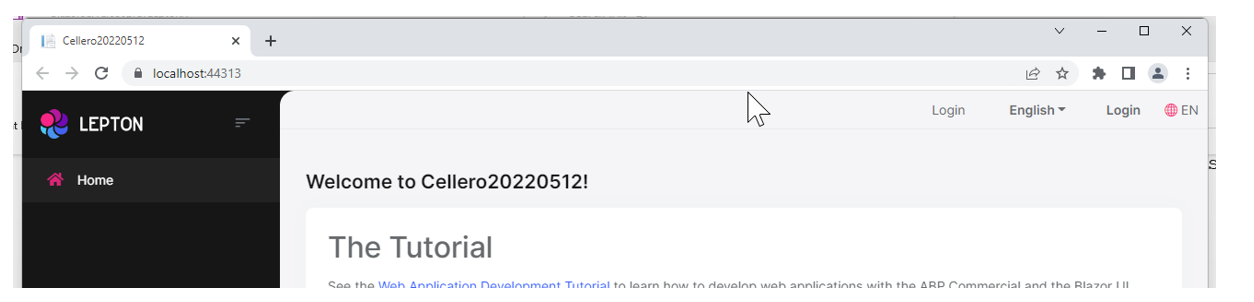
Blazor server results in this:
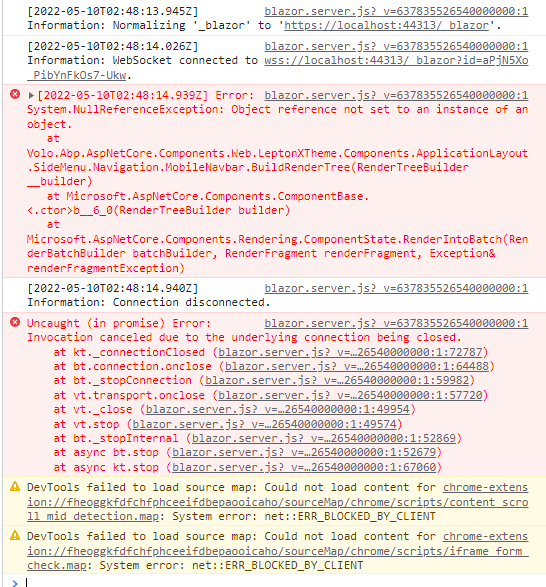
[2022-05-10T02:48:13.945Z] Information: Normalizing '_blazor' to 'https://localhost:44313/_blazor'. blazor.server.js?_v=637835526540000000:1 [2022-05-10T02:48:14.026Z] Information: WebSocket connected to wss://localhost:44313/_blazor?id=aPjN5Xo_PibYnFkOs7-Ukw. blazor.server.js?_v=637835526540000000:1 [2022-05-10T02:48:14.939Z] Error: System.NullReferenceException: Object reference not set to an instance of an object. at Volo.Abp.AspNetCore.Components.Web.LeptonXTheme.Components.ApplicationLayout.SideMenu.Navigation.MobileNavbar.BuildRenderTree(RenderTreeBuilder __builder) at Microsoft.AspNetCore.Components.ComponentBase.<.ctor>b__6_0(RenderTreeBuilder builder) at Microsoft.AspNetCore.Components.Rendering.ComponentState.RenderIntoBatch(RenderBatchBuilder batchBuilder, RenderFragment renderFragment, Exception& renderFragmentException) log @ blazor.server.js?_v=637835526540000000:1 blazor.server.js?_v=637835526540000000:1 [2022-05-10T02:48:14.940Z] Information: Connection disconnected. blazor.server.js?_v=637835526540000000:1 Uncaught (in promise) Error: Invocation canceled due to the underlying connection being closed. at kt._connectionClosed (blazor.server.js?_v=637835526540000000:1:72787) at bt.connection.onclose (blazor.server.js?_v=637835526540000000:1:64488) at bt._stopConnection (blazor.server.js?_v=637835526540000000:1:59982) at vt.transport.onclose (blazor.server.js?_v=637835526540000000:1:57720) at vt._close (blazor.server.js?_v=637835526540000000:1:49954) at vt.stop (blazor.server.js?_v=637835526540000000:1:49574) at bt._stopInternal (blazor.server.js?_v=637835526540000000:1:52869) at async bt.stop (blazor.server.js?_v=637835526540000000:1:52679) at async kt.stop (blazor.server.js?_v=637835526540000000:1:67060) DevTools failed to load source map: Could not load content for chrome-extension://fheoggkfdfchfphceeifdbepaooicaho/sourceMap/chrome/scripts/content_scroll_mid_detection.map: System error: net::ERR_BLOCKED_BY_CLIENT DevTools failed to load source map: Could not load content for chrome-extension://fheoggkfdfchfphceeifdbepaooicaho/sourceMap/chrome/scripts/iframe_form_check.map: System error: net::ERR_BLOCKED_BY_CLIENT
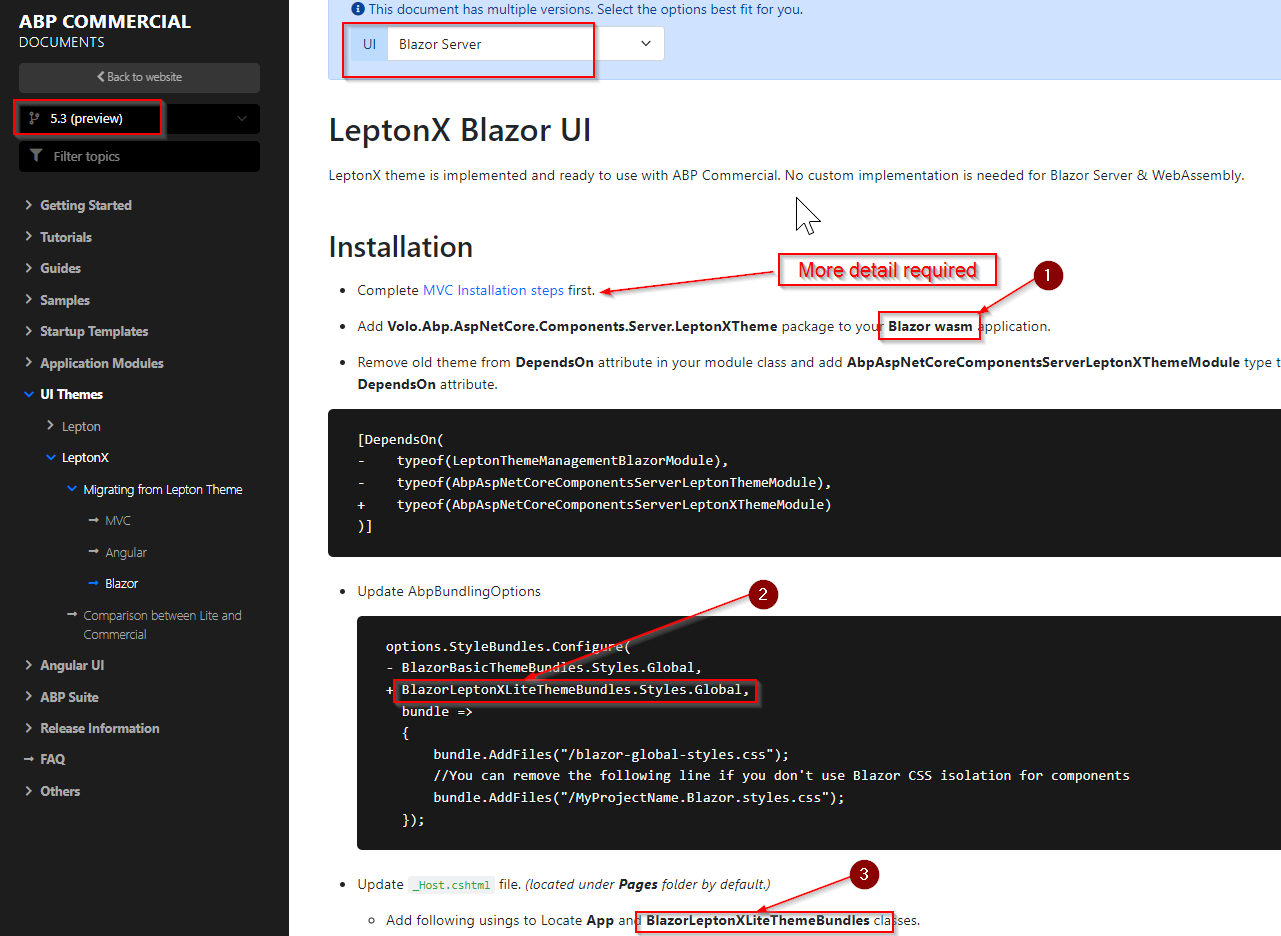
The Blazor Server documentation for 5.3 preview need to be reviewed and updated.
a. It is not clear where to apply the MVC installation is to occur. Is it just the Blazor Project only?
The typeof(LeptonThemeManagementWebModule) reference does not exist in the Blazor project.
b. There are references to LeptonLite and Wasm for the Blazor Server documentation.
Yes! another abp bundle has solved the problem.
Thank you.
Good day, I have been waiting patiently for the LeptonX release, but I am now frustrated with lack of progress for the Blazor UI (both wasm and server) I have a commercial project waiting for LeptonX because the customer does not like the current Lepton theme.
It is coming up 9 months since LeptonX was announced: https://blog.abp.io/abp/LeptonX-Theme-for-ABP-Framework-Alpha-Release
I have politely enquired on the status via this GitHub link: https://github.com/volosoft/lepton-theme/issues/5#issuecomment-1106045088 Dates keep passing with no information. I monitor this issue each day.
Today I saw 5.3.0-rc.1 has been released, so created a project via the website and still no reference to LeptonX / Lite


ABP Suite has no 5.3.0-rc.1 templates.

The instructions here are inconsistent between Lite and Commercial
https://github.com/abpio/abp-commercial-docs/tree/docs/lpx/en/themes/lepton-x
It does seem some of the Lite instructions missing from Commercial are required!?
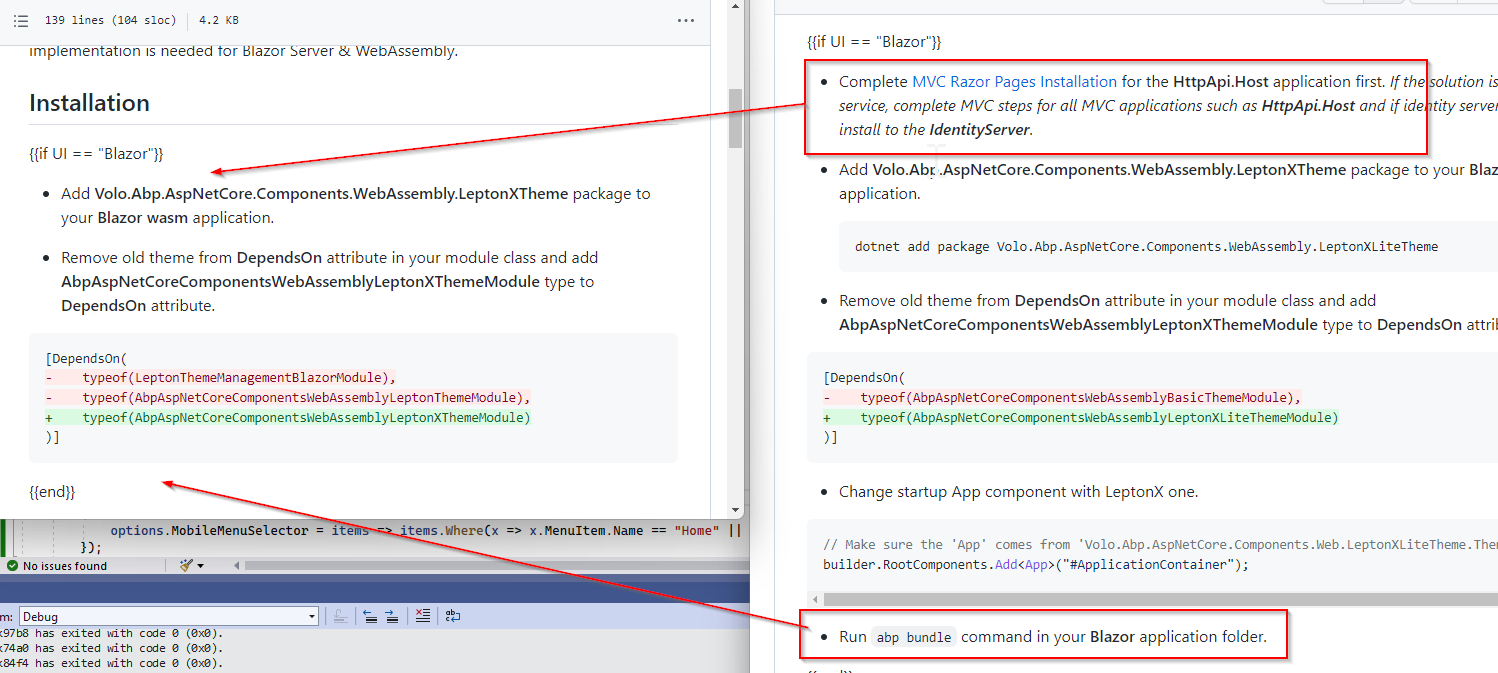
I have tried many times using combinations of the commercial and lite instructions to get the project running. I did have success with an MVC solution but that is not the UI I use.
The closest to a running system I can get to is using a combination of the Lite and Commercial for Blazor Wasm. But get this error:
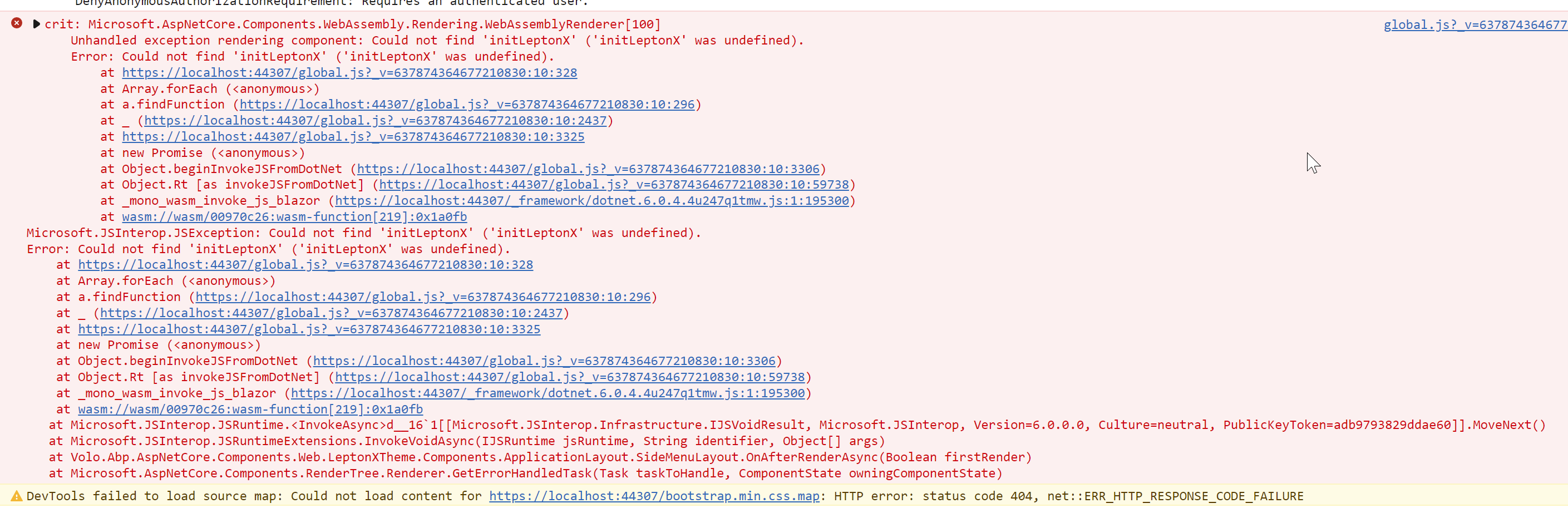
The page does render but badly formatted.
All that I require at this point is an accurate date when the beta version of LeptonX will be working in Blazor Wasm and/or Blazor Server.
Kind regards, Roger









