We are implementing a custom audit system based on ABP Framework's Audit Logging module. We have successfully implemented an AuditLogsAppService that allows us to query audit logs from the AbpAuditLogs and AbpAuditLogActions tables.
Currently we can:
We have two additional requirements to enrich audit information:
Goal: Store custom descriptive names for actions instead of only using technical method names.
Current Situation: When an audit action is logged, we get technical information like:
ServiceName: "Entity1CrudAppService"MethodName: "CreateAsync"What We Need:
We want to add a descriptive name in the ExtraProperties of AuditLogActionInfo, for example:
ExtraProperties["ActionDisplayName"] = "Create Entity1"ExtraProperties["ActionCategory"] = "CRUD Operations"ExtraProperties["MyCustomValue"] = "MyCustomValue From Method XXX"Usage Example:
public class Entity1CrudAppService : ApplicationService
{
    // When executing this method, we want it to be logged as:
    // ServiceName: "Entity1CrudAppService"
    // MethodName: "CreateAsync"
    // ExtraProperties["ActionDisplayName"] = "Create Entity1"
    public async Task<EntityDto> CreateAsync(CreateEntityDto input)
    {
        // ... method logic
    }
}
Question 1:
What is the recommended way to add these custom properties to AuditLogActionInfo?
We have considered:
Option A: Use a custom attribute on methods
[AuditActionName("Create Entity1", Category = "CRUD")]
public async Task<EntityDto> CreateAsync(CreateEntityDto input)
Option B: Use a custom AuditLogContributor
public class CustomActionNameContributor : AuditLogContributor
{
    public override void PostContribute(AuditLogContributionContext context)
    {
        // How do we access current method information to add properties?
    }
}
Option C: Another approach you recommend
Goal: From within an AppService method, be able to add custom information to the current audit log.
Scenario: In a specific method, we want to record additional business information that is relevant for auditing.
Use Case Example:
public class ProjectsAppService : ApplicationService
{
    public async Task<ProjectDto> CreateAsync(CreateProjectDto input)
    {
        // Create the project
        var project = new Project(input.Name, input.Budget);
        await _repository.InsertAsync(project);

        // HERE: We want to add additional information to the current audit log
        // For example:
        // - Created project budget
        // - Project category
        // - Approver user if exists

        // ❓ How do we add this information to the current AuditLog?

        return ObjectMapper.Map<Project, ProjectDto>(project);
    }

    public async Task ApproveProjectAsync(Guid projectId)
    {
        var project = await _repository.GetAsync(projectId);
        project.Approve(CurrentUser.Id);

        // HERE: We want to record specific approval information
        // - Previous project state
        // - Approved amount
        // - Approval comments

        // ❓ How do we add this information to the current AuditLog?

        await _repository.UpdateAsync(project);
    }
}
What We Know:
According to ABP documentation, we can access the current audit scope:
public class MyService : ITransientDependency
{
    private readonly IAuditingManager _auditingManager;

    public MyService(IAuditingManager auditingManager)
    {
        _auditingManager = auditingManager;
    }

    public async Task DoItAsync()
    {
        var currentAuditLogScope = _auditingManager.Current;
        if (currentAuditLogScope != null)
        {
            currentAuditLogScope.Log.Comments.Add("Custom comment");
            currentAuditLogScope.Log.SetProperty("MyCustomProperty", 42);
        }
    }
}
Question 2:
AuditLogActionInfo of the current method, or only to the general AuditLogInfo?When querying logs, we want to see:
{
  "auditLogId": "guid",
  "executionTime": "2026-01-21T10:30:00",
  "actions": [
    {
      "serviceName": "ProjectsAppService",
      "methodName": "CreateAsync",
      "executionDuration": 250,
      "extraProperties": {
        "ActionDisplayName": "Create Project",
        "ActionCategory": "Project Management",
        "EntityType": "Project"
      }
    }
  ]
}
{
  "auditLogId": "guid",
  "executionTime": "2026-01-21T10:30:00",
  "actions": [
    {
      "serviceName": "ProjectsAppService",
      "methodName": "CreateAsync",
      "executionDuration": 250,
      "extraProperties": {
        "ProjectBudget": 50000,
        "ProjectCategory": "Infrastructure",
        "ApprovalRequired": true
      }
    }
  ],
  "extraProperties": {
    "BusinessOperation": "ProjectCreation",
    "Department": "Engineering"
  }
}
What is the recommended way in ABP to add custom properties to AuditLogActionInfo?
Is there any attribute or interceptor mechanism to add metadata to audit actions?
How can we access the current action (AuditLogActionInfo) from within an AppService method to add specific properties?
Are there examples or documentation about similar use cases?
Is it possible to extend the audit system without modifying ABP source code?
public class ProjectsAppService : ApplicationService, IProjectsAppService
{
    private readonly IRepository<Project> _repository;

    public ProjectsAppService(IRepository<Project> repository)
    {
        _repository = repository;
    }

    [AuditActionName("Create Project", Category = "Project Management")]
    public async Task<ProjectDto> CreateAsync(CreateProjectDto input)
    {
        var project = new Project(input.Name, input.Budget);
        await _repository.InsertAsync(project);
        return ObjectMapper.Map<Project, ProjectDto>(project);
    }

    [AuditActionName("Update Project", Category = "Project Management")]
    public async Task<ProjectDto> UpdateAsync(Guid id, UpdateProjectDto input)
    {
        var project = await _repository.GetAsync(id);
        project.Update(input.Name, input.Budget);
        await _repository.UpdateAsync(project);
        return ObjectMapper.Map<Project, ProjectDto>(project);
    }
}
public class ProjectsAppService : ApplicationService, IProjectsAppService
{
    private readonly IRepository<Project> _repository;
    private readonly IAuditingManager _auditingManager;

    public ProjectsAppService(
        IRepository<Project> repository,
        IAuditingManager auditingManager)
    {
        _repository = repository;
        _auditingManager = auditingManager;
    }

    public async Task<ProjectDto> CreateAsync(CreateProjectDto input)
    {
        var project = new Project(input.Name, input.Budget);
        await _repository.InsertAsync(project);

        // Add business information to audit log
        var auditScope = _auditingManager.Current;
        if (auditScope != null)
        {
            // ❓ How do we add properties to the CURRENT ACTION, not just the general log?

            // This works but adds to general AuditLogInfo:
            auditScope.Log.SetProperty("ProjectBudget", input.Budget);

            // ❓ How do we do this for AuditLogActionInfo?
            // auditScope.CurrentAction?.SetProperty("ProjectBudget", input.Budget);
        }

        return ObjectMapper.Map<Project, ProjectDto>(project);
    }
}
auditScope.Log.Comments.Add($"Project created with budget: {input.Budget}");
Problem: Comments are plain text, not structured. We prefer typed properties.
Problem: Parameters already contain method input information. We don't want to mix with calculated or business information.
Problem: Would duplicate functionality and wouldn't leverage ABP's system.
A solution that allows us to:
AuditLogsAppServiceWe appreciate any guidance, code examples, or documentation references that help us achieve these goals.
Hello ABP Team,
Following the successful resolution of ticket #10222 regarding Domain/Subdomain Tenant Resolver implementation, we have encountered a critical issue when integrating this functionality with Azure AD B2C as an external authentication provider.
The domain/subdomain tenant resolution works perfectly in local development environments using OpenIddict, but fails when Azure AD B2C is enabled as the external provider, which is required for our QA, Preproduction, and Production environments in Azure.
Our application is deployed with environment-based subdomains and tenant resolution:
QA: https://tenant1.app-app1-qa.commondomain.com
Preproduction: https://tenant2.app-app1-pre.commondomain.com
Production: https://tenant3.app-app1.commondomain.com
The tenant (e.g., tenant1, tenant2) is resolved from the first subdomain label, following the implementation described in ticket #10222.
Following the solution provided by @maliming in ticket #10222, we successfully implemented:
AbpOpenIddictWildcardDomainOptions configuration with wildcard domain formatsAbpTenantResolveOptions with domain-based tenant resolversTokenWildcardIssuerValidator for JWT validation with wildcard issuersMyWebAssemblyMultiTenantUrlProvider in Blazor WASM client to extract tenant from subdomainResult: ✅ Works perfectly in local development with OpenIddict.
When attempting to replicate this behavior in Azure environments using Azure AD B2C as the external provider, we encounter authentication flow failures.
We identified a fundamental conflict between Azure AD B2C requirements and the subdomain-based tenant resolution strategy:
Current Redirect URIs registered in Azure AD B2C "App1 QA" app:
https://app-app1server-qa-qa-we-001.azurewebsites.net/signin-azuread-oidchttps://server-app1-qa.commondomain.com/signin-azuread-oidchttps://localhost:44329/signin-azuread-oidchttps://app-app1-qa.commondomain.com/authentication/loginhttps://app-app1-qa.commondomain.com/authentication/logouthttps://app-app1-qa.commondomain.com/signout/B2C_1_signupsignin01https://app-app1-qa.commondomain.com/signin-azuread-oidchttps://localhost:44385/signin-azuread-oidchttps://localhost:44385/authentication/logouthttps://localhost:44385/authentication/loginhttps://localhost:44385/signout/B2C_1_signupsignin01The Problem: To support subdomain-based tenant resolution, we would need to register one redirect URI per tenant, for example:
https://tenant1.app-app1-qa.commondomain.com/authentication/loginhttps://tenant2.app-app1-qa.commondomain.com/authentication/loginhttps://tenant3.app-app1-qa.commondomain.com/authentication/loginAzure AD B2C Limitation: According to Microsoft documentation, there is a hard limit on the number of redirect URIs that can be registered per App Registration.
This makes the manual registration approach not scalable for multi-tenant scenarios with subdomain resolution.
Wildcard Support: Azure AD B2C does support wildcards in redirect URIs (e.g., https://*.app-app1-qa.commondomain.com/authentication/login), but Microsoft does not recommend this practice for security reasons.
After researching and implementing various solutions found in documentation and forums, we have advanced in the authentication flow but now encounter a correlation cookie error:
'.AspNetCore.Correlation.Kh3ihYshY6FPVHu7SpFA9Uka76CC_IBMV0yO8yMcZxQ' cookie not found.
This error indicates that the correlation cookie used by ASP.NET Core during the OAuth/OpenID Connect authentication flow is not found or is not available when Azure AD B2C attempts to redirect back to the application.
Potential causes:
https://tenant1.app-app1-qa.commondomain.comtenant1 is automatically resolved from the subdomaintenant1) remains correctly applied throughout the sessionhttps://tenant1.app-app1-qa.commondomain.comtenant1 is correctly resolved from the subdomainThe primary use case for this functionality is to facilitate direct links to specific entities without requiring manual tenant specification.
Previous URL (without automatic resolution):
https://app-app1-qa.commondomain.com/Entity/36512651
Users had to manually select their tenant before accessing the patient record.
With subdomain-based tenant resolution, the tenant is automatically resolved from the URL:
Improved URL (with automatic resolution):
https://tenantCliente.app-app1-qa.commondomain.com/Entity/36512651
The system automatically detects tenantCliente from the subdomain, configures the appropriate context, and allows direct access to the record without intermediate steps.
This works perfectly in local development with OpenIddict, but fails when Azure AD B2C is enabled.
Is the Domain/Subdomain Tenant Resolver compatible with Azure AD B2C external authentication providers?
Are there additional configurations or workarounds required to make subdomain-based tenant resolution work with Azure AD B2C?
How can we resolve the correlation cookie error when using subdomains with Azure AD B2C authentication?
Is there a recommended approach for handling redirect URI configuration in Azure AD B2C for multi-tenant applications with subdomain resolution?
Are there known limitations or incompatibilities between:
Has ABP team tested or validated the Domain/Subdomain Tenant Resolver with Azure AD B2C in production scenarios?
We have tried various approaches to integrate Azure AD B2C, including:
None of these attempts have successfully resolved the correlation cookie error when using subdomain-based tenant resolution with Azure AD B2C.
We would greatly appreciate:
Official guidance or documentation on integrating Domain/Subdomain Tenant Resolver with external authentication providers like Azure AD B2C
Sample implementation or reference project demonstrating this integration
Clarification on whether this scenario is supported in the current ABP Framework version
Recommended architectural patterns for handling this use case in production Azure environments
Any known workarounds or alternative approaches that maintain the automatic tenant resolution functionality while working with Azure AD B2C
Thank you in advance for any guidance or assistance you can provide.
Related Issues:
Hello ABP Team,
We are trying to implement tenant resolution by subdomain following the official ABP documentation, but the described approach does not work as expected, even in a clean ABP solution created from the templates.
We have followed the documentation step by step, specifically the section:
https://abp.io/docs/latest/framework/architecture/multi-tenancy#domainsubdomain-tenant-resolver
However, the tenant is not resolved correctly from the subdomain, and the application does not behave as expected.
ABP Framework: 9.1.3
UI: Blazor Interactive (WebAssembly only)
Multi-tenancy: enabled
Reproduced both in:
Our application is deployed with environment-based subdomains:
https://app-qa.example.comhttps://app-pre.example.comhttps://app.example.comExpected tenant URLs would be, for example:
https://tenant1.app-qa.example.comhttps://tenant2.app-pre.example.comhttps://tenant3.app.example.comThe base subdomain (app, app-qa, app-pre) represents the application, not a tenant.
ITenantResolveContributor to handle our URL logic.However:
This suggests the issue is not only related to parsing the URL, but to how the resolved tenant is applied internally by ABP, possibly in a Blazor Interactive WebAssembly scenario.
Is the Domain/Subdomain Tenant Resolver fully supported in ABP 9.1.3 with Blazor Interactive (WebAssembly only)?
Is there any additional configuration, middleware order, or Blazor-specific requirement missing from the documentation?
Are there known limitations or issues when:
Is there a recommended or official approach for resolving tenants by subdomain in this setup?
Any clarification, guidance, or updated example would be greatly appreciated.
Thank you in advance.
Hi, I have a question about the number of rest requests that blazor webassembly makes to the server at the same time.
I have some interfaces that make several requests, and I observe that at the same time 5 requests are made, while others are waiting. Is this limited for some performance reason? Is it parameterizable from some XXXModule?
In case it helps, I use static clients in the api, generated with the abp cli command.
Hi, I am experiencing performance problems when working with requests up to 120 seconds maximum.
The main problem is the blocking of the tables on which I am inserting/updating in the same operation. I am transferring the development team's proposal for improvement: In this process an endpoint of an App Service is called which, in turn, invokes an external service to read information. The theory is that before the UoW (Unit of Work), when synchronising an entity, was managed with the default configuration: on receiving the request, the API opened the UoW and, on completion, it was completed and the changes were automatically saved. What happens? Fetching data from the external API can take tens of seconds for the UoW to complete, which keeps the transaction open and causes crashes in the database (which are most of the errors we are seeing now).
We doubt that this is actually causing these database timeouts, since the database transaction is understood to start and end when SaveChangesAsync is called. We don't know to what extent it makes sense that, when starting a transactional Unit of Work, these table locks occur.
https://abp.io/community/articles/understanding-transactions-in-abp-unit-of-work-0r248xsr#gsc.tab=0
1 commandBatches, IRelationalConnection connection, CancellationToken cancellationToken) at Microsoft.EntityFrameworkCore.Update.Internal.BatchExecutor.ExecuteAsync(IEnumerable1 commandBatches, IRelationalConnection connection, CancellationToken cancellationToken)
at Microsoft.EntityFrameworkCore.Update.Internal.BatchExecutor.ExecuteAsync(IEnumerable1 commandBatches, IRelationalConnection connection, CancellationToken cancellationToken) at Microsoft.EntityFrameworkCore.Storage.RelationalDatabase.SaveChangesAsync(IList1 entries, CancellationToken cancellationToken)
at Microsoft.EntityFrameworkCore.ChangeTracking.Internal.StateManager.SaveChangesAsync(IList1 entriesToSave, CancellationToken cancellationToken) at Microsoft.EntityFrameworkCore.ChangeTracking.Internal.StateManager.SaveChangesAsync(StateManager stateManager, Boolean acceptAllChangesOnSuccess, CancellationToken cancellationToken) at Microsoft.EntityFrameworkCore.SqlServer.Storage.Internal.SqlServerExecutionStrategy.ExecuteAsync[TState,TResult](TState state, Func4 operation, Func4 verifySucceeded, CancellationToken cancellationToken) at Microsoft.EntityFrameworkCore.DbContext.SaveChangesAsync(Boolean acceptAllChangesOnSuccess, CancellationToken cancellationToken) at Volo.Abp.EntityFrameworkCore.AbpDbContext1.SaveChangesAsync(Boolean acceptAllChangesOnSuccess, CancellationToken cancellationToken)
--- End of inner exception stack trace ---
at Volo.Abp.EntityFrameworkCore.AbpDbContext1.SaveChangesAsync(Boolean acceptAllChangesOnSuccess, CancellationToken cancellationToken) at Volo.Abp.Domain.Repositories.EntityFrameworkCore.EfCoreRepository2.InsertAsync(TEntity entity, Boolean autoSave, CancellationToken cancellationToken)
at Castle.DynamicProxy.AsyncInterceptorBase.ProceedAsynchronous[TResult](IInvocation invocation, IInvocationProceedInfo proceedInfo)
at Volo.Abp.Castle.DynamicProxy.CastleAbpMethodInvocationAdapterWithReturnValue1.ProceedAsync() at Volo.Abp.Uow.UnitOfWorkInterceptor.InterceptAsync(IAbpMethodInvocation invocation) at Volo.Abp.Castle.DynamicProxy.CastleAsyncAbpInterceptorAdapter1.InterceptAsync[TResult](IInvocation invocation, IInvocationProceedInfo proceedInfo, Func3 proceed) at Volo.Abp.OpenIddict.Tokens.AbpOpenIddictTokenStore.CreateAsync(OpenIddictTokenModel token, CancellationToken cancellationToken) at OpenIddict.Core.OpenIddictTokenManager1.CreateAsync(TToken token, CancellationToken cancellationToken)
at OpenIddict.Core.OpenIddictTokenManager1.CreateAsync(OpenIddictTokenDescriptor descriptor, CancellationToken cancellationToken) at OpenIddict.Core.OpenIddictTokenManager1.OpenIddict.Abstractions.IOpenIddictTokenManager.CreateAsync(OpenIddictTokenDescriptor descriptor, CancellationToken cancellationToken)
at OpenIddict.Server.OpenIddictServerHandlers.Protection.CreateTokenEntry.HandleAsync(GenerateTokenContext context)
at OpenIddict.Server.OpenIddictServerDispatcher.DispatchAsync[TContext](TContext context)
at OpenIddict.Server.OpenIddictServerDispatcher.DispatchAsync[TContext](TContext context)
at OpenIddict.Server.OpenIddictServerHandlers.GenerateAuthorizationCode.HandleAsync(ProcessSignInContext context)
at OpenIddict.Server.OpenIddictServerDispatcher.DispatchAsync[TContext](TContext context)
at OpenIddict.Server.OpenIddictServerDispatcher.DispatchAsync[TContext](TContext context)
at OpenIddict.Server.AspNetCore.OpenIddictServerAspNetCoreHandler.SignInAsync(ClaimsPrincipal user, AuthenticationProperties properties)
at Microsoft.AspNetCore.Authentication.AuthenticationService.SignInAsync(HttpContext context, String scheme, ClaimsPrincipal principal, AuthenticationProperties properties)
at Microsoft.AspNetCore.Mvc.Infrastructure.ResourceInvoker.<InvokeNextResultFilterAsync>g__Awaited|30_0[TFilter,TFilterAsync](ResourceInvoker invoker, Task lastTask, State next, Scope scope, Object state, Boolean isCompleted)
at Microsoft.AspNetCore.Mvc.Infrastructure.ResourceInvoker.Rethrow(ResultExecutedContextSealed context)
at Microsoft.AspNetCore.Mvc.Infrastructure.ResourceInvoker.ResultNext[TFilter,TFilterAsync](State& next, Scope& scope, Object& state, Boolean& isCompleted)
at Microsoft.AspNetCore.Mvc.Infrastructure.ResourceInvoker.<InvokeResultFilters>g__Awaited|28_0(ResourceInvoker invoker, Task lastTask, State next, Scope scope, Object state, Boolean isCompleted)
at Microsoft.AspNetCore.Mvc.Infrastructure.ResourceInvoker.<InvokeNextResourceFilter>g__Awaited|25_0(ResourceInvoker invoker, Task lastTask, State next, Scope scope, Object state, Boolean isCompleted)
at Microsoft.AspNetCore.Mvc.Infrastructure.ResourceInvoker.Rethrow(ResourceExecutedContextSealed context)
at Microsoft.AspNetCore.Mvc.Infrastructure.ResourceInvoker.Next(State& next, Scope& scope, Object& state, Boolean& isCompleted)
at Microsoft.AspNetCore.Mvc.Infrastructure.ResourceInvoker.<InvokeFilterPipelineAsync>g__Awaited|20_0(ResourceInvoker invoker, Task lastTask, State next, Scope scope, Object state, Boolean isCompleted)
at Microsoft.AspNetCore.Mvc.Infrastructure.ResourceInvoker.<InvokeAsync>g__Logged|17_1(ResourceInvoker invoker)
at Microsoft.AspNetCore.Mvc.Infrastructure.ResourceInvoker.<InvokeAsync>g__Logged|17_1(ResourceInvoker invoker)
at Microsoft.AspNetCore.Routing.EndpointMiddleware.<Invoke>g__AwaitRequestTask|7_0(Endpoint endpoint, Task requestTask, ILogger logger)
at Volo.Abp.AspNetCore.Serilog.AbpSerilogMiddleware.InvokeAsync(HttpContext context, RequestDelegate next)
at Microsoft.AspNetCore.Builder.UseMiddlewareExtensions.InterfaceMiddlewareBinder.<>c__DisplayClass2_0.<<CreateMiddleware>b__0>d.MoveNext()
--- End of stack trace from previous location ---
at Volo.Abp.AspNetCore.Auditing.AbpAuditingMiddleware.InvokeAsync(HttpContext context, RequestDelegate next)
at Volo.Abp.AspNetCore.Auditing.AbpAuditingMiddleware.InvokeAsync(HttpContext context, RequestDelegate next)
at Microsoft.AspNetCore.Builder.UseMiddlewareExtensions.InterfaceMiddlewareBinder.<>c__DisplayClass2_0.<<CreateMiddleware>b__0>d.MoveNext()
--- End of stack trace from previous location ---
at Microsoft.AspNetCore.Authorization.AuthorizationMiddleware.Invoke(HttpContext context)
at Volo.Abp.AspNetCore.Security.Claims.AbpDynamicClaimsMiddleware.InvokeAsync(HttpContext context, RequestDelegate next)
at Microsoft.AspNetCore.Builder.UseMiddlewareExtensions.InterfaceMiddlewareBinder.<>c__DisplayClass2_0.<<CreateMiddleware>b__0>d.MoveNext()
--- End of stack trace from previous location ---
at Volo.Abp.AspNetCore.Uow.AbpUnitOfWorkMiddleware.InvokeAsync(HttpContext context, RequestDelegate next)
at Microsoft.AspNetCore.Builder.UseMiddlewareExtensions.InterfaceMiddlewareBinder.<>c__DisplayClass2_0.<<CreateMiddleware>b__0>d.MoveNext()
--- End of stack trace from previous location ---
at Volo.Abp.AspNetCore.ExceptionHandling.AbpExceptionHandlingMiddleware.InvokeAsync(HttpContext context, RequestDelegate next)
at Volo.Abp.AspNetCore.ExceptionHandling.AbpExceptionHandlingMiddleware.InvokeAsync(HttpContext context, RequestDelegate next)
at Microsoft.AspNetCore.Builder.UseMiddlewareExtensions.InterfaceMiddlewareBinder.<>c__DisplayClass2_0.<<CreateMiddleware>b__0>d.MoveNext()
--- End of stack trace from previous location ---
at Volo.Abp.AspNetCore.MultiTenancy.MultiTenancyMiddleware.InvokeAsync(HttpContext context, RequestDelegate next)
at Microsoft.AspNetCore.Builder.UseMiddlewareExtensions.InterfaceMiddlewareBinder.<>c__DisplayClass2_0.<<CreateMiddleware>b__0>d.MoveNext()
--- End of stack trace from previous location ---
at Microsoft.AspNetCore.Builder.ApplicationBuilderAbpOpenIddictMiddlewareExtension.<>c__DisplayClass0_0.<<UseAbpOpenIddictValidation>b__0>d.MoveNext()
--- End of stack trace from previous location ---
at Microsoft.AspNetCore.Authentication.AuthenticationMiddleware.Invoke(HttpContext context)
at Volo.Abp.AspNetCore.Security.AbpSecurityHeadersMiddleware.InvokeAsync(HttpContext context, RequestDelegate next)
at Microsoft.AspNetCore.Builder.UseMiddlewareExtensions.InterfaceMiddlewareBinder.<>c__DisplayClass2_0.<<CreateMiddleware>b__0>d.MoveNext()
--- End of stack trace from previous location ---
at Microsoft.AspNetCore.Diagnostics.ExceptionHandlerMiddlewareImpl.<Invoke>g__Awaited|10_0(ExceptionHandlerMiddlewareImpl middleware, HttpContext context, Task task)I have reproduced on several occasions this exception when several users at the same time are logged out due to inactivity time, the user sees a page with a 409 concurrency error. This is happening frequently, it is quite annoying for the users. I've seen it happen to other people in the thread, with no apparent solution. https://abp.io/support/questions/7520/OpenIddict-TokenProvider-Concurrency-Exception
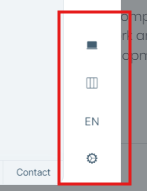
I need to remove this section of the application, i can't find how in the documentation:
Previously I had an application in blazor webassembly since it was born in net core 6. After migrating to Blazor WebApp I am having problems since one of my components injects the IAccessTokenProvider interface (belongs to Microsoft.AspNetCore.Components.WebAssembly.Authentication.dll).
After the migration this service is no longer injected, moreover, I have tried to inject IAbpAccessTokenProvider, but the implementation I get is Volo.Abp.AspNetCore.Components.WebAssembly.WebApp.CookieBasedWebAssemblyAbpAccessTokenProvider, which after reviewing its code, returns a null string.
By default I use InteractiveAutoRenderMode with prerender set to false. I've tried to indicate in the component that it uses the InteractiveWebAssemblyRenderMode interface but it doesn't solve anything. Any idea?
Hi, I am having some problems migrating a solution from blazor web assembly to blazor web app.
I have tried the steps mentioned in the different links: https://abp.io/docs/latest/release-info/migration-guides/abp-8-2-blazor-web-app https://abp.io/support/questions/8378/Render-Modes https://github.com/abpframework/abp/issues/20128
The documentation is not clear, it does not detail anything step by step, it does not indicate if you have to create a new solution, create new projects... In the documentation it is mentioned that you have to run the project "Blazor.Webapp" and the cli only generates "Blazor" and "Blazor.Client". I need a solution because I have to migrate 6 solutions.
Attached are screenshots of the errors I have found:
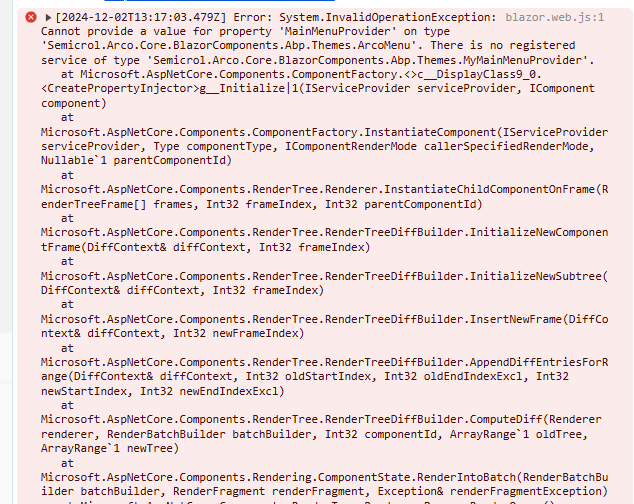
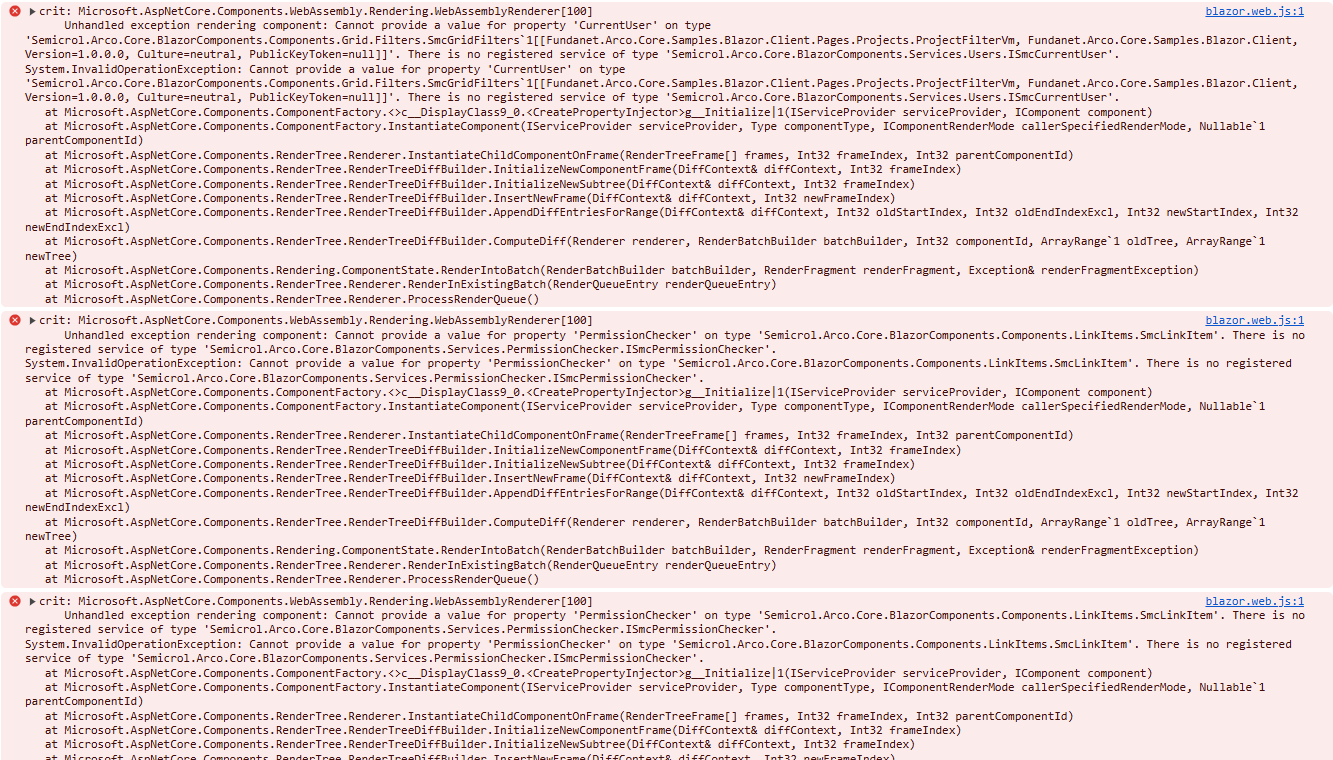
There are many errors that I am finding
Good morning, In a new project created with the CLI I tried to overwrite the Login.cshtml file. I have searched for documentation, tried solutions discussed in other threads.... But the changes are never applied, could you give me a project with a custom Login.cshtml?









