hi
Request finished HTTP/2 GET https://localhost:44321/api/identity/roles?filter=&sorting=name%20asc&skipCount=0&maxResultCount=10 - 401
The Exceego.EHSWatch.AppV3.Web. use C# HTTP remote proxy to call the Identity/role API.
Can you share the debug logs from Identity/role API website?
By the way, you are not enabled the debug logs for Microsoft namespace. See https://abp.io/support/questions/8622/How-to-enable-Debug-logs-for-troubleshoot-problems
var loggerConfiguration = new LoggerConfiguration()
    .MinimumLevel.Debug()
    .MinimumLevel.Override("Microsoft.EntityFrameworkCore", LogEventLevel.Warning)
    .Enrich.FromLogContext()
    .WriteTo.Async(c => c.File("Logs/logs.txt"))
Thanks.
hi
Does your website work in IIS?
Can you check the application logs in Windows Event Viewer(https://learn.microsoft.com/en-us/shows/inside/event-viewer)?
Thanks.
hi
Only Data Access is affected. You need to use MyRetryDbContext to manage transactions and perform CRUD operations on the entities.
hi
Add it to the project that has forbidden erros
And can you share the debug logs for forbidden erros?
https://abp.io/support/questions/8622/How-to-enable-Debug-logs-for-troubleshoot-problems
Thanks.
If we check the permissions in JS we are able to see the proper permissions but not at backend so getting forbidden erros.
Sorry for that. I missed it.
Can you check the claims value and type by adding a custom middleware after UseAuthentication?
app.UseAuthentication();

app.Use(async (httpContext, next) =>
{
    var claims = httpContext.User.Claims;
    var currentUser = httpContext.RequestServices.GetRequiredService<ICurrentUser>().GetAllClaims();

    var userid = AbpClaimTypes.UserId;
    var username = AbpClaimTypes.UserName;
    var roleClaimType = AbpClaimTypes.Role;

    await next(httpContext);
});
Thanks.
hi
Removing IdentityServer4 from the Back office Web project will fix this error.
As you can see. the IdentityServer4 is used in your Back office Web project
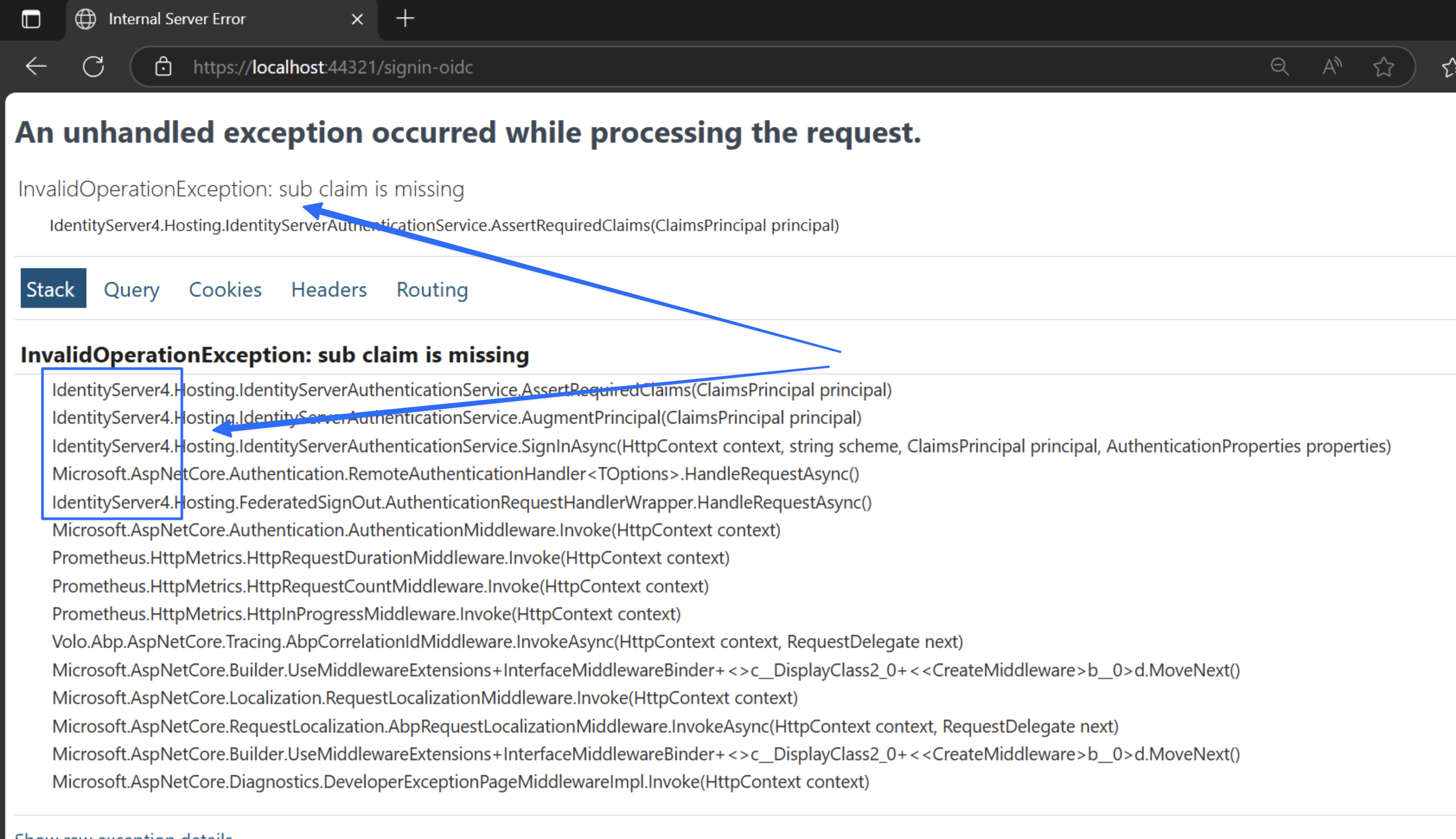
hi
Unable to obtain an updated configuration from: 'https://auth/.well-known/openid-configuration'. Returning the current configuration. Exception: 'System.IO.IOException: IDX20804: Unable to retrieve document from: 'https://auth/.well-known/openid-configuration'.
API website in k8s will request https://auth/.well-known/openid-configuration, but the auth website has an HTTPS(SSL) problem.
Can you set a valid HTTPS certificate for the auth website?
Of course you can disable the SSL check. But it not recommended.
public override void PreConfigureServices(ServiceConfigurationContext context)
{
    PreConfigure<AbpHttpClientBuilderOptions>(options =>
    {
        options.ProxyClientBuildActions.Add((_, clientBuilder) =>
        {
            var client = new HttpClientHandler
            {
                    ServerCertificateCustomValidationCallback = HttpClientHandler.DangerousAcceptAnyServerCertificateValidator
            };)
            clientBuilder.ConfigurePrimaryHttpMessageHandler(client);
        });
    });
}
context.Services.AddAuthentication(JwtBearerDefaults.AuthenticationScheme)
    .AddAbpJwtBearer(options =>
    {
        options.Authority = configuration["AuthServer:Authority"];
        options.RequireHttpsMetadata = configuration.GetValue<bool>("AuthServer:RequireHttpsMetadata");
        options.Audience = "MyProjectName";

        options.BackchannelHttpHandler = new HttpClientHandler
        {
            ServerCertificateCustomValidationCallback =  HttpClientHandler.DangerousAcceptAnyServerCertificateValidator
        };
    });
hi
Please try to remove IdentityServer4 from Back office Web project first.
Then, the claims problem you can see https://abp.io/community/articles/how-claim-type-works-in-asp-net-core-and-abp-framework-km5dw6g1
Thanks.
hi
1.
Add $("#qrImageModal").modal('hide'); when success.
$("#captchImage").val(encoded);
$.ajax({
    type: 'GET',
    url: url,
    success: function (data) {
        switch (data) {
            case 1:
                captchaSuccess = true;
                $("#qrImageModal").modal('hide');
                $('#btnSubmit').prop('disabled', false);
                $('#check').addClass('shown');
                $('#check').removeAttr('check');
                $('#check').removeClass('hiden');
                $('#eCaptchadiv').addClass('showncheck');
                chechboxlength();
                myStopFunction();
                break;
            default:
                captchaSuccess = false;
                $('#btnSubmit').prop('disabled', true);
                $('#check').addClass('hiden');
                $('#check').removeClass('shown');
                $('#eCaptchadiv').removeClass('shown');
                myStopFunction();
                break;
        }
    },
});
It seems you have added ProfileManagementGroup/PersonalInfo/Default.js in your view.
The account module will add it automatically.
hi
The new MyRetryDbContext should not be used with ABP AddAbpDbContext/Repository, etc..
You can use the AddDbContext method to add it to the Dependency Injection system and configure it to enable EnableRetryOnFailure. Then inject AddDbContext into your service and use it.
This will lose some features of ABP. But still can use it to query and add/update new entites.
Thanks.




