Hi,
Thanks for the detailed report. We've fixed the template issues, including the multi-tenancy ones: AppUser, Book and Author are now tenant-aware in the generated code. The fix will be in a coming ABP Studio release. The LowCode test issue is in the LowCode module, and we've passed it to the LowCode team.
There are two things you can apply to your current solution now.
1. LowCode test isolation
Other LowCode services also subscribe to DynamicModelManager.OnModelChanged, not only AbpLowCodeApplicationModule. Resetting the backing field to a no-op also removes the handler the manager adds for itself. This version keeps that handler and removes the rest. Put it in BinyatTestModule:
using System;
using System.Linq;
using System.Reflection;
using System.Threading.Tasks;
using Volo.Abp.LowCode.Modeling;

public override void OnApplicationShutdown(ApplicationShutdownContext context)
{
    _database?.Dispose();
    RemoveLowCodeModelChangedHandlers();
}

private static void RemoveLowCodeModelChangedHandlers()
{
    var manager = DynamicModelManager.Instance;
    var handlers = typeof(DynamicModelManager)
        .GetFields(BindingFlags.Instance | BindingFlags.NonPublic)
        .Single(f => f.FieldType == typeof(Func<Task>))
        .GetValue(manager) as Func<Task>;

    if (handlers == null)
    {
        return;
    }

    foreach (var handler in handlers.GetInvocationList().Cast<Func<Task>>())
    {
        if (!ReferenceEquals(handler.Target, manager))
        {
            manager.OnModelChanged -= handler;
        }
    }
}
2. AppUser tenant isolation
The options.EtoMappings.Add<IdentityUser, AppIdentityUserEto>() line in BinyatModule replaces Identity's own IdentityUser to UserEto mapping. So besides the missing TenantId, the UserEto events are never published, and the permission grants of a deleted user are not cleaned up. To fix it:
EtoMappings.Add line, the AppIdentityUserEto class and its mapper in BinyatMappers.AppUserSyncHandler to handle EntityCreatedEto<UserEto>, EntityUpdatedEto<UserEto> and EntityDeletedEto<UserEto>. Volo.Abp.Users.UserEto already has TenantId.AppUser multi-tenant, and pass TenantId when you create it in AppUserSyncHandler (identityUser.TenantId from UserEto) and in AppUserSeedBootstrapper:public class AppUser : AuditedAggregateRoot<Guid>, IMultiTenant
{
public Guid? TenantId { get; private set; }
public AppUser(
Guid id,
string userName,
string? email,
string? name,
string? surname,
string? phoneNumber,
bool isActive,
Guid? tenantId)
: base(id)
{
TenantId = tenantId;
UserName = Check.NotNullOrWhiteSpace(userName, nameof(userName), maxLength: AppUserConsts.MaxUserNameLength);
Update(email, name, surname, phoneNumber, isActive);
}
// ...
}
TenantId of the existing rows in the same migration. Without this, the existing tenant users stay under the host, and the tenant data seeding fails with a duplicate key error:migrationBuilder.AddColumn<Guid>(
name: "TenantId",
table: "AppUsers",
type: "uuid",
nullable: true);
migrationBuilder.Sql(
@"UPDATE ""AppUsers"" AS a SET ""TenantId"" = u.""TenantId"" FROM ""AbpUsers"" AS u WHERE u.""Id"" = a.""Id"";");
AppUserSyncHandler_Tests to use UserEto instead of AppIdentityUserEto.Thanks
Hi,
1. Example applications on demo.abp.io
The example applications on the demo site are custom code written only for the demo. They aren't part of the startup templates or the modules, and we don't share that source code, so we can't send it by email either. For learning, you can check the sample applications here: https://abp.io/docs/latest/samples
2. The Order and OrderLineItem entities
There are two problems in the code:
[DynamicEntity] to both classes so Low-Code can discover them. [DynamicEntityUI] only sets the display name.[DynamicEntity(typeof(Order))]. Low-Code adds the OrderId property to the child for you. A collection property like List<OrderLineItem> Items isn't supported, so please remove it.[DynamicForeignKey] is for lookup fields, for example a ProductId that points to a Product entity. Its second parameter is the property shown in the dropdown (like "Name"), not the foreign key name.
Here are the corrected classes:
using System;
using System.ComponentModel.DataAnnotations;
using Volo.Abp.LowCode;
using Volo.Abp.LowCode.Entities;

namespace DemoApp.Orders;

[DynamicEntity(DefaultDisplayPropertyName = nameof(OrderNumber))]
[DynamicEntityUI("Orders")]
public class Order : DynamicEntityBase
{
    [Required]
    [MaxLength(32)]
    [DynamicPropertyUnique]
    public string OrderNumber { get; set; } = null!;

    [DynamicPropertyType(EntityPropertyType.Date)]
    public DateOnly OrderDate { get; set; }

    [MaxLength(128)]
    public string? CustomerName { get; set; }
}

[DynamicEntity(typeof(Order), DefaultDisplayPropertyName = nameof(ProductName))]
[DynamicEntityUI("Order Line Items")]
public class OrderLineItem : DynamicEntityBase
{
    [Required]
    [MaxLength(128)]
    public string ProductName { get; set; } = null!;

    public int Quantity { get; set; }

    [DynamicPropertyType(EntityPropertyType.Money)]
    public decimal UnitPrice { get; set; }
}
Since these are C# classes, they also need to be mapped in your DbContext, like any other EF Core entity. Use your existing DbContext (the one that already calls ConfigureDynamicEntities() and ConfigureLowCode()) and keep everything else in it as is.
Add the DbSet properties:
public DbSet<Order> Orders { get; set; }
public DbSet<OrderLineItem> OrderLineItems { get; set; }
And add the mappings at the end of your existing OnModelCreating method. DbTablePrefix and DbSchema are the ones already defined in your project:
builder.Entity<Order>(b =>
{
    b.ToTable(DbTablePrefix + "Orders", DbSchema);
    b.ConfigureByConvention();
    b.Property(x => x.OrderNumber).IsRequired().HasMaxLength(32);
    b.Property(x => x.CustomerName).HasMaxLength(128);
});

builder.Entity<OrderLineItem>(b =>
{
    b.ToTable(DbTablePrefix + "OrderLineItems", DbSchema);
    b.ConfigureByConvention();
    b.Property(x => x.ProductName).IsRequired().HasMaxLength(128);
    b.Property(x => x.UnitPrice).HasColumnType("decimal(18,2)");
});
Then add a new EF Core migration and apply it to the database. The OrderId column is created in the OrderLineItems table automatically.
3. Order and line items on one form
The Low-Code System is still in preview, and its forms can't show an editable line items grid inside the order form yet.
What works now: create the order first, then add its line items from the order row. Low-Code shows the child entity as a related grid for each order. Click Actions > Order Line Items on an order row, and use New in that dialog to add lines. The OrderId is filled in automatically.
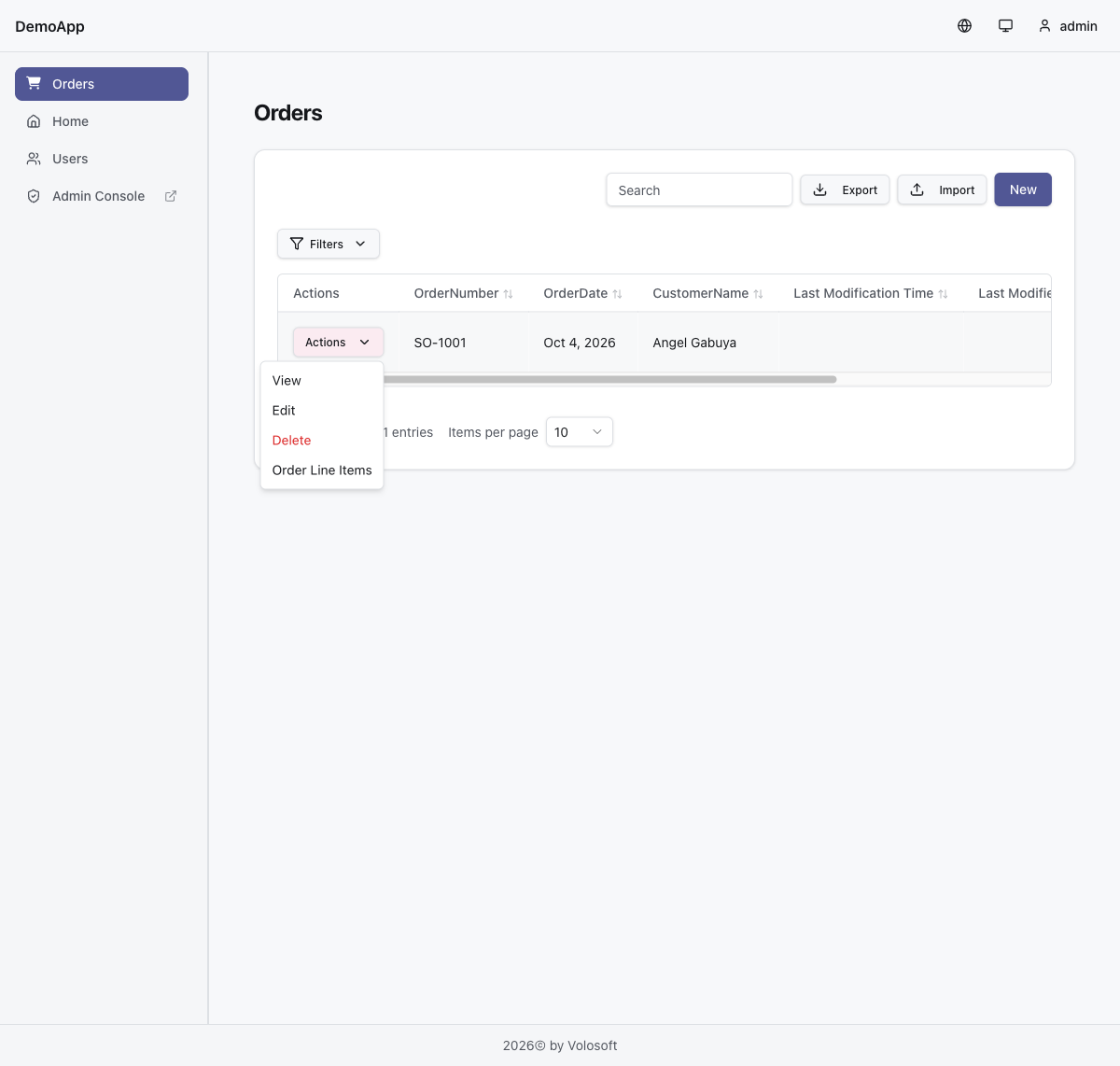
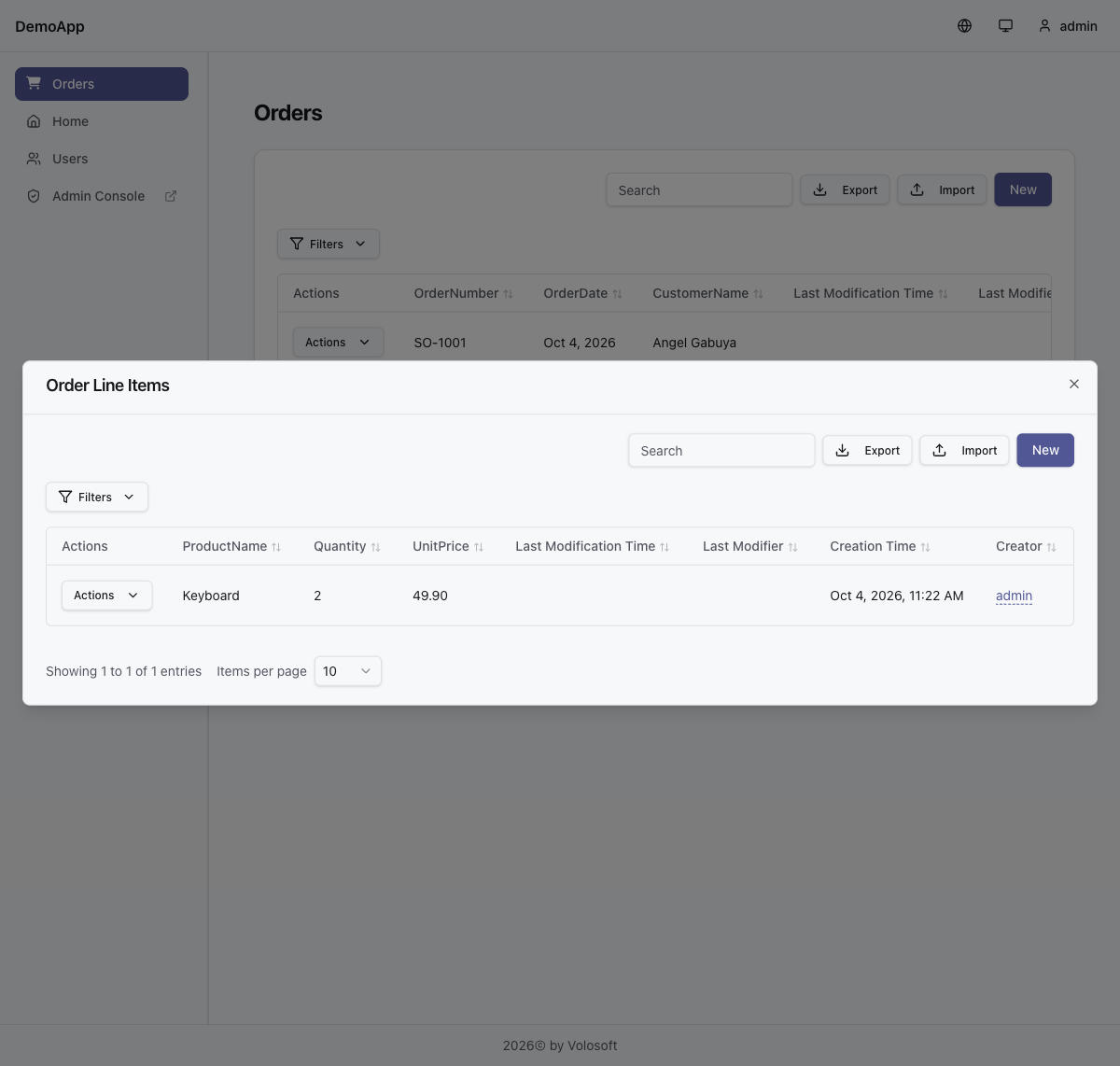
Here is the order-form.json and the page for the order itself. Put them under the _Dynamic/model/forms/ and _Dynamic/model/pages/ folders of your project. In a layered solution _Dynamic is in the Domain project, and in a single-layer solution it's in the Host project:
_Dynamic/model/forms/order-form.json
{
  "name": "order-form",
  "entityName": "DemoApp.Orders.Order",
  "fields": [
    { "id": "order-number", "label": "Order Number", "type": "text", "binding": "OrderNumber" },
    { "id": "order-date", "label": "Order Date", "type": "date", "binding": "OrderDate" },
    { "id": "customer-name", "label": "Customer", "type": "text", "binding": "CustomerName" }
  ],
  "layout": {
    "tabs": [
      {
        "id": "main",
        "title": "Order",
        "isDefault": true,
        "groups": [
          {
            "id": "header",
            "title": "Order Info",
            "isDefault": true,
            "fields": [
              { "fieldId": "order-number", "row": 0, "colSpan": 2, "colStart": 1 },
              { "fieldId": "order-date", "row": 0, "colSpan": 2, "colStart": 3 },
              { "fieldId": "customer-name", "row": 1, "colSpan": 4 }
            ]
          }
        ]
      }
    ]
  },
  "rules": []
}
_Dynamic/model/pages/orders.json
{
  "name": "orders",
  "title": "Orders",
  "icon": "fa-solid fa-cart-shopping",
  "type": "dataGrid",
  "entityName": "DemoApp.Orders.Order",
  "createFormName": "order-form",
  "editFormName": "order-form",
  "columns": [
    { "propertyName": "OrderNumber", "order": 0, "visible": true },
    { "propertyName": "OrderDate", "order": 1, "visible": true },
    { "propertyName": "CustomerName", "order": 2, "visible": true }
  ]
}
Replace DemoApp.Orders.Order with the full name of your Order class. You can check the files with:
dotnet run --project <your-host-project> -- --check-lowcode-model-files
Documentation:
Thanks
Hi,
If the user changes the password on the My account page, on the host or in any tenant, the new password is synced to all four records. So changing it in Tenant C also updates the host, Tenant A and Tenant B. Your account has a host record, so the next login checks the password against it and the new password works.
The "current password" on that page is checked against the record you are signed in to. In Tenant C, it's the Tenant C password. If a tenant admin set a different password there before, enter that one. After the change, all four records have the same password again.
Name, surname and phone number aren't synced, even from My account. They're kept separately for the host and each tenant. Only the username, email and password are shared.
Thanks
Hi,
This is a bug. The workspace configuration treats an empty EmbedderProvider as configured, and the Workspaces page saves empty fields as ''.
For now, you can add this class to your Application project (it runs in the HttpApi.Host in your tiered solution). It saves empty providers as NULL when a workspace is created, updated or duplicated:
using System;
using System.Collections.Generic;
using System.Threading.Tasks;
using Volo.Abp.DependencyInjection;
using Volo.Abp.Domain.Repositories;
using Volo.AIManagement.ApplicationWorkspaceProviders;
using Volo.AIManagement.McpServers;
using Volo.AIManagement.VectorStores;
using Volo.AIManagement.WorkspaceDataSources;
using Volo.AIManagement.Workspaces;

namespace MyCompanyName.MyProjectName;

[Dependency(ReplaceServices = true)]
[ExposeServices(typeof(IWorkspaceAppService), typeof(WorkspaceAppService))]
public class MyWorkspaceAppService : WorkspaceAppService
{
    public MyWorkspaceAppService(
        IWorkspaceRepository repository,
        IRepository<ApplicationAIProvider, Guid> applicationWorkspaceProviderRepository,
        IMcpServerRepository mcpServerRepository,
        ApplicationWorkspaceManager applicationWorkspaceManager,
        VectorStoreInitializer vectorStoreInitializer,
        IEnumerable<IVectorStoreFactory> vectorStoreFactories,
        IWorkspaceDataSourceAppService workspaceDataSourceAppService)
        : base(
            repository,
            applicationWorkspaceProviderRepository,
            mcpServerRepository,
            applicationWorkspaceManager,
            vectorStoreInitializer,
            vectorStoreFactories,
            workspaceDataSourceAppService)
    {
    }

    public override Task<WorkspaceDetailDto> CreateAsync(WorkspaceCreateInput input)
    {
        input.EmbedderProvider = NullIfWhiteSpace(input.EmbedderProvider);
        input.VectorStoreProvider = NullIfWhiteSpace(input.VectorStoreProvider);
        return base.CreateAsync(input);
    }

    public override async Task<WorkspaceDetailDto> UpdateAsync(Guid id, WorkspaceUpdateInput input)
    {
        input.EmbedderProvider = NullIfWhiteSpace(input.EmbedderProvider);
        input.VectorStoreProvider = NullIfWhiteSpace(input.VectorStoreProvider);

        // Normalize the stored values first, so '' -> NULL is not treated as an embedder change
        var workspace = await Repository.GetAsync(id);
        var embedderProvider = NullIfWhiteSpace(workspace.EmbedderProvider);
        var vectorStoreProvider = NullIfWhiteSpace(workspace.VectorStoreProvider);
        if (workspace.EmbedderProvider != embedderProvider || workspace.VectorStoreProvider != vectorStoreProvider)
        {
            workspace.EmbedderProvider = embedderProvider;
            workspace.VectorStoreProvider = vectorStoreProvider;
            await Repository.UpdateAsync(workspace, autoSave: true);
        }

        return await base.UpdateAsync(id, input);
    }

    public override async Task<WorkspaceDetailDto> DuplicateAsync(Guid id, WorkspaceDuplicateInput input)
    {
        var result = await base.DuplicateAsync(id, input);
        await CurrentUnitOfWork!.SaveChangesAsync();

        var workspace = await Repository.GetAsync(result.Id);
        workspace.EmbedderProvider = NullIfWhiteSpace(workspace.EmbedderProvider);
        workspace.VectorStoreProvider = NullIfWhiteSpace(workspace.VectorStoreProvider);
        await Repository.UpdateAsync(workspace);

        return ObjectMapper.Map<Workspace, WorkspaceDetailDto>(workspace);
    }

    private static string? NullIfWhiteSpace(string? value)
    {
        return string.IsNullOrWhiteSpace(value) ? null : value;
    }
}
After you deploy it:
'' values to NULL.-h, -p, -n and -a to both redis-cli calls as needed):redis-cli --scan --pattern '*Volo.AIManagement.Factory.ChatClientCreationConfiguration*' | while IFS= read -r key; do redis-cli del "$key"; done
If you use the default in-memory cache instead of Redis, skip this step. The restart in the next step clears it.
After that, the search_documents tool is no longer added for these workspaces, and later edits in the UI keep the values as NULL.
We'll also fix this in the AI Management module.
Thanks
Hi,
No, it isn't synced. When a tenant admin sets the password on the Users page, only that tenant's record changes. The host record and the other tenants keep the old password.
Since the user signs in with the host record, the new password won't work at login, and the old one still does. The same happens when a host admin sets the password: only the host record changes.
The only way that syncs today is when the user changes the password on the My account page. That updates the host record and all tenant records. I need to correct my earlier answer here: "password changes stay in sync" is only true for this case.
We'll improve the scenarios you ran into as soon as possible.
Thanks
Hi,
The MudBlazor UI of AI Management is missing these parts. The backend already supports them, only the pages were not added. We have added the MCP server connections and the Embedding / Vector Store tabs to the MudBlazor pages, and they will be in the 10.7.0 release. Your ticket has been refunded.
Until then, you can configure them with the HTTP API, for example from the Swagger UI of your HttpApi.Host.
Embedding and Vector Store
GET /api/ai-management/workspaces/by-name/{workspaceName}.PUT /api/ai-management/workspaces/{id}. Keep the other fields as they are. The update saves every field it gets, so a missing field such as apiKey is saved as empty.{
"embedderProvider": "OpenAI",
"embedderModelName": "text-embedding-3-small",
"embedderApiKey": "<your-api-key>",
"vectorStoreProvider": "Pgvector",
"vectorStoreSettings": "Host=<host>;Port=5432;Database=<database>;Username=<user>;Password=<password>"
}
GET /api/ai-management/workspaces/embedder-providers and GET /api/ai-management/workspaces/vector-store-providers return the provider names you can use.
If the Pgvector database doesn't exist yet, add Persist Security Info=true to the connection string. Otherwise creating the database fails with "No password has been provided".
MCP servers
GET /api/ai-management/mcp-servers/by-name/{mcpServerName}.POST /api/ai-management/workspaces/{workspaceId}/mcp-servers:{
"mcpServerId": "<mcp-server-id>",
"isEnabled": true
}
GET /api/ai-management/workspaces/{workspaceId}/mcp-servers lists the connected servers, and DELETE /api/ai-management/workspaces/{workspaceId}/mcp-servers/{mcpServerId} removes one.
Thanks
Hi,
Your app won't stop because of ABP. The ABP Azure Service Bus integration (Volo.Abp.AzureServiceBus and Volo.Abp.EventBus.Azure) uses the new Azure.Messaging.ServiceBus SDK. That's the same in 7.0 and 10.0. It doesn't use any of the retired packages.
The Microsoft.Azure.ServiceBus 4.2.1 reference you found doesn't come from ABP. It's in your own project. It will still work after 30 September, because Microsoft only stops support and updates for these libraries. But it won't get fixes anymore, so it's better to replace it:
QueueClient, TopicClient, MessageReceiver or Message, add the new package and move that code to ServiceBusClient, ServiceBusSender, ServiceBusProcessor and ServiceBusMessage. Changing only the package name won't compile.<PackageReference Include="Azure.Messaging.ServiceBus" Version="7.21.0" />
Microsoft's migration guide maps the old API to the new one: https://github.com/Azure/azure-sdk-for-net/blob/main/sdk/servicebus/Azure.Messaging.ServiceBus/MigrationGuide.md
To make sure no other package brings in the old SDKs, run this in your solution folder and search the output for Microsoft.Azure.ServiceBus and WindowsAzure.ServiceBus:
dotnet list package --include-transitive
Thanks
Hi,
This is a bug in the Angular proxy generator. The fix is in https://github.com/abpframework/abp/pull/26212 and will be in the next release. After you upgrade, you won't need your local changes anymore.
Until then, you can keep your changes. If you want them to stay after reinstalling packages, save them as a patch with patch-package:
yarn add patch-package --dev
npx patch-package @abp/ng.schematics
Then add "postinstall": "patch-package" to the scripts in package.json. If you use npm, install it with npm install patch-package --save-dev instead. Remove the patch and the script after you upgrade.
We've refunded your ticket.
Thanks
Hi,
Renewal discounts only apply if you renew within 30 days after your license expires. For Business licenses, that's 40% off for 1 year, 45% for 2 years and 50% for 3 years. If you renew more than 30 days after the expiry date, the price is the same as buying a new license. See https://abp.io/faq#when-should-i-renew-my-license
For anything else about pricing, please contact us at info@abp.io with your organization name (KOConsulting) and your renewal details.
We've refunded the credit for this question.
Thanks
Hi,
Yes, that's correct for the current version. A host record makes the user a host member, so Host shows up in the tenant list at login. Without a host record, the host 2FA settings don't apply to that user.
We know this isn't ideal, and we're looking into improving it.
Thanks




