ABP version: 10.2.0 / LeptonX 5.2.0
Affected template: MVC/Razor Pages + Angular (HttpApi.Host), tiered
Reproduction URL pattern: https://example.com/server/Account/Manage (any MVC page when App:SelfUrl includes a sub-path, e.g. https://example.com/server)
Problem
The project template generates global-styles.css (in wwwroot/) with root-absolute url() references for LeptonX CSS custom properties:
:root {
    --lpx-theme-light-bg: url('/LeptonX/images/login-pages/login-bg-img-light.svg');
    --lpx-theme-dim-bg: url('/LeptonX/images/login-pages/login-bg-img-dim.svg');
    --lpx-theme-dark-bg: url('/LeptonX/images/login-pages/login-bg-img-dark.svg');
}

:root {
    --lpx-logo: url('/images/logo/leptonx/icon.svg');
    --lpx-logo-icon: url('/images/logo/leptonx/icon.svg');
}
When the application is hosted under a sub-application path (e.g. /server), these root-absolute URLs resolve against the host root instead of the application root. The browser requests:
GET /images/logo/leptonx/icon.svg → 404

instead of:
GET /server/images/logo/leptonx/icon.svg → 200
As a result, the application logo is not displayed and login page backgrounds are broken for any deployment that uses a path base.
Root cause
global-styles.css is a static file — it has no server-side context and cannot dynamically include the configured path base. Root-absolute paths (starting with /) always resolve from the host root, ignoring any UsePathBase middleware configuration.
Other parts of ABP handle this correctly by generating URLs server-side (e.g. LeptonX's accountLayoutBackgroundStyle uses a Razor-computed URL). The CSS variable definitions in global-styles.css have no equivalent mechanism.
Impact
Expected behaviour
Either:
Url.Content("~/...")) for these CSS variable definitions so the path base is respected, orglobal-styles.css when hosting under a sub-application path.Additional observation
We also briefly observed a similar 404 for bootstrap-dark.css (a LeptonX virtual file system asset) on the same page, which would suggest the issue may extend beyond global-styles.css to bundle-managed stylesheet URLs as well. However, we were unable to reproduce it consistently and it subsequently resolved itself, so we cannot confirm whether it is related or was an unrelated transient error.
Hello ABP team,
I checked the docs/samples/search before opening this request.
We are using ABP Commercial and hosting the server as an IIS sub-application under /server (not at site root). We found that the Account Manage/Profile Picture UI generates an image URL without the app pathbase, which breaks under sub-application hosting.
We validated this on package version Volo.Abp.Account.Pro.Public.Web 10.1.1 (same behavior as 10.0.2).
https://<host>/server/https://<host>/web/No server exception is thrown. This is a client-side URL generation issue resulting in 404 for profile picture image requests under https://<host>/server/Account/Manage (please note this is not web but server side app)
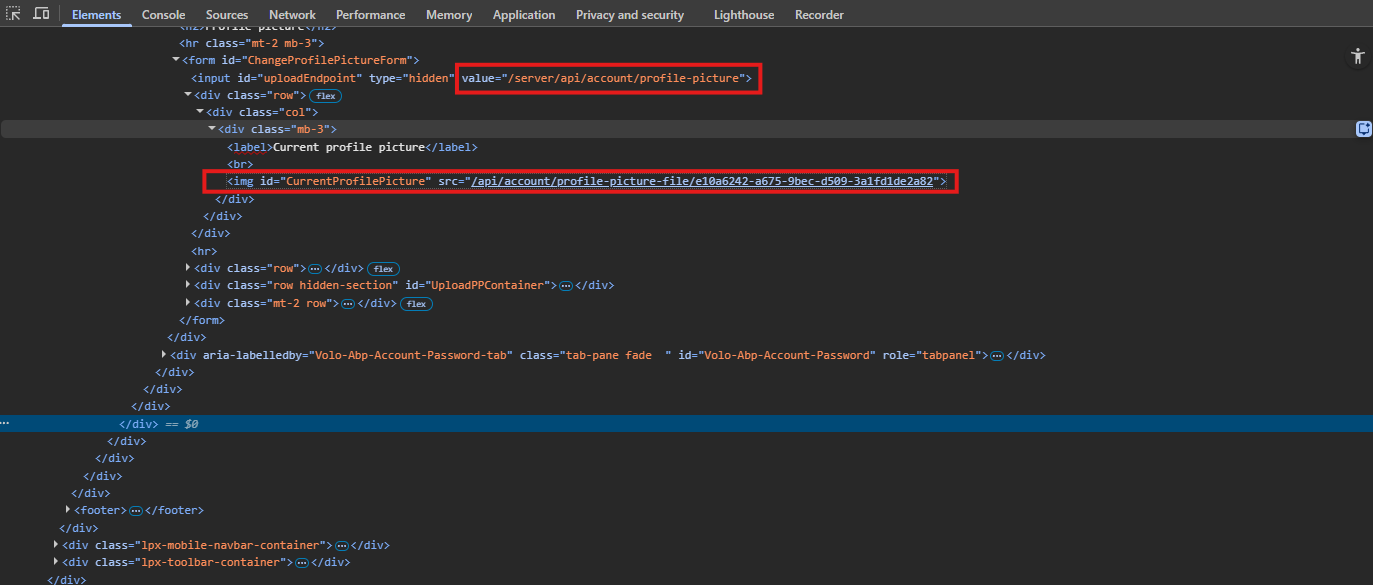
https://<host>/server/Account/Manage).https://<host>/api/account/profile-picture-file/{id} (missing /server)https://<host>/server/api/account/profile-picture-file/{id}<img id="CurrentProfilePicture" ...> points to root-relative /api/account/profile-picture-file/{id}.~/api/... / pathbase-aware URL generation.abp.appPath and <base href> are correctly set to /server/.Please advise whether this is a known issue and if there is an official fix/workaround planned.









