closed due to inactivity...
closed due to inactivity...
closed due to inactivity...
closed due to inactivity...
closed due to inactivity
drpdev2 sorry that this issue has been forgotten. did you manage to solve it? you can also add a CSS to hide to from UI.
hi,
This information is not available on the currentUser object at the moment. I have discussed it with the team and it'll be added to the currentUser which comes from http://domain.com/api/abp/application-configuration I've created an internal issue for this (for v3.2)
Until this is implemented, you can use this URL to get the user's name surname: http://domain.com/api/identity/my-profile
@pkouame, you need to update Microsoft.Extensions.FileProviders.Embedded package to 3.1.6 manually.
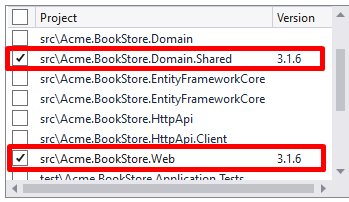
and for yarn gulp problem; it checks the installed NPM packages and searches for gulp@. See
https://github.com/abpframework/abp/blob/95d2eb200d704768f67764dd3c1b02258e9e6f6f/framework/src/Volo.Abp.Cli.Core/Volo/Abp/Cli/ProjectModification/NpmGlobalPackagesChecker.cs#L27
I guess it's related a fix that's done in v3.1.0 (because we fixed some Suite issues in 3.1.0) Today we have released a new RC version (preview) of 3.1.0 - RC4 (the production of 3.1.0 will be released this weekend) Try to create a new project with 3.1.0-RC4 and we'll see if it's related with MAC or the framework.
hi myke@mycra.co I just made a sample project for this topic. See https://community.abp.io/articles/how-to-add-the-user-entity-as-a-navigation-property-furp75ex
Note this example is implemented with ABP Commercial 3.1.0-rc.3. This is a RC version. If you want to install the CLI and Suite RC version follow the next steps:
1- Uninstall the current version of the CLI and install the specific RC version:
dotnet tool uninstall --global Volo.Abp.Cli && dotnet tool install --global Volo.Abp.Cli --version 3.1.0-rc.3
2- Uninstall the current version of the Suite and install the specific RC version:
dotnet tool uninstall --global Volo.Abp.Suite && dotnet tool install -g Volo.Abp.Suite --version 3.1.0-rc.3 --add-source https://nuget.abp.io/<YOUR-API-KEY>/v3/index.json
Don't forget to replace the <YOUR-API-KEY> with your own key!









