Thanks, I decided to have a simpler solution that i custom to show Main Toolbar on the right-side for Home only, other pages when open will hide the main toolbar.
Hi Maliming, Is there any issue for upgrading or future development if we use the old Lepton? Thanks, Dharma
I'm using LeptonX theme for blazor server, I saw the old Lepton them can support as my requirement, we will custom LeptonX to support my requirement or we back to use the old Lepton version? Which is best solution for future maintenance, upgrading, extending... thanks,
Hi ABP Team, I'm using ABP v10 and having an issue with Sidebar navigation menu and Main Toolbar. Currently as Leptonx standard theme if we select Side menu then both Navigation Menu and Main Toolbar are on both left and right side, for this case it take quite space of screen in wide especially for user using laptop does not have so much space for the main content. If we change to top menu both will be on top and user don't familiar with navigation menu on top. They requested to have an UI similar to as common software application with navigation menu on the left and main tool bar on the top to show avatar, notification, chat... is there any option or custom solution to meet this requirement?
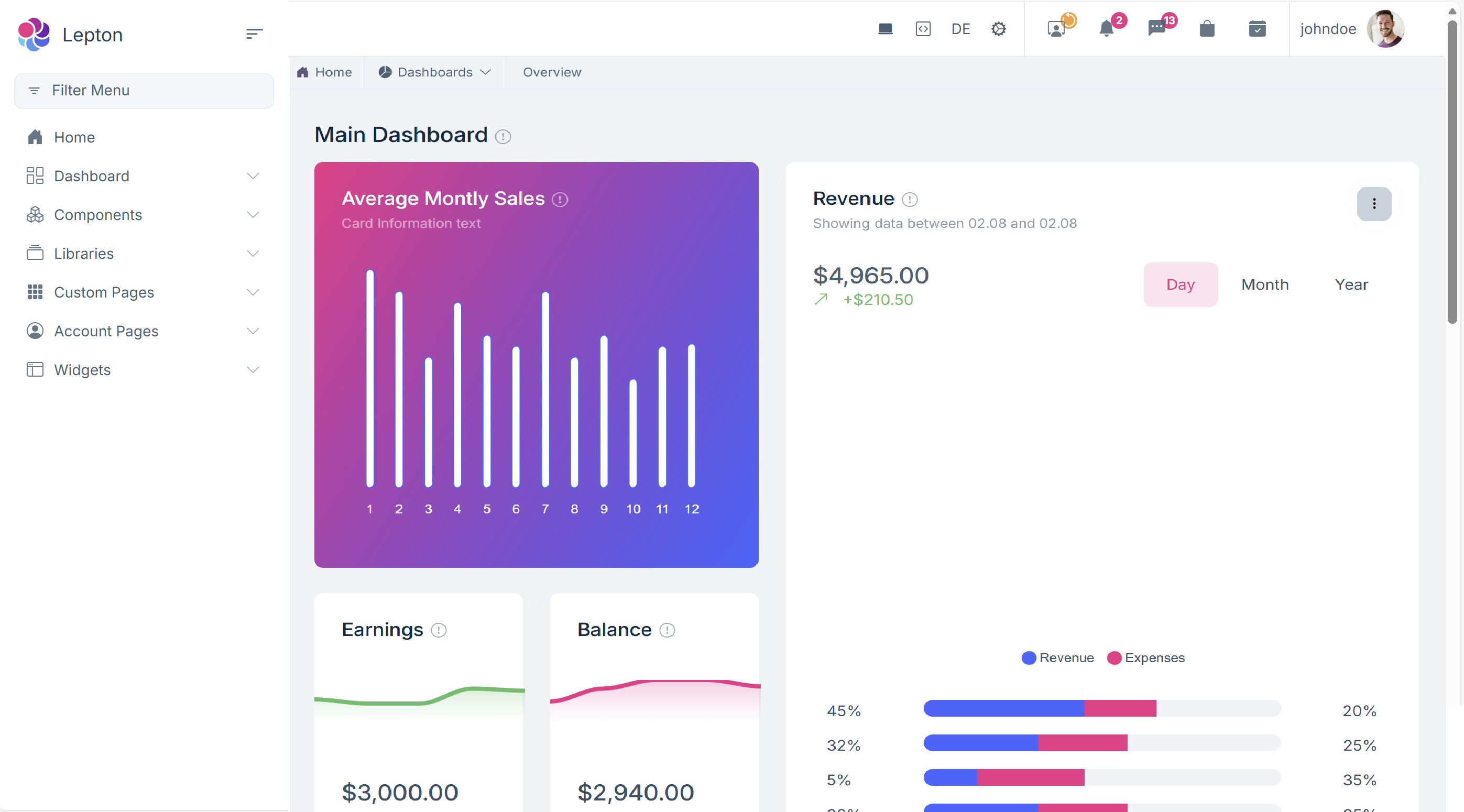 Thanks,
Dharma
Thanks,
Dharma
The issue has been supported via email. Thanks
Hi, I have changed my development machine from Ubuntu (named Agent_Dev_01) to new windows named Agent_Win11_01, please remove license record on your system for ubuntu machine so that i can use on my new windows, as now i have issue of license checking "ABP-LIC-0012 - License Error! Given user 'hanntd' has reached the maximum allowed developer computer count (2) for the organization 'HQSOFTCompanyLimited'! Can not use the license in a new computer. Contact to license@abp.io if you think that this is an error." Thanks, Dharma
Thanks, i have resolved my issue, i remove "-r linux-x64" in dotnet restore/build/publish now it worked.
as i said before i try to publish on local machine ok, the issue only happened when publish to docker during docker build. even you publish to docker on local machine or on the server has the same issue
Sure Maliming, it is working well for v9.x just issue when upgraded to v10. My current docker file, even i tried on docker local still the same:
# ============================================
# HQSOFT.Xspire.Blazor - Standard Dockerfile
# Optimized for BuildKit caching with parallel builds
# With DevExpress License support
# ============================================

# ----------------------------
# Build stage - restore and compile
# ----------------------------
FROM mcr.microsoft.com/dotnet/sdk:10.0 AS build

# DevExpress License Build Argument
# This is passed from GitLab CI/CD via --build-arg
ARG DevExpress_License

# Set DevExpress License as environment variable (exact casing required)
# This makes the license available during dotnet build/publish
ENV DevExpress_License=${DevExpress_License}

# Set environment for build performance
ENV DOTNET_CLI_TELEMETRY_OPTOUT=1 \
    DOTNET_SKIP_FIRST_TIME_EXPERIENCE=1 \
    DOTNET_SYSTEM_GLOBALIZATION_INVARIANT=1 \
    NUGET_HTTP_TIMEOUT=180

WORKDIR /src

# Copy solution and project files first (for better layer caching)
COPY ["HQSOFT.Xspire.sln", "./"]
COPY ["NuGet.Config", "./"]
COPY ["common.props", "./"]

# Copy all project files for restore
COPY ["src/HQSOFT.Xspire.Blazor/HQSOFT.Xspire.Blazor.csproj", "src/HQSOFT.Xspire.Blazor/"]
COPY ["src/HQSOFT.Xspire.Application/HQSOFT.Xspire.Application.csproj", "src/HQSOFT.Xspire.Application/"]
COPY ["src/HQSOFT.Xspire.Application.Contracts/HQSOFT.Xspire.Application.Contracts.csproj", "src/HQSOFT.Xspire.Application.Contracts/"]
COPY ["src/HQSOFT.Xspire.Domain/HQSOFT.Xspire.Domain.csproj", "src/HQSOFT.Xspire.Domain/"]
COPY ["src/HQSOFT.Xspire.Domain.Shared/HQSOFT.Xspire.Domain.Shared.csproj", "src/HQSOFT.Xspire.Domain.Shared/"]
COPY ["src/HQSOFT.Xspire.EntityFrameworkCore/HQSOFT.Xspire.EntityFrameworkCore.csproj", "src/HQSOFT.Xspire.EntityFrameworkCore/"]
COPY ["src/HQSOFT.Xspire.HttpApi.Client/HQSOFT.Xspire.HttpApi.Client.csproj", "src/HQSOFT.Xspire.HttpApi.Client/"]

# Copy module project files
COPY ["modules/", "modules/"]

# Restore dependencies (this layer is cached if project files don't change)
RUN dotnet restore "src/HQSOFT.Xspire.Blazor/HQSOFT.Xspire.Blazor.csproj" \
    -r linux-x64 \
    --verbosity quiet

# Copy all source code
COPY ["src/", "src/"]

# Build the project (cached if source code doesn't change)
# DevExpress License is available via environment variable
RUN dotnet build "src/HQSOFT.Xspire.Blazor/HQSOFT.Xspire.Blazor.csproj" \
    -c Release \
    -r linux-x64 \
    --no-restore \
    --disable-build-servers \
    --verbosity quiet \
    /p:WarningLevel=0 \
    /consoleLoggerParameters:ErrorsOnly

# ----------------------------
# Publish stage
# ----------------------------
FROM build AS publish
# DevExpress License remains available in this stage from build stage
RUN dotnet publish "src/HQSOFT.Xspire.Blazor/HQSOFT.Xspire.Blazor.csproj" \
    -c Release \
    -r linux-x64 \
    -o /app/publish \
    --no-restore \
    --verbosity quiet \
    /p:WarningLevel=0 \
    /consoleLoggerParameters:ErrorsOnly \
    /p:CopyStaticWebAssets=true \
    /p:IncludeStaticWebAssets=true

# ----------------------------
# Runtime stage
# ----------------------------
FROM mcr.microsoft.com/dotnet/aspnet:10.0 AS final

# Set timezone
ENV TZ=Asia/Ho_Chi_Minh
RUN ln -snf /usr/share/zoneinfo/$TZ /etc/localtime && echo $TZ > /etc/timezone

# Configure ASP.NET Core
ENV ASPNETCORE_URLS=http://+:8080 \
    ASPNETCORE_FORWARDEDHEADERS_ENABLED=true \
    UseHttpsRedirection=true \
    ASPNETCORE_PATHBASE=""

WORKDIR /app

# Install runtime dependencies for reporting and fonts
RUN apt-get update && apt-get install -y \
    libfontconfig1 \
    fontconfig \
    libicu-dev \
    libfreetype6 \
    libjpeg-turbo8 \
    libpng16-16 \
    libgif7 \
    libx11-6 \
    libxcb1 \
    libxext6 \
    libgl1 \
    wget \
    --no-install-recommends && \
    rm -rf /var/lib/apt/lists/* /tmp/* /var/tmp/* && \
    mkdir -p /usr/share/fonts/truetype/msttcorefonts && \
    wget -q https://github.com/web-platform-tests/wpt/raw/master/fonts/Ahem.ttf -O /usr/share/fonts/truetype/Ahem.ttf && \
    fc-cache -f

# Create application directories
RUN mkdir -p /app/Logs /app/Reports && \
    chmod 755 /app/Logs /app/Reports

# Set shared library path
ENV LD_LIBRARY_PATH=/usr/lib/x86_64-linux-gnu:/usr/lib:/app

# Copy published application
COPY --from=publish /app/publish .

# Copy Reports folder if it exists (using RUN with mount for optional copy)
RUN --mount=type=bind,from=build,source=/src/src/HQSOFT.Xspire.Blazor/Reports,target=/tmp/reports \
    if [ -d /tmp/reports ]; then cp -r /tmp/reports/* /app/Reports/ || true; fi

# Health check
HEALTHCHECK --interval=30s --timeout=10s --start-period=60s --retries=5 \
    CMD wget -q --spider http://localhost:8080/health-status || exit 1

EXPOSE 8080

# Run the application
ENTRYPOINT ["dotnet", "HQSOFT.Xspire.Blazor.dll"]
Hi,
My solution is the tired for Balzor server, after upgraded to v10 I found the issue when deploy to docker the blazor project is missing _framework cause when open blazor page cannot login or do anything. I tried to publish on local still see this folder. Is this .Net 10 issue or related to ABP Framework. How can fix it or work around solution?
Thanks, Dhamar









