






Hi, we’re finding that users often get a 400 error message when they try to authenticate.
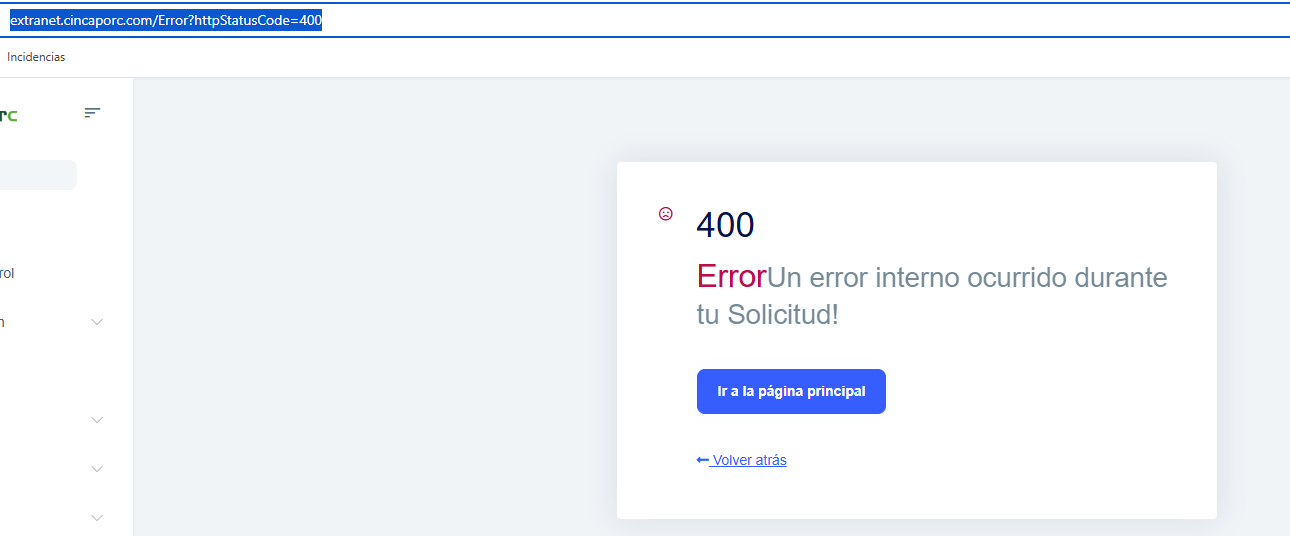
I’ve checked the logs and this is what I see:
2026-01-27 12:51:57.800 +01:00 [ERR] [] [] An unhandled exception has occurred while executing the request. System.Exception: An error was encountered while handling the remote login. ---> System.Exception: Unable to unprotect the message.State. --- End of inner exception stack trace --- at Microsoft.AspNetCore.Authentication.RemoteAuthenticationHandler`1.HandleRequestAsync() at Microsoft.AspNetCore.Authentication.AuthenticationMiddleware.Invoke(HttpContext context) at Volo.Abp.AspNetCore.Security.AbpSecurityHeadersMiddleware.InvokeAsync(HttpContext context, RequestDelegate next) at Microsoft.AspNetCore.Builder.UseMiddlewareExtensions.<>c__DisplayClass6_1.<
What solution would you suggest in this case? Best regards
60 Answer(s)
-
0
- Root cause
From the log:
System.Exception: Unable to unprotect the message.State(during remote login callback)The required antiforgery request token was not provided...- HTTP 400 on
/Error?httpStatusCode=400
This combination typically happens when:
- The auth / antiforgery cookies are not sent back to your app after the external login redirect (most often because of SameSite cookie rules, especially with external IdPs, reverse proxies, HTTPS/HTTP mismatch, or some browsers like Safari), or
- Data‑Protection keys are not stable/shared, so the app cannot decrypt the state that was encrypted before redirect.
When the cookies or keys don’t match, ASP.NET Core fails to unprotect the
stateparameter and the antiforgery system also fails, resulting in 400.
- Recommended fixes
Apply all of these; they address the most common production causes.
2.1. Make sure cookies work correctly across redirects (SameSite + HTTPS)
Especially if you use:
- External identity provider (Azure AD, ADFS, etc.)
- A different domain for AuthServer and UI
- Safari / recent Chrome / reverse proxy (NGINX, load balancer)
Do the following in your AuthServer / UI host:
- Run only over HTTPS.
- Configure cookie policy for compatibility with modern SameSite behavior (so cookies are sent on the external redirect round‑trip).
The ABP team recommends the patch described here (originally for IdentityServer4, but the SameSite issue is the same):
public void ConfigureServices(IServiceCollection services)
{
    services.AddSameSiteCookiePolicy(); // extension method from the article/patch
}
And in
Configure:app.UseCookiePolicy();Details and full sample code are in this ABP article and support answer:
- https://abp.io/community/articles/patch-for-chrome-login-issue-identityserver4-samesite-cookie-problem-weypwp3n
- https://abp.io/support/questions/9426
These ensure that the antiforgery and auth cookies are correctly set with
SameSite=None; Secure(or appropriate fallbacks), so they survive the external login redirect.
2.2. Use a persistent/shared Data Protection key ring
If you are:
- Running in a web farm / multiple containers, or
- Redeploying often without persisting keys
then each instance may have different Data‑Protection keys. The
statevalue is encrypted before redirect and must be decrypted by the same keys on callback.Configure ASP.NET Core Data Protection to use a persistent store (shared across all instances) – for example, a folder volume or Redis:
using Microsoft.AspNetCore.DataProtection;

public void ConfigureServices(IServiceCollection services)
{
    services
        .AddDataProtection()
        .PersistKeysToFileSystem(new DirectoryInfo(@"/var/keys")) // or a shared folder
        .SetApplicationName("YourAppName");
}
Do this in all AuthServer / UI hosts.
(If you already persist keys, ensure all instances point to the same location and time is in sync.)
2.3. Address the antiforgery error itself
After fixing cookies/keys, the antiforgery error may still appear if some POST is being made without a token (e.g., a custom form, widget, or JS client).
Typical ABP solutions:
- Add the antiforgery token to your custom views (MVC / Razor):
<form asp-action="..." method="post">
       @Html.AntiForgeryToken()
       ...
   </form>
or ensure your layout includes the default ABP antiforgery helpers (which then can be read and added as a header by your JS code).
For API endpoints called via JS / Swagger, either:
- Send the antiforgery token in header
RequestVerificationToken, or - If the endpoint is not form‑based (pure API), decorate it with:
- Send the antiforgery token in header
[IgnoreAntiforgeryToken]
     public class YourAppService : ApplicationService
     {
         // ...
     }
Relevant ABP support references:
- File upload / custom JS call missing antiforgery token: https://abp.io/support/questions/3406
- Custom page without default theme missing antiforgery cookie: https://abp.io/support/questions/595
Practical checklist
Ensure HTTPS everywhere (AuthServer and UI).
Apply the SameSite cookie patch (or equivalent configuration) as per the ABP article.
Configure persistent/shared Data‑Protection keys.
Check any custom POST endpoints/views:
- Add antiforgery token to forms, or
- Use
[IgnoreAntiforgeryToken]on pure API actions.
Re-test the login flow:
- Clear browser cookies.
- Log in via the external provider.
- Confirm you no longer see
Unable to unprotect the message.Stateor missing antiforgery token, and the 400 no longer appears.
This response was generated by AI. If it didn’t solve your problem, feel free to post a new answer — our support team will jump in to help you soon.
Markdown supported.Copy, paste, or drag & drop images and files (max 100 MB per file, 100 MB total per post) -
0
I’d prefer this to be handled by someone who isn’t a bot.
Markdown supported.Copy, paste, or drag & drop images and files (max 100 MB per file, 100 MB total per post) -
0
hi
Do you have multiple instances?
Have your instances been restarted?
Have you set up
ConfigureDataProtection?private void ConfigureDataProtection( ServiceConfigurationContext context, IConfiguration configuration, IWebHostEnvironment hostingEnvironment) { var dataProtectionBuilder = context.Services.AddDataProtection().SetApplicationName("MyProjectName"); if (!hostingEnvironment.IsDevelopment()) { var redis = ConnectionMultiplexer.Connect(configuration["Redis:Configuration"]!); dataProtectionBuilder.PersistKeysToStackExchangeRedis(redis, "MyProjectName-Protection-Keys"); } }Thanks.
Markdown supported.Copy, paste, or drag & drop images and files (max 100 MB per file, 100 MB total per post) -
0
Hi, in my app we do have that. It seems to me that the error I showed you happens when you stay on the login screen for a long time without logging in. At the moment you log in, the 400 error appears on the screen. We have ConfigureDataProtection exactly the same. I’ll send you my GitHub.
https://github.com/Cincaporc/Cincaporc.WebApp
Markdown supported.Copy, paste, or drag & drop images and files (max 100 MB per file, 100 MB total per post) -
0
I already invited you.
Markdown supported.Copy, paste, or drag & drop images and files (max 100 MB per file, 100 MB total per post) -
0
The one I sent you is the web one, although it seems to me that the web.public one also has that problem. While you’re looking into the web one, I’m going to try to trigger that error in public to see if it happens there as well.
Markdown supported.Copy, paste, or drag & drop images and files (max 100 MB per file, 100 MB total per post) -
0
Hi, in web.public that error also happens.
Markdown supported.Copy, paste, or drag & drop images and files (max 100 MB per file, 100 MB total per post) -
0
Can you send it to me again?, Translate, and what exactly is it that you really want the error screen to show you? I already sent you the screenshot.
Markdown supported.Copy, paste, or drag & drop images and files (max 100 MB per file, 100 MB total per post) -
0
Hello, when do you can, send it to me again
Markdown supported.Copy, paste, or drag & drop images and files (max 100 MB per file, 100 MB total per post) -
0
I’ve already sent you the logs in the email.
Markdown supported.Copy, paste, or drag & drop images and files (max 100 MB per file, 100 MB total per post) -
0
hi]
The logs doesn't contain 400 error
Can you reproduce the error and then share the logs again?
Before that, can you share the previous logs and HAR files?
Thanks.
Markdown supported.Copy, paste, or drag & drop images and files (max 100 MB per file, 100 MB total per post) -
0
I’ve already sent you the logs in the email.
Markdown supported.Copy, paste, or drag & drop images and files (max 100 MB per file, 100 MB total per post) -
0
hi
You can
Increase remote auth cookie lifetime to 60m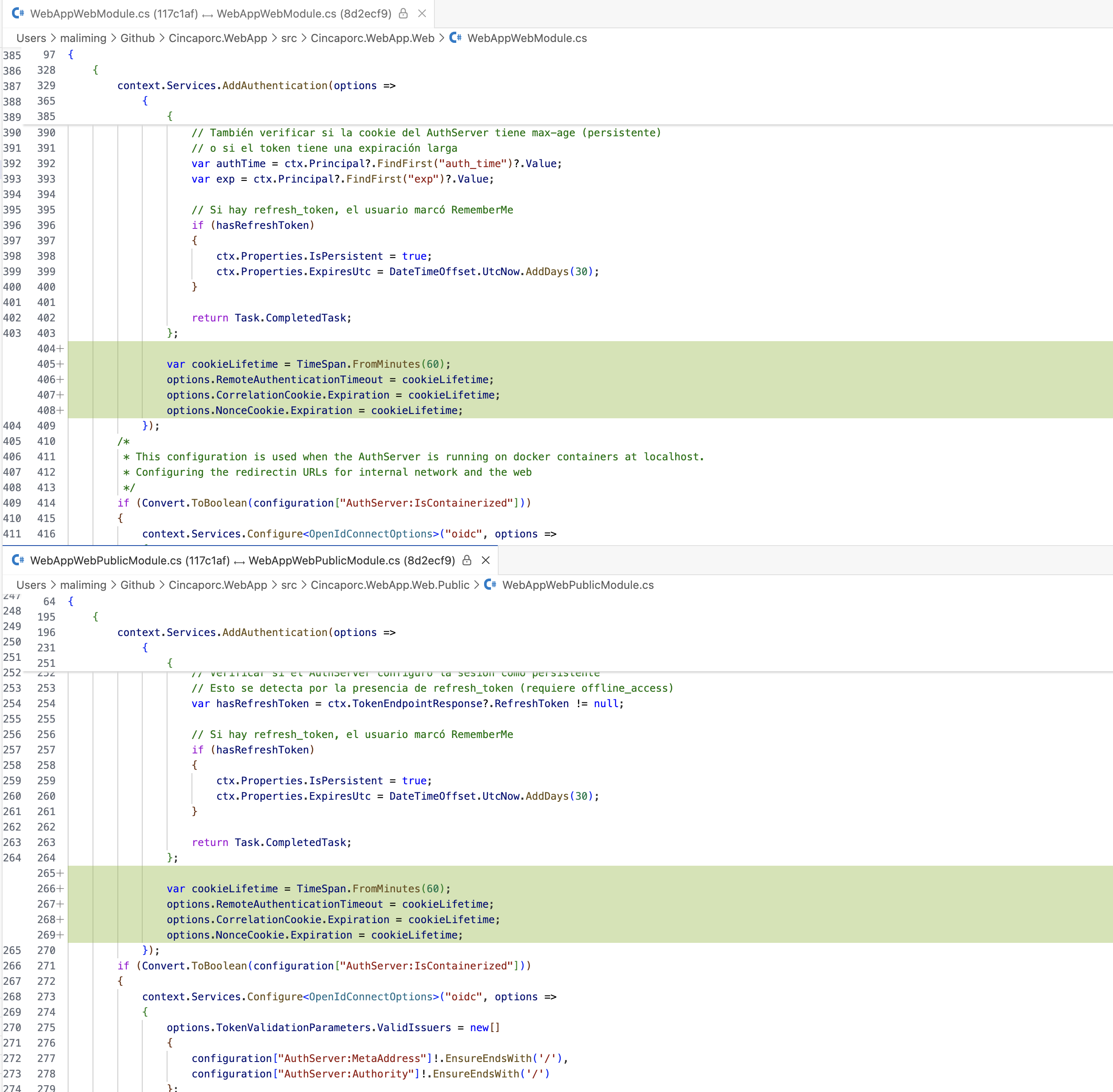
var cookieLifetime = TimeSpan.FromMinutes(60);
options.RemoteAuthenticationTimeout = cookieLifetime;
options.CorrelationCookie.Expiration = cookieLifetime;
options.NonceCookie.Expiration = cookieLifetime;
Thanks.
Markdown supported.Copy, paste, or drag & drop images and files (max 100 MB per file, 100 MB total per post) -
0
Hi,
I haven’t done what you asked yet, but I believe that increasing this by a few more minutes would only be a workaround. Even if it’s increased, if the user leaves it for a longer time, the error will appear again.
Let me know what you think.
Markdown supported.Copy, paste, or drag & drop images and files (max 100 MB per file, 100 MB total per post) -
0
Hi,
I agree with what you’re saying about increasing the time to one hour so that this issue doesn’t appear as it does now, when it’s only 15 minutes. However, if someone leaves the login page open for hours, the error will still appear when they try to log in.
The idea is that users should not see this error under any circumstances, because for an end user this doesn’t look very professional and makes it seem like our app has issues. That’s why I’m asking whether, in addition to increasing the timeout, you see any other possible options.
Markdown supported.Copy, paste, or drag & drop images and files (max 100 MB per file, 100 MB total per post) -
0
Hi I made the changes as you told me:
I’ve tested it and I’m still getting the 400 error. I’m sending you the logs.
var cookieLifetime = TimeSpan.FromDays(365); options.RemoteAuthenticationTimeout = cookieLifetime; options.CorrelationCookie.Expiration = cookieLifetime; options.NonceCookie.Expiration = cookieLifetime;
2026-01-29 14:39:14.330 +01:00 [ERR] [] [] An unhandled exception has occurred while executing the request. System.Exception: An error was encountered while handling the remote login. ---> System.Exception: Correlation failed. --- End of inner exception stack trace --- at Microsoft.AspNetCore.Authentication.RemoteAuthenticationHandler
1.HandleRequestAsync() at Microsoft.AspNetCore.Authentication.AuthenticationMiddleware.Invoke(HttpContext context) at Volo.Abp.AspNetCore.Security.AbpSecurityHeadersMiddleware.InvokeAsync(HttpContext context, RequestDelegate next) at Microsoft.AspNetCore.Builder.UseMiddlewareExtensions.<>c__DisplayClass6_1.<<UseMiddlewareInterface>b__1>d.MoveNext() --- End of stack trace from previous location --- at Microsoft.AspNetCore.Diagnostics.ExceptionHandlerMiddleware.<Invoke>g__Awaited|6_0(ExceptionHandlerMiddleware middleware, HttpContext context, Task task) 2026-01-29 14:39:14.350 +01:00 [DBG] [] [] 1 candidate(s) found for the request path '/Error' 2026-01-29 14:39:14.350 +01:00 [DBG] [] [] Endpoint 'Volo.Abp.AspNetCore.Mvc.UI.Theme.Shared.Controllers.ErrorController.Index (Volo.Abp.AspNetCore.Mvc.UI.Theme.Shared)' with route pattern '{controller=Home}/{action=Index}/{id?}' is valid for the request path '/Error' 2026-01-29 14:39:14.350 +01:00 [DBG] [] [] Request matched endpoint 'Volo.Abp.AspNetCore.Mvc.UI.Theme.Shared.Controllers.ErrorController.Index (Volo.Abp.AspNetCore.Mvc.UI.Theme.Shared)' 2026-01-29 14:39:14.350 +01:00 [DBG] [] [] Static files was skipped as the request already matched an endpoint. 2026-01-29 14:39:14.350 +01:00 [DBG] [] [] Endpoint 'Volo.Abp.AspNetCore.Mvc.UI.Theme.Shared.Controllers.ErrorController.Index (Volo.Abp.AspNetCore.Mvc.UI.Theme.Shared)' already set, skipping route matching. 2026-01-29 14:39:14.350 +01:00 [DBG] [] [] AuthenticationScheme: Cookies was not authenticated. 2026-01-29 14:39:14.350 +01:00 [DBG] [null] [null] Static files was skipped as the request already matched an endpoint. 2026-01-29 14:39:14.350 +01:00 [INF] [null] [null] Executing endpoint 'Volo.Abp.AspNetCore.Mvc.UI.Theme.Shared.Controllers.ErrorController.Index (Volo.Abp.AspNetCore.Mvc.UI.Theme.Shared)' 2026-01-29 14:39:14.350 +01:00 [INF] [null] [null] Route matched with {action = "Index", controller = "Error", area = "", page = ""}. Executing controller action with signature System.Threading.Tasks.Task1[Microsoft.AspNetCore.Mvc.IActionResult] Index(Int32) on controller Volo.Abp.AspNetCore.Mvc.UI.Theme.Shared.Controllers.ErrorController (Volo.Abp.AspNetCore.Mvc.UI.Theme.Shared). 2026-01-29 14:39:14.350 +01:00 [DBG] [null] [null] Execution plan of authorization filters (in the following order): ["Volo.Abp.AspNetCore.Mvc.AntiForgery.AbpAutoValidateAntiforgeryTokenAuthorizationFilter"] 2026-01-29 14:39:14.350 +01:00 [DBG] [null] [null] Execution plan of resource filters (in the following order): ["Microsoft.AspNetCore.Mvc.ViewFeatures.Filters.SaveTempDataFilter"] 2026-01-29 14:39:14.351 +01:00 [DBG] [null] [null] Execution plan of action filters (in the following order): ["Microsoft.AspNetCore.Mvc.Filters.ControllerActionFilter (Order: -2147483648)","Microsoft.AspNetCore.Mvc.ModelBinding.UnsupportedContentTypeFilter (Order: -3000)","Volo.Abp.AspNetCore.Mvc.GlobalFeatures.GlobalFeatureActionFilter","Volo.Abp.AspNetCore.Mvc.Auditing.AbpAuditActionFilter","Volo.Abp.AspNetCore.Mvc.Response.AbpNoContentActionFilter","Volo.Abp.AspNetCore.Mvc.Features.AbpFeatureActionFilter","Volo.Abp.AspNetCore.Mvc.Validation.AbpValidationActionFilter","Volo.Abp.AspNetCore.Mvc.Uow.AbpUowActionFilter"] 2026-01-29 14:39:14.351 +01:00 [DBG] [null] [null] Execution plan of exception filters (in the following order): ["Volo.Abp.AspNetCore.Mvc.ExceptionHandling.AbpExceptionFilter"] 2026-01-29 14:39:14.351 +01:00 [DBG] [null] [null] Execution plan of result filters (in the following order): ["Microsoft.AspNetCore.Mvc.ViewFeatures.Filters.SaveTempDataFilter"] 2026-01-29 14:39:14.352 +01:00 [ERR] [null] [null] The required antiforgery cookie ".AspNetCore.Antiforgery.4ewlKE2fs7M" is not present. 2026-01-29 14:39:14.353 +01:00 [INF] [null] [null] Authorization failed for the request at filter 'Volo.Abp.AspNetCore.Mvc.AntiForgery.AbpAutoValidateAntiforgeryTokenAuthorizationFilter'. 2026-01-29 14:39:14.353 +01:00 [INF] [null] [null] Executing StatusCodeResult, setting HTTP status code 400 2026-01-29 14:39:14.353 +01:00 [INF] [null] [null] Executed action Volo.Abp.AspNetCore.Mvc.UI.Theme.Shared.Controllers.ErrorController.Index (Volo.Abp.AspNetCore.Mvc.UI.Theme.Shared) in 1.8941ms 2026-01-29 14:39:14.353 +01:00 [INF] [null] [null] Executed endpoint 'Volo.Abp.AspNetCore.Mvc.UI.Theme.Shared.Controllers.ErrorController.Index (Volo.Abp.AspNetCore.Mvc.UI.Theme.Shared)' 2026-01-29 14:39:14.354 +01:00 [INF] [] [] Request finished HTTP/1.1 POST https://extranet-dev.cincaporc.com/signin-oidc application/x-www-form-urlencoded 1962 - 302 - - 58.4764ms 2026-01-29 14:39:14.442 +01:00 [INF] [] [] Request starting HTTP/1.1 GET https://extranet-dev.cincaporc.com/Error?httpStatusCode=400 - - 2026-01-29 14:39:14.442 +01:00 [DBG] [] [] The request path /Error does not match a supported file type 2026-01-29 14:39:14.442 +01:00 [DBG] [] [] 1 candidate(s) found for the request path '/Error' 2026-01-29 14:39:14.442 +01:00 [DBG] [] [] Endpoint 'Volo.Abp.AspNetCore.Mvc.UI.Theme.Shared.Controllers.ErrorController.Index (Volo.Abp.AspNetCore.Mvc.UI.Theme.Shared)' with route pattern '{controller=Home}/{action=Index}/{id?}' is valid for the request path '/Error' 2026-01-29 14:39:14.442 +01:00 [DBG] [] [] Request matched endpoint 'Volo.Abp.AspNetCore.Mvc.UI.Theme.Shared.Controllers.ErrorController.Index (Volo.Abp.AspNetCore.Mvc.UI.Theme.Shared)' 2026-01-29 14:39:14.442 +01:00 [DBG] [] [] AuthenticationScheme: Cookies was not authenticated. 2026-01-29 14:39:14.442 +01:00 [DBG] [null] [null] Static files was skipped as the request already matched an endpoint. 2026-01-29 14:39:14.442 +01:00 [INF] [null] [null] Executing endpoint 'Volo.Abp.AspNetCore.Mvc.UI.Theme.Shared.Controllers.ErrorController.Index (Volo.Abp.AspNetCore.Mvc.UI.Theme.Shared)' 2026-01-29 14:39:14.442 +01:00 [INF] [null] [null] Route matched with {action = "Index", controller = "Error", area = "", page = ""}. Executing controller action with signature System.Threading.Tasks.Task`1[Microsoft.AspNetCore.Mvc.IActionResult] Index(Int32) on controller Volo.Abp.AspNetCore.Mvc.UI.Theme.Shared.Controllers.ErrorController (Volo.Abp.AspNetCore.Mvc.UI.Theme.Shared).Markdown supported.Copy, paste, or drag & drop images and files (max 100 MB per file, 100 MB total per post) -
0
hi
I can see the cookie expiration time has changed.
Can you share a test username and password for your website?
I will try to stay on the login page for 20 min.
Thanks.
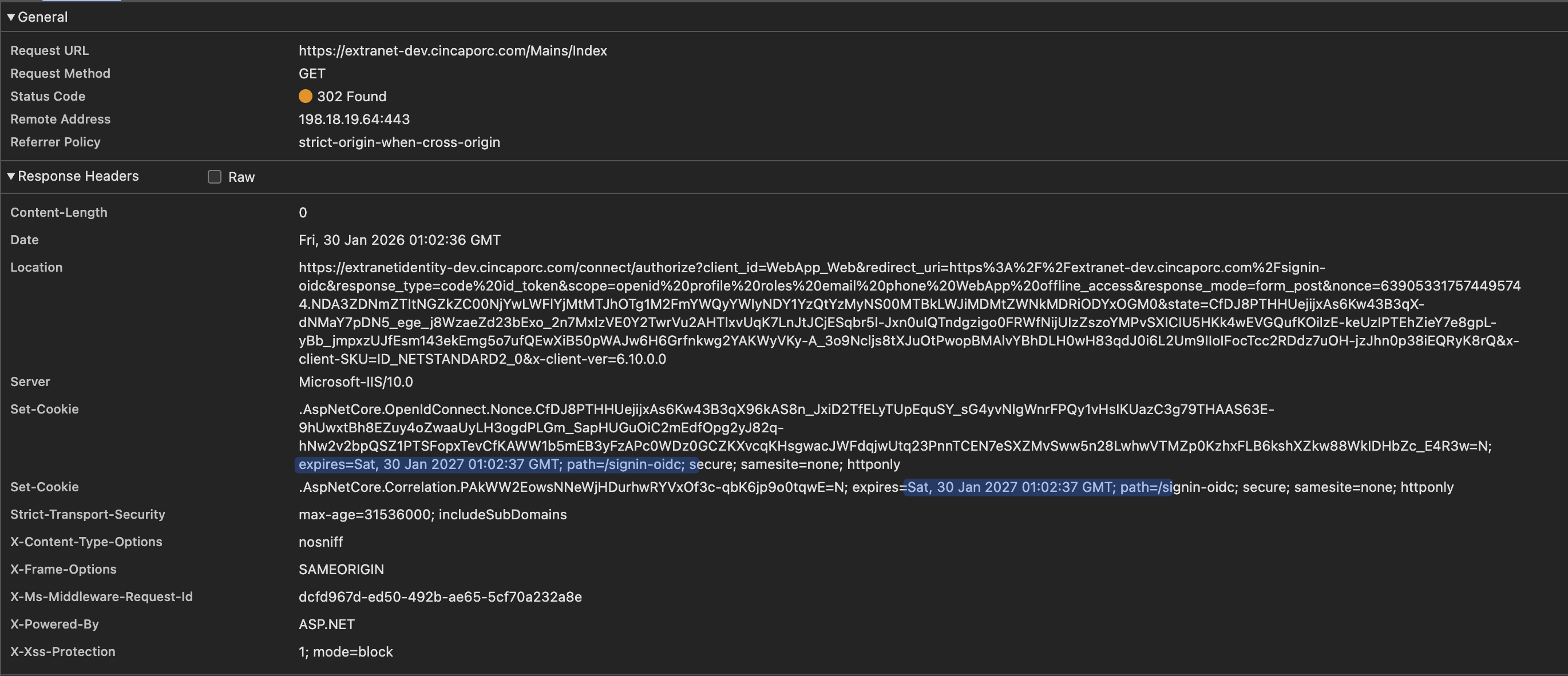 Markdown supported.Copy, paste, or drag & drop images and files (max 100 MB per file, 100 MB total per post)
 -
0
Hi url: https://extranet-dev.cincaporc.com/ Username: maliming Password: maliming1234
Markdown supported.Copy, paste, or drag & drop images and files (max 100 MB per file, 100 MB total per post)



