






Hello Team
I am experiencing a noticeable delay during the initial load of the application. When I open the web application, it takes a significant amount of time to render, with the first response taking approximately 20–30 seconds.
Additionally, when I click on any page or module for the first time, the response is slow.
Could you please help identify the cause and suggest ways to reduce this first-load delay?
Thanks
36 Answer(s)
-
0
In an ABP Angular (separated Auth Server) solution, a 20–30s “first response” delay is almost always server cold-start + first-time caches/build steps, not Angular rendering itself. The Angular app blocks on backend calls like OIDC discovery/token and especially
GET /api/abp/application-configuration(ABP must load permissions, localization resources, settings, etc.). After that, subsequent navigations become fast because the server and caches are warm.Use this checklist (highest impact first) to reduce first-load and first-visit-per-module slowness:
Run everything in Release mode (backend)
- Make sure you are not deploying/running the HTTP API Host/Auth Server with Debug settings.
- Publish with production-oriented settings (helps startup/JIT time):
- Enable ReadyToRun (and optionally trimming/single-file depending on your constraints).
Avoid expensive “run on startup” operations
- Ensure you are not applying EF Core migrations automatically on startup in production.
- If you seed a lot of data/permissions/localization at startup, move it to a one-time migrator or background job.
Warm up the app (solve cold start)
- If hosted on IIS/Azure/App Service/containers with scale-to-zero, the first request can easily take 20–30 seconds.
- Use platform features such as:
- “Always On” / keep-alive
- app initialization/warmup pings (hit
/api/abp/application-configurationonce after deployment)
- If you have multiple services (Auth Server + API Host), warm up both.
Check Redis / distributed cache health & latency (if enabled)
- ABP heavily uses caching for permissions/localization/config. If Redis is misconfigured, slow, or intermittently unavailable, the first load can degrade badly.
- Verify Redis is reachable with low latency from both Auth Server and API Host.
- If Redis is not stable, disable distributed cache temporarily to confirm the bottleneck.
Reduce payload and work in
/api/abp/application-configuration- First navigation triggers loading:
- permissions (PermissionStore cache fill)
- localization dictionaries
- settings, features, etc.
- If you have many localization resources or large dictionaries, this endpoint becomes heavier. Reduce unnecessary localization resource registrations/modules if possible.
- First navigation triggers loading:
Angular-side: serve production build
- For real measurement, test using
ng build --configuration production(and serve the built assets), not dev server.
- For real measurement, test using
Practical way to pinpoint the exact cause (fastest confirmation):
- Open browser DevTools → Network:
- Identify which request takes ~20–30s (commonly: OIDC discovery/token, or
application-configuration).
- Identify which request takes ~20–30s (commonly: OIDC discovery/token, or
- Check server logs with timing around that endpoint.
- Open browser DevTools → Network:
Sources (verified)
- https://abp.io/community/articles/wa24j28e
- https://abp.io/docs/latest/framework/ui/angular/quick-start
This response was generated by AI. If it didn’t solve your problem, feel free to post a new answer — our support team will jump in to help you soon.
-
0
hi
You can enable debug logs to see which step/request is slow.
https://abp.io/support/questions/8622/How-to-enable-Debug-logs-for-troubleshoot-problems
Thanks
-
0
Hi
I have checked in network tab.
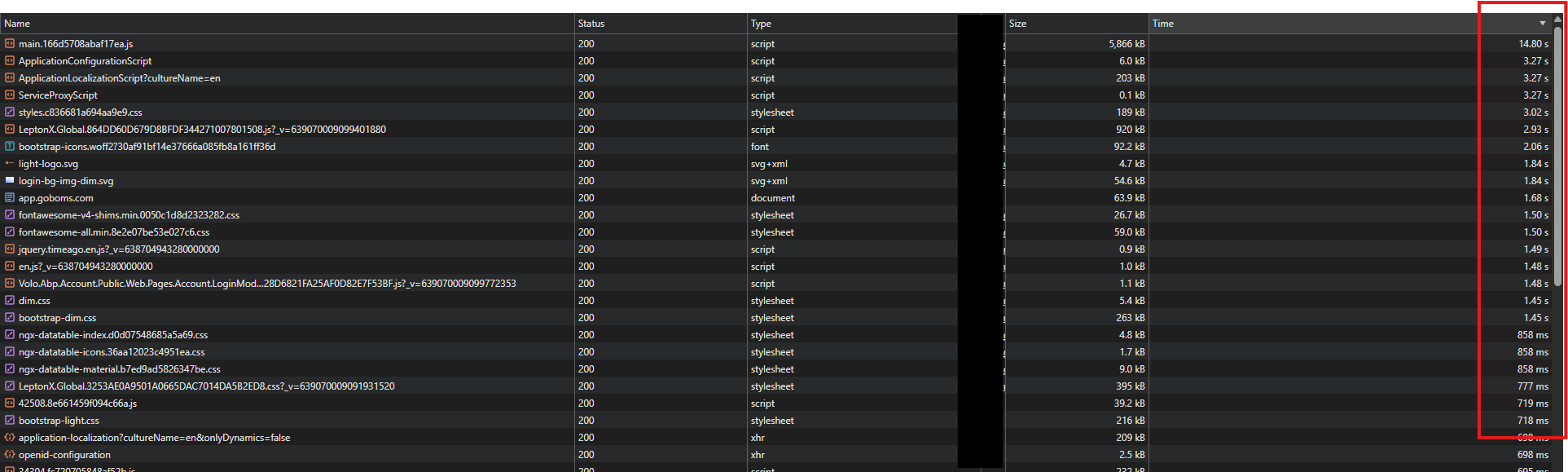
Thank you
-
0
hi
Can you change the log level and share the logs.txt file? https://abp.io/support/questions/8622/How-to-enable-Debug-logs-for-troubleshoot-problems
It seems the static PNG file also takes ~2 seconds.
Thanks.
-
0
Hi
I have shared the log files via email.
Thanks
-
0
hi
It seems the cache is delayed. To confirm this, you can disable Redis in your two websites
  "Redis": {
    "IsEnabled": "false",
    "Configuration": "127.0.0.1"
  }
Can you also share a test username &password of https://dev.hxxxxx.com/ website?
Thanks.
-
0
[maliming] said: hi
It seems the cache is delayed. To confirm this, you can disable Redis in your two websites
  "Redis": {
    "IsEnabled": "false",
    "Configuration": "127.0.0.1"
  }
Can you also share a test username &password of https://dev.hxxxxx.com/ website?
Thanks.
Hi
I have shared the latest log files via email.
Thanks
-
0
hi
I checked your new logs. How many permission in your app?
The logs show there are over 1600 permissions.
Is the application also slow during local development? Or does it only become slow after deployment? What are your server specifications?
Can you also share a test username &password of https://dev.hxxxxx.com/ website?
I will try to reproduce it online.
Thanks.
-
0
[maliming] said: hi
I checked your new logs. How many permission in your app?
The logs show there are over 1600 permissions.
Is the application also slow during local development? Or does it only become slow after deployment?
What are your server specifications?
Can you also share a test username &password of https://dev.hxxxxx.com/ website?
I will try to reproduce it online.
Thanks.
Hi
I have shared the details via email.
Thanks
-
0
hi
Can you share here? Our Angular team may also check it.
Thanks.
-
0
[maliming] said: hi
I checked your new logs. How many permission in your app?
The logs show there are over 1600 permissions.
Is the application also slow during local development? Or does it only become slow after deployment?
What are your server specifications?
Can you also share a test username &password of https://dev.hxxxxx.com/ website?
I will try to reproduce it online.
Thanks.
Hi
Yes, it is also slow during local development on the first load. The server has 16 GB RAM.
Thanks
-
0
hi
Thanks. Can you share a demo project that reproduces the slow issue?
We will check it in our local environment.
-
0
Hi
I noticed that we don't need to load these css and js file without login on angular side as we are redirecting to the auth server.
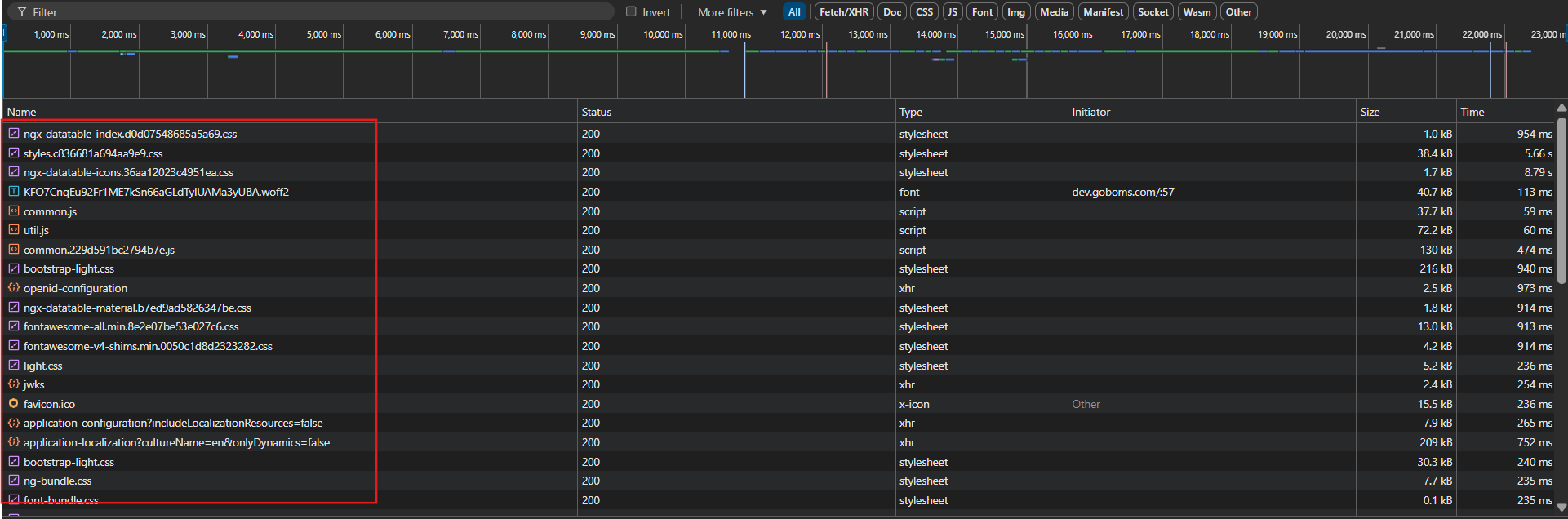
Please let me know if we have any steps to prevent this.
Thanks
-
0
hi
Please first share a demo that reproduces this issue. After that, we will fix it, and the problem you mentioned will no longer exist.
liming.ma@volosoft.com
Thanks.
-
0
[maliming] said: hi
Please first share a demo that reproduces this issue. After that, we will fix it, and the problem you mentioned will no longer exist.
liming.ma@volosoft.com
Thanks.
Hi
I am using an Angular application. You can check it here: https://dev.goboms.com/
The initial loading time is very slow. After loading, it redirects to the auth server, which makes it take even more time.
Thanks
-
0
hi
Yes, it is also slow during local development on the first load.
We need to reproduce this in the local environment.
Thanks.
-
0
[maliming] said: hi
Yes, it is also slow during local development on the first load.
We need to reproduce this in the local environment.
Thanks.
Hi
I have shared the demo project via email. Please let me know if you are able to reproduce the issue.
Thanks
-
0
hi
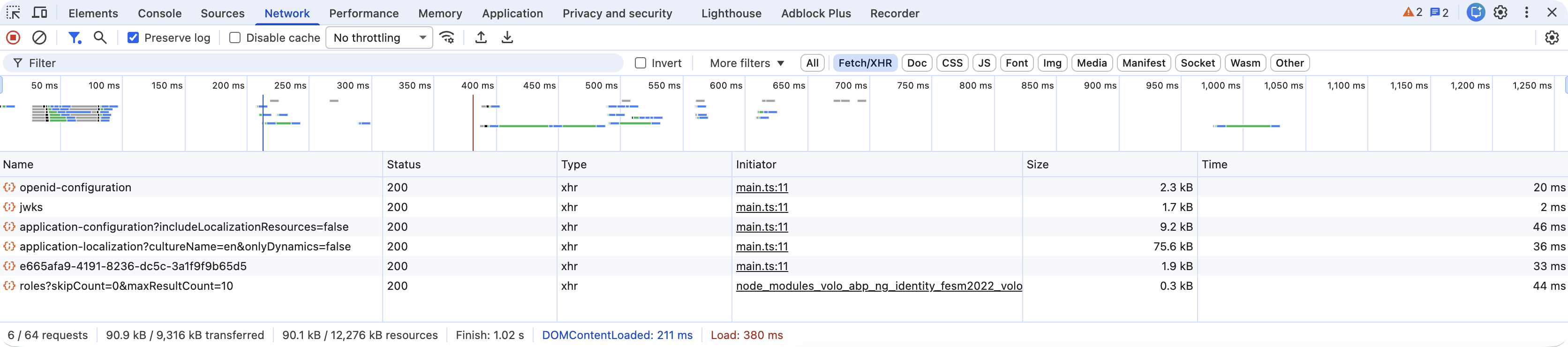
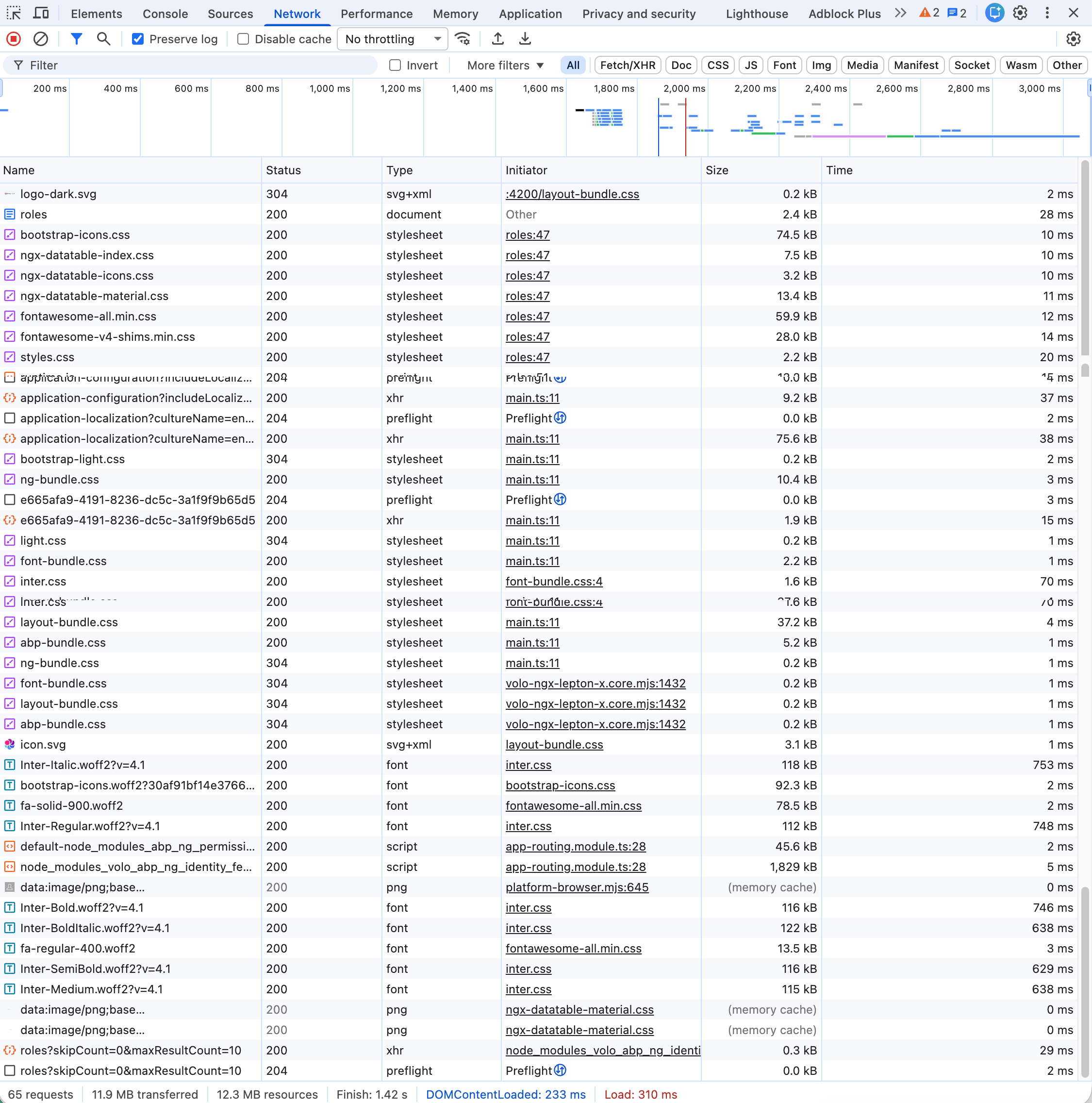
I ran your project, and there is no slow problem.
-
0
Hi,
The issue is that the highlighted JS and CSS files are being requested on every page load. On my side, they are taking approximately 3–4 seconds to load each time.
Why are these files being called even before login and on every page refresh? Ideally, once they are loaded, they should be served from the browser cache instead of being requested again.
Additionally, comparing an empty project with a fully developed ERP application is not appropriate. Please ask your team to re-verify this behavior in the proper context and provide a fix.

Thank you.
-
0
hi
Why are these files being called even before login and on every page refresh? Ideally, once they are loaded, they should be served from the browser cache instead of being requested again.
Which web server is hosting your Angular app? Is it nginx?
You can configure the web server to send the cache header to the browser.
eg:
location ~* \.(css|js|jpg|png|woff|woff2|svg)$ {
    expires 30d;
    add_header Cache-Control "public, immutable";
}
Additionally, comparing an empty project with a fully developed ERP application is not appropriate. Please ask your team to re-verify this behavior in the proper context and provide a fix.
Can you share a project that reproduces the slow issue?
Thanks.
-
0
Hi
We are hosting the application on a Virtual Machine (VM).
It is not hosted on Nginx; the application is deployed directly on the VM environment.
Thank you
-
0
hi
Maybe the
VM environmentis IIS?Can you share more info about your
VM environment?Thanks.
-
0
[maliming] said: hi
Maybe the
VM environmentis IIS?Can you share more info about your
VM environment?Thanks.
Hi,
Yes, we are using IIS. Please find the VM environment details below: Operating System: Windows Server 2022 (64-bit), Version 21H2 Database: Microsoft SQL Server VM Configuration: Processor: Intel® Xeon® CPU v4 Installed RAM: 16.0 GB IIS Version: 10
Please let me know if you need any additional details.
Thank you.
-
0
hi
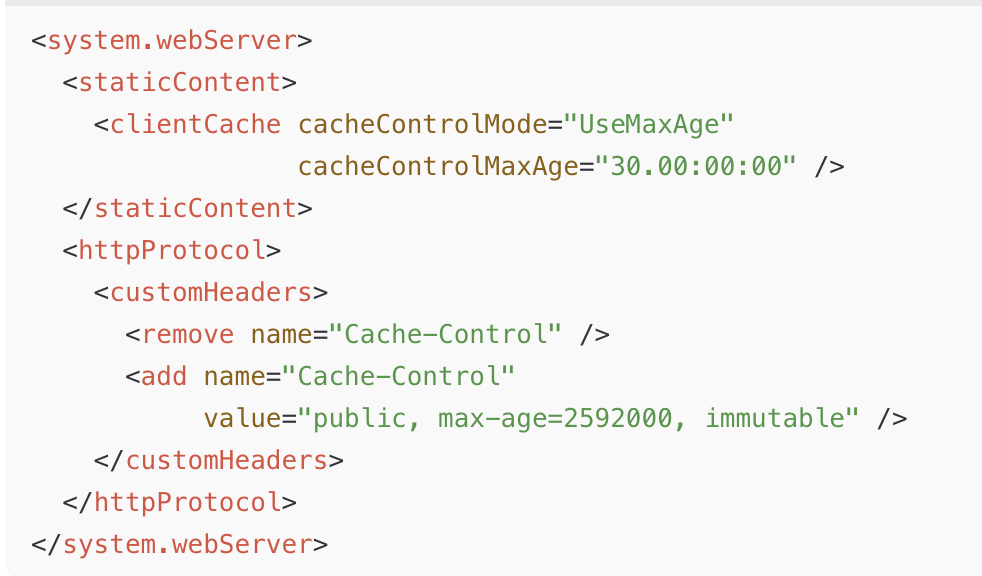
Your web server is IIS. You can set it in IIS to let static files be cached in the browser.
Change your Angular website's web config
-
0
Hi, Thank you for your help.
I have noticed that the highlighted APIs sometimes take a very long time to respond — around 41.4 seconds. However, occasionally they load much faster, around 350 ms, especially after restarting the application or during the first load. For the first time I can understand but Sometimes the delay also occurs on a simple refresh.
I understand that these APIs handle large amounts of data, but the response time is still too high.
Please suggest the proper approach to reduce the load time and improve performance.

Thanks



