






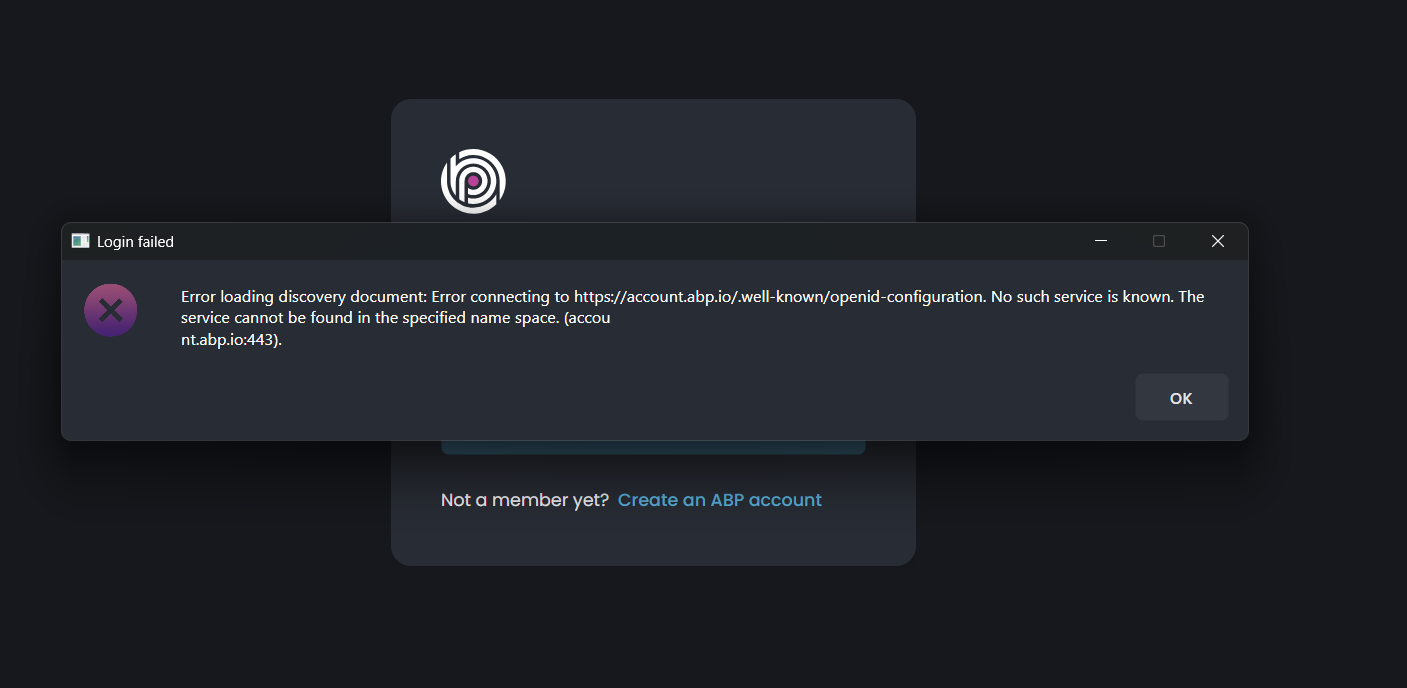
we are encountering an issue while attempting to log in to ABP Studio. This appears to be critical, as all ABP-related services stop functioning
26 Answer(s)
-
0
This error is not caused by your ABP solution/services directly. ABP Studio can’t complete login because it can’t reach the OpenId Connect discovery endpoint (
https://account.abp.io/.well-known/openid-configuration).
The message “No such service is known … (account.abp.io:443)” indicates a DNS/network resolution problem on the machine (or corporate network/proxy), not an ABP Studio credential issue.Fix steps (apply in order):
Verify DNS resolution
- From the same machine, run:
nslookup account.abp.ioping account.abp.io(ICMP may be blocked; DNS result is what matters)
- If
nslookupfails or returns an internal/blocked address, fix your DNS (corporate DNS, VPN DNS, etc.).
- From the same machine, run:
Check proxy / firewall / SSL inspection
- If you are behind a corporate proxy, ensure
account.abp.io:443is allowed and that the proxy is correctly configured for Windows (WinHTTP) and the current user. - If SSL inspection is enabled, ensure it does not break TLS to
account.abp.io.
- If you are behind a corporate proxy, ensure
Allowlist required domains
- Allow outbound HTTPS to at least:
account.abp.io(authentication discovery endpoint)abp.io(Studio services/updates may use it)
- If your company blocks unknown external identity providers by policy, you must explicitly allow these.
- Allow outbound HTTPS to at least:
Retry login
- After DNS/proxy is fixed, reopen ABP Studio and login again.
If this is license/account related or you need your network requirements officially confirmed for your organization, please contact us: https://abp.io/contact
This response was generated by AI. If it didn’t solve your problem, feel free to post a new answer — our support team will jump in to help you soon.
Markdown supported.Copy, paste, or drag & drop images and files (max 100 MB per file, 100 MB total per post) -
0
{ "issuer": "https://account.abp.io/", "authorization_endpoint": "https://account.abp.io/connect/authorize", "token_endpoint": "https://account.abp.io/connect/token", "introspection_endpoint": "https://account.abp.io/connect/introspect", "end_session_endpoint": "https://account.abp.io/connect/endsession", "revocation_endpoint": "https://account.abp.io/connect/revocat", "userinfo_endpoint": "https://account.abp.io/connect/userinfo", "device_authorization_endpoint": "https://account.abp.io/device", "pushed_authorization_request_endpoint": "https://account.abp.io/connect/par", "jwks_uri": "https://account.abp.io/.well-known/jwks", "grant_types_supported": [ "authorization_code", "implicit", "password", "client_credentials", "refresh_token", "urn:ietf:params:oauth:grant-type:device_code", "urn:ietf:params:oauth:grant-type:token-exchange", "LinkLogin", "Impersonation" ], "response_types_supported": [ "code", "code id_token", "code id_token token", "code token", "id_token", "id_token token", "token", "none" ], "response_modes_supported": [ "query", "form_post", "fragment" ], "scopes_supported": [ "openid", "offline_access", "email", "profile", "phone", "roles", "address", "abpio" ], "claims_supported": [ "aud", "exp", "iat", "iss", "sub" ], "id_token_signing_alg_values_supported": [ "RS256" ], "code_challenge_methods_supported": [ "plain", "S256" ], "subject_types_supported": [ "public" ], "prompt_values_supported": [ "consent", "login", "none", "select_account" ], "token_endpoint_auth_methods_supported": [ "client_secret_post", "private_key_jwt", "client_secret_basic" ], "introspection_endpoint_auth_methods_supported": [ "client_secret_post", "private_key_jwt", "client_secret_basic" ], "revocation_endpoint_auth_methods_supported": [ "client_secret_post", "private_key_jwt", "client_secret_basic" ], "device_authorization_endpoint_auth_methods_supported": [ "client_secret_post", "private_key_jwt", "client_secret_basic" ], "pushed_authorization_request_endpoint_auth_methods_supported": [ "client_secret_post", "private_key_jwt", "client_secret_basic" ], "require_pushed_authorization_requests": false, "claims_parameter_supported": false, "request_parameter_supported": false, "request_uri_parameter_supported": false, "tls_client_certificate_bound_access_tokens": false, "authorization_response_iss_parameter_supported": true }
Markdown supported.Copy, paste, or drag & drop images and files (max 100 MB per file, 100 MB total per post) -
0
no i didn't use any kind of proxy
Markdown supported.Copy, paste, or drag & drop images and files (max 100 MB per file, 100 MB total per post) -
0
hi
Can you share the Studio logs to liming.ma@volosoft.com?
maos: /Users/yourusername/.abp/studio/backend/logs
win: C:\Users\yourusername\.abp\studio\backend\logs
Thanks.
Markdown supported.Copy, paste, or drag & drop images and files (max 100 MB per file, 100 MB total per post) -
0
Sent. Please check your inbox
Markdown supported.Copy, paste, or drag & drop images and files (max 100 MB per file, 100 MB total per post) -
0
hi
Based on the logs you shared, there is no direct error related to
account.abp.ioconnection failure. The login-related entry only showsLogin cancelled by user, which means the login process was interrupted before it could complete.Since you can open
https://account.abp.io/.well-known/openid-configurationin your browser without any problem, the issue is likely specific to how the .NET application (ABP Studio) makes network requests, rather than a DNS resolution problem.Here are a few things you can try:
Check if any antivirus or security software is blocking ABP Studio's network access. Try temporarily disabling it and then attempt to login again.
Check Windows Firewall rules to ensure ABP Studio is not being blocked from making outbound connections.
Try resetting the network configuration by running the following commands in an Administrator Command Prompt, then restart your computer:
netsh winsock reset
netsh int ip reset
ipconfig /flushdns
Additionally, from your logs, I noticed another issue: your machine is missing .NET 9.0 runtime. You only have .NET 7.0.20 and .NET 10.0.0-rc.1 installed.
https://dotnet.microsoft.com/en-us/download
BTW, is your Studio the latest version?
Thanks.
Markdown supported.Copy, paste, or drag & drop images and files (max 100 MB per file, 100 MB total per post) -
0
yes it's updated version and i also installed the NET 9.0 runtime but issue still persist. Since the URL https://account.abp.io/.well-known/openid-configuration is accessible from our end, it indicates that there are no network or DNS-related restrictions. However, we are encountering an error when clicking the login button in the ABP Studio application, which suggests that the issue may be related to the application itself.
Markdown supported.Copy, paste, or drag & drop images and files (max 100 MB per file, 100 MB total per post) -
0
Thank you for the update.
To help narrow down whether this is an ABP Studio application issue or a .NET runtime networking issue on your machine, could you please run the following command in PowerShell?
[System.Net.Http.HttpClient]::new().GetStringAsync('https://account.abp.io/.well-known/openid-configuration').ResultOr
try { $handler = [System.Net.Http.HttpClientHandler]::new() $client = [System.Net.Http.HttpClient]::new($handler) $client.Timeout = [TimeSpan]::FromSeconds(30) Write-Host "=== .NET Runtime: $([System.Runtime.InteropServices.RuntimeInformation]::FrameworkDescription)" Write-Host "=== OS: $([System.Runtime.InteropServices.RuntimeInformation]::OSDescription)" Write-Host "" Write-Host "Requesting https://account.abp.io/.well-known/openid-configuration ..." $result = $client.GetStringAsync('https://account.abp.io/.well-known/openid-configuration').Result Write-Host "SUCCESS - Response length: $($result.Length) characters" -ForegroundColor Green Write-Host $result.Substring(0, [Math]::Min(200, $result.Length)) } catch { Write-Host "FAILED" -ForegroundColor Red Write-Host "" Write-Host "=== Exception Type: $($_.Exception.GetType().FullName)" Write-Host "=== Message: $($_.Exception.Message)" $inner = $_.Exception.InnerException $depth = 1 while ($inner -ne $null) { Write-Host "" Write-Host "=== InnerException ($depth): $($inner.GetType().FullName)" Write-Host "=== Message: $($inner.Message)" if ($inner -is [System.Net.Sockets.SocketException]) { Write-Host "=== SocketErrorCode: $($inner.SocketErrorCode)" Write-Host "=== NativeErrorCode: $($inner.NativeErrorCode)" } $inner = $inner.InnerException $depth++ } } finally { if ($client) { $client.Dispose() } }- If this command also fails with the same error, it means the issue is with the .NET networking stack on your machine, not ABP Studio itself.
- If this command succeeds and returns the JSON content, then we can investigate further on the application side.
Please share the result so we can determine the next steps.
Thanks.
Markdown supported.Copy, paste, or drag & drop images and files (max 100 MB per file, 100 MB total per post) -
0
 Markdown supported.Copy, paste, or drag & drop images and files (max 100 MB per file, 100 MB total per post)
 -
0
Hi,
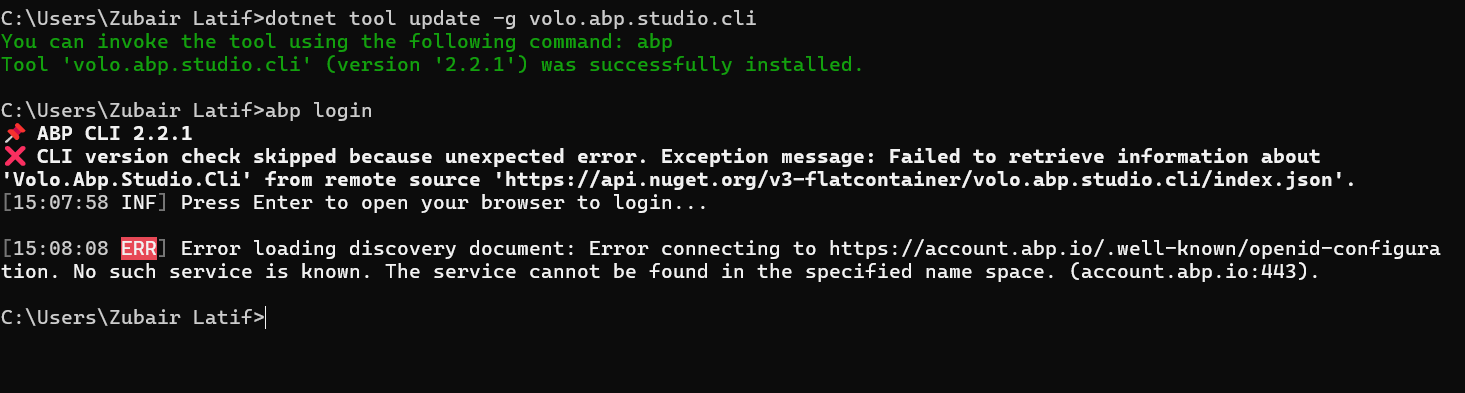
For a quick answer, if you login by using ABP Studio CLI, it should work on ABP Studio, too.
As a workaround
- Close all the ABP Studio instances
- If not installed, install abp studio cli
dotnet tool update -g volo.abp.studio.cli- Login by using CLI
abp loginOur team will post whenever they find the real solution, this approach should allow you to use ABP Studio at least
Markdown supported.Copy, paste, or drag & drop images and files (max 100 MB per file, 100 MB total per post) -
0
 Markdown supported.Copy, paste, or drag & drop images and files (max 100 MB per file, 100 MB total per post)
 -
0
Hi @zubair_Latif
There is another possibility that, either Windows Defender or your Virus program might block ABP Studio to access an external URL. Are you using Windows Defender or any other Virus program ?
Markdown supported.Copy, paste, or drag & drop images and files (max 100 MB per file, 100 MB total per post) -
0
We have been using Kaspersky on our system since the beginning, but the ABP issue has only started occurring today.
Markdown supported.Copy, paste, or drag & drop images and files (max 100 MB per file, 100 MB total per post) -
0
It is managed by our company. The issue has now been resolved. It was caused by Kaspersky restrictions impacting ABP Studio’s network communication. Necessary adjustments have been made. Thank you for your guidance and support throughout this issue and everything is now working as expected
Markdown supported.Copy, paste, or drag & drop images and files (max 100 MB per file, 100 MB total per post) -
0
We need all authentication-related URLs for ABP.IO so we can whitelist them on our end, as we cannot keep Kaspersky disabled all the time
Markdown supported.Copy, paste, or drag & drop images and files (max 100 MB per file, 100 MB total per post) -
0
Can you please share all the URLs so we can whitelist them on our end?
Markdown supported.Copy, paste, or drag & drop images and files (max 100 MB per file, 100 MB total per post) -
0
hi
It would be easiest if you could add domain keywords or if it supported subdomains.
https://abp.io/ https://nuget.abp.io/ https://account.abp.io/
Thanks.
Markdown supported.Copy, paste, or drag & drop images and files (max 100 MB per file, 100 MB total per post) -
0
Is everything related to authentication as well? We need to whitelist all URLs associated with ABP.IO otherwise, if anything is missed, we may face the same issue again
Markdown supported.Copy, paste, or drag & drop images and files (max 100 MB per file, 100 MB total per post) -
0
Yes, our whitelist supports subdomains
Markdown supported.Copy, paste, or drag & drop images and files (max 100 MB per file, 100 MB total per post)



