






I had a working solution in ABP Suite. Everything was fine during the ABP Trial period. Last monday the license expired while i was talking with your sales person Elif, and although she agreed to extend the trial period, i was not able to run the solution anymore.
What happens: I can start ABP Studio I can start the docker container for Redis I cannot start the AuthServer. It fails with error -42 and then it restarts. I cannot start my HttpApi.Host, same problem
Mainwhile I already paid for the license, and the production license is active now, but nothing changed. Error stays I already removed the license and logged in again, no success
My colleague has the exact same problem since the exact same time, so it must be something with the license that expired.
Exception message and full stack trace: 17:52:46.175 Information Initialized Scheduler Signaller of type: Quartz.Core.SchedulerSignalerImpl 17:52:46.177 Information Quartz Scheduler created 17:52:46.177 Information JobFactory set to: Quartz.Simpl.MicrosoftDependencyInjectionJobFactory 17:52:46.224 Information RAMJobStore initialized. 17:52:46.224 Information Quartz Scheduler 3.15.0.0 - '483ca290-1e37-4461-95cd-e436393cfc4c' with instanceId 'NON_CLUSTERED' initialized 17:52:46.224 Information Using thread pool 'Quartz.Simpl.DefaultThreadPool', size: 10 17:52:46.224 Information Using job store 'Quartz.Simpl.RAMJobStore', supports persistence: False, clustered: False 17:52:46.230 Information Adding 0 jobs, 0 triggers. 17:52:46.245 Information Scheduler 483ca290-1e37-4461-95cd-e436393cfc4c_$_NON_CLUSTERED started. 17:52:46.829 Information Starting ABP Studio Backend... 17:52:46.889 Information MCP Server started on http://localhost:38280"/mcp"/ 17:52:46.999 Information Initialized all ABP modules. 17:52:47.024 Information Application started. Press Ctrl+C to shut down. 17:52:47.024 Information Hosting environment: "Production" 17:52:47.025 Information Content root path: "C:\Users\TomHaepers\AppData\Local\abp-studio\current" 17:52:52.521 Information Trying to connect to ABP Studio Backend: "http://localhost:38271" 17:52:57.345 Information Starting task execution: "Checking for the new version of ABP Studio" 17:53:00.076 Information [VPK] Creating HttpClient for AbpIoFileDownloader 17:53:00.409 Information No updates, remote version (2.2.1) is not newer than current version (2.2.1) and / or downgrade is not enabled. 17:53:08.940 Information [VPK] No updates available. 17:53:08.941 Information Completed task execution: "Checking for the new version of ABP Studio" 17:53:08.943 Information Starting task execution: "Checking pre-requirements" 17:53:09.498 Information CLI command executed. Command: "dotnet dev-certs https --check" Working directory: "C:\Users\TomHaepers\AppData\Local\abp-studio\current" CommandResult { ExitCode: 0, IsSuccess: True, StartTime: 03/19/2026 17:53:08 +01:00, ExitTime: 03/19/2026 17:53:09 +01:00, RunTime: 00:00:00.6558169 } 17:53:14.080 Information CLI command executed. Command: "abp cli version" Working directory: "C:\Users\TomHaepers\AppData\Local\abp-studio\current" CommandResult { ExitCode: 0, IsSuccess: True, StartTime: 03/19/2026 17:53:11 +01:00, ExitTime: 03/19/2026 17:53:14 +01:00, RunTime: 00:00:02.9754543 } 17:53:23.828 Information Completed task execution: "Checking pre-requirements" 17:53:23.829 Information Starting task execution: "Loading extensions" 17:53:23.842 Information Completed task execution: "Loading extensions" 17:53:55.923 Information CLI command executed. Command: "pwsh -Command "netsh interface ipv4 show excludedportrange protocol=Tcp"" Working directory: "C:\Users\TomHaepers\AppData\Local\abp-studio\current" CommandResult { ExitCode: 0, IsSuccess: True, StartTime: 03/19/2026 17:53:55 +01:00, ExitTime: 03/19/2026 17:53:55 +01:00, RunTime: 00:00:00.7171635 } 17:53:55.946 Information Starting the application: TVRS.AuthServer 17:53:55.948 Information Running the project: C:\Users\TomHaepers\source\repos\TVRS\src\TVRS.AuthServer\TVRS.AuthServer.csproj 17:53:55.970 Information Project has been started: C:\Users\TomHaepers\source\repos\TVRS\src\TVRS.AuthServer\TVRS.AuthServer.csproj 17:53:55.970 Information Application has been started: TVRS.AuthServer17:54:34.183 Information TVRS.AuthServer exited with code: -42 17:54:36.218 Information Automatically restarting the application: TVRS.AuthServer 17:54:36.218 Information Running the project: C:\Users\TomHaepers\source\repos\TVRS\src\TVRS.AuthServer\TVRS.AuthServer.csproj 17:54:36.230 Information Project has been started: C:\Users\TomHaepers\source\repos\TVRS\src\TVRS.AuthServer\TVRS.AuthServer.csproj 17:54:36.230 Information Application has been restarted: TVRS.AuthServer 17:54:46.706 Information Stopping the application: TVRS.AuthServer 17:54:46.717 Information Stopping the project: C:\Users\TomHaepers\source\repos\TVRS\src\TVRS.AuthServer\TVRS.AuthServer.csproj 17:54:46.926 Information Application has been stopped: TVRS.AuthServer
Steps to reproduce the issue:
Open ABP Suite Open existing solution that worked before Start Redit docker Start AuthServer ==> FAIL AuthServer keeps on restarting
Solution info:
- Template: app
- Created ABP Studio Version: 2.1.9
- Current ABP Studio Version: 2.2.1
- Tiered: Yes
- Multi-Tenancy: Yes
- UI Framework: angular
- Theme: leptonx
- Theme Style: system
- Theme Menu Placement: side
- Progressive Web App: No
- Run Progressive Web App Support: No
- Database Provider: ef
- Database Management System: sqlserver
- Separate Tenant Schema: No
- Mobile Framework: maui
- Public Website: No
- Social Login: No
- Include Tests: Yes
- Kubernetes Configuration: No
- Distributed Event Bus: none
- Use Local References: No
- Optional Modules:
- GDPR
- TextTemplateManagement
- LanguageManagement
- AuditLogging
- Selected Languages: English, French, Nederlands
- Default Language: English
- Create Command: abp new TVRS -t app --tiered --ui-framework angular --mobile maui --database-provider ef --database-management-system sqlserver --theme leptonx --skip-migration --skip-migrator --without-cms-kit --sample-crud-page --dont-run-install-libs --dont-run-bundling --no-social-logins -no-openiddict-admin-ui -no-file-management
3 Answer(s)
-
0
- This is not an ABP Framework / AuthServer (OpenIddict) license issue. An ABP commercial license expiring does not make your
*.AuthServeror*.HttpApi.Hostprocess exit with a special code. - In ABP Studio, “exited with code: -42” is a pattern typically seen when the process is killed externally (security software / endpoint protection / corporate policy), not when the app throws an exception. That also explains why you don’t see any .NET exception/stack trace in the output and why it suddenly started for multiple colleagues at the same time.
Do this to fix it (works in corporate environments)
- Run the AuthServer outside ABP Studio to see the real termination reason
- Open a terminal in the AuthServer folder and run:
dotnet run --project .\src\TVRS.AuthServer\TVRS.AuthServer.csproj- If it still exits with
-42without a .NET stack trace, it’s being terminated by something external (AV/EDR/policy).
Whitelist ABP/Studio network endpoints in your security software
- If your company uses Kaspersky/Defender/EDR, ensure
abp.ioand subdomains are allowed (this is a known class of issues with ABP Studio/network communication, and it can indirectly break the “run” experience):*.abp.io(coversaccount.abp.io,nuget.abp.io, etc.)
- If your company uses Kaspersky/Defender/EDR, ensure
Verify ABP account endpoint is reachable from the .NET runtime (not just browser)
- Run:
[System.Net.Http.HttpClient]::new().GetStringAsync('https://account.abp.io/.well-known/openid-configuration').Result- If this fails while the browser works, it’s almost always proxy/SSL inspection/AV interference.
- If you need an official/support action (license/account side)
- Since you already paid and the production license is active, but you’re blocked, the fastest way is to open a ticket with logs and your company security context here:
- https://abp.io/contact
- Since you already paid and the production license is active, but you’re blocked, the fastest way is to open a ticket with logs and your company security context here:
(Background case that matches your symptoms: corporate security blocking ABP Studio’s network communication / endpoints: https://abp.io/support/questions/10523 )
This response was generated by AI. If it didn’t solve your problem, feel free to post a new answer — our support team will jump in to help you soon.
Markdown supported.Copy, paste, or drag & drop images and files (max 100 MB per file, 100 MB total per post) - This is not an ABP Framework / AuthServer (OpenIddict) license issue. An ABP commercial license expiring does not make your
-
0
I did step 1 It stops with a license error [19:33:14 ERR] ABP-LIC-0018 - EtVHKXrqlGVmoMegUvB: Your trial period has ended! - Please contact to license@abp.io to purchase a license.
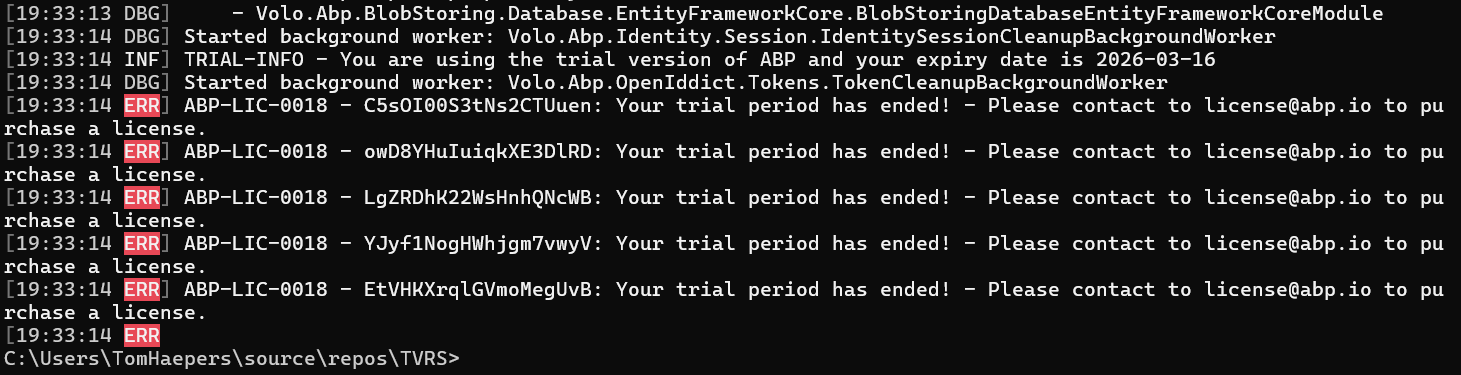
But I have a production license.
Markdown supported.Copy, paste, or drag & drop images and files (max 100 MB per file, 100 MB total per post) -
1
Hi,
Could you try this solution and see if it works ? https://abp.io/support/questions/3931/I-purchased-a-license-from-Trial-License---ABP-LIC-0018#answer-c86140f4-9845-c223-2e3e-3a0721603a9a
Markdown supported.Copy, paste, or drag & drop images and files (max 100 MB per file, 100 MB total per post)



