






⚡ Update ABP CLI and ABP Suite
dotnet tool update -g Volo.Abp.Cli --prerelease
abp suite update --preview
📗 Blog post
- https://blog.abp.io/abp/announcing-abp-8-0-release-candidate
📘 Commercial release logs
- https://docs.abp.io/en/commercial/8.0/release-notes
- https://commercial.abp.io/releases/
🔼 Migration guides
- https://docs.abp.io/en/abp/8.0/Migration-Guides/Abp-8_0
- https://docs.abp.io/en/commercial/8.0/migration-guides/v8_0
✏️ Feel free to report any bugs, issues, and problems.
97 Answer(s)
-
0
Hello, It's me again!
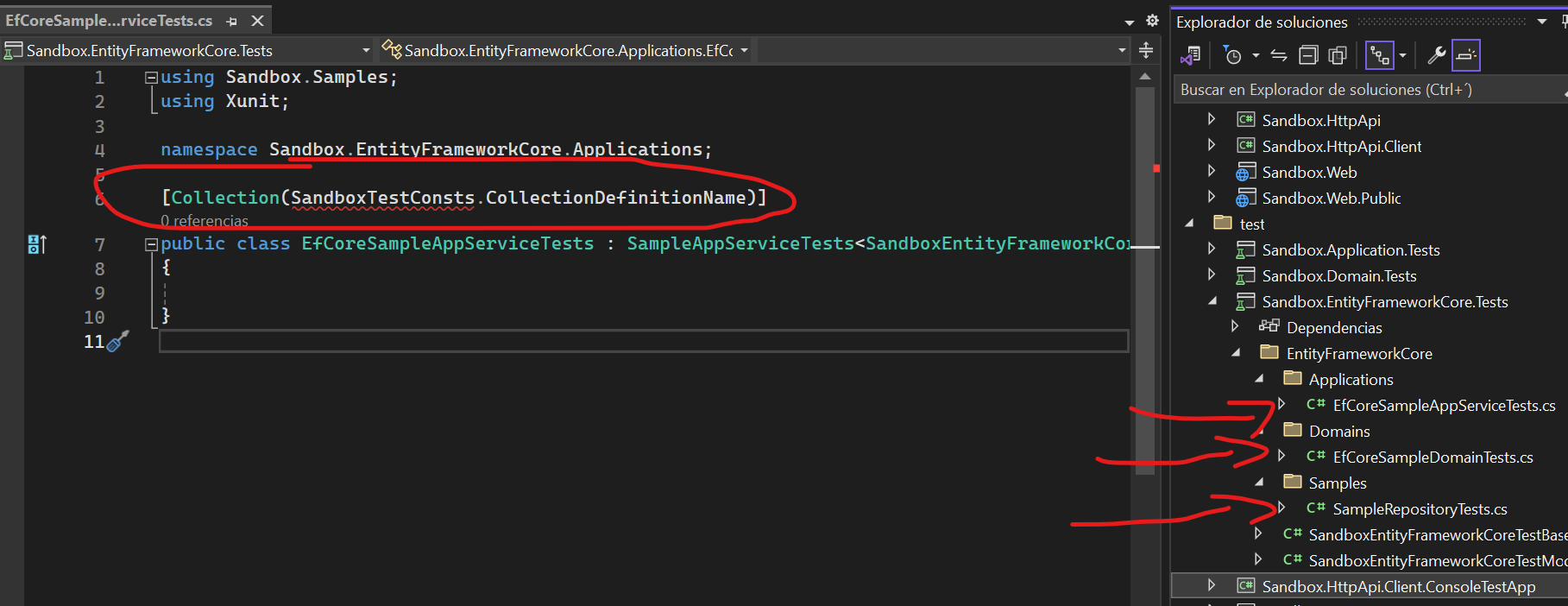
I started testing version 8.0.0 r.c-2 and I found this issue in the default template
Project Type: MVC Database: Postgresql Mobile: React Native Non-Tiered
It's missing a class with some pre-defined constants in the default template
 Markdown supported.Copy, paste, or drag & drop images and files (max 100 MB per file, 100 MB total per post)
 -
0
hi rafael.gonzales
I will check this problem. Thank you.
This will be fixed in the next RC version.
https://github.com/abpframework/abp/pull/18346
Markdown supported.Copy, paste, or drag & drop images and files (max 100 MB per file, 100 MB total per post) -
0
Hi there,
The problem in the link is still present on the newly generated pages. It is not practical to offer a manual solution. Wouldn't it be better if you fixed the problem?
Thank you
Navigation properties do not work in generated UI (Angular)
https://support.abp.io/QA/Questions/5977/Navigation-properties-do-not-work-in-generated-UI-Angular#answer-3a0e4b05-6a9d-5a2a-323c-6dec5aef111f
Markdown supported.Copy, paste, or drag & drop images and files (max 100 MB per file, 100 MB total per post) -
0
I found another bug.
No matter what combination of templates are you using within the MVC scope. When you try to add a new Module for your project. It won't add a reference for the new SubModule in the Web Project.
Markdown supported.Copy, paste, or drag & drop images and files (max 100 MB per file, 100 MB total per post) -
0
Hi some input validations are not localized.
[Required]
[StringLength(AdConsts.AdUrlMaxLength)]
public string AdUrl { get; set; } = null!;
public decimal Budget { get; set; }
<abp-input asp-for="AdUrl" /> <abp-input asp-for="Budget" />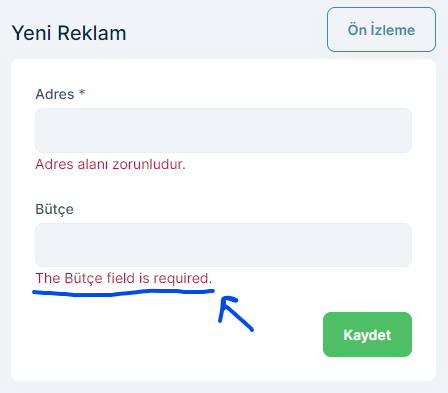 Markdown supported.Copy, paste, or drag & drop images and files (max 100 MB per file, 100 MB total per post)
 -
0
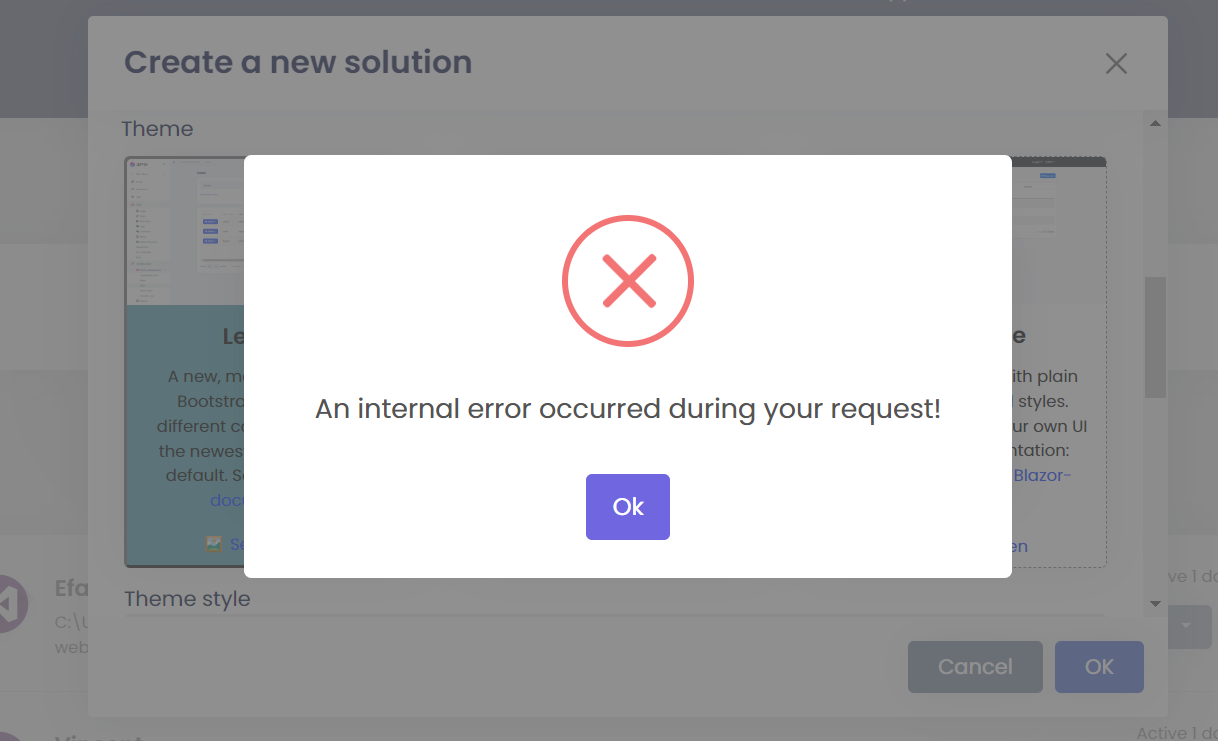
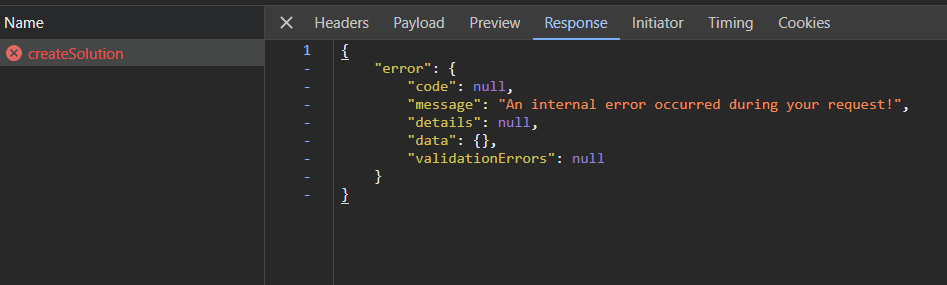
There is a critical error after updating to 8.0.0.rc-3
It's not possible to create a project in ABP Suite
 Markdown supported.Copy, paste, or drag & drop images and files (max 100 MB per file, 100 MB total per post)
 -
0
There is a critical error after updating to 8.0.0.rc-3
It's not possible to create a project in ABP Suite
Hi @rafael.gonzales, we have released v8.0.0-rc.3 about 1 hour ago and it seems you tried it about 2 hours ago therefore when you tried it, the commercial templates and packages were not released and if you retry again, it should work as expected. Can you try again?
Markdown supported.Copy, paste, or drag & drop images and files (max 100 MB per file, 100 MB total per post) -
0
I think that the timing from GitHub and the ABP release schedule are not aligned. I got an alert from Git Hub about a new pre-release and updated my solution.
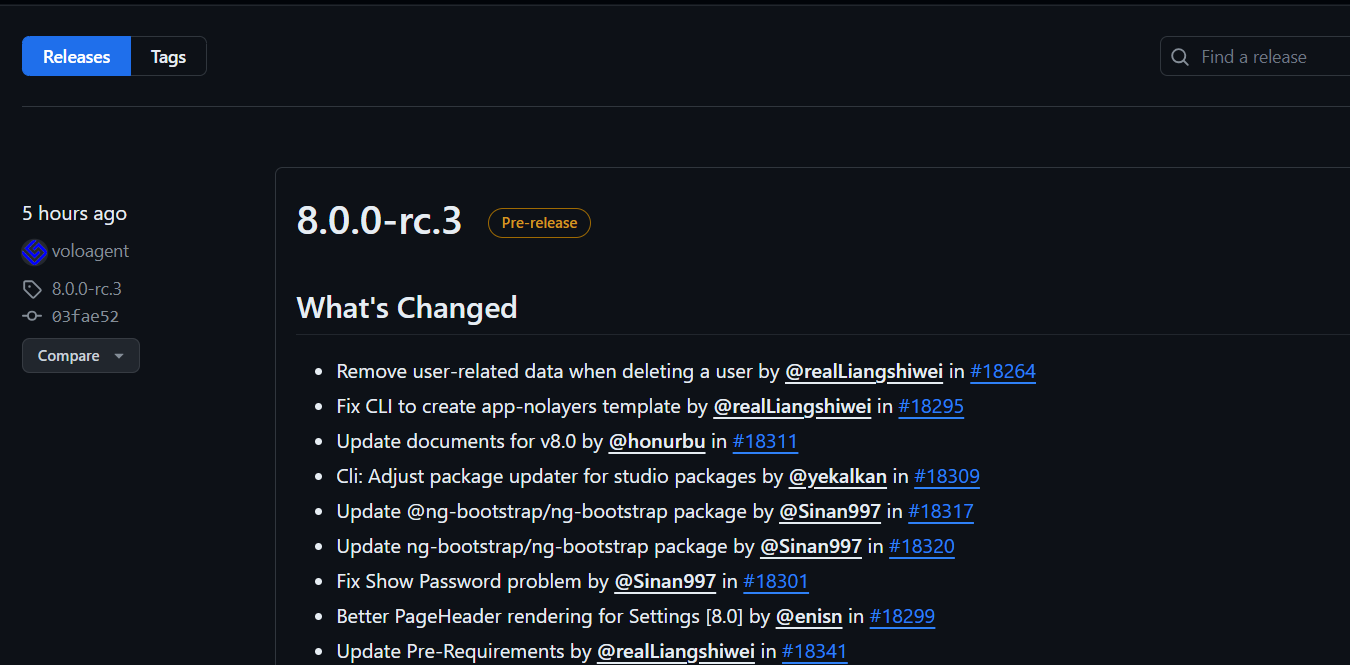
I will try again now
Markdown supported.Copy, paste, or drag & drop images and files (max 100 MB per file, 100 MB total per post) -
0
I think that the timing from GitHub and the ABP release schedule are not aligned. I got an alert from Git Hub about a new pre-release and updated my solution.
I will try again now
I understand your confusion but this is the release for ABP Framework, after this has been completed, then we have started releasing ABP Commercial packages & templates, so they are being released a couple of hours late.
Markdown supported.Copy, paste, or drag & drop images and files (max 100 MB per file, 100 MB total per post) -
0
I think that the timing from GitHub and the ABP release schedule are not aligned. I got an alert from Git Hub about a new pre-release and updated my solution.
I will try again now
@rafael.gonzales, you need to check this page to see if a new version has been published 👉 https://commercial.abp.io/releases
Markdown supported.Copy, paste, or drag & drop images and files (max 100 MB per file, 100 MB total per post) -
0
There is a known bug right now in dotnet 8.0
If you compile the project you will get the following warning
The analyzer "Microsoft.AspNetCore.Analyzers.RouteHandlers.RouteHandlerAnalyzer" threw an exception of type "System.InvalidOperationException" with the message "Failed to resolve well-known type 'Microsoft.AspNetCore.Builder.EndpointRouteBuilderExtensions'.".This is not an ABP Related bug but a DOTNET 8.0 one. It will be fixed in the next dotnet patch. It can be followed here https://github.com/dotnet/aspnetcore/issues/50836
Markdown supported.Copy, paste, or drag & drop images and files (max 100 MB per file, 100 MB total per post) -
0
This seems to be appearing in the new release candidate when you create a new module in a MVC | Non-Tiered Solution
 Markdown supported.Copy, paste, or drag & drop images and files (max 100 MB per file, 100 MB total per post)
 -
0
I found a bug in ABP Suite 8.0.0.rc-3
When you create a Master Entity with a X number of properties and a Detail Entity with another Y number of properties and generate the C# code. When you want to delete a column in the MASTER entity. ABP Suite won't delete the entity in the Detail.json file specification and either won't be deleted in the language file "en.json".
Markdown supported.Copy, paste, or drag & drop images and files (max 100 MB per file, 100 MB total per post) -
0
in ABP Suite 8.0.0.rc-3
When you generate code for a DETAIL entity. The namespace added in the MASTER entity code is not the one defined in the DETAIL.json file instead It uses the following structure [PROJECT_NAME].[DETAIL_PLURAL_NAME].
It should be [PROJECT_NAME].[DETAIL_NAMESPACE]
Note: In some MASTER entities. The child namespace is missing.
Markdown supported.Copy, paste, or drag & drop images and files (max 100 MB per file, 100 MB total per post) -
0
in ABP Suite 8.0.0.rc-3
In the Master Controller file. The path of the generated _ChildDataGrids.cshtml is wrong. It doesn't include the Module name so It will fail
Now
public class DemosController : AbpController
{
    [HttpGet]
    public virtual async Task<PartialViewResult> ChildDataGrid(Guid demoId)
    {
        return PartialView("~/Pages/Shared/Guias/_ChildDataGrids.cshtml", demoId);
    }
}
Should be
public class DemosController : AbpController
{
    [HttpGet]
    public virtual async Task<PartialViewResult> ChildDataGrid(Guid demoId)
    {
        return PartialView("~/Pages/MYMODULE/Shared/Guias/_ChildDataGrids.cshtml", demoId);
    }
}
Markdown supported.Copy, paste, or drag & drop images and files (max 100 MB per file, 100 MB total per post) -
0
in ABP Suite 8.0.0.rc-3
There is another issue in the generated Index.js
In the Init DataGrid for child entities, the viewURL and scriptUrl doesn't include the Project Name.
Using the template system to temporary fix this.
In template: Frontend.Mvc.Page.Partials.index.js_InitChildDataGridMethod.txt Now:
    function init%%child-entity-name%%Grid(data) {
        if(!abp.auth.isGranted("%%only-project-name%%.%%child-entity-name-plural%%")) {
            return;
        }

        var %%entity-name-camelcase%%Id = data%%<if:HasNavigationProperties>%%.%%entity-name-camelcase%%%%</if:HasNavigationProperties>%%.id;

        %%<if:IsTieredArchitecture>%%var %%child-entity-name-camelcase%%Service = window.%%solution-namespace-camelcase%%.controllers.%%child-entity-namespace-camelcase%%.%%child-entity-name-camelcase%%;%%</if:IsTieredArchitecture>%%
        %%<if:IsNonTieredArchitecture>%%var %%child-entity-name-camelcase%%Service = window.%%solution-namespace-camelcase%%.%%child-entity-namespace-camelcase%%.%%<if:IsModule>%%%%child-entity-name-camelcase%%%%</if:IsModule>%%%%<if:IsNonModule>%%%%child-entity-name-plural-camelcase%%%%</if:IsNonModule>%%;%%</if:IsNonTieredArchitecture>%%

        var %%child-entity-name-camelcase%%CreateModal = new abp.ModalManager({
            viewUrl: abp.appPath + "%%child-entity-name-plural%%/CreateModal",
            scriptUrl: abp.appPath + "Pages/%%child-entity-name-plural%%/createModal.js",
            modalClass: "%%child-entity-name-camelcase%%Create"
        });

        var %%child-entity-name-camelcase%%EditModal = new abp.ModalManager({
            viewUrl: abp.appPath + "%%child-entity-name-plural%%/EditModal",
            scriptUrl: abp.appPath + "Pages/%%child-entity-name-plural%%/editModal.js",
            modalClass: "%%child-entity-name-camelcase%%Edit"
        });

        var %%child-entity-name-camelcase%%DataTable = $("#%%child-entity-name-plural%%Table-" + %%entity-name-camelcase%%Id).DataTable(abp.libs.datatables.normalizeConfiguration({
            processing: true,
            serverSide: true,
            paging: true,
            searching: false,
            scrollX: true,
            autoWidth: true,
            scrollCollapse: true,
            order: [[1, "asc"]],
            ajax: abp.libs.datatables.createAjax(%%child-entity-name-camelcase%%Service.getList%%child-navigation-properties%%By%%entity-name%%Id, {
                %%entity-name-camelcase%%Id: %%entity-name-camelcase%%Id,
                maxResultCount: 5
            }),
            columnDefs: [
                {
                    rowAction: {
                        items:
                            [
                                {
                                    text: l("Edit"),
                                    visible: abp.auth.isGranted('%%only-project-name%%.%%child-entity-name-plural%%.Edit'),
                                    action: function (data) {
                                        %%child-entity-name-camelcase%%EditModal.open({
                                            id: data.record%%include-navigation-property%%.id
                                        });
                                    }
                                },
                                {
                                    text: l("Delete"),
                                    visible: abp.auth.isGranted('%%only-project-name%%.%%child-entity-name-plural%%.Delete'),
                                    confirmMessage: function () {
                                        return l("DeleteConfirmationMessage");
                                    },
                                    action: function (data) {
                                        %%child-entity-name-camelcase%%Service.delete(data.record%%include-navigation-property%%.id)
                                            .then(function () {
                                                abp.notify.info(l("SuccessfullyDeleted"));
                                                %%child-entity-name-camelcase%%DataTable.ajax.reloadEx();
                                            });
                                    }
                                }
                            ]
                    },
                    width: "1rem"
                },
                %%index-js-TableProperties%%%%table-navigation-property-fields%%
            ]
        }));

        %%child-entity-name-camelcase%%CreateModal.onResult(function () {
            %%child-entity-name-camelcase%%DataTable.ajax.reloadEx();
        });

        %%child-entity-name-camelcase%%EditModal.onResult(function () {
            %%child-entity-name-camelcase%%DataTable.ajax.reloadEx();
        });

        $("#New%%child-entity-name%%Button").click(function (e) {
            e.preventDefault();

            %%child-entity-name-camelcase%%CreateModal.open({
                %%entity-name-camelcase%%Id: $(this).data("%%entity-name-camelcase%%-id")
            });
        });
    }
Should be:
function init%%child-entity-name%%Grid(data) {
    if(!abp.auth.isGranted("%%only-project-name%%.%%child-entity-name-plural%%")) {
        return;
    }

    var %%entity-name-camelcase%%Id = data%%<if:HasNavigationProperties>%%.%%entity-name-camelcase%%%%</if:HasNavigationProperties>%%.id;

    %%<if:IsTieredArchitecture>%%var %%child-entity-name-camelcase%%Service = window.%%solution-namespace-camelcase%%.controllers.%%child-entity-namespace-camelcase%%.%%child-entity-name-camelcase%%;%%</if:IsTieredArchitecture>%%
    %%<if:IsNonTieredArchitecture>%%var %%child-entity-name-camelcase%%Service = window.%%solution-namespace-camelcase%%.%%child-entity-namespace-camelcase%%.%%<if:IsModule>%%%%child-entity-name-camelcase%%%%</if:IsModule>%%%%<if:IsNonModule>%%%%child-entity-name-plural-camelcase%%%%</if:IsNonModule>%%;%%</if:IsNonTieredArchitecture>%%

    var %%child-entity-name-camelcase%%CreateModal = new abp.ModalManager({
        viewUrl: abp.appPath + "%%only-project-name%%/%%child-entity-name-plural%%/CreateModal",
        scriptUrl: abp.appPath + "Pages/%%only-project-name%%/%%child-entity-name-plural%%/createModal.js",
        modalClass: "%%child-entity-name-camelcase%%Create"
    });

    var %%child-entity-name-camelcase%%EditModal = new abp.ModalManager({
        viewUrl: abp.appPath + "%%only-project-name%%/%%child-entity-name-plural%%/EditModal",
        scriptUrl: abp.appPath + "Pages/%%only-project-name%%/%%child-entity-name-plural%%/editModal.js",
        modalClass: "%%child-entity-name-camelcase%%Edit"
    });

    var %%child-entity-name-camelcase%%DataTable = $("#%%child-entity-name-plural%%Table-" + %%entity-name-camelcase%%Id).DataTable(abp.libs.datatables.normalizeConfiguration({
        processing: true,
        serverSide: true,
        paging: true,
        searching: false,
        scrollX: true,
        autoWidth: true,
        scrollCollapse: true,
        order: [[1, "asc"]],
        ajax: abp.libs.datatables.createAjax(%%child-entity-name-camelcase%%Service.getList%%child-navigation-properties%%By%%entity-name%%Id, {
            %%entity-name-camelcase%%Id: %%entity-name-camelcase%%Id,
            maxResultCount: 5
        }),
        columnDefs: [
            {
                rowAction: {
                    items:
                        [
                            {
                                text: l("Edit"),
                                visible: abp.auth.isGranted('%%only-project-name%%.%%child-entity-name-plural%%.Edit'),
                                action: function (data) {
                                    %%child-entity-name-camelcase%%EditModal.open({
                                        id: data.record%%include-navigation-property%%.id
                                    });
                                }
                            },
                            {
                                text: l("Delete"),
                                visible: abp.auth.isGranted('%%only-project-name%%.%%child-entity-name-plural%%.Delete'),
                                confirmMessage: function () {
                                    return l("DeleteConfirmationMessage");
                                },
                                action: function (data) {
                                    %%child-entity-name-camelcase%%Service.delete(data.record%%include-navigation-property%%.id)
                                        .then(function () {
                                            abp.notify.info(l("SuccessfullyDeleted"));
                                            %%child-entity-name-camelcase%%DataTable.ajax.reloadEx();
                                        });
                                }
                            }
                        ]
                },
                width: "1rem"
            },
            %%index-js-TableProperties%%%%table-navigation-property-fields%%
        ]
    }));

    %%child-entity-name-camelcase%%CreateModal.onResult(function () {
        %%child-entity-name-camelcase%%DataTable.ajax.reloadEx();
    });

    %%child-entity-name-camelcase%%EditModal.onResult(function () {
        %%child-entity-name-camelcase%%DataTable.ajax.reloadEx();
    });

    $("#New%%child-entity-name%%Button").click(function (e) {
        e.preventDefault();

        %%child-entity-name-camelcase%%CreateModal.open({
            %%entity-name-camelcase%%Id: $(this).data("%%entity-name-camelcase%%-id")
        });
    });
}
Markdown supported.Copy, paste, or drag & drop images and files (max 100 MB per file, 100 MB total per post) -
0
Issue in the generated Master | Detail
Can you consider moving the "Add new child entity" button to the left instead of being aligned to the right? It will help with the visibility of the button.
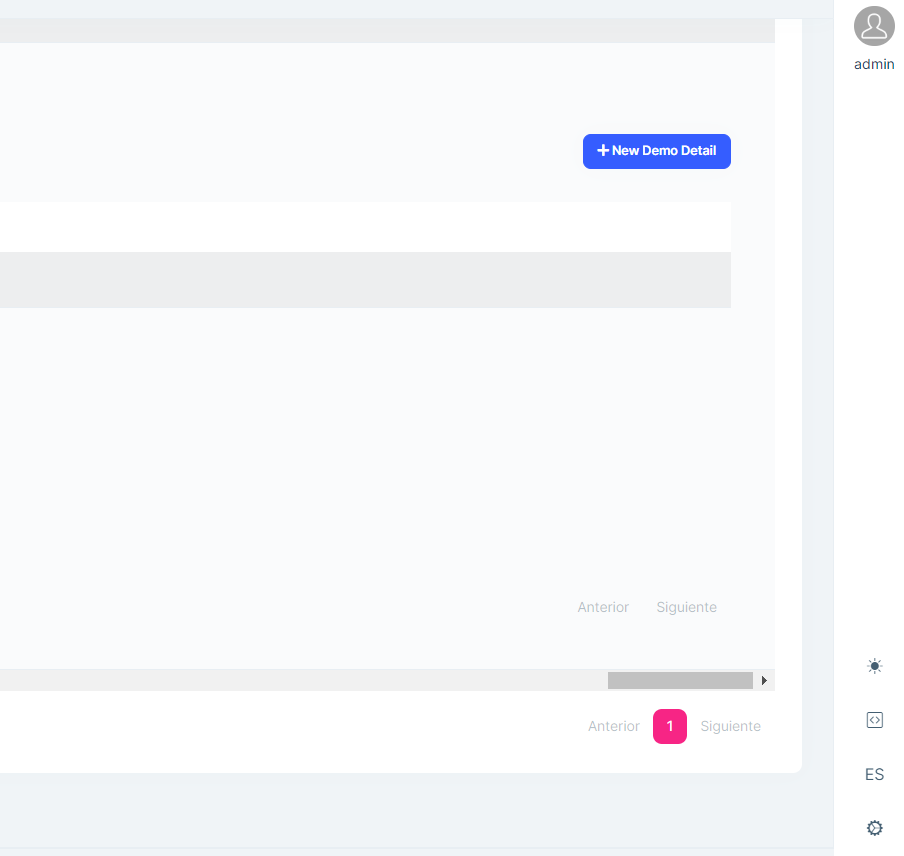 Markdown supported.Copy, paste, or drag & drop images and files (max 100 MB per file, 100 MB total per post)
 -
0
In the new Master | Detail functionality. The "Export to Excel" feature doesn't include Child entities in the XLSX.
Markdown supported.Copy, paste, or drag & drop images and files (max 100 MB per file, 100 MB total per post) -
0
In the new Master | Detail functionality.
- When you create and generate a Child Entity, in the Demo.Domain project, specifically in the Master Entity definition. The namespace of the child entity is not added when a new child entity is generated.
- In Demo.Application.Contracts happen some sort of the same issue, in the Master Entity Dto, the references added in the USING area it's the PROJECT_NAME.PLURAL_NAME instead of PROJECT_NAME.NAMESPACE defined in the Entity
Markdown supported.Copy, paste, or drag & drop images and files (max 100 MB per file, 100 MB total per post) -
0
Hello,
I create a table with ABP Suite CRUD Generator. I have Latitude and Longtitude columns in it as double type. When opening Edit Dialog, these values shown with numericpicker but with 2 decimals as it is default according to Blazorise website (https://blazorise.com/docs/components/numeric-picker). After updating, it saved to database as 2 decimal points and i am loosing data because of that. My request is to fixing this bug to add Decimals attribute to the numericpicker. Adding decimal point count into the CRUD generator page may be another option (for float and double values). Please see my corrected answer below.
<Validation> <Field> <FieldLabel>@L["Latitude"]</FieldLabel> <NumericPicker TValue="double" Decimals="15" @bind-Value="@EditingLocation.Latitude" Min="LocationConsts.LatitudeMinLength" Max="LocationConsts.LatitudeMaxLength"> <Feedback> <ValidationError /> </Feedback> </NumericPicker> </Field> </Validation>
Markdown supported.Copy, paste, or drag & drop images and files (max 100 MB per file, 100 MB total per post) -
0
Hi, The following issue appeared with v.8.0.0rc3 after creating a brand new project by abp suite. The Enum type field is not populated correctly in the edit/add new screen.
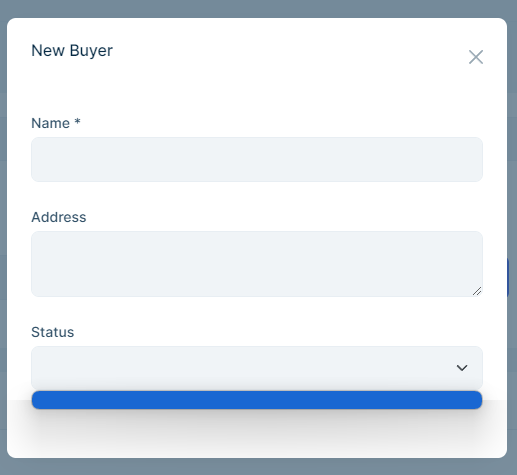
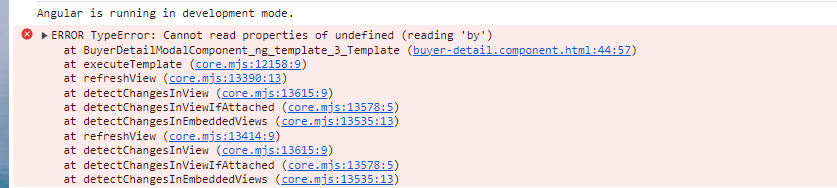 Markdown supported.Copy, paste, or drag & drop images and files (max 100 MB per file, 100 MB total per post)
 -
0
Hi, The following issue appeared with v.8.0.0rc3 after creating a brand new project by abp suite.
Cannot find name 'HttpErrorComponent'.
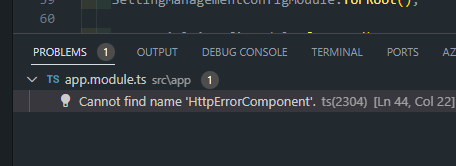
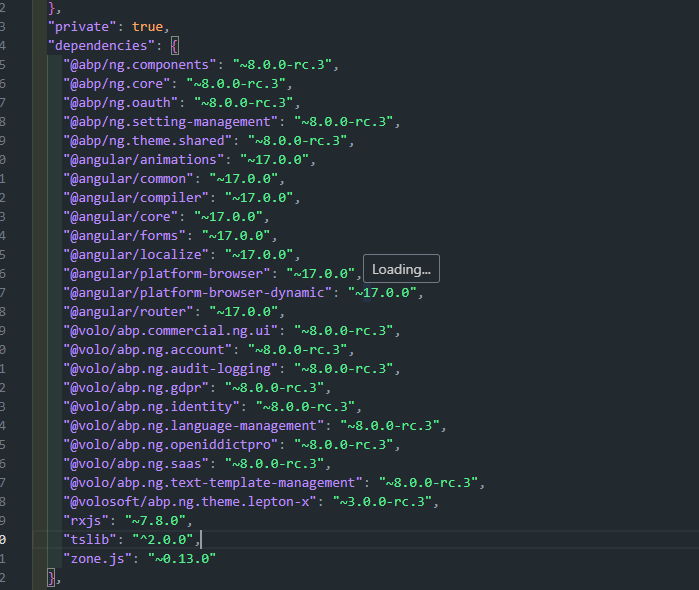
Thanks for reporting, this is a known issue and we will fix it asap.
Markdown supported.Copy, paste, or drag & drop images and files (max 100 MB per file, 100 MB total per post) -
0
I have a situation with ABP Suite. Even when you change the default order of a newly created Entity. It doesn't generate any code related to the Sorting of the selected property. Could you please review that?
Markdown supported.Copy, paste, or drag & drop images and files (max 100 MB per file, 100 MB total per post)



