Mehmet, is there any documentation that talks about being able to disable the dynamic loading of css? I assume this will stop all the Style1-6 from being loaded? Which version of ABP is this enhancement in?
This solution still have problems, when you have both lepton theme source code and account source code, you cannot change the style of the theme, (you still read the value from node module)
Hi Paul
- The theme-lepton library gets style files from
node_modules/@volo/abp.ng.theme.lepton/distfolder. You should overwrite the CSS files after building. So you can use a command to achieve this like the following:yarn ng build theme-lepton && cp -r packages/theme-lepton/dist dist/theme-leptonThen check the styles in
dist/theme-lepton/dist/stylesfolder. You will see your edited styles there.
- You should add a variable named appInfo. This custom footer component works:
import { EnvironmentService } from '@abp/ng.core';
import { Component } from '@angular/core';

@Component({
  selector: 'app-footer',
  template: `
    <footer class="lp-footer">
      <div class="d-flex">
        <div class="mr-auto">
          <span>2019 - {{ currentYear }} © {{ appInfo.name }}</span
> > ><br />
    </div>
  </div>
</footer>
`,
styleUrls: ['./footer.component.scss'],
})
export class FooterComponent {
currentYear = new Date().getFullYear();get appInfo() {
return this.environment.getEnvironment().application;
}constructor(private environment: EnvironmentService) {}
}3. Here is the `tsconfig.prod.json`:{
"compileOnSave": false,
"compilerOptions": {
"baseUrl": "./",
"outDir": "./dist/out-tsc",
"sourceMap": true,
"declaration": false,
"downlevelIteration": true,
"experimentalDecorators": true,
"module": "esnext",
"moduleResolution": "node",
"importHelpers": true,
"target": "es2015",
"typeRoots": ["node_modules/@types"],
"lib": ["es2018", "dom"],
"types": ["jest"]
},
"angularCompilerOptions": {
"fullTemplateTypeCheck": true,
"strictInjectionParameters": true
}
}`tsconfig.json`:{
"extends": "./tsconfig.prod.json",
"compilerOptions": {
"paths": {
"@volo/abp.commercial.ng.ui": ["packages/commercial-ui/src/public-api.ts"],
"@volo/abp.ng.account": ["packages/account/src/public-api.ts"],
"@volo/abp.ng.account/config": ["packages/account/config/src/public-api.ts"],
"@volo/abp.ng.account/admin": ["packages/account/admin/src/public-api.ts"],
"@volo/abp.ng.audit-logging": ["packages/audit-logging/src/public-api.ts"],
"@volo/abp.ng.audit-logging/config": ["packages/audit-logging/config/src/public-api.ts"],
"@volo/abp.ng.identity-server": ["packages/identity-server/src/public-api.ts"],
"@volo/abp.ng.identity-server/config": ["packages/identity-server/config/src/public-api.ts"],
"@volo/abp.ng.identity": ["packages/identity/src/public-api.ts"],
"@volo/abp.ng.identity/config": ["packages/identity/config/src/public-api.ts"],
"@volo/abp.ng.saas": ["packages/saas/src/public-api.ts"],
"@volo/abp.ng.saas/config": ["packages/saas/config/src/public-api.ts"],
"@volo/abp.ng.theme.lepton": ["packages/theme-lepton/src/public-api.ts"],
"@volo/abp.ng.theme.lepton/": ["packages/theme-lepton/src/lib/"],
"@volo/abp.ng.language-management": ["packages/language-management/src/public-api.ts"],
"@volo/abp.ng.language-management/config": [
"packages/language-management/config/src/public-api.ts"
],
"@volo/abp.ng.language-management/locale": ["packages/language-management/locale/src/public-api.ts"],
"@volo/abp.ng.text-template-management": [
"packages/text-template-management/src/public-api.ts"
],
"@volo/abp.ng.text-template-management/config": [
"packages/text-template-management/config/src/public-api.ts"
]
}
}
}
Yes we are already doing what u r describing. Every new version of ABP we repeat the procedure again, so not an ideal solution. It would make things even easier if ABP would use the vars they create (perhaps they do this b/c of older browsers). Another method which we use is i load the style being used as a class in the body. then in style.scss i can create styles like
.Style1 .lp-footer {
// these styles only affect this style and not globally. this is being done so i can use Style1 as our specific brand. this allows
// me to change the background color of the footer. We still run into issues where ABP uses styles that are !important that I am
// not able to override. an example of this is with the pick lists and errors, like the user submitted and didn't enter the data
// required (we do not disable the submit button if there are form errors, b/c we feel it's a bad user experience if the user cannot
// see any visual of what is wrong with the form).
}
As for footer, i was able to replace the footer component with a custom footer component.
Check the docs before asking a question: https://docs.abp.io/en/commercial/latest/ Check the samples, to see the basic tasks: https://docs.abp.io/en/commercial/latest/samples/index The exact solution to your question may have been answered before, please use the search on the homepage.
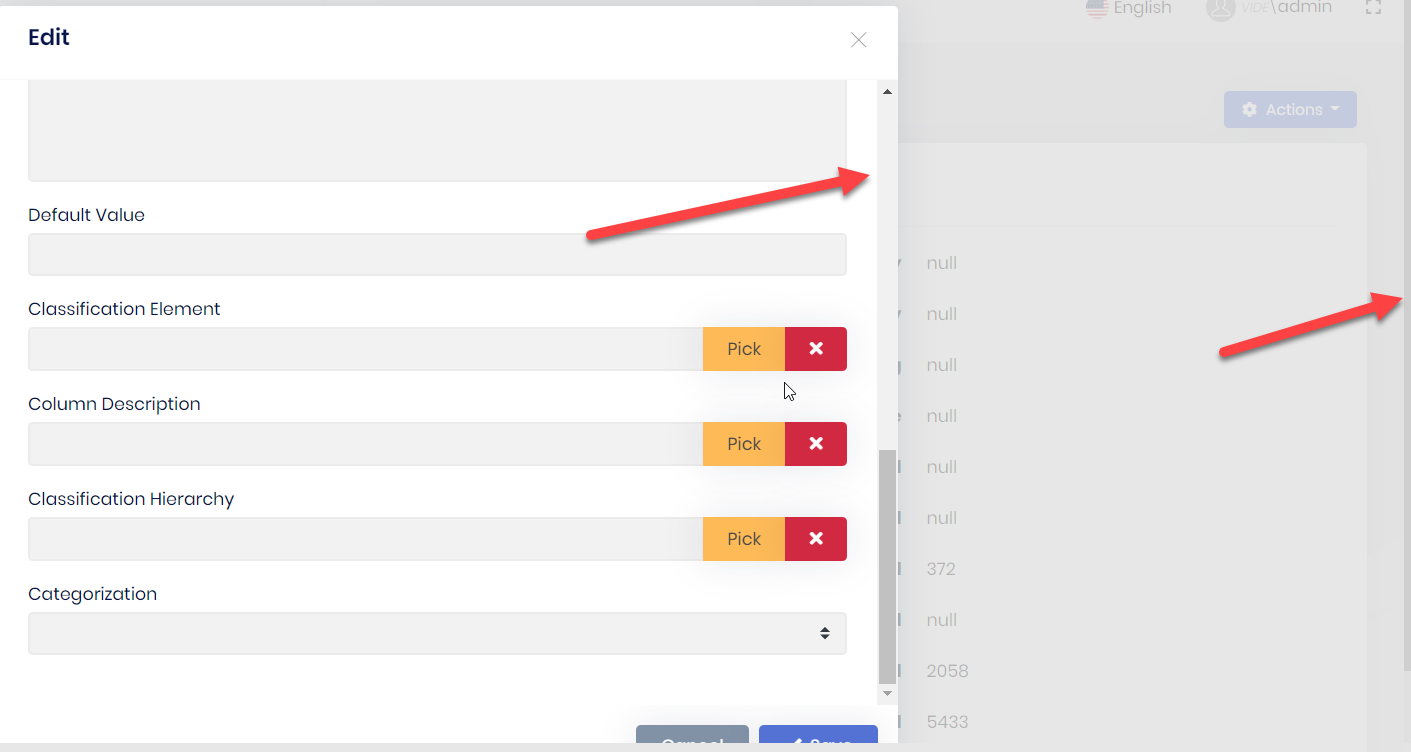
double scroll, scroll on inside, visible, and if you look very closely on the right hand edge you can see a very thin scrollbar
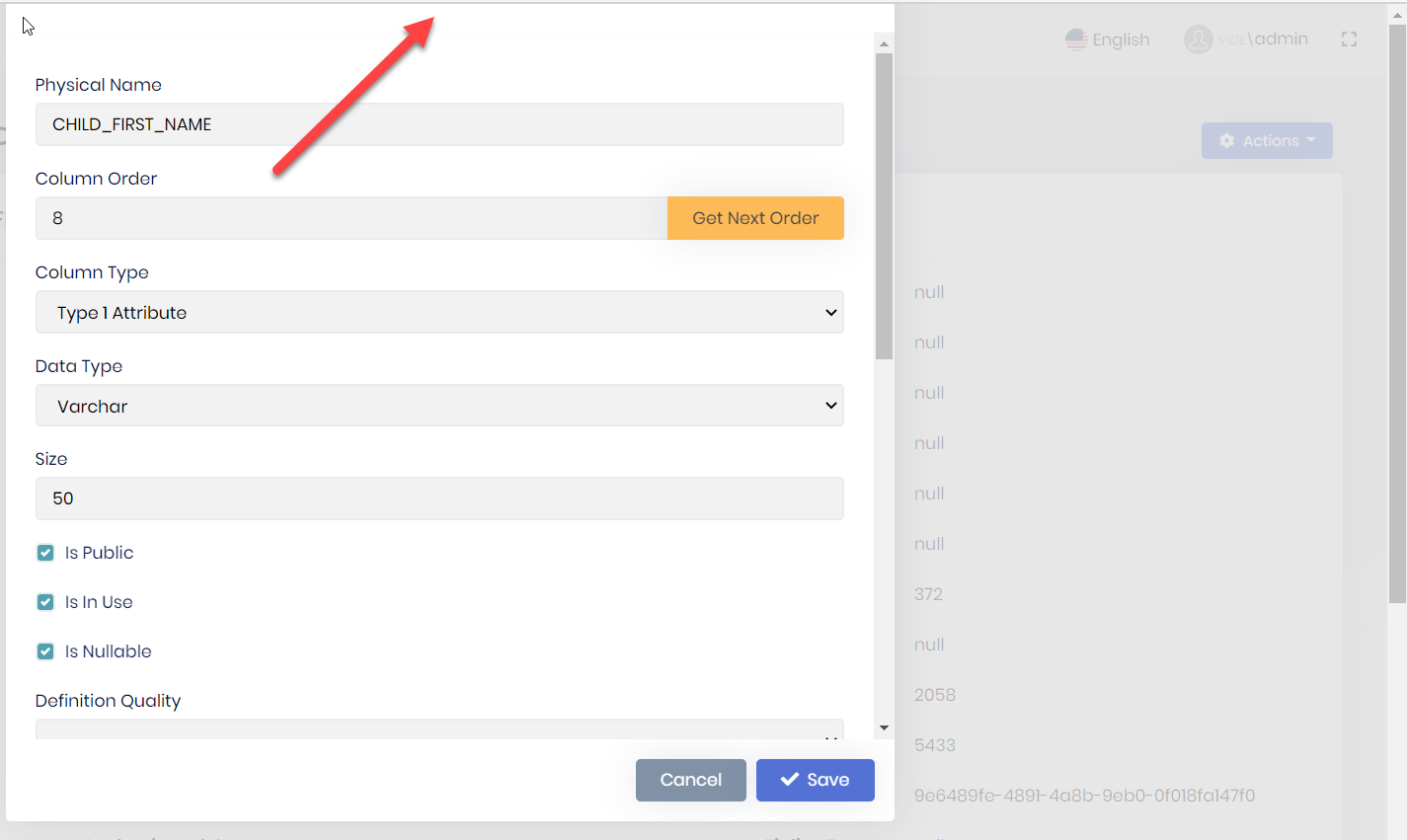
clipping - header is un-reachable
Which r u looking for? Solution 2?
I', going with the first solution. I have to do some ui repair as moving the footer creates some visual issues. the send solution did not work for me.
Is the functionality for Lepton Angular Theme Customization available now in 4.2? I looked through the documentation for something that would tell me how to use it, but didn't see anything.
Check the docs before asking a question: https://docs.abp.io/en/commercial/latest/ Check the samples, to see the basic tasks: https://docs.abp.io/en/commercial/latest/samples/index The exact solution to your question may have been answered before, please use the search on the homepage.
Have a form in a modal with validation. For simplicity mark fields as required
component.html <abp-modal [(visible)]="isModalVisible" [busy]="modalBusy" (disappear)="form = null"> <ng-template #abpHeader> <h3>{{ (selected?.id ? 'AbpUi::Edit' : 'HR::NewEmployeeExperience') | abpLocalization }}</h3> </ng-template>
<ng-template #abpBody> <form [formGroup]="form" validateOnSubmit> <div class="mt-2 fade-in-top"> <div class="form-group"> <label for="employeeExperience-workplace"> {{ 'HR::Workplace' | abpLocalization }} </label> <span class="req-mark"> * </span> <input type="text" id="employeeExperience-workplace" class="form-control" formControlName="workplace" /> </div> <div class="form-group"> <label for="employeeExperience-seniority"> {{ 'HR::Seniority' | abpLocalization }} </label> <span class="req-mark"> * </span> <input type="number" id="employeeExperience-seniority" class="form-control" formControlName="seniority" /> </div> <div class="form-group"> <label for="employeeExperience-position"> {{ 'HR::Position' | abpLocalization }} </label> <span class="req-mark"> * </span> <input type="text" id="employeeExperience-position" class="form-control" formControlName="position" /> </div> </div> </form> </ng-template>
<ng-template #abpFooter> <button type="button" class="btn btn-secondary" #abpClose> {{ 'AbpUi::Cancel' | abpLocalization }} </button>
<abp-button iconClass="fa fa-save" (click)="save()">
  {{ 'AbpUi::Save' | abpLocalization }}
</abp-button>
</ng-template> </abp-modal>
component.ts buildForm() { this.form = this.fb.group({ employeeCode: [this.employeeCode || '', [Validators.required]], workplace: [this.selected.workplace || '', [Validators.required]], seniority: [this.selected.seniority || '', [Validators.required]], position: [this.selected.position || '', [Validators.required]], }); }
submitForm(): void { if (this.form.invalid) { return; } .... remaining logic to do update }
don't enter any data, click save. the click will send it to the component, and indeed the form is invalid. the form is not marked up b/c validateOnSubmit is not triggered, the user cannot visually see what the issue is. i tried to move the form html element after <abp-modal [(visible)]="isModalVisible" [busy]="modalBusy" (disappear)="form = null"> so it would wrap all the ng-template. I also removed the click event and replaced it with a buttonType="submit" the html form element is not rendered.
Check the docs before asking a question: https://docs.abp.io/en/commercial/latest/ Check the samples, to see the basic tasks: https://docs.abp.io/en/commercial/latest/samples/index The exact solution to your question may have been answered before, please use the search on the homepage.
I have a abp-lookup-input in a model driven form. the field is required. the error display wen trying to submit the form is not very aesthetic. abp-lookup-select error display is not as bad but is not display like a input field
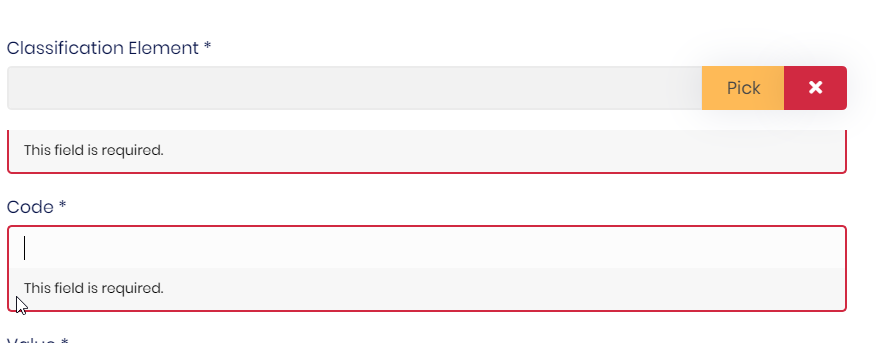
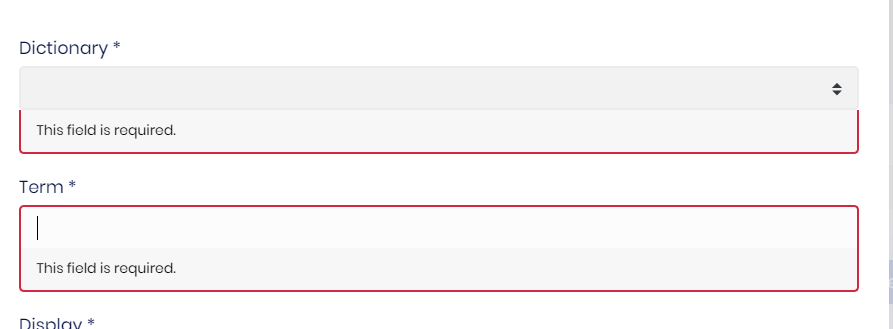
Check the docs before asking a question: https://docs.abp.io/en/commercial/latest/ Check the samples, to see the basic tasks: https://docs.abp.io/en/commercial/latest/samples/index The exact solution to your question may have been answered before, please use the search on the homepage.
We are able to use "deep links" when entering a client side address in the browser address bar, when testing locally. An example deep link is: http://otis.com/dashboard. When we promote the website to azure we are not able to access deep links. We can however access the "index.html". When we try and access a deep link, we get an error "The resource you are looking for has been removed, had its name changed, or is temporarily unavailable." dev tools shows: "Failed to load resource: the server responded with a status of 404 (Not Found)". The only difference that we see is locally we are using http, in azure we are using https. I tried looking at the middleware routes in .netcore, but I do not see them. Perhaps they are buried somewhere in the archecture. This is where in previous non abp environments I would have expected to see a spa route (a route that just redirects to the index.html, so that angular can handle the routing)
I am already doing what you prescribe for the first issue. I noticed after I added the private package, it adds dependencies which I believe includes the original npm package. So my changes are stepped on. If the new functionality is encorporated into 4.1, which is still in rc, then i will wait for 4.1, then the "stepped" becomes a non issue. If all else fails I can always add a postbuild step that does the copy to the node modules. Maybe not the best solution, but it should work for a little while
warning "@volo/abp.ng.identity > ng-zorro-antd@9.3.0" has incorrect peer dependency "@angular/router@^9.0.0".
warning "@volo/abp.ng.identity > ng-zorro-antd > @angular/cdk@9.2.4" has incorrect peer dependency "@angular/core@^9.0.0 || ^10.0.0-0".
warning "@volo/abp.ng.identity > ng-zorro-antd > @angular/cdk@9.2.4" has incorrect peer dependency "@angular/common@^9.0.0 || ^10.0.0-0".
warning "@volo/abp.ng.identity > ng-zorro-antd > @ant-design/icons-angular@9.0.1" has incorrect peer dependency "@angular/common@^9.0.0".
warning "@volo/abp.ng.identity > ng-zorro-antd > @ant-design/icons-angular@9.0.1" has incorrect peer dependency "@angular/core@^9.0.0".
warning "@volo/abp.ng.identity > ng-zorro-antd > @ant-design/icons-angular@9.0.1" has incorrect peer dependency "@angular/platform-browser@^9.0.0".
[4/4] Building fresh packages...
success Saved lockfile.
success Saved 3 new dependencies.
info Direct dependencies
└─** @volo/abp.ng.theme.lepton@4.1.0-rc.2**
info All dependencies
├─ @abp/ng.setting-management@4.1.0-rc.2
├─ @volo/abp.ng.theme.lepton@4.1.0-rc.2
└─ flag-icon-css@3.5.0
Done in 9.65s.
The error in the footer was a name collision.









