Hey,
how did you configure your auditing?
https://docs.abp.io/en/abp/latest/Audit-Logging
Kind regards Jack
Hi that code is wrapped up in an entire email confirmation process for us so there is nothing I can really share. The snippet I provided above IS standalone though you should be able to just inject the abp TenantService anywhere as a quick test, then call Create with an additional connectionstrings.
Okay understood. I'll try my best and keep you updated
Hey Jasen,
sorry that you're experiencing troubles. Can you maybe share the complete file with me? I will then try to reproduce and debug it. If it's a bug, we'll of course refund the ticket.
kind regards Jack
Hey,
So here are my steps according to the documentation: I had to make some adjustments. If you exactly to the steps I describe here, you should be fine to go (as they worked out for me).
all good
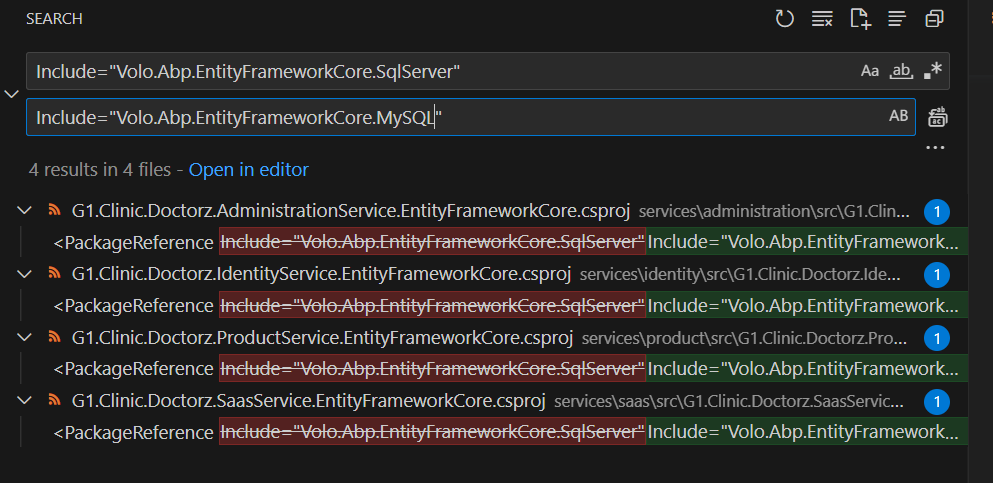
✅ all good
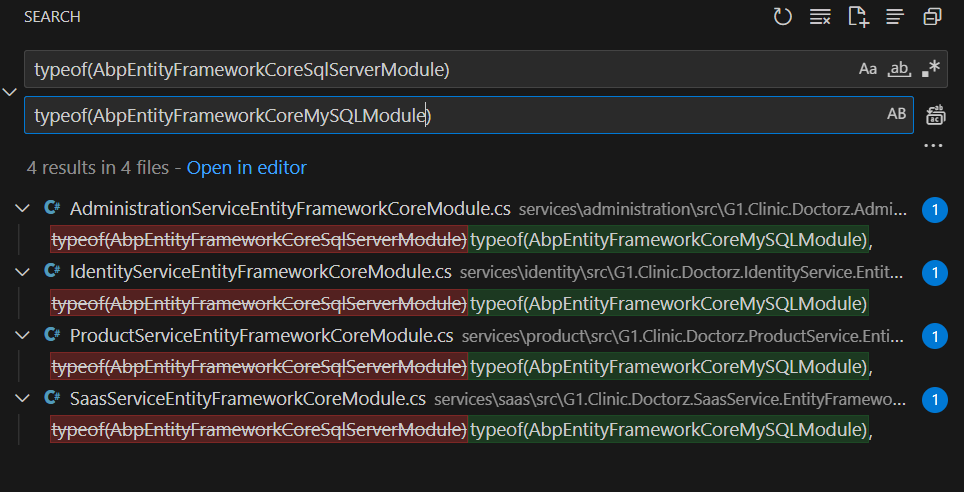
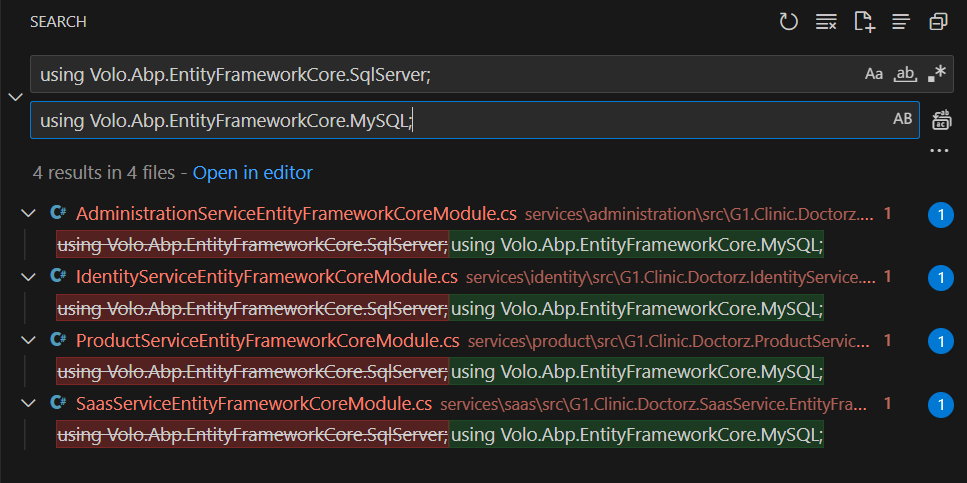
⚠️ Changed things
This is okay:
YourProjectNameEntityFrameworkCoreModule.cs inside the .EntityFrameworkCore project. Replace UseSqlServer() with UseMySQL().
This is something I made a bit different:
YourProjectNameDbContextFactory.cs inside the .EntityFrameworkCore project. Replace UseSqlServer() with UseMySql(). Then add a new parameter (ServerVersion) to UseMySql() method. Example: .UseMySql(configuration.GetConnectionString("Default"), ServerVersion.Parse("8.0.21-mysql")). See this issue for more information about ServerVersion)
My change looks like this:
public AdministrationServiceDbContext CreateDbContext(string[] args)
    {
        AdministrationServiceEfCoreEntityExtensionMappings.Configure();

        var connectionString = GetConnectionStringFromConfiguration();

        var builder = new DbContextOptionsBuilder<AdministrationServiceDbContext>()
            .UseMySql(connectionString, ServerVersion.AutoDetect(connectionString), b =>
            {
                b.MigrationsHistoryTable("__AdministrationService_Migrations");
            });

        return new AdministrationServiceDbContext(builder.Options);
    }
*In addition to that, some of the ServiceDbContext.cs file needed more adjustment.
before:
protected override void OnConfiguring(DbContextOptionsBuilder optionsBuilder)
    {
        optionsBuilder.ConfigureWarnings(w => w.Ignore(SqlServerEventId.SavepointsDisabledBecauseOfMARS));
        base.OnConfiguring(optionsBuilder);
    }
after:
protected override void OnConfiguring(DbContextOptionsBuilder optionsBuilder)
    {
        base.OnConfiguring(optionsBuilder);
    }
pretty straight forward.
My new connection string look like this:
"ConnectionStrings": {
    "ProductService": "server=127.0.0.1;port=3306;user=mysuperduperuser;pwd=mysuperduperpasswort;database=Doctorz_ProductService",
    "IdentityService": "server=127.0.0.1;port=3306;user=mysuperduperuser;pwd=mysuperduperpasswort;database=Doctorz_Identity",
    "AdministrationService": "server=127.0.0.1;port=3306;user=mysuperduperuser;pwd=mysuperduperpasswort;database=Doctorz_Administration",
    "SaasService": "server=127.0.0.1;port=3306;user=mysuperduperuser;pwd=mysuperduperpasswort;database=Doctorz_Saas"
  },
Did exactly what the docs told me
⚠️ Adjustments needed to be made
First: Deleted everything inside the migrations folders
Second: executed dotnet build /graphBuild on solution level
Third:
Wanted to add initial migrations 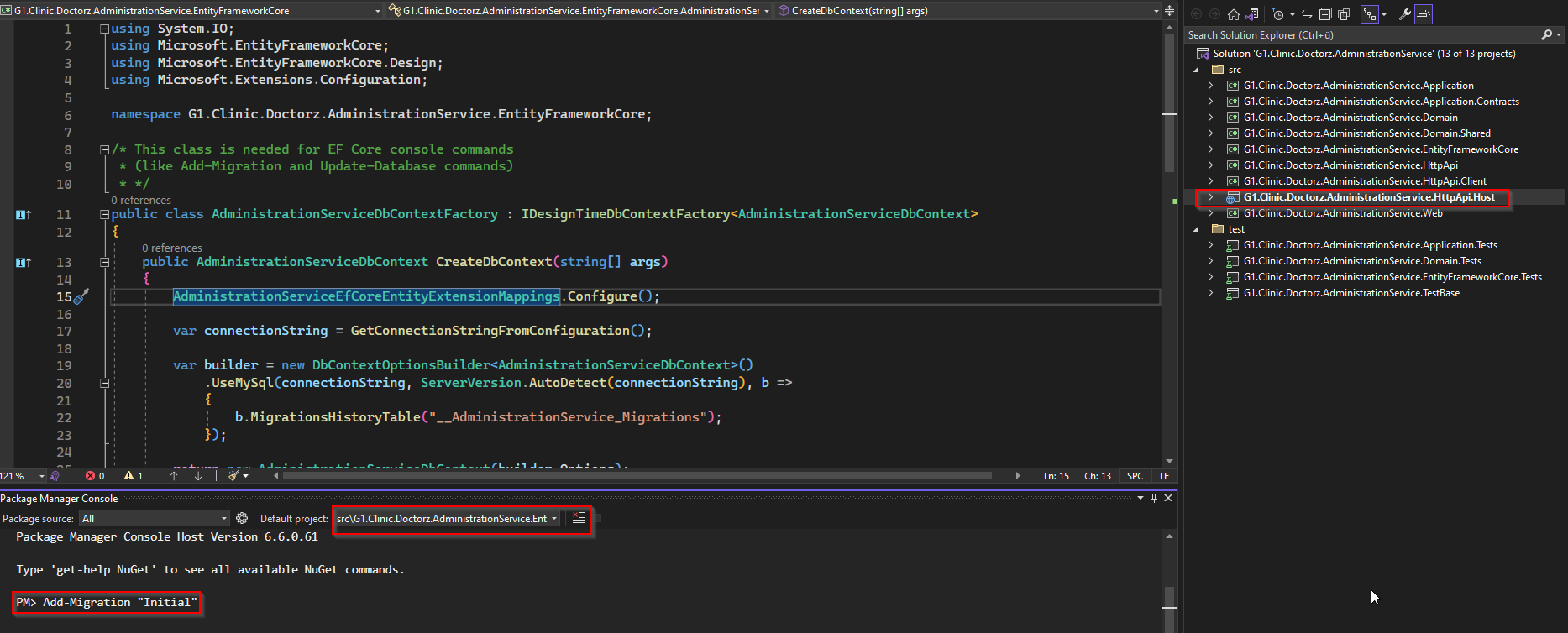
PM> Add-Migration "Initial"
Build started...
Build succeeded.
The Entity Framework tools version '7.0.1' is older than that of the runtime '7.0.2'. Update the tools for the latest features and bug fixes. See https://aka.ms/AAc1fbw for more information.
[14:44:46 INF] Starting G1.Clinic.Doctorz.AdministrationService.HttpApi.Host.
[14:44:46 FTL] G1.Clinic.Doctorz.AdministrationService.HttpApi.Host terminated unexpectedly!
Microsoft.Extensions.Hosting.HostAbortedException: The host was aborted.
   at Microsoft.Extensions.Hosting.HostFactoryResolver.HostingListener.ThrowHostAborted()
   at Microsoft.Extensions.Hosting.HostFactoryResolver.HostingListener.OnNext(KeyValuePair`2 value)
   at System.Diagnostics.DiagnosticListener.Write(String name, Object value)
   at Microsoft.Extensions.Hosting.HostBuilder.ResolveHost(IServiceProvider serviceProvider, DiagnosticListener diagnosticListener)
   at Microsoft.Extensions.Hosting.HostApplicationBuilder.Build()
   at Microsoft.AspNetCore.Builder.WebApplicationBuilder.Build()
   at G1.Clinic.Doctorz.AdministrationService.Program.Main(String[] args) in C:\G1.Clinic.Doctorz\services\administration\src\G1.Clinic.Doctorz.AdministrationService.HttpApi.Host\Program.cs:line 28
To undo this action, use Remove-Migration.
Used this answer https://stackoverflow.com/a/76170042
my program.cs now looks like this:
public async static Task<int> Main(string[] args)
    {
        var assemblyName = typeof(Program).Assembly.GetName().Name;

        SerilogConfigurationHelper.Configure(assemblyName!);

        try
        {
            Log.Information($"Starting {assemblyName}.");
            var builder = WebApplication.CreateBuilder(args);
            builder.Host
                .AddAppSettingsSecretsJson()
                .UseAutofac()
                .UseSerilog();
            await builder.AddApplicationAsync<AdministrationServiceHttpApiHostModule>();
            var app = builder.Build();
            await app.InitializeApplicationAsync();
            await app.RunAsync();
            return 0;
        }
        catch (Exception ex) when (ex is not HostAbortedException)
        {
            Log.Fatal(ex, $"{assemblyName} terminated unexpectedly! \nEX: {ex}\nStackTrace: {ex.StackTrace}\nINNER{ex.InnerException}");
            return 1;
        }
        finally
        {
            Log.CloseAndFlush();
        }
After that, I was able to create the migrations.
I executed dotnet build /graphBuild again just to ensure I did everything correctly (solution still buildable) and it went through.
Fourth: Run the DbMigrator
[16:01:56 INF] Loaded ABP modules:
...
[16:01:56 DBG] Started background worker: Volo.Abp.OpenIddict.Tokens.TokenCleanupBackgroundWorker
[16:01:56 INF] Initialized all ABP modules.
[16:01:56 INF] Migrating Host side...
[16:01:56 INF] Migrating SaasService database...
[16:01:57 INF] Migrating AdministrationService database...
[16:01:59 INF] Migrating IdentityService database...
[16:02:00 INF] Migrating ProductService database...
[16:02:01 INF] All databases have been successfully migrated (HOST).
[16:02:04 INF] Migrating tenants...
[16:02:04 INF] Migration completed!
[16:02:04 DBG] Stopped background worker: Volo.Abp.OpenIddict.Tokens.TokenCleanupBackgroundWorker

C:\G1.Clinic.Doctorz\shared\G1.Clinic.Doctorz.DbMigrator\bin\Debug\net7.0\G1.Clinic.Doctorz.DbMigrator.exe (process 43416) exited with code 0.
To automatically close the console when debugging stops, enable Tools->Options->Debugging->Automatically close the console when debugging stops.
Press any key to close this window . . .
⚠️
adjust run-tye.yaml. You do not need sql-server-db. you may replace it with mysql server also adjust ms sql stuff from build/etc/docker to match your requirements
Now, execute run-tye.ps1 from the solution directory.
Hi,
it depends on where you want it to appear.
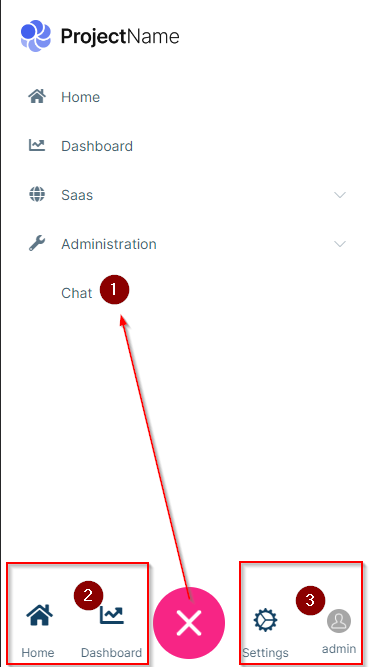
Add something like this to your menu contributor
context.Menu.AddItem(new ApplicationMenuItem(
            name: "Chat",
            displayName: "Chat",
            url: "~/Chat",
            requiredPermissionName: Volo.Chat.Authorization.ChatPermissions.Messaging
            ));
Do option 1 and in addition, add this inside the ConfigureService-Method of your web project:
Configure<LeptonXThemeMvcOptions>(options =>
        {
            options.MobileMenuSelector = items =>
            items.Where(x => x.MenuItem.Name == "Home" || x.MenuItem.Name == "Chat");
        });
Here's the documentation for that: https://docs.abp.io/en/commercial/6.0/themes/lepton-x/commercial/mvc#leptonxthememvcoptions
The right side of the mobile menu is not configurable via code. You would need to override this file here and do the adjustments to get your desired outcome:
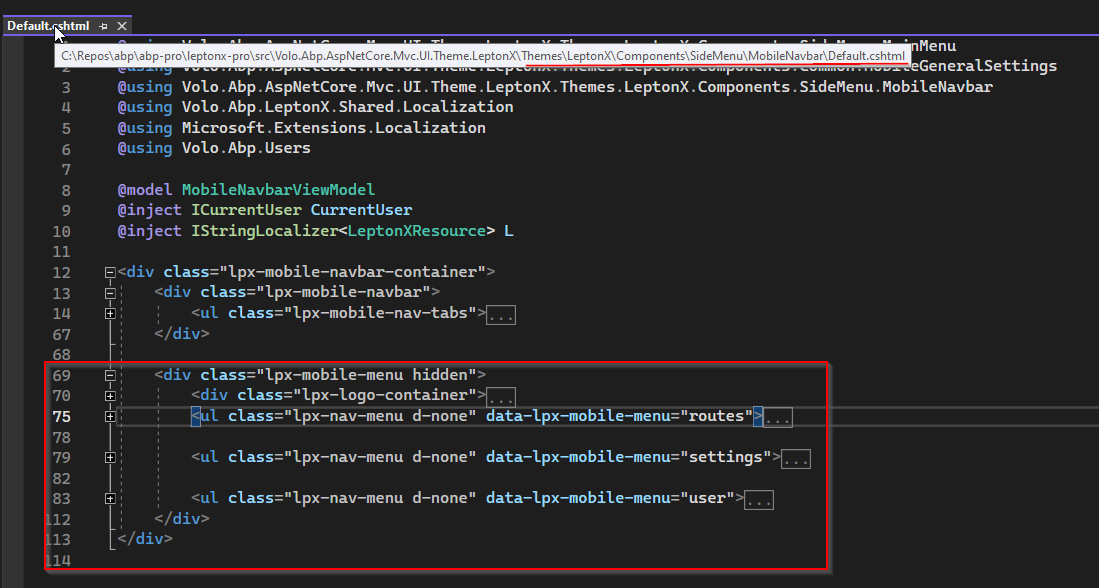
Here's the documentation on how to do something like that: https://docs.abp.io/en/abp/latest/UI/AspNetCore/Customization-User-Interface
I hope this helps. If not, please let me know.
Kind regards Jack
Hello,
please execute dotnet build /graphBuild like described here
Does that solve your issue?
kind regards Jack
Is there any way we can download the solution with microservices template having mysql as database?
No, that is not possible as of today. You may want to upvote this feature request here or create a new one
Hello,
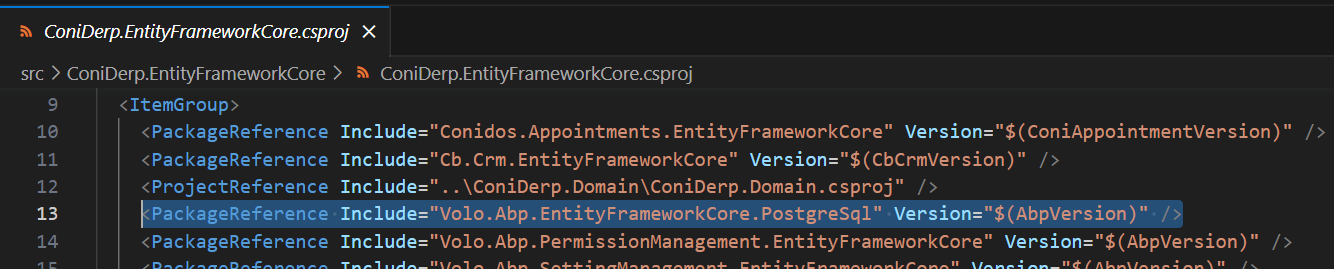
if the UI in Visual Studio does not allow for it, you can always edit the .csproj directly and make the adjustments needed.
You're looking for <PackageReference> entries.
Example in VS Code:
Example in Visual Studio:
Double Click on your *.EntityFrameworkCore Project
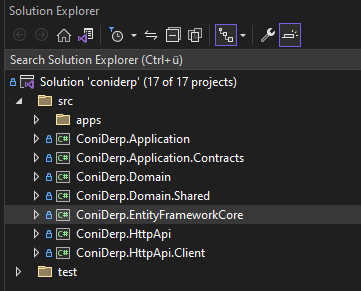
It will then open the .csproj file for you to edit

Does that help you?
Kind regards Jack
Taking aside the fact that there are migration guides which did not get applied here - I now better understand what you mean. Thank you for that example.
The cli - at least at the moment - only updates package references. Therefore, everything else needs to be done manually as described in the migration guides. Can you point out a specific case where the migration guides did not include such a change? I would then discuss it internally.
Apart from that, I see that we have multiple points here. If I get you right, you wouldn't use the update command even if it did produce the same outcome (update and new) - as you have your own code in place.
How would you describe a desirable outcome for this issue/ what would need to change?
Hard to tell without taking a look at the code.
Is this reproducable with the template project? If not, can you send your example to kontakt@chrobyte.de ?









