Ok Great.
I've taken that approach and when I run the application, the last referenced DependsOn module with a type of EntityFrameworkCoreModule in the Host project seems to determine which database driver to use.
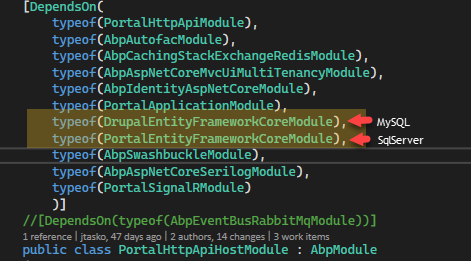
When the SqlServer module is last, the application starts fine and I don't get any errors until I invoke the application service (from an Application project that references both Domain projects) that uses the MySql repository. The error indicates that a SQL server driver is used when connecting to the MySql database:
2022-08-18 09:10:48.677 -07:00 [ERR] Keyword not supported: 'port'. System.ArgumentException: Keyword not supported: 'port'. at Microsoft.Data.SqlClient.SqlConnectionStringBuilder.GetIndex(String keyword) Here's what I've done so far and the issue I am experiencing:
When I swap these around and the MySql module is last, the application doesn't start because it attempts to connect to the SqlServer repositories used by the framework using a MySql connection:
2022-08-18 09:13:24.639 -07:00 [ERR] An exception was thrown while activating Volo.Abp.BackgroundJobs.EntityFrameworkCore.BackgroundJobsDbContext -> λ:Microsoft.EntityFrameworkCore.DbContextOptions1[[Volo.Abp.BackgroundJobs.EntityFrameworkCore.BackgroundJobsDbContext, Volo.Abp.BackgroundJobs.EntityFrameworkCore, Version=5.1.4.0, Culture=neutral, PublicKeyToken=null]]. Autofac.Core.DependencyResolutionException: An exception was thrown while activating Volo.Abp.BackgroundJobs.EntityFrameworkCore.BackgroundJobsDbContext -> λ:Microsoft.EntityFrameworkCore.DbContextOptions1[[Volo.Abp.BackgroundJobs.EntityFrameworkCore.BackgroundJobsDbContext, Volo.Abp.BackgroundJobs.EntityFrameworkCore, Version=5.1.4.0, Culture=neutral, PublicKeyToken=null]].
---> System.ArgumentException: Option 'trusted_connection' not supported.
at MySqlConnector.MySqlConnectionStringOption.GetOptionForKey(String key) in /_/src/MySqlConnector/MySqlConnectionStringBuilder.cs:line 927
In my Host project, I have the connection strings defined:

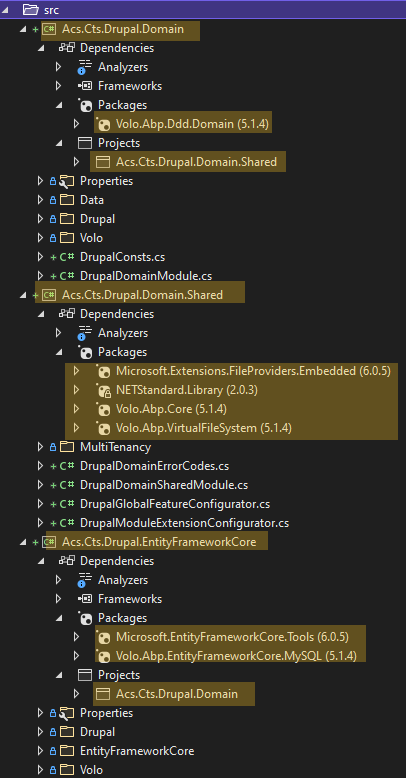
In the MySql Domain, Domain.Shared and EntityFrameworkCore projects, I have removed everything except for the minimum package references:
I am not sure how I can resolve this issue.
Thanks
Hi,
Is it possible to connect using two different database management systems within the same solution?
I want to use two different DBs; one SQL Server and one MySQL.
I've been testing an approach but before I go too far down that path, can you tell me if it's even possible?
If so, I'll share the approach I started taking and the issues.
Thanks Jamie
that worked - thank you.
@berkansasmaz
Thanks for the solution. It worked well!
I made one minor change to the script to close the sub-menu if enter is pressed when the sub-menu is expanded:
$(function () {
    var menuItems = document.querySelectorAll('li.has-drop');
    Array.prototype.forEach.call(menuItems, function (el, i) {
        el.querySelector('a').addEventListener("click", function (event) {
            if (this.parentNode.classList.contains("has-drop")) {
                if (!this.parentNode.classList.contains("open"))
                    this.parentNode.classList.add('open');
                else
                    this.parentNode.classList.remove('open');
            } else {
                this.parentNode.className = "has-submenu";
                this.setAttribute('aria-expanded', "false");
            }

            event.preventDefault();
            return false;
        });
    });
});
Thanks.
I just want to highlight that this is an urgent issue for us, as we are going live very soon.
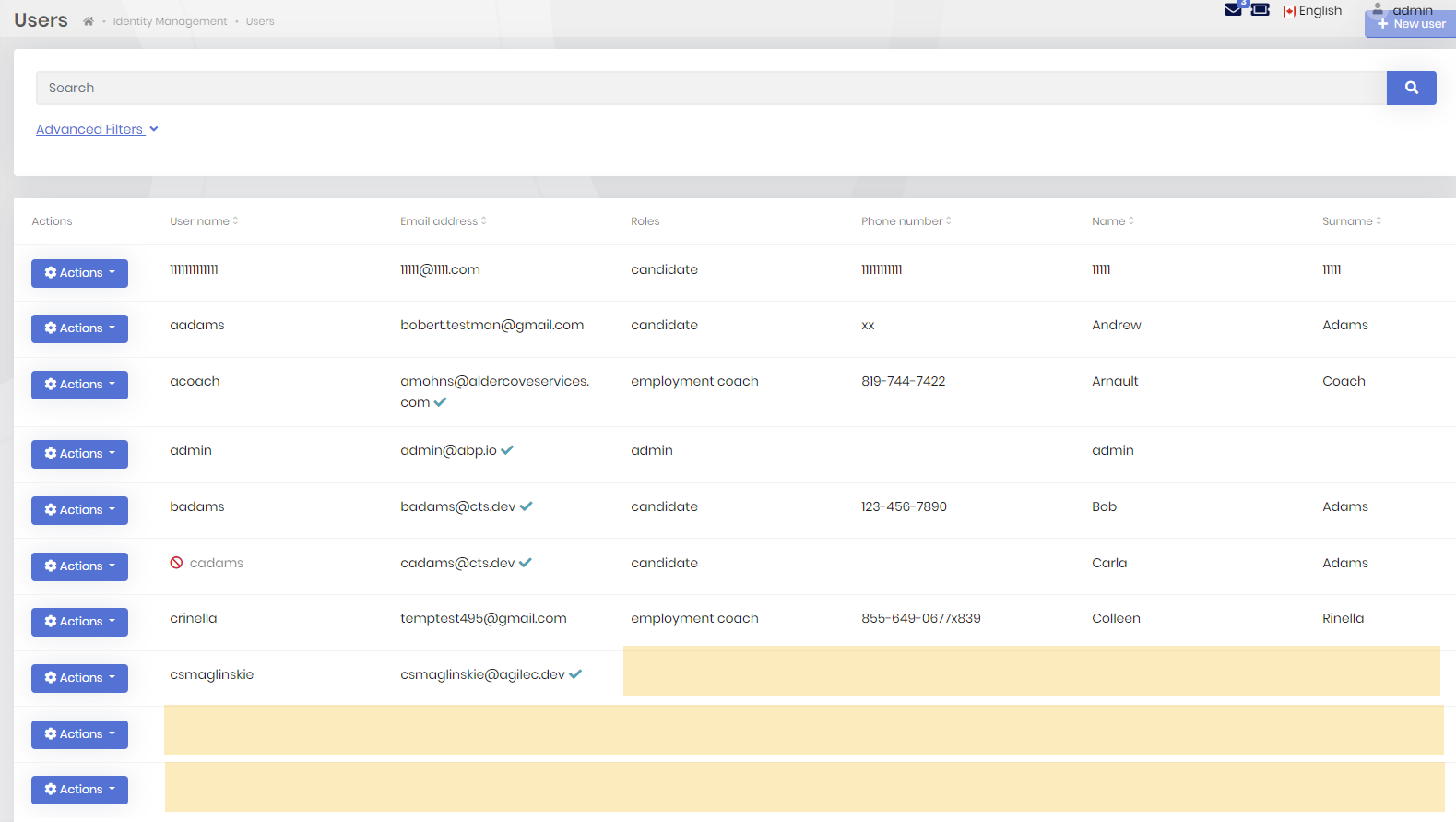
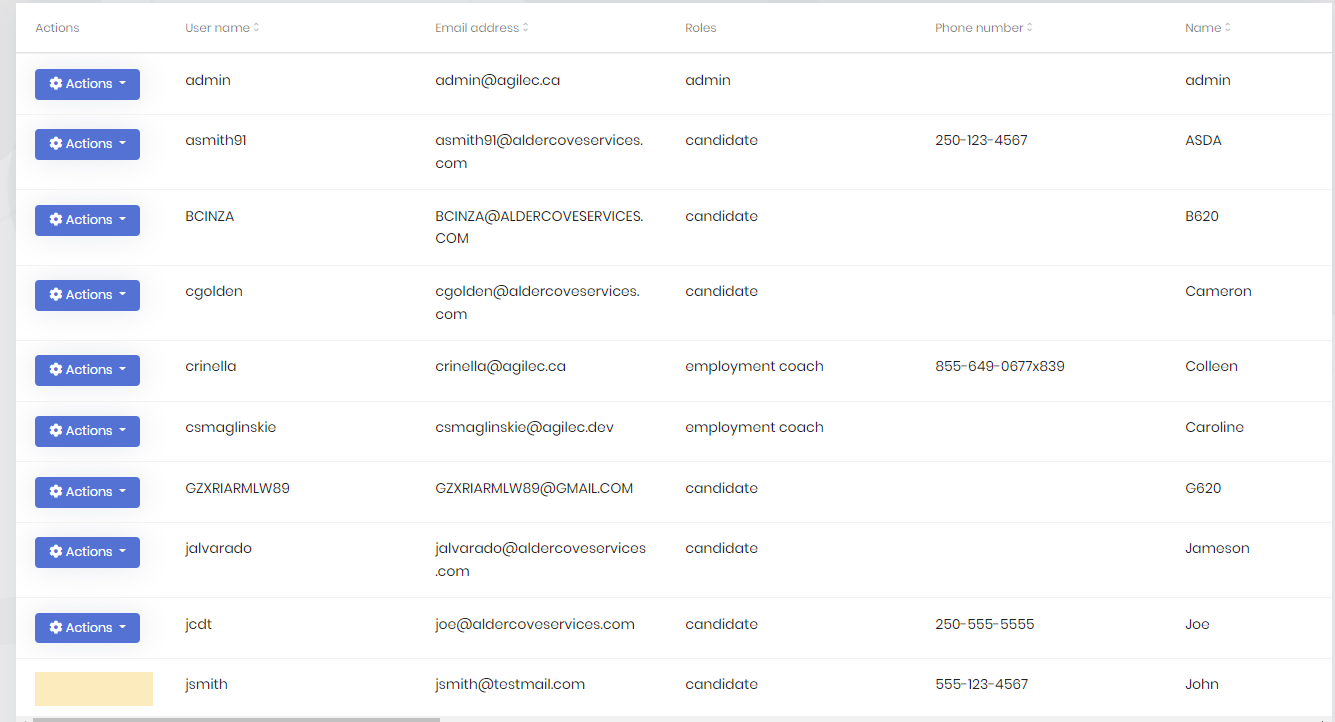
The impact of this issue in our system is that the User page is not fully loading. Sometimes the columns are not fully rendered, including the action menu button:
Here are a couple of examples:
Hi,
I encountered this issue while adding several properties to the IdentityUser entity and Dtos (v5.1.4) . In my application, this error prevents the Users page from fully loading - some of the columns in the last few rows aren't rendered including the Action menu button.
I was able to reproduce the error with a scratch project (v 5.2.2), by adding a single property to the IdentityUser entity. I followed the Architecture -> Modularity -> Customizing/Extending Modules -> Module Entity Extension System of the documentation for 5.2 to add the SSN to the IdentityUser. I needed to create 12 or so users before the error cropped up:
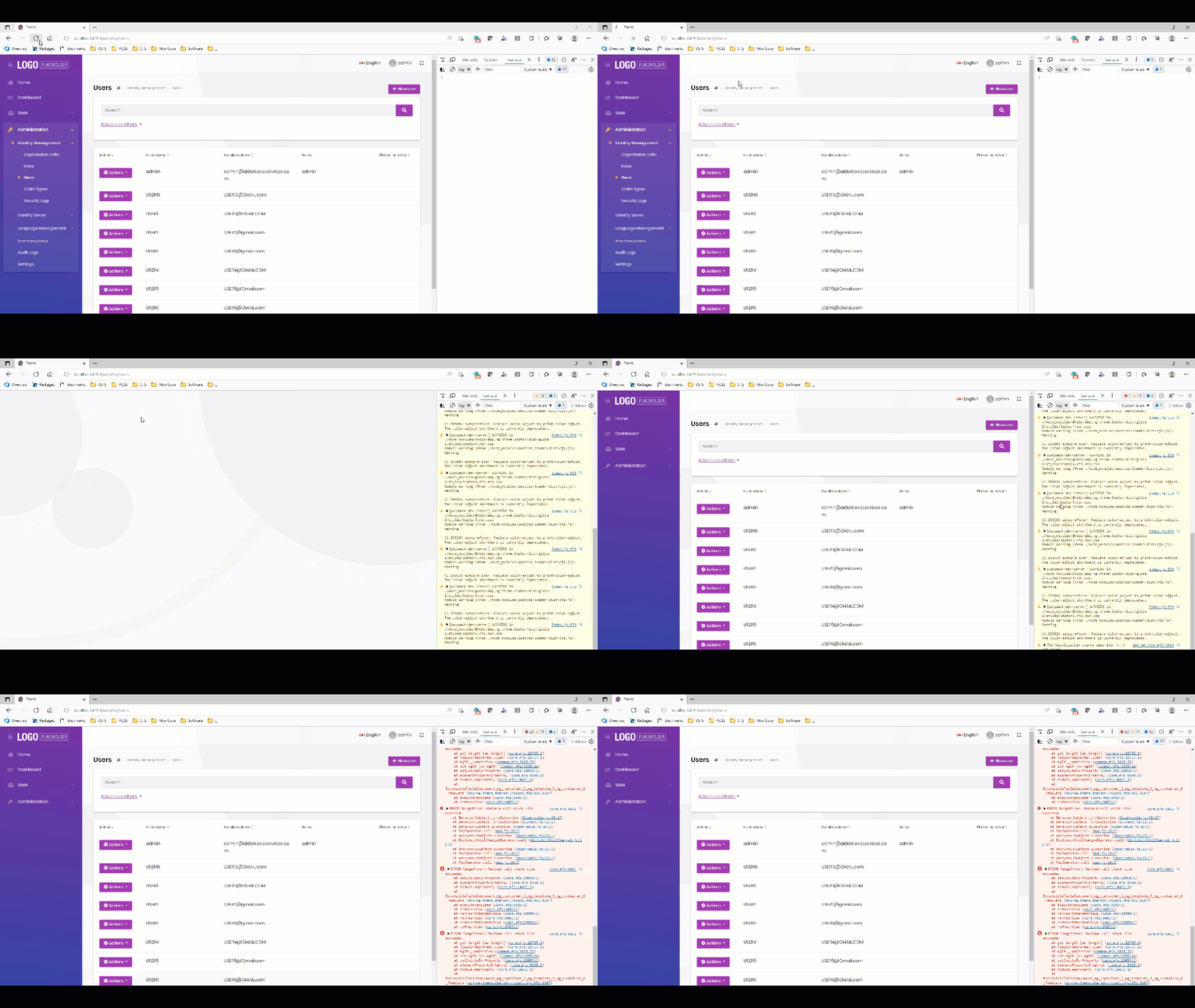
When I remove the configuration for the extra property from the PortalModuleExtensionConfigurator in the Domain.Shared project, and restart the identity server & API, the error goes away:
        * See the documentation for more:
         * https://docs.abp.io/en/abp/latest/Module-Entity-Extensions
         */
        //ObjectExtensionManager.Instance.Modules()
        //.ConfigureIdentity(identity =>
        //{
        //    identity.ConfigureUser(user =>
        //    {
        //        user.AddOrUpdateProperty<string>( //property type: string
        //            "SocialSecurityNumber", //property name
        //            property =>
        //            {

        //                //validation rules
        //                property.Attributes.Add(new RequiredAttribute());
        //                property.Attributes.Add(new StringLengthAttribute(64) { MinimumLength = 4 });
        //            });
        //    });
        //});
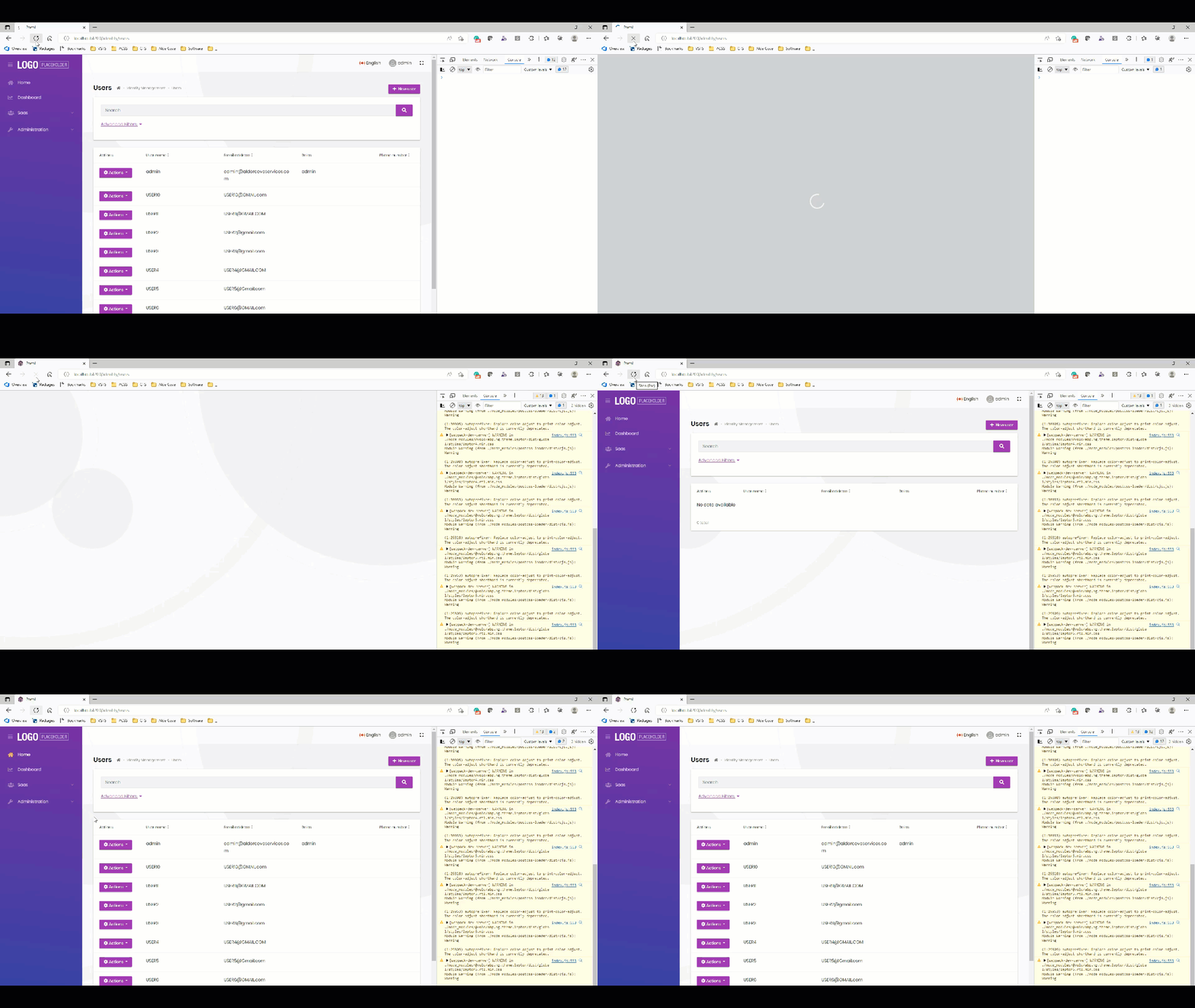
Appreciate your help.
Thanks Jamie
Hi,
Please help me to add keyboard support for sub-menus on the main menu region of the public website.
When the user hovers on the menu item, the sub-menu opens, which is great.
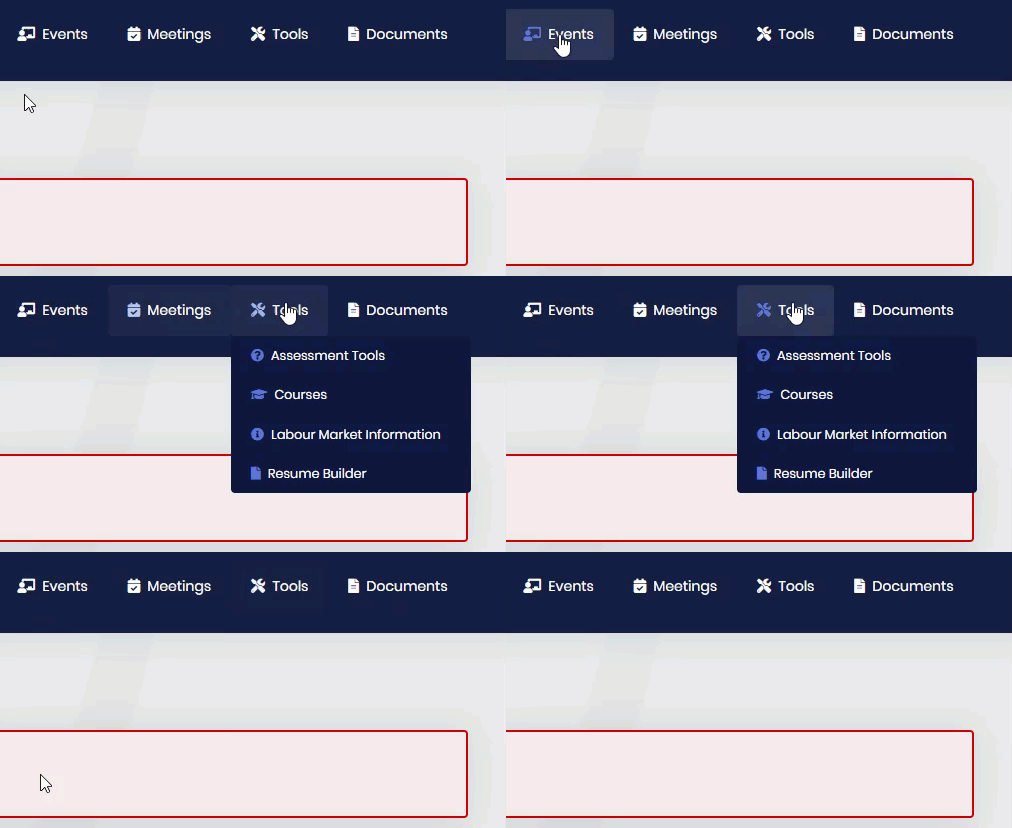
For users navigating with the keyboard, the submenu should open when the user presses enter on the menu item (as described here https://www.w3.org/WAI/tutorials/menus/flyout/#flyoutnavkbfixed).
The current behaviour does not support keyboard access to sub-menus.
I tried adding javascript (from the w3 example) for it in the /Themes/Lepton/Components/MainMenu/_MenuItem.cshtml page without success.
var menuItems = document.querySelectorAll('li.has-drop');
Array.prototype.forEach.call(menuItems, function(el, i){
	el.querySelector('a').addEventListener("click",  function(event){
		if (this.parentNode.className == "has-drop") {
			this.parentNode.className = "has-drop open";
			this.setAttribute('aria-expanded', "true");
		} else {
			this.parentNode.className = "has-submenu";
			this.setAttribute('aria-expanded', "false");
		}
		event.preventDefault();
		return false;
	});
});
Menu configuration from public class PortalPublicMenuContributor : IMenuContributor
           // Tools
            var tools =
                new ApplicationMenuItem(
                    PortalPublicMenus.Tools,
                    l["Menu:Tools"],
                    icon: "fas fa-tools",
                    order: 6
                    )
            ;
            context.Menu.AddItem(tools);

            // AssessmentTools
            tools.AddItem(
                new ApplicationMenuItem(
                    PortalPublicMenus.AssessmentTools,
                    l["Menu:AssessmentTools"],
                    "~/assessment-tools",
                    icon: "fas fa-question-circle",
                    order: 1
                    ).RequirePermissions(PortalPermissions.PublicWeb.AssessmentTools)
            );

            // courses
            tools.AddItem(
                new ApplicationMenuItem(
                    PortalPublicMenus.Courses,
                    l["Menu:Courses"],
                    "~/courses",
                    icon: "fas fa-graduation-cap",
                    order: 2
                    ).RequirePermissions(PortalPermissions.PublicWeb.Courses)
            );

            // LabourMarketInfo
            tools.AddItem(
                new ApplicationMenuItem(
                    PortalPublicMenus.LabourMarketInfo,
                    l["Menu:LabourMarketInfo"],
                    "~/labour-market-info",
                    icon: "fas fa-info-circle",
                    order: 3
                    ).RequirePermissions(PortalPermissions.PublicWeb.LabourMarketInfo)
            );

            // Resume Builder
            tools.AddItem(
                new ApplicationMenuItem(
                    PortalPublicMenus.ResumeBuilder,
                    l["Menu:ResumeBuilder"],
                    "~/resume-builder",
                    icon: "fas fa-file",
                    order: 4
                    ).RequirePermissions(PortalPermissions.PublicWeb.ResumeBuilder)
            );
Thanks
@gterdem,
Thank you for the additional details.
I wasn't understanding how to trigger the login flow from the start and thought there was something complex that needed to be done!
I have modified the page logic to show a button with a link to the public website (which is parsed from the model return url).
Upon returning to the website, the user must log in to restart the login flow.
It's one extra step, but will resolve the issue until a more permanent solution is implemented.
I appreciate the detailed response.
Can you please let me know what I need to change to update the button to trigger the login workflow from the start again?
Thank you.
Hi, any update on this?
We are going live soon and this is a critical issue for us.
Thanks









