Hi,
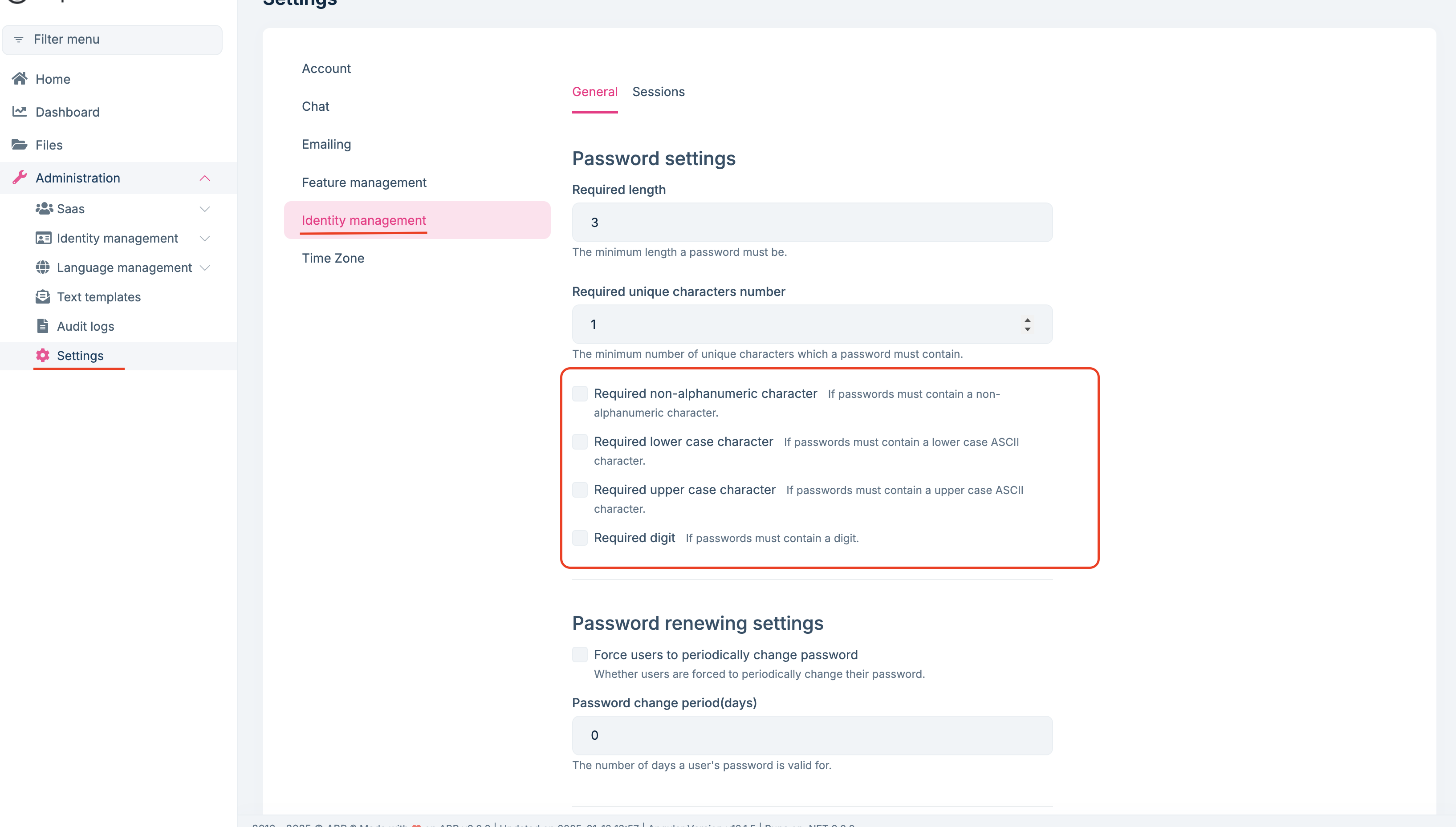
You can change these settings in the identity management section of the settings management page as follows:
Hi,
If it does not fix your problem, please share your solution if it's possible via email (to support@abp.io with ticket number), so we can more quickly fix your problem.
I'm glad to hear that :)
Hi,
You can check this support ticket to disable the multi-tenant filter for Language Texts.
and it works now. Really appreciate the support!
I'm glad your problem is solved.
It might be worth linking that ticket here as this seems to solve the issue requested by the author (at least the part about language texts)
Yes, it is useful to mention it there. Thank you for the information.
Hi,
I think I misunderstood you at first. I understand your question better now. Can you add the following code to your Domain project and try again?
[Dependency(ServiceLifetime.Singleton, ReplaceServices = true)]
[ExposeServices(typeof(DynamicResourceLocalizer), typeof(IDynamicResourceLocalizer))]
public class MyDynamicResourceLocalizer : DynamicResourceLocalizer
{
    private readonly ICurrentTenant _currentTenant;

    public MyDynamicResourceLocalizer(IServiceScopeFactory serviceScopeFactory, IDistributedCache<LanguageTextCacheItem> cache, ICurrentTenant currentTenant) : base(serviceScopeFactory, cache)
    {
        _currentTenant = currentTenant;
    }

    public override LocalizedString GetOrNull(LocalizationResourceBase resource, string cultureName, string name)
    {
        using (_currentTenant.Change(null))
        {
            return base.GetOrNull(resource, cultureName, name);
        }
    }

    protected override LanguageTextCacheItem GetCacheItem(LocalizationResourceBase resource, string cultureName)
    {
        using (_currentTenant.Change(null))
        {
            return base.GetCacheItem(resource, cultureName);
        }
    }

    protected override Task<LanguageTextCacheItem> GetCacheItemAsync(LocalizationResourceBase resource, string cultureName)
    {
        using (_currentTenant.Change(null))
        {
            return base.GetCacheItemAsync(resource, cultureName);
        }
    }
}
I'm glad to hear that. Feel free to create a new issue if you have further questions.
Hi,
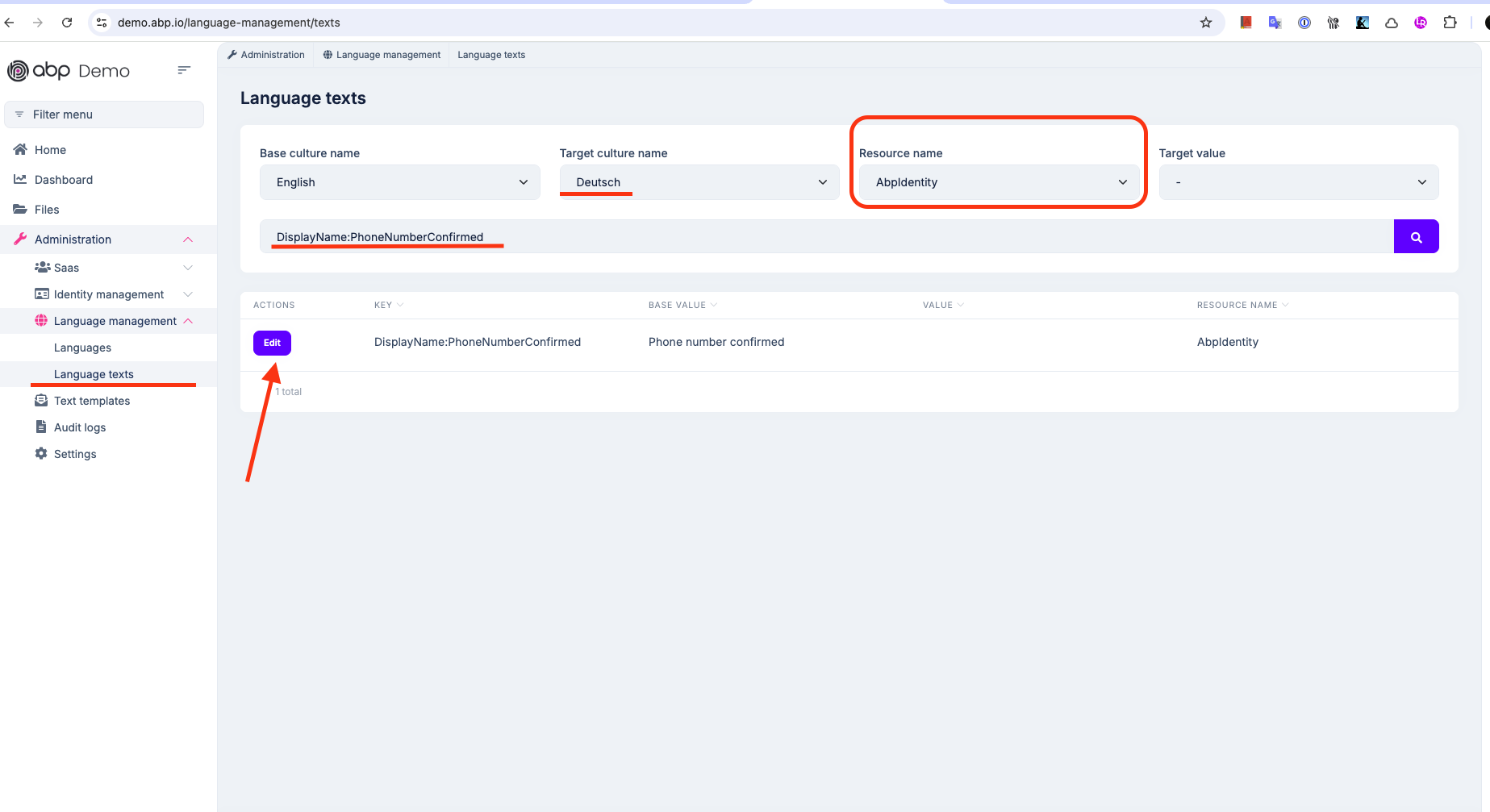
I understand your problem now. Yes, when we apply this method, it does not work as expected, sorry for the misdirection. The reason why it doesn't work is that these localization keys come from IdentityResource in ABP's Identity module. So we need to override these localization keys there. This article explains how to do this, you can easily do it by following the article. However, if you have any problems, don't hesitate to ask.
You can also do this via UI as shown in the picture below:
Hi,
Can you send your application to berkan.sasmaz@volosoft.com so I can reproduce your problem?
Hi,
As a result of the information you provided, I was able to reproduce the problem. I will create an internal issue regarding the problem. I will ask you to fix it manually until the issue is resolved. Thank you for your patience.
Closing the issue. Feel free to create a new issue if you have further questions.









