How Replaceable Components Work with Extensions
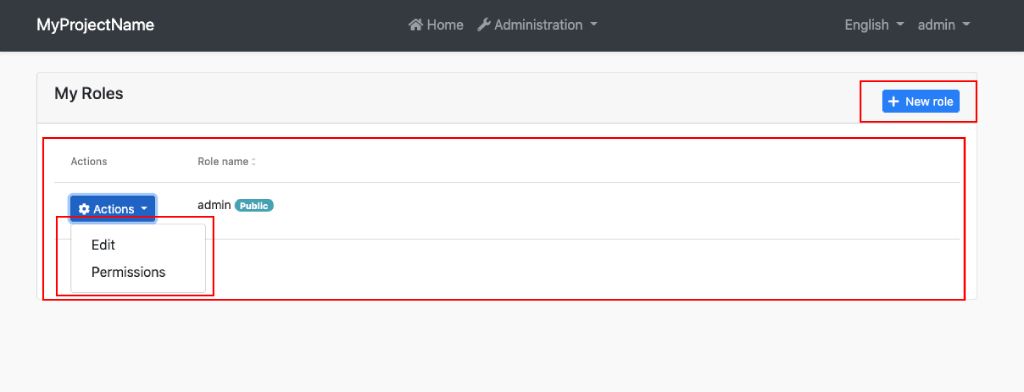
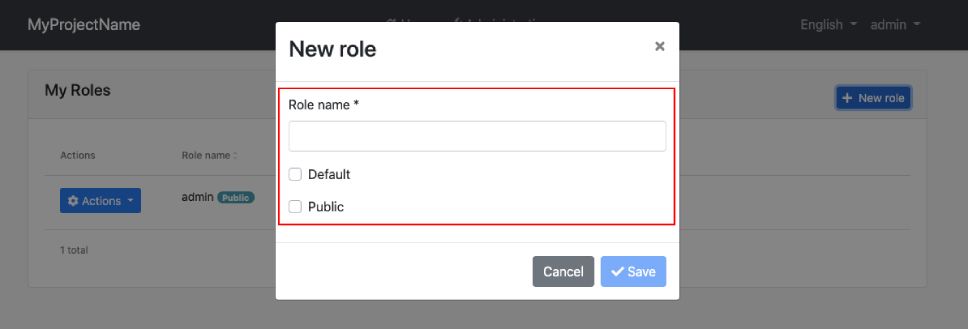
Additional UI extensibility points (Entity action extensions, data table column extensions, page toolbar extensions and others) are used in ABP pages to allow to control entity actions, table columns and page toolbar of a page. If you replace a page, you need to apply some configurations to be able to work extension components in your component. Let's see how to do this by replacing the roles page.
Create a new component called MyRolesComponent:
yarn ng generate component my-roles/my-roles --flat
Open the generated src/app/my-roles/my-roles.component.ts file and replace its content with the following:
import { Component, Injector, inject, OnInit } from '@angular/core';
import { FormGroup, ReactiveFormsModule } from '@angular/forms';
import { finalize } from 'rxjs/operators';

import { ListService, PagedAndSortedResultRequestDto, PagedResultDto, LocalizationPipe } from '@abp/ng.core';
import { eIdentityComponents, RolesComponent } from '@abp/ng.identity';
import { IdentityRoleDto, IdentityRoleService } from '@abp/ng.identity/proxy';
import { ePermissionManagementComponents, PermissionManagementComponent } from '@abp/ng.permission-management';
import { Confirmation, ConfirmationService, ModalComponent, ButtonComponent } from '@abp/ng.theme.shared';
import {
  EXTENSIONS_IDENTIFIER,
  FormPropData,
  generateFormFromProps,
  PageToolbarComponent,
  ExtensibleTableComponent,
  ExtensibleFormComponent
} from '@abp/ng.components/extensible';

@Component({
  selector: 'app-my-roles',
  imports: [
    ReactiveFormsModule,
    LocalizationPipe,
    ModalComponent,
    ButtonComponent,
    PageToolbarComponent,
    ExtensibleTableComponent,
    ExtensibleFormComponent,
    PermissionManagementComponent
  ],
  templateUrl: './my-roles.component.html',
  providers: [
    ListService,
    {
      provide: EXTENSIONS_IDENTIFIER,
      useValue: eIdentityComponents.Roles,
    },
    {
      provide: RolesComponent,
      useExisting: MyRolesComponent,
    },
  ],
})
export class MyRolesComponent implements OnInit {
  public readonly list = inject<ListService<PagedAndSortedResultRequestDto>>(ListService);
  protected readonly confirmationService = inject(ConfirmationService);
  protected readonly injector = inject(Injector);
  protected readonly service = inject(IdentityRoleService);

  data: PagedResultDto<IdentityRoleDto> = { items: [], totalCount: 0 };

  form: FormGroup;

  selected: IdentityRoleDto;

  isModalVisible: boolean;

  visiblePermissions = false;

  providerKey: string;

  modalBusy = false;

  permissionManagementKey = ePermissionManagementComponents.PermissionManagement;

  onVisiblePermissionChange = (event) => {
    this.visiblePermissions = event;
  };

  ngOnInit() {
    this.hookToQuery();
  }

  buildForm() {
    const data = new FormPropData(this.injector, this.selected);
    this.form = generateFormFromProps(data);
  }

  openModal() {
    this.buildForm();
    this.isModalVisible = true;
  }

  add() {
    this.selected = {} as IdentityRoleDto;
    this.openModal();
  }

  edit(id: string) {
    this.service.get(id).subscribe(res => {
      this.selected = res;
      this.openModal();
    });
  }

  save() {
    if (!this.form.valid) return;
    this.modalBusy = true;

    const { id } = this.selected;
    (id
      ? this.service.update(id, { ...this.selected, ...this.form.value })
      : this.service.create(this.form.value)
    )
      .pipe(finalize(() => (this.modalBusy = false)))
      .subscribe(() => {
        this.isModalVisible = false;
        this.list.get();
      });
  }

  delete(id: string, name: string) {
    this.confirmationService
      .warn('AbpIdentity::RoleDeletionConfirmationMessage', 'AbpIdentity::AreYouSure', {
        messageLocalizationParams: [name],
      })
      .subscribe((status: Confirmation.Status) => {
        if (status === Confirmation.Status.confirm) {
          this.service.delete(id).subscribe(() => this.list.get());
        }
      });
  }

  private hookToQuery() {
    this.list.hookToQuery(query => this.service.getList(query)).subscribe(res => (this.data = res));
  }

  openPermissionsModal(providerKey: string) {
    this.providerKey = providerKey;
    setTimeout(() => {
      this.visiblePermissions = true;
    }, 0);
  }

  sort(data) {
    const { prop, dir } = data.sorts[0];
    this.list.sortKey = prop;
    this.list.sortOrder = dir;
  }
}
    {
      provide: EXTENSIONS_IDENTIFIER,
      useValue: eIdentityComponents.Roles,
    },
    {
      provide: RolesComponent,
      useExisting: MyRolesComponent
    }
The two providers we have defined in MyRolesComponent are required for the extension components to work correctly.
- With the first provider, we defined the extension identifier for using
RolesComponent's extension actions in theMyRolesComponent. - With the second provider, we have replaced the
RolesComponentinjection with theMyRolesComponent. Default extension actions of theRolesComponenttry to getRolesComponentinstance. However, the actions can get theMyRolesComponentinstance after defining the second provider.
Open the generated src/app/my-role/my-role.component.html file and replace its content with the following:
<div id="identity-roles-wrapper" class="card">
  <div class="card-header">
    <div class="row">
      <div class="col col-md-6">
        <h5 class="card-title">My Roles</h5>
      </div>
      <div class="text-end col col-md-6">
        <abp-page-toolbar [record]="data.items"></abp-page-toolbar>
      </div>
    </div>
  </div>

  <div class="card-body">
    <abp-extensible-table
      [data]="data.items"
      [recordsTotal]="data.totalCount"
      [list]="list"
    ></abp-extensible-table>
  </div>
</div>

<abp-modal size="md" [(visible)]="isModalVisible" [busy]="modalBusy">
  <ng-template #abpHeader>
    <h3>{{ (selected?.id ? 'AbpIdentity::Edit' : 'AbpIdentity::NewRole') | abpLocalization }}</h3>
  </ng-template>

  <ng-template #abpBody>
    <form [formGroup]="form" (ngSubmit)="save()" validateOnSubmit>
      <abp-extensible-form [selectedRecord]="selected"></abp-extensible-form>
    </form>
  </ng-template>

  <ng-template #abpFooter>
    <button type="button" class="btn btn-secondary" abpClose>
      {{ 'AbpIdentity::Cancel' | abpLocalization }}
    </button>
    <abp-button iconClass="fa fa-check" [disabled]="form?.invalid" (click)="save()">{{
      'AbpIdentity::Save' | abpLocalization
    }}</abp-button>
  </ng-template>
</abp-modal>

<abp-permission-management
  #abpPermissionManagement="abpPermissionManagement"
  *abpReplaceableTemplate="
    {
      inputs: {
        providerName: { value: 'R' },
        providerKey: { value: providerKey },
        visible: { value: visiblePermissions, twoWay: true },
        hideBadges: { value: true }
      },
      outputs: { visibleChange: onVisiblePermissionChange },
      componentKey: permissionManagementKey
    };
    let init = initTemplate
  "
  (abpInit)="init(abpPermissionManagement)"
>
</abp-permission-management>
We have added the abp-page-toolbar, abp-extensible-table, and abp-extensible-form extension components to template of the MyRolesComponent.
Since we are using standalone components, all required imports are already defined in the component's imports array:
PageToolbarComponent,ExtensibleTableComponent,ExtensibleFormComponent- Extension componentsPermissionManagementComponent- Permission management componentModalComponent,ButtonComponent- Theme shared componentsLocalizationPipe- For localizationReactiveFormsModule- For form handling
As the last step, it is needs to be replaced the RolesComponent with the MyRolesComponent. Open the app.component.ts and modify its content as shown below:
import { Component, inject } from '@angular/core';
import { ReplaceableComponentsService } from '@abp/ng.core';
import { eIdentityComponents } from '@abp/ng.identity';
import { MyRolesComponent } from './my-roles/my-roles.component';

@Component({
  // component metadata
})
export class AppComponent {
  private replaceableComponents = inject(ReplaceableComponentsService);

  constructor() {
    this.replaceableComponents.add({ component: MyRolesComponent, key: eIdentityComponents.Roles });
  }
}
After the steps above, the RolesComponent has been successfully replaced with the MyRolesComponent. When you navigate to the /identity/roles URL, you will see the MyRolesComponent's template and see the extension components working correctly.