






CMS Kit Pro: URL Forwarding System
You must have an ABP Team or a higher license to use CMS Kit Pro module's features.
CMS Kit provides a URL forwarding system to create URLs that redirect to other pages or external websites.
Enabling the URL Forwarding System
By default, CMS Kit features are disabled. Therefore, you need to enable the features you want before starting to use them. You can use the Global Feature system to enable or disable CMS Kit features at development time. Alternatively, you can use ABP's Feature System to disable a CMS Kit feature at runtime.
In addition to enabling the URL Forwarding global feature, add UrlShortingMiddleware to the final web application. Register it before middleware that may produce a 404 Not Found response so it can evaluate unmatched request paths after the rest of the pipeline runs.
using Volo.CmsKit.Pro.Public.Web.Middlewares;

public override void OnApplicationInitialization(
    ApplicationInitializationContext context)
{
    var app = context.GetApplicationBuilder();

    app.UseMiddleware<UrlShortingMiddleware>();

    app.UseRouting();
    app.UseAuthentication();
    app.UseAuthorization();

    app.UseConfiguredEndpoints();
}
This example focuses on the relative middleware order. Keep the other middleware required by your application in the pipeline.
The middleware looks up the decoded request path and query string when the downstream pipeline returns 404. Matching exact or regular-expression rules return a permanent redirect. Same-host relative targets must start with /, for example /products/current; the middleware expands them using the current request scheme and host. Absolute targets are used as absolute destinations.
User Interface
Menu Items
URL Forwarding: Opens the URL Forwarding management page.
Pages
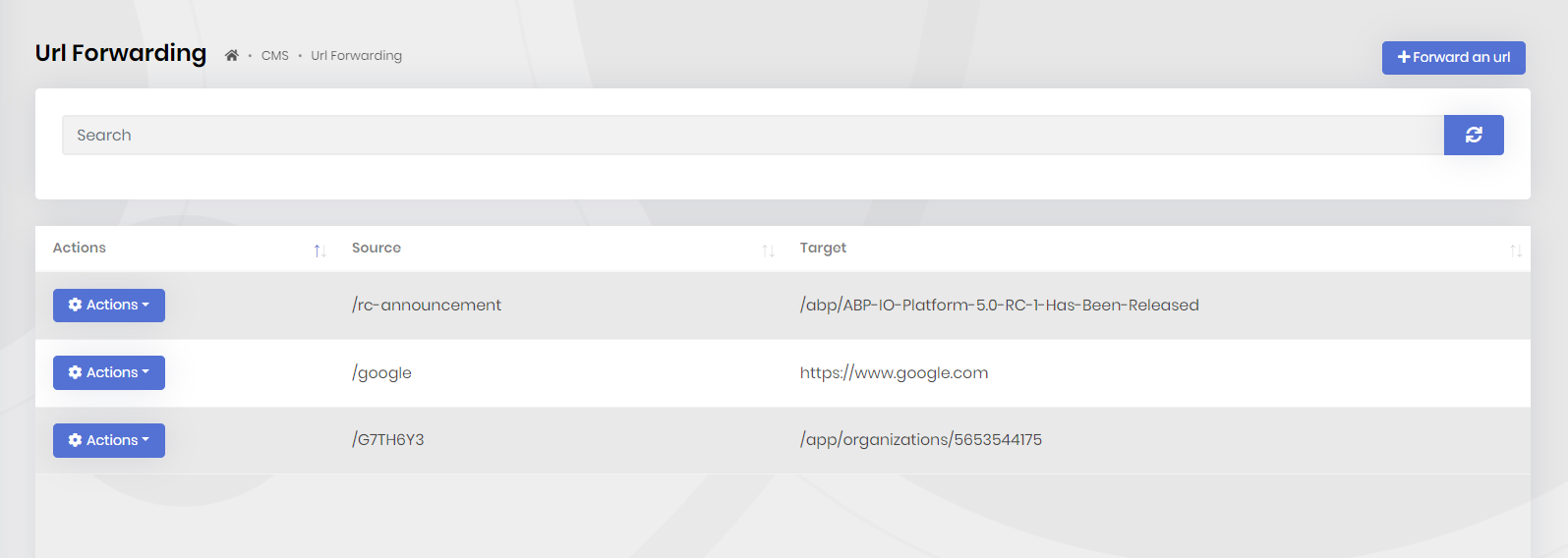
URL Forwarding management page
You can create, update and delete forwarding rules from the administration interface.
Options
ShortenedUrlCacheOptions
ShortenedUrlCacheOptions is used to configure the cache settings for the URL forwarding system. Example:
Configure<ShortenedUrlCacheOptions>(options =>
{
    options.CacheAllOnStartup = true;
    options.Expiration = TimeSpan.FromMinutes(30);
});
Expiration(default: one hour): Absolute lifetime applied when a single URL lookup result, including a negative result, is cached.CacheAllOnStartup(default:false): Enqueues a background job during application initialization to populate all URL rules in the cache.
UrlShortingOptions
UrlShortingOptions controls regular-expression matching and conflicts:
Configure<UrlShortingOptions>(options =>
{
    options.RegexIgnoreCase = true;
    options.PreventRegexLoop = true;
    options.TrackingQueryStringParameter = "__redirect";
    options.OnConflict = context =>
        Task.FromResult(context.ConflictUrls[0]);
});
RegexIgnoreCase(default:true): Uses case-insensitive regular-expression matching.PreventRegexLoop(default:true): Adds and checks a tracking query-string value when a regular-expression rule redirects to the same host.TrackingQueryStringParameter(default:__redirect): Name of that tracking query-string parameter.OnConflict: Selects a rule when more than one regular expression matches. The default selects the first matching rule.
Internals
Domain Layer
Aggregates
This module follows the Entity Best Practices & Conventions guide.
ShortenedUrl
ShortenedUrl(aggregate root): Represents a URL mapping in the system.
Repositories
This module follows the Repository Best Practices & Conventions guide.
Following custom repositories are defined for this feature:
IShortenedUrlRepository
Application layer
Application services
UrlShortingAdminAppService(implementsIUrlShortingAdminAppService): Implements the use cases of URL Forwarding management.UrlShortingPublicAppService(implementsIUrlShortingPublicAppService): Implements the use cases of URL Forwarding for public websites.
Database providers
Common
Table / collection prefix & schema
All tables/collections use the Cms prefix by default. Set static properties on the AbpCmsKitDbProperties class if you need to change the table prefix or set a schema name (if supported by your database provider).
Connection string
This module uses CmsKit for the connection string name. If you don't define a connection string with this name, it falls back to the Default connection string.
See the connection strings documentation for details.
Entity Framework Core
Tables
- CmsShortenedUrls
MongoDB
Collections
- CmsShortenedUrls



